
1. Танилцуулга
Thank you for choosing the OSCAL PowerMax 3600 Portable Power Station and PM200 Solar Panel. This manual provides essential information for the safe and efficient operation, setup, and maintenance of your device. Please read this manual thoroughly before use and retain it for future reference.
Аюулгүй байдлын урьдчилан сэргийлэх арга хэмжээ
- Төхөөрөмжийг задлах, засах, өөрчлөхийг хориглоно.
- Төхөөрөмжийг гал, ус, хэт температураас хол байлга.
- Ашиглах болон цэнэглэх явцад агааржуулалтыг сайтар хангана.
- Нэгжийг унагах эсвэл хүчтэй цохилтонд оруулахаас зайлсхий.
- Хүүхэд, тэжээвэр амьтдын гар хүрэхгүй газар хадгална уу.
2. Бүтээгдэхүүн дууссанview
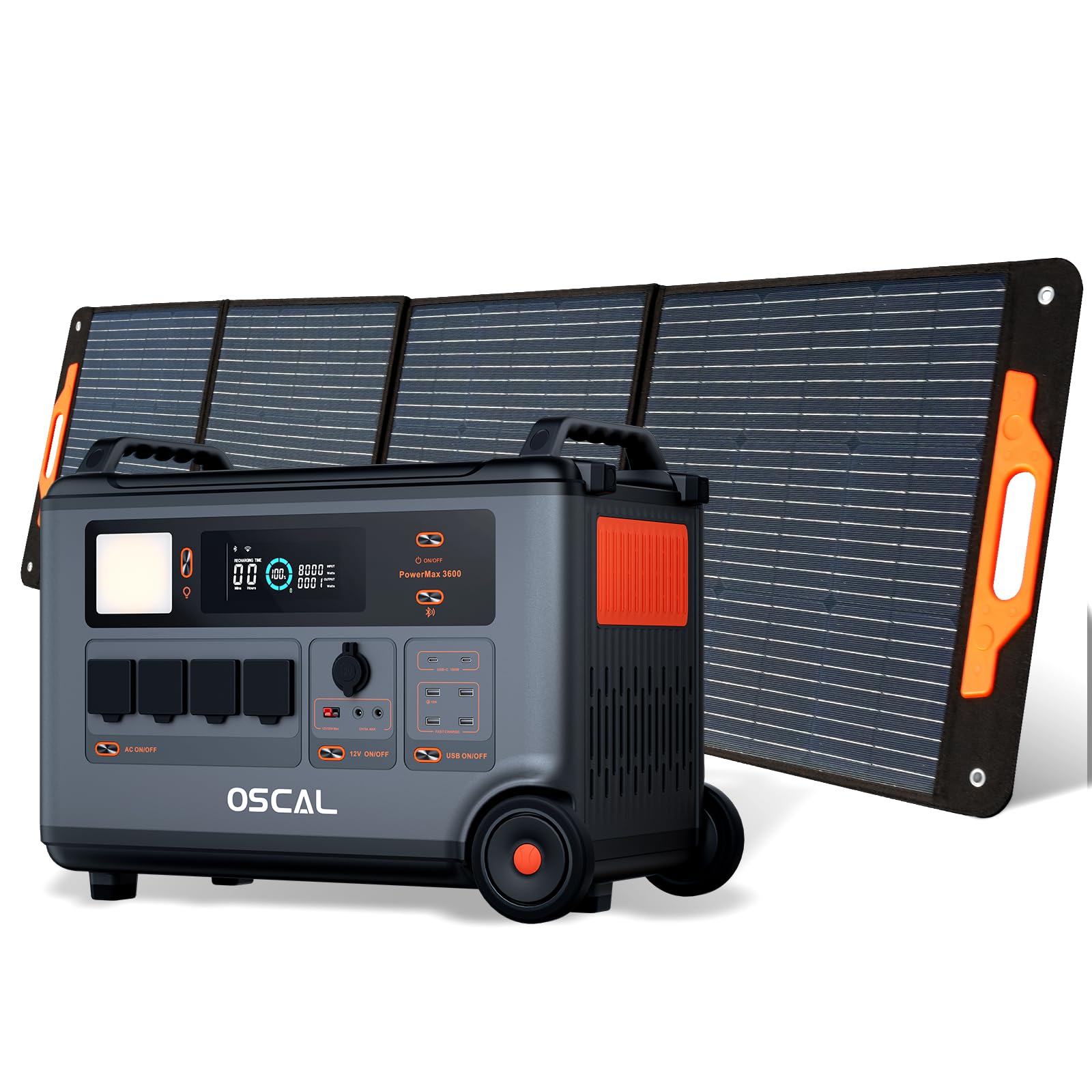
The OSCAL PowerMax 3600 is a high-capacity portable power station designed for various applications, from outdoor adventures to emergency home backup. It features a robust LiFePO4 battery and multiple output ports.
Гол онцлогууд:
- Өндөр хүчин чадал: 3600 Wh base capacity, expandable up to 57,600 Wh with additional batteries.
- Хүчтэй гаралт: 6000 W peak output, capable of powering most household appliances.
- LiFePO4 батерей: Safe, stable, and durable with over 3500 charge cycles (to 80% capacity).
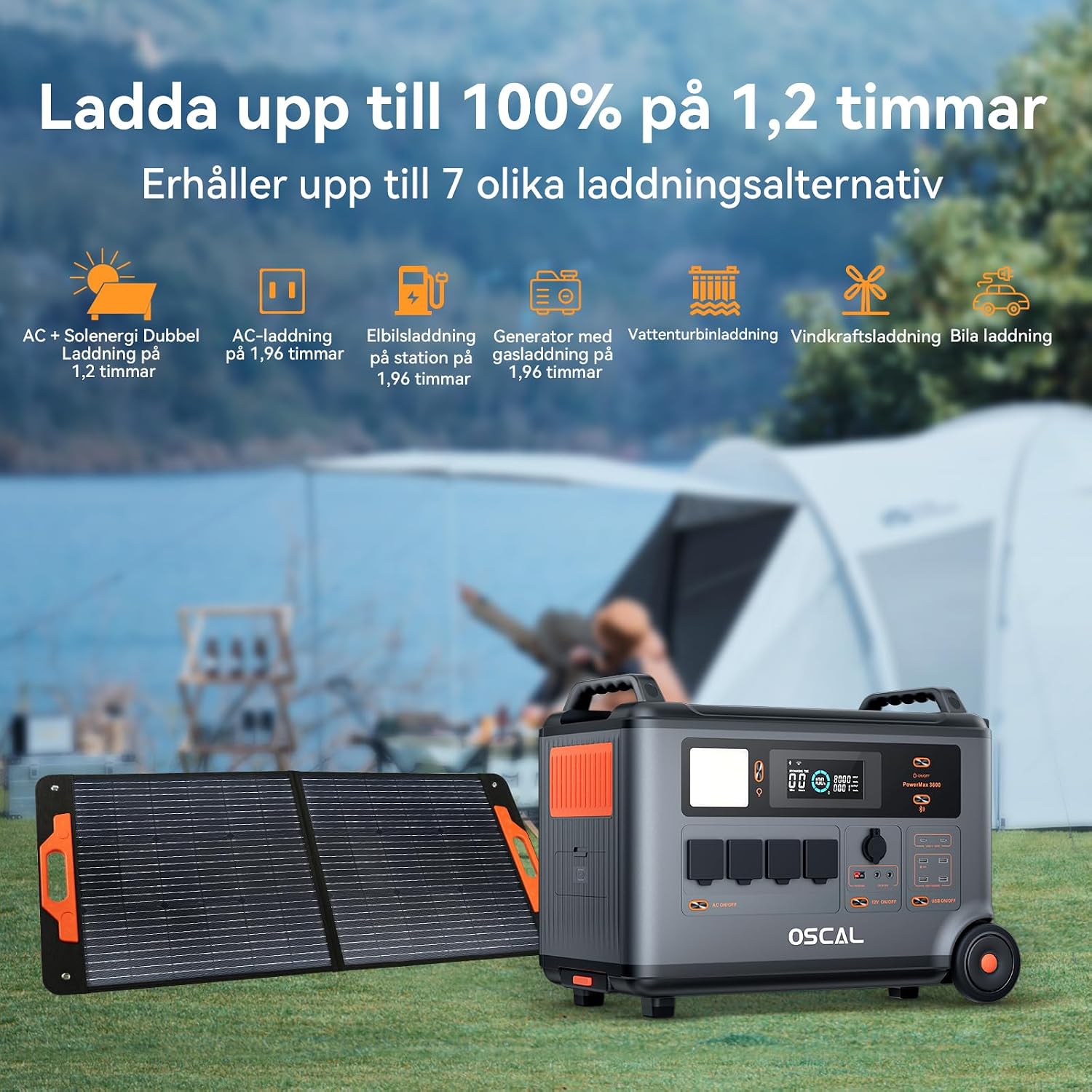
- Хурдан цэнэглэх: Fully charged in 1.2 hours with dual AC and solar input.
- Тасралтгүй цахилгаан хангамж (UPS): Automatic switchover in 5-8 ms during power outages.
- Ухаалаг хяналт: Monitor and control via the OSCAL smartphone application (Wi-Fi/Bluetooth).
- Бат бөх дизайн: Splash-proof, dust-proof, 0.8M vertical drop protection, UV-resistant, and UL94V-0 fire rating.

3. Тохиргоо
3.1 Сав баглаа боодол, анхны үзлэг
Carefully remove all components from the packaging. Verify that all items listed in the 'What you will get' section are present and undamaged. If any items are missing or damaged, contact customer support immediately.
3.2 Анхны цэнэглэлт
Before first use, fully charge the PowerMax 3600. Connect the AC charging cable to the unit's AC input port and then to a standard wall outlet. The display will indicate the charging status. A full charge typically takes 1.2 hours with combined AC and solar input, or 1.96 hours with AC only.
3.3 Connecting the PM200 Solar Panel
To charge using solar power, unfold the PM200 solar panel and position it in direct sunlight. Connect the MC4 to Anderson cable (or other compatible cable) from the solar panel to the PowerMax 3600's solar input port. The unit will automatically detect the solar input and begin charging.

4. Ашиглалтын заавар
4.1 Асаах/унтраах
Төхөөрөмжийг асаах эсвэл унтраахын тулд үндсэн асаах товчийг хэдэн секундын турш дарна уу. Идэвхжүүлсний дараа дэлгэц гэрэлтэх болно.
4.2 Хувьсах гүйдлийн гаралтыг ашиглах
Press the AC power button to activate the AC outlets. Plug your devices into the available AC ports. The PowerMax 3600 provides a pure sine wave output, suitable for sensitive electronics. The unit has 4 AC outlets.
4.3 Using DC Outputs (USB-A, USB-C, 12V)
Press the DC power button to activate the DC outputs. Connect your USB-powered devices to the 4 USB-A ports or 2 USB-C ports (100W each). The 12V car port and other DC outputs are also available for compatible devices.

4.4 Дэлгэцийг ойлгох
The integrated display shows real-time information including battery level, input/output wattage, remaining run time, and active ports. Refer to the on-screen icons for specific indicators.
4.5 Тасралтгүй тэжээлийн хангамж (UPS) функц
When connected to an AC wall outlet and powering devices, the PowerMax 3600 acts as a UPS. In the event of a power outage, it automatically switches to battery power within 5 to 8 milliseconds, ensuring continuous operation for connected devices like computers or medical equipment (e.g., CPAP machines).

4.6 Smart Remote Control (OSCAL App)
Download the OSCAL application from your smartphone's app store. Pair the PowerMax 3600 via Wi-Fi or Bluetooth to monitor battery status, control outputs, and perform firmware updates remotely.

5. Цэнэглэх аргууд
The PowerMax 3600 supports multiple charging methods to ensure you always have power.
- АС ханын залгуур: Connect the included AC charging cable to a standard wall outlet.
- Нарны цэнэглэгч: Use the PM200 solar panel or other compatible solar panels via the MC4 input.
- Машин цэнэглэх: Charge from your vehicle's 12V cigarette lighter port using the included car charging cable.
- EV цэнэглэх станц: The unit can be charged at an electric vehicle charging station (up to 2200W input).
- Генератор: Connect to a gasoline generator for charging (up to 2200W input).
- Хар тугалганы хүчлийн батерей: Supports charging from lead-acid batteries for emergency situations.


6. Засвар үйлчилгээ
6.1 Батерейны арчилгаа
The PowerMax 3600 uses LiFePO4 batteries, known for their longevity. To maximize battery lifespan:
- Байнга зайгаа бүрэн цэнэглэхээс зайлсхий.
- Төхөөрөмжийг удаан хугацаагаар ашиглаагүй бол 50% -аас 80% хүртэл цэнэглэх боломжтой.
- Хадгалах явцад гүн алдагдахаас сэргийлж төхөөрөмжийг 3-6 сар тутамд цэнэглэ.

6.2 Цэвэрлэгээ
Use a dry, soft cloth to clean the exterior of the unit. Do not use abrasive cleaners or solvents. Ensure all ports are free from dust and debris.
6.3 Хадгалалт
Store the PowerMax 3600 in a cool, dry place, away from direct sunlight and extreme temperatures. Ensure the unit is turned off during storage.
7. Алдаа засах
If you encounter issues with your PowerMax 3600, refer to the following common problems and solutions:
| Асуудал | Боломжит шалтгаан | Шийдэл |
|---|---|---|
| Төхөөрөмж асахгүй байна | Батерей бүрэн цэнэггүй болсон; Асаах товчийг хангалттай удаан дараагүй байна. | Charge the unit using AC power; Press and hold the power button for 3-5 seconds. |
| No output from AC/DC ports | AC/DC output not activated; Device draws too much power; Overload protection triggered. | Press the respective AC/DC button; Check device wattage; Restart the unit and reduce load. |
| Нарны цэнэглэгч ажиллахгүй байна | Insufficient sunlight; Incorrect panel connection; Damaged solar panel/cable. | Ensure direct sunlight; Verify cable connections; Test with another solar panel/cable if possible. |
| Апп холболтын асуудал | Bluetooth/Wi-Fi off; Unit too far from phone; App not updated. | Ensure Bluetooth/Wi-Fi is on; Move phone closer to unit; Update the OSCAL app. |
If the problem persists, please contact OSCAL customer support.
8. Техникийн үзүүлэлтүүд
| Онцлог | Дэлгэрэнгүй |
|---|---|
| Брэнд | OSCAL |
| Загварын дугаар | BP3600-PM3600 (PowerMax 3600) |
| Зайны төрөл | LiFePO4 |
| Хүчин чадал | 3600 Wh (expandable up to 57,600 Wh) |
| AC гаралтын хүч | 3600 W (Rated), 6000 W (Peak) |
| Нийт АС залгуур | 4 |
| USB-A гаралт | 4 |
| USB-C гаралт | 2 (100 W each) |
| Оролтын хэмжээtage | 12 Volts (DC input for car/solar) |
| Давтамж | 60 Гц |
| Charging Time (AC + Solar) | 1.2 цаг (100% хүртэл) |
| Charging Time (AC only) | 1.96 цаг (100% хүртэл) |
| UPS солих хугацаа | 5-8 мс |
| Амьдрах хугацаа | 3500+ цикл (80% хүртэл хүчин чадалтай) |
| Хэмжээ (L x W x H) | 48 см х 44 см х 35 см |
| Жин | 44.45 кг |
| Материал | ABS |
| Онцлог шинж чанарууд | Extra-long battery life, Energy efficient, BMS protection (over-voltage, боть доорtage, over-current, over-charge, low/high temperature, short-circuit) |
9. Баталгаат хугацаа ба дэмжлэг
9.1 Баталгаат хугацааны мэдээлэл
The OSCAL PowerMax 3600 comes with a Үйлдвэрлэгчийн 5 жилийн баталгаат хугацаа. Энэхүү баталгаа нь ердийн ашиглалтын үед хийгдсэн материал, хийцийн согогийг хамарна. Баталгаат заргад зориулж худалдан авалтаа нотлох баримтаа үлдээнэ үү.
9.2 Оруулсан бүрэлдэхүүн хэсгүүд
Багцад дараахь зүйлс орно.
- PowerMax 3600 Portable Charging Station
- PM200 Portable Solar Panel
- AC цэнэглэгч кабель
- Машины цэнэглэгч кабель
- Solar Charging Cable (MC4 to Anderson, MC4 to 7909, 6530, XT60, 5521)
- Хэрэглэгчийн гарын авлага
- Баталгаат карт
9.3 Хэрэглэгчийн дэмжлэг
For technical assistance, warranty claims, or any questions regarding your OSCAL PowerMax 3600, please refer to the contact information provided on your warranty card or visit the official OSCAL website. 24-hour after-sales support is available.