
Topyond Topyondods2w34yzc
Topyond Ebike LCD Display User Manual
Model: Topyondods2w34yzc
1. Танилцуулга
The Topyond Ebike LCD Display is designed to provide essential real-time information for your electric bike or scooter. This display meter allows you to monitor speed, distance traveled, battery level, and other critical performance metrics, enabling informed decisions during your ride. Crafted from high-quality ABS material, it ensures durability and resistance to wear and tear. Its compact design with a 22.5mm diameter ensures broad compatibility and ease of installation across various electric scooter and bike models.
2. Аюулгүй байдлын мэдээлэл
- Унаахаас өмнө дэлгэцийг найдвартай суурилуулсан эсэхийг үргэлж шалгаарай.
- Do not attempt to disassemble or modify the display, as this may void the warranty and cause damage.
- Keep the display clean and free from excessive moisture. While waterproof, prolonged submersion is not recommended.
- Avoid extreme temperatures, both hot and cold, to ensure optimal performance and longevity.
- If any unusual behavior or error codes appear, refer to the troubleshooting section or contact support.
3. Багцын агуулга
Таны багцад бүх зүйл байгаа эсэхийг шалгана уу:
- 1 x Topyond Electric Bike LCD Display Meter
- 1 х хэрэглэгчийн гарын авлага
4. Бүтээгдэхүүн дууссанview
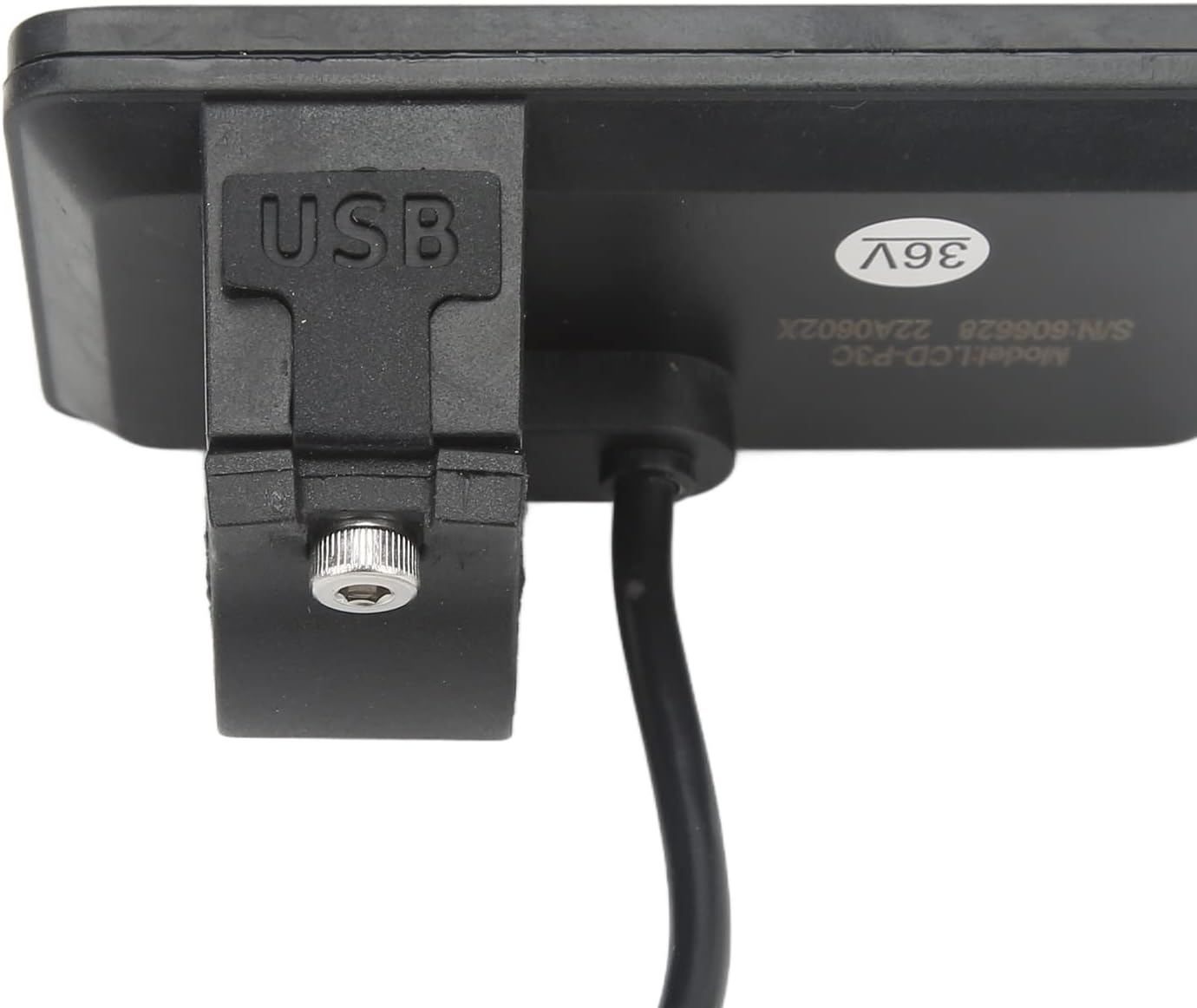
The Topyond Ebike LCD Display features a clear screen and intuitive button layout for easy operation. Below are images illustrating the display from various angles, highlighting its design and key features.


5. Тохиргоо ба суурилуулалт
The Topyond Ebike LCD Display is designed for easy installation on handlebars with a 22.5mm diameter. Follow these steps to properly install your display:
- Байршлыг сонгох: Select a suitable position on your ebike's handlebar, typically near the grip, ensuring it does not obstruct braking or shifting.
- Дэлгэцийг суурилуулах: Loosen the screw on the display's mounting bracket. Place the display on the handlebar and tighten the screw until it is secure. Ensure the display is oriented correctly for optimal viewing.
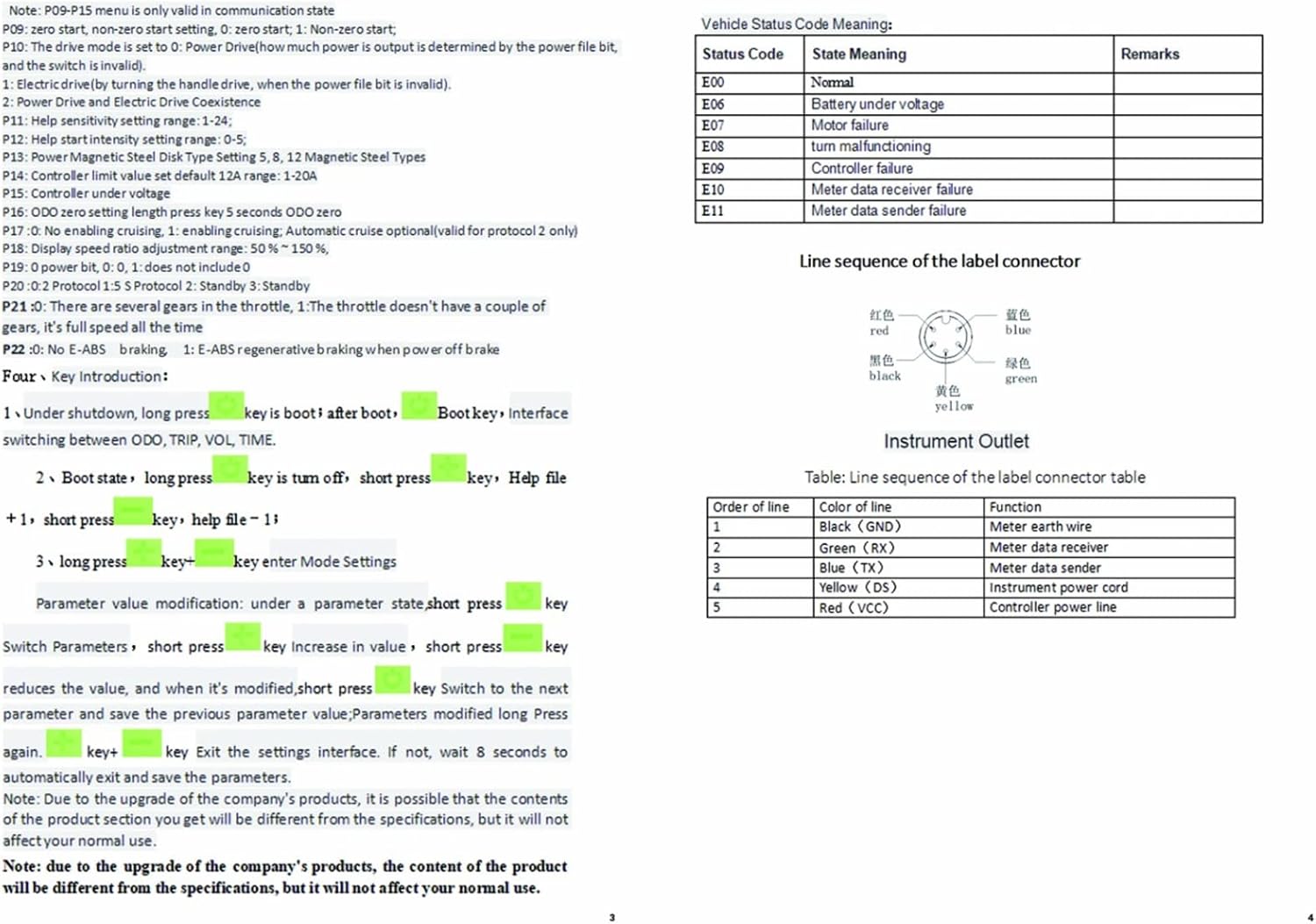
- Кабель холбох: Connect the display's cable to the corresponding connector on your ebike's controller or wiring harness. Ensure the 5-pin connector is firmly seated. The line sequence of the label connector is typically: Red (VCC), Black (GND), Blue (TX), Green (RX), Yellow (DS).
- Туршилтын функц: After installation, turn on your ebike to verify the display powers on and shows information correctly.

6. Ашиглалтын заавар
The Topyond Ebike LCD Display provides various functions and settings to enhance your riding experience. Familiarize yourself with the buttons and display information.
6.1. Товчлуурын функцууд
- Power Button (Middle): Press and hold to turn the display ON/OFF. Short press to switch between ODO (Odometer), TRIP (Trip Distance), VOL (Voltage), and TIME.
- '+' Button (Top): Short press to increase parameter values or navigate menus.
- '-' Button (Bottom): Short press to decrease parameter values or navigate menus.
- Тохиргоог оруулах: To enter the settings menu, press and hold the '+' and '-' buttons simultaneously.
6.2. Display Functions (LCD-930 Hand Control Panel)
The display provides comprehensive information at a glance:
- Хурдны дэлгэц: Shows current speed (AVG: average speed, MAX: maximum speed).
- Эрчим хүчний үзүүлэлт: Battery level display.
- Гэмтлийн шинж тэмдэг: Асуудал гарсан тохиолдолд алдааны кодуудыг харуулна.
- Нийт миль (ODO): Cumulative distance traveled.
- Нэг миль (АЯЛАЛ): Distance for the current ride.
- Single Boot Time (TIME): Duration of the current ride.
- Батерейны эзлэхүүнtage (VOL): Одоогийн батерейны хэмжээtage.
- DST: Зай.
- Тэвчээр: Estimated remaining range.
6.3. Settings and Parameters (P09-P15 Menu)
To access and modify advanced settings, enter the P09-P15 menu by holding the '+' and '-' buttons. Use '+' and '-' to navigate and change values, and the Power button to confirm or exit.

- P01: Backlight Brightness: Adjusts display backlight (Level 1-3).
- P02: Mileage Unit: 0 for KM, 1 for MILE.
- P03: Ботьtage түвшин: Зайны хэмжээг тохируулнаtage (24V, 36V, 48V, 60V). Default is 36V.
- P04: Dormancy Time: Sets the time until the display enters sleep mode (0: no dormancy, 1-60 minutes).
- P05: Туслаач File: 0, 3 file горим.
- P06: Wheel Diameter: Sets the wheel diameter in inches for accurate speed and distance readings.
- P07: Speed Gauge Magnetic Steel Number: Sets the number of magnetic steel poles for the speed sensor.
- P08: Speed Limit: Sets the maximum speed (0-100km/h).
- P09: Zero Start/Non-Zero Start: 0 for zero start, 1 for non-zero start.
- P10: Drive Mode: 0 for power drive, 1 for electric drive (throttle), 2 for power drive and electric drive coexistence.
- P11: Help Sensitivity Setting Range: 1-24.
- P12: Help Start Intensity Setting Range: 0-5.
- P13: Цахилгаан соронзон ган дискний тохируулга: 5, 8, 12 Magnetic Steel Types.
- P14: Controller Limit Value Set Default: 12A range: 1-20A.
- P15: Controller Under Voltage.
7. Засвар үйлчилгээ
Proper maintenance ensures the longevity and optimal performance of your Topyond Ebike LCD Display.
- Цэвэрлэгээ: Зөөлөн ашиглах, damp cloth to wipe the display screen and body. Avoid abrasive cleaners or solvents that could damage the ABS material or screen.
- Усанд өртөх: While the display is waterproof, avoid high-pressure water jets directly on the unit. Dry any moisture promptly after exposure to rain.
- Хадгалах: When not in use for extended periods, store the ebike and display in a cool, dry place away from direct sunlight and extreme temperatures.
- Кабелийн үзлэг: Periodically check the connection cables for any signs of wear, fraying, or damage. Ensure connections remain secure.
8. Алдаа засах
If you encounter issues with your Topyond Ebike LCD Display, refer to the common problems and their solutions below. The display may show specific error codes to help diagnose the problem.
8.1. Vehicle Status Code Meanings
| Статусын код | Төрийн утга | Тайлбар |
|---|---|---|
| E00 | Ердийн | No error detected. |
| E06 | Зайны хэмжээ бага байнаtage | Зайны цэнэгийн түвшинг шалгана уу. |
| E07 | Моторын эвдрэл | Inspect motor connections and functionality. |
| E08 | Turn mal-functioning | Check throttle or pedal assist sensor. |
| E09 | Хянагчийн эвдрэл | Inspect controller connections and unit. |
| E10 | Meter data receiver failure | Check display cable connection. |
| E11 | Meter data sender failure | Check display cable connection. |
8.2. Алдааг олж засварлах ерөнхий зөвлөмжүүд
- Дэлгэц асахгүй байна: Ensure the battery is charged and properly connected. Check all cable connections between the display and the ebike's system.
- Буруу уншилтууд: Verify that the wheel diameter (P06) and magnetic steel number (P07) settings are correctly configured in the display's parameters.
- Товчнууд хариу өгөхгүй байна: Check for any physical obstructions or debris around the buttons. If the issue persists, a factory reset (if available) or professional inspection may be needed.
9. Техникийн үзүүлэлтүүд
Detailed technical specifications for the Topyond Ebike LCD Display:
| Онцлог | Тодорхойлолт |
|---|---|
| Зүйлийн төрөл | Electric Bike LCD Display Meter |
| Материал | ABS |
| Жин | Approx. 0.1 Kilograms (95g/3.35oz) |
| Өнгө | Хар |
| Diameter (for installation) | Ойролцоогоор 22.5мм / 0.89инч |
| Ботьtagд нийцтэй байдал | Default 36V, Universal for 24V, 36V, 48V, 60V |
| Багцын хэмжээ (L x W x H) | 4.29 x 3.39 x 2.8 инч |
| Үйлдвэрлэгч | Topyond |
| Хэсгийн дугаар | Topyondods2w34yzc |
| Эхний боломжтой огноо | 22 оны нэгдүгээр сарын 2024 |

10. Баталгаат хугацаа ба дэмжлэг
Topyond is committed to providing high-quality products. For any questions, technical assistance, or warranty claims, please refer to the contact information provided with your purchase or visit the official Topyond store on Amazon. Please retain your proof of purchase for warranty purposes.
Ask a question about this manual
Ask about setup, troubleshooting, compatibility, parts, safety, or missing instructions. Manuals+ will review the question and use this page’s manual context to help answer it.