
1. Танилцуулга
This manual provides essential information for the safe and efficient operation of your Next YE-43020GG4 43-inch Full HD Google Android TV. Please read this manual thoroughly before using the product and retain it for future reference.

Зураг 1.1: Урд view of the Next YE-43020GG4 43-inch Full HD Google Android TV, showcasing its sleek design and the Google Android TV interface.
The Next YE-43020GG4 is a 43-inch Full HD (1920x1080p) LED television featuring the Google Android TV operating system. It offers a dynamic contrast enhancer for improved picture quality and integrated Wi-Fi for seamless internet connectivity. This model is designed for ease of use and provides access to a wide range of applications and streaming services.
2. Аюулгүй байдлын мэдээлэл
Зурагт гэмтэл учруулахаас сэргийлж, хувийн аюулгүй байдлаа хангахын тулд дараах аюулгүй байдлын арга хэмжээг дагаж мөрдөнө үү.
- Эрчим хүчний хангамж: Connect the TV only to an AC 100-240V, 50/60Hz power source. Ensure the power cord is not damaged or pinched.
- Агааржуулалт: Агааржуулалтын нүхийг хааж болохгүй. Хэт халалтаас урьдчилан сэргийлэхийн тулд ТВ-ийн эргэн тойронд зохих агаарын урсгалыг хангахад хангалттай зай гарга.
- Ус ба чийг: Do not expose the TV to rain, moisture, or place objects filled with liquids on or near the TV.
- Цэвэрлэгээ: Цэвэрлэхийн өмнө телевизорыг залгуураас нь салга. Зөөлөн, хуурай даавуу хэрэглээрэй. Шингэн цэвэрлэгч эсвэл аэрозоль шүршигч хэрэглэж болохгүй.
- Байршил: Place the TV on a stable, level surface. If wall-mounting, ensure the mount is compatible and installed by qualified personnel.
- Аянга: During lightning storms or when unused for long periods, unplug the TV from the power outlet and disconnect the antenna cable.
- Үйлчилгээ: Телевизийг өөрөө засварлах гэж бүү оролдоорой. Бүх үйлчилгээг мэргэшсэн үйлчилгээний ажилтнуудад шилжүүлээрэй.
3. Багцын агуулга
Бүх зүйл багцад байгаа эсэхийг шалгана уу:
- Next YE-43020GG4 43-inch Full HD Google Android TV Unit
- Алсын удирдлага
- ТВ тавиур (2 ширхэг)
- Цахилгааны утас
- Хэрэглэгчийн гарын авлага (энэ баримт бичиг)
- Batteries for Remote Control (may vary by region)
4. Физик шинж чанар ба холболтууд
Familiarize yourself with the physical layout and connection ports of your television.

Зураг 4.1: Арын view of the TV with labeled connection ports.
4.1. Арын самбарын холболтууд
| Порт | Тодорхойлолт |
|---|---|
| HDMI 1 (ARC) | High-Definition Multimedia Interface with Audio Return Channel support. Connect external devices like Blu-ray players or soundbars. |
| HDMI 2 | High-Definition Multimedia Interface. Connect external devices. |
| USB (2x) | Universal Serial Bus ports for connecting USB storage devices (e.g., flash drives) to play media or for software updates. |
| Ethernet | RJ45 port for wired internet connection. |
| DVB-S / DVB-S2 | Satellite input for connecting a satellite dish. |
| DVB-T / DVB-T2 | Terrestrial antenna input for connecting a digital terrestrial antenna. |
| DVB-C | Cable input for connecting to a cable TV network. |
| CI MODULE | Common Interface slot for inserting a CI+ module and smart card, typically used for encrypted digital TV services. |
| MINI AV-IN | Mini Audio/Video input for connecting older devices using an adapter cable (not always included). |
4.2. Side Profile

Зураг 4.2: Зүүн талын мэргэжлийнfile ТВ-ийн.

Зураг 4.3: Баруун талын мэргэжлийнfile ТВ-ийн.
The slim design of the television allows for versatile placement options, whether on a stand or wall-mounted. The side profiles illustrate the minimal depth of the unit.
5. Тохиргоо
5.1. Телевизийн тавиурыг холбох
- Carefully place the TV face down on a soft, flat surface (e.g., a blanket or foam) to prevent screen damage.
- Зүүн ба баруун тавиурын хэсгүүдийг тодорхойл.
- Тавиурын хэсэг бүрийг ТВ-ийн доод талд байгаа харгалзах шурагны нүхнүүдтэй зэрэгцүүлнэ.
- Өгөгдсөн эрэг ашиглан тулгууруудыг бэхлэнэ. Хэт чангалж болохгүй.
- Carefully lift the TV to an upright position and place it on a stable surface.
5.2. Хананд суурилуулах (заавал биш)
If you choose to wall-mount your TV, ensure you use a VESA-compatible wall mount kit (not included) and follow the instructions provided with the wall mount. It is recommended to have this installation performed by a qualified professional.
5.3. Цахилгаан болон гадаад төхөөрөмжүүдийг холбох
- Цахилгааны утсыг ТВ-ийн тэжээлийн оролтод, дараа нь ханын залгуурт холбоно.
- Connect your antenna, satellite dish, or cable TV source to the appropriate input ports (DVB-T/T2, DVB-S/S2, DVB-C).
- Connect any external devices (e.g., game consoles, Blu-ray players) to the HDMI ports.
- For wired internet, connect an Ethernet cable to the ETHERNET port. For Wi-Fi, ensure your router is on and within range.
5.4. Initial Setup Wizard
- Алсын удирдлага эсвэл ТВ өөрөө асаах товчийг ашиглан ТВ-ээ асаана уу.
- Follow the on-screen instructions to select your language, country, and network settings (Wi-Fi or Ethernet).
- Sign in with your Google Account to access Google Play Store, Google Assistant, and other Google services.
- Complete the channel scan for terrestrial, satellite, or cable broadcasts.
6. Ашиглалтын заавар
6.1. Алсын удирдлагатайview

Зураг 6.1: The remote control for your Next Google Android TV, featuring quick access buttons for popular streaming services and voice control.
The remote control provides access to all TV functions. Insert two AAA batteries (not included) into the battery compartment, observing polarity.
- Цахилгаан товч: ТВ-г асаах эсвэл унтраана.
- Навигацийн самбар (дээш/доошоо/зүүн/баруун/ОК): Цэс рүү шилжиж, сонголтыг баталгаажуулна.
- Буцах товчлуур: Өмнөх дэлгэц рүү буцна.
- Нүүр хуудас товч: Android TV-ийн үндсэн дэлгэц рүү нэвтэрнэ.
- Дууны хэмжээг нэмэгдүүлэх/доошруулах: Дууны түвшнийг тохируулна.
- Суваг дээш/доошоо: Телевизийн сувгийг өөрчилдөг.
- Netflix, YouTube, Prime Video, Google Play Buttons: Эдгээр програмуудад шууд хандах.
- Google Assistant Button (Microphone Icon): Дуут хяналтыг идэвхжүүлдэг.
6.2. Google Туслахыг ашиглах

Зураг 6.2: Voice search functionality via the remote control, activated by the Google Assistant button.
Алсын удирдлага дээрх Google Туслах товчийг дарж, микрофон руу ярина уу:
- хайх movies, TV shows, or information.
- Ухаалаг гэрийн төхөөрөмжийг хянах.
- Нээлттэй програмууд.
- Асуултанд хариулт авах.
6.3. Accessing Applications and Streaming Services
From the Android TV home screen, you can access pre-installed applications or download new ones from the Google Play Store. Use the dedicated buttons on the remote for quick access to popular streaming platforms.
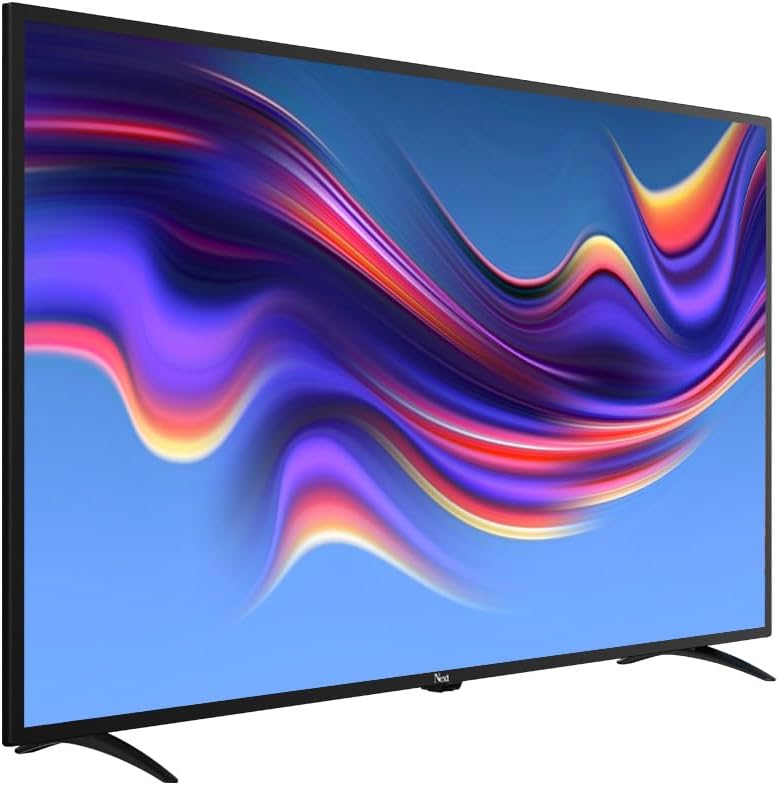
Зураг 6.3: The Next Google Android TV provides access to a wide range of streaming applications, enhancing your entertainment options.
7. Засвар үйлчилгээ
7.1. ТВ цэвэрлэх
- Дэлгэц: Зөөлөн, хөвөнгүй даавуугаар дэлгэцийг зөөлөн арчина. Зөрүүд тэмдгийн хувьд бага зэрэг dampдаавууг усаар эсвэл тусгай дэлгэц цэвэрлэгчээр арчиж (LED дэлгэцэнд аюулгүй эсэхийг шалгаарай) зөөлөн арчина. Дэлгэц рүү шууд шингэн цацаж болохгүй.
- Засгийн газрын танхим Wipe the TV cabinet with a soft, dry cloth. Avoid using abrasive cleaners, waxes, or solvents.
- Цэвэрлэхийн өмнө: Цэвэрлэхийн өмнө ТВ-ээ үргэлж цахилгааны залгуураас салга.
7.2. Програм хангамжийн шинэчлэлтүүд
Your Android TV may receive software updates periodically. It is recommended to keep your TV's software updated to ensure optimal performance and access to the latest features and security patches. You can usually check for updates in the TV's settings menu under "About" or "System Update."
8. Алдаа засах
Нийтлэг асуудлууд болон тэдгээрийн шийдлүүдийг дараах хүснэгтээс харна уу.
| Асуудал | Боломжит шалтгаан / шийдэл |
|---|---|
| Хүч чадалгүй |
|
| Зураг байхгүй ч дуу чимээ байна |
|
| Дуу байхгүй ч зураг байна |
|
| Алсын удирдлага ажиллахгүй байна |
|
| Wi-Fi холболтын асуудал |
|
| Аппликейшнүүд гацаж эсвэл хөлдөж байна |
|
9. Техникийн үзүүлэлтүүд
Technical specifications for the Next YE-43020GG4 43-inch Full HD Google Android TV:
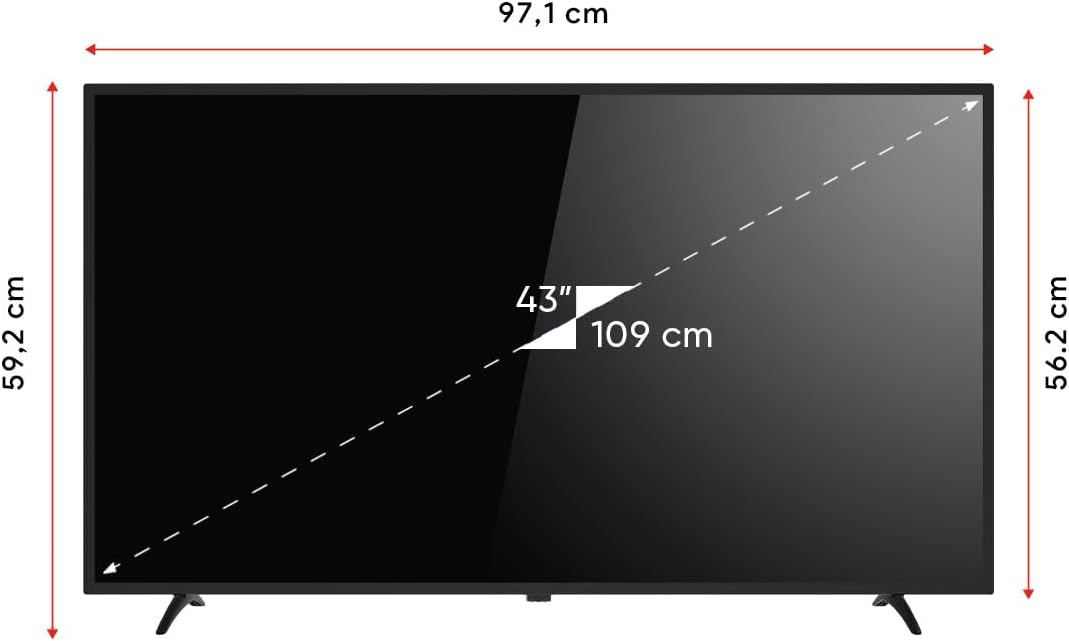
Зураг 9.1: Dimensions of the Next YE-43020GG4 TV.
| Онцлог | Дэлгэрэнгүй |
|---|---|
| Загварын нэр | YE-43020GG4 |
| Брэнд | Дараа нь |
| Дэлгэцийн хэмжээ | 43 инч (109 см) |
| Дэлгэцийн технологи | LED |
| Шийдвэр | Бүрэн HD (1920x1080p) |
| Сэргээх хурд | 60 Гц |
| Үйлдлийн систем | Google Android ТВ |
| Холболт | Wi-Fi, Ethernet |
| HDMI портууд | 2 (1x ARC) |
| USB портууд | 2 |
| Харьцаа | 16:9 |
| Ялгаатай харьцаа | 3000:1 |
| Онцлог шинж чанарууд | Dynamic Contrast Enhancer, Google Assistant |
| Бүтээгдэхүүний хэмжээ (ӨхӨХ) | 97.1 x 19.4 x 59.2 см |
| Бүтээгдэхүүний жин | 5.9 кг |
| Загварын жил | 2024 |
Зураг 9.2: EU Energy Label for the Next YE-43020GG4, indicating its energy efficiency rating and consumption.
10. Баталгаат хугацаа ба дэмжлэг
10.1. Баталгаат хугацааны мэдээлэл
Your Next YE-43020GG4 television comes with a manufacturer's warranty. Please refer to the warranty card included in your product packaging for specific terms, conditions, and duration of the warranty. Keep your purchase receipt as proof of purchase for warranty claims.
10.2. Хэрэглэгчийн дэмжлэг
For technical assistance, troubleshooting beyond this manual, or warranty service, please contact Next customer support. Contact details can typically be found on the manufacturer's official webсайт эсвэл баталгаат карт дээр.
Тусламж үйлчилгээтэй холбогдохдоо дараах мэдээллийг бэлэн байлгана уу.
- Загварын нэр: YE-43020GG4
- Serial Number (located on the back of the TV)
- Худалдан авсан огноо
- A clear description of the issue