
1. Танилцуулга
This manual provides essential information for the safe and efficient operation of your Sharp GX-BT190 Portable Bluetooth Speaker. Please read it thoroughly before using the device and retain it for future reference.
2. Аюулгүй байдлын мэдээлэл
- Чанга яригчийг хэт өндөр температур, нарны шууд тусгал, өндөр чийгшилд бүү тавь.
- Чанга яригчийг задлах, засах эсвэл өөрчлөхийг хориглоно. Энэ нь баталгааг хүчингүй болгож, аюулгүй байдлын эрсдэл учруулж болзошгүй.
- Ensure the charging port cover is securely closed when using the speaker near water to maintain its IP67 rating.
- Зөвхөн өгсөн цэнэглэгч кабель эсвэл баталгаажуулсан түүнтэй адилтгах төхөөрөмжийг ашиглана уу.
- Чанга яригчийг хүүхэд, тэжээвэр амьтдаас хол байлга.
- Сонсголыг гэмтээхгүйн тулд өндөр дууны түвшинд удаан хугацаагаар сонсохоос зайлсхий.
3. Багцын агуулга
- Sharp GX-BT190 Portable Bluetooth Speaker
- USB цэнэглэгч кабель
- оосор
- Зааварчилгааны гарын авлага
4. Бүтээгдэхүүн дууссанview

Урд view of the Sharp GX-BT190 speaker, showing the central speaker grille with the Sharp logo and the LED light ring.

Хажуу тал view of the Sharp GX-BT190 speaker, highlighting the textured speaker grille and the integrated lanyard.
Арын view of the Sharp GX-BT190 speaker, showing the control buttons and the sealed charging port cover.
Хяналт ба үзүүлэлтүүд:
- Цахилгаан товч: Асаах/унтраахын тулд удаан дарна уу.
- Дууг чангалах / Дараагийн дууны товчлуур (+): Дууны хэмжээг нэмэгдүүлэхийн тулд богино дарж, дараагийн дууг удаан дарна уу.
- Дууг багасгах / Өмнөх дууны товчлуур (-): Дууны дууг багасгахын тулд богино дарж, өмнөх дууг удаан дарна уу.
- Play/Pause / Call Button (►||): Short press to play/pause, answer/end calls. Long press to reject calls.
- Mode / Light Button (M): Short press to cycle through LED light modes. Long press to turn off LED lights.
- USB-C цэнэглэх порт: For charging the speaker. Ensure the rubber cover is sealed when not charging.
- LED үзүүлэлт: Цэнэглэх төлөв болон Bluetooth холболтын төлөвийг харуулна.
5. Тохиргоо
5.1 Чанга яригчийг цэнэглэх
- Open the rubber cover on the back of the speaker to access the USB-C charging port.
- Connect the provided USB charging cable to the speaker's USB-C port.
- USB кабелийн нөгөө үзүүрийг USB тэжээлийн адаптер (дагаагүй) эсвэл компьютерийн USB порт руу холбоно уу.
- Цэнэглэх үед LED индикатор асах бөгөөд бүрэн цэнэглэгдсэний дараа унтарна.
- Close the rubber cover securely after charging to maintain the speaker's waterproof rating.
5.2 Асаах/унтраах
- Асаахын тулд: Press and hold the Power button for approximately 3 seconds. You will hear an audible prompt, and the LED indicator will flash.
- Унтраахын тулд: Асаах товчийг ойролцоогоор 3 секундын турш дарна уу. Та дуут дохио сонсох бөгөөд LED индикатор унтарна.
5.3 Bluetooth холболт
- Ensure the speaker is powered on and the LED indicator is flashing, indicating it is in pairing mode.
- Мобайл төхөөрөмж дээрээ Bluetooth-г идэвхжүүлж, боломжтой төхөөрөмжүүдийг хай.
- Select "GX-BT190" from the list of devices.
- Хослуулсны дараа LED индикатор анивчихаа больж, тогтвортой хэвээр байх бөгөөд та баталгаажуулах дууг сонсох болно.
- Хэрэв төхөөрөмж холбогдох хүрээнд байгаа бөгөөд Bluetooth асаалттай байвал чанга яригч нь асаалттай үед хамгийн сүүлд холбогдсон төхөөрөмжтэй автоматаар дахин холбогдоно.
5.4 Жинхэнэ утасгүй стерео (TWS) хослуулах
TWS allows you to pair two GX-BT190 speakers together for a stereo audio experience.

Two Sharp GX-BT190 speakers, one red and one blue, positioned together, illustrating the True Wireless Stereo (TWS) pairing feature.
- Ensure both GX-BT190 speakers are powered on and not connected to any Bluetooth device.
- On one of the speakers (this will be the primary speaker), double-press the Power button. The speaker will enter TWS pairing mode.
- Хоёр чанга яригч автоматаар бие биенээ хайж, холбогдох болно. TWS холболт амжилттай болсны дараа та баталгаажуулах дууг сонсох болно.
- Once TWS paired, connect your mobile device to the primary speaker via Bluetooth as described in section 5.3.
- To disconnect TWS, double-press the Power button on either speaker.
6. Ажиллаж байгаа
6.1 Аудио тоглуулах
- Тоглуулах/түр зогсоох: Тоглуулах/Түр зогсоох товчийг богино хугацаанд дарна уу.
- Дууг нэмэгдүүлэх: "+" товчийг богино хугацаанд дарна уу.
- Дууг багасгах: '-' товчийг богино хугацаанд дарна уу.
- Дараагийн дуу: '+' товчийг удаан дар.
- Өмнөх бичлэг: '-' товчийг удаан дар.
6.2 Гар чөлөөтэй дуудлага хийх
- Дуудлагад хариулах: Ирж буй дуудлага дуугарах үед Тоглуулах/Түр зогсоох товчийг богино дарна уу.
- Дуудлага дуусгах: Дуудлага хийх үед Тоглуулах/Түр зогсоох товчийг богино хугацаанд дарна уу.
- Дуудлагаас татгалзах: Ирж буй дуудлага дуугарах үед Тоглуулах/Түр зогсоох товчийг удаан дарна уу.
6.3 LED Mood Lights
- Short press the 'M' (Mode/Light) button to cycle through the 6 available LED mood light modes.
- Long press the 'M' button to turn off the LED lights.
6.4 Waterproof and Dustproof Usage (IP67)

The Sharp GX-BT190 speaker partially submerged in water, demonstrating its IP67 waterproof and dustproof capabilities.
The GX-BT190 speaker is rated IP67, meaning it is protected from dust ingress and can withstand immersion in water up to 1 meter for 30 minutes. To ensure this protection:
- Always ensure the rubber cover for the charging port is fully and securely sealed before exposing the speaker to water or dust.
- Чанга яригчийг удаан хугацаагаар эсвэл заасан гүнээс хэтрүүлэн санаатайгаар живүүлж болохгүй.
- After exposure to water, wipe the speaker dry with a soft cloth before charging.
7. Засвар үйлчилгээ
7.1 Цэвэрлэгээ
- Чанга яригчийг зөөлөн арчих, damp даавуу.
- Зүлгүүрийн цэвэрлэгч, архи, химийн уусгагчийг бүү ашигла.
- Ensure the speaker is dry before charging or storing.
7.2 Хадгалалт
- Чанга яригчийг нарны шууд тусгал, хэт температураас хол, сэрүүн, хуурай газар хадгална уу.
- Хэрэв удаан хугацаагаар хадгалах бол батерейг эрүүл байлгахын тулд үе үе (жишээ нь, 3 сар тутамд) цэнэглээрэй.
8. Алдаа засах
| Асуудал | Шийдэл |
|---|---|
| Чанга яригч асахгүй байна. | Батерей цэнэглэгдсэн эсэхийг шалгана уу. USB кабель ашиглан чанга яригчийг тэжээлийн эх үүсвэрт холбоно уу. |
| Bluetooth-ээр холбох боломжгүй. | Ensure the speaker is in pairing mode (LED flashing). Turn off and on Bluetooth on your device. Move the speaker closer to your device. Clear previous Bluetooth connections on your device. |
| Дуу байхгүй эсвэл дуу багатай. | Чанга яригч болон холбогдсон төхөөрөмжийнхөө дууг нэмэгдүүлнэ үү. Чанга яригч зөв холбогдсон эсэхийг шалгана уу. |
| Дууны чанар муу. | Move the speaker closer to your device. Ensure there are no obstructions between the speaker and your device. Try playing a different audio source. |
| TWS холболт амжилтгүй боллоо. | Ensure both speakers are GX-BT190 models and are not connected to any other Bluetooth device. Try powering both speakers off and on, then re-attempt TWS pairing. |
9. Техникийн үзүүлэлтүүд

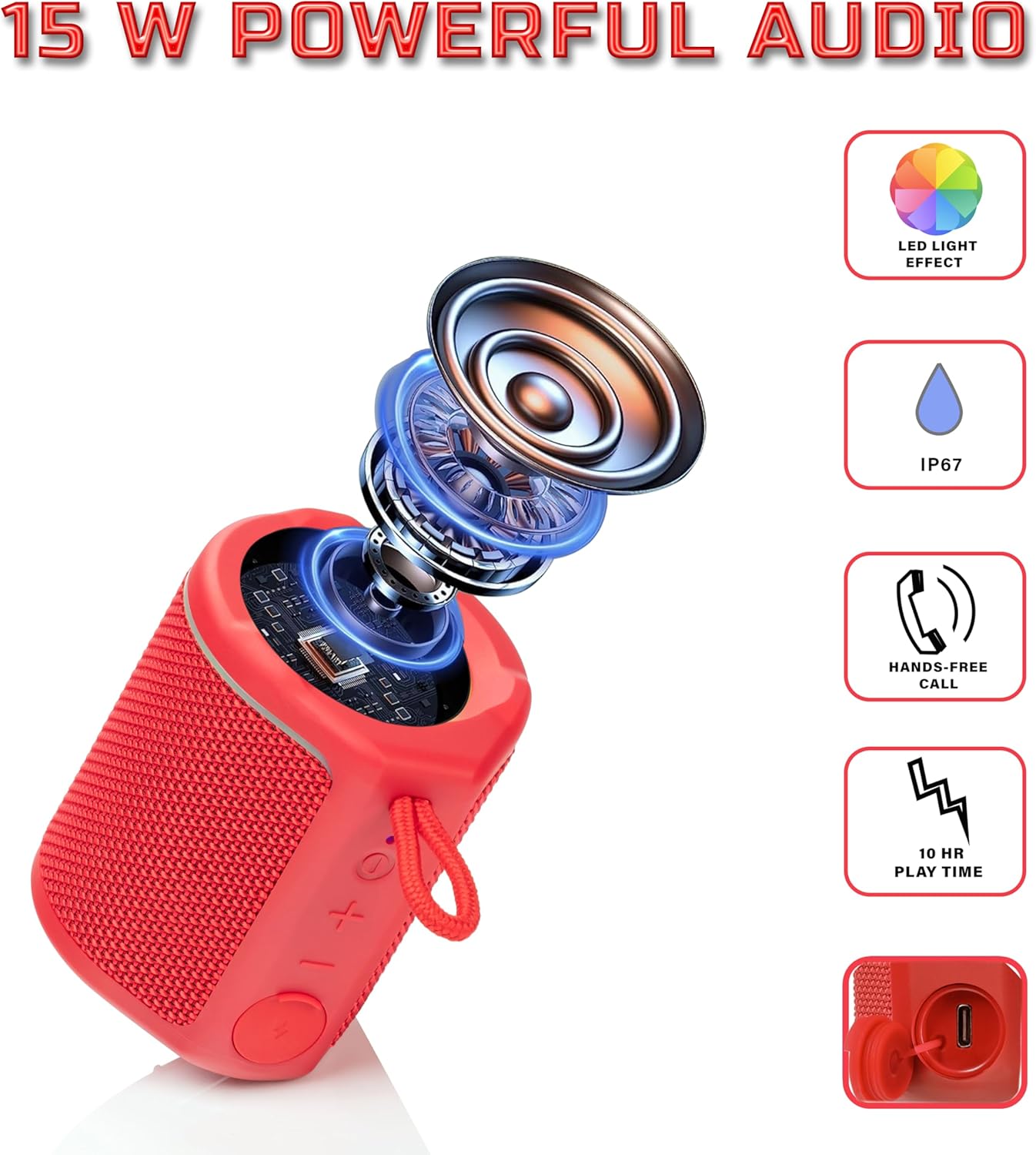
Diagram illustrating the internal components of the Sharp GX-BT190 speaker, including the speaker driver, and highlighting features like LED light effect, IP67 rating, hands-free call function, and battery life.
| Онцлог | Дэлгэрэнгүй |
|---|---|
| Загварын дугаар | GX-BT190 |
| Холболтын технологи | Bluetooth |
| Чанга яригчийн хамгийн их гаралтын чадал | 10 ватт |
| Усны хамгаалалттай үнэлгээ | IP67 |
| Зайны ашиглалт | 15 цаг хүртэл |
| Зайны төрөл | 1 литийн ион (оруулсан) |
| Зайны багтаамж | 1200 мАч |
| Бүтээгдэхүүний хэмжээ (D x W x H) | 7.5 x 7.5 x 7.5 см (ойролцоогоор) |
| Зүйлийн жин | 226.8 гр (8 унц) |
| Утасгүй сүлжээ | 33 фут хүртэл |
| Нэмэлт онцлогууд | LED Light, True Wireless Stereo (TWS), Hands-Free Calling |
10. Баталгаат хугацаа
The Sharp GX-BT190 Portable Bluetooth Speaker comes with a 1-Year Limited Warranty from the date of purchase. This warranty covers manufacturing defects under normal use. It does not cover damage caused by misuse, accidents, unauthorized modifications, or normal wear and tear. Please retain your proof of purchase for warranty claims.
11. Дэмжлэг
For technical assistance, warranty inquiries, or further information regarding your Sharp GX-BT190 speaker, please contact Sharp Inc. customer support:
- Үйлдвэрлэгчийн холбоо барих хаяг: Sharp Inc
- Утас: 1-800-BE-SHARP