Танилцуулга
This manual provides detailed instructions for the setup, operation, and maintenance of your BUFFBEE RS11 Radio Alarm Clock. Please read this manual thoroughly before using the device to ensure proper function and to maximize your user experience. Keep this manual for future reference.
Багцын агуулга
Савыг задлахдаа доор жагсаасан бүх зүйл байгаа бөгөөд сайн нөхцөлд байгаа эсэхийг шалгана уу.
- 1 x BUFFBEE RS11 Radio Alarm Clock
- 1 x DC тэжээлийн адаптер
- 1 х хэрэглэгчийн гарын авлага (энэ баримт бичиг)
- 1 x CR2032 Battery (pre-installed or included separately for backup)
Бүтээгдэхүүн дууссанview
The BUFFBEE RS11 is a compact device combining an alarm clock, FM radio, and a 7-color night light. It features a clear digital display and intuitive controls.

Зураг 1: Урд view of the BUFFBEE RS11 Radio Alarm Clock, displaying the digital time and accessible control buttons on top.

Зураг 2: Internal structure highlighting the 5W Hi-Fi speaker, designed for clear and authentic sound reproduction.
Тохиргоо
1. Эрчим хүчний холболт
- Connect the provided DC power adapter to the 'DC 5V' port on the back of the alarm clock.
- Plug the adapter into a standard wall outlet. The display will illuminate, and the clock will be ready for initial setup.
2. Нөөц батерей суурилуулах
The BUFFBEE RS11 includes a CR2032 battery for backup, which preserves time and alarm settings during a power outage.
- Төхөөрөмжийн доод хэсэгт зайны тасалгааг ол.
- CR2032 батерейг эерэг (+) талыг дээш харуулан оруулна.
- Зайны тасалгааг найдвартай хаа.
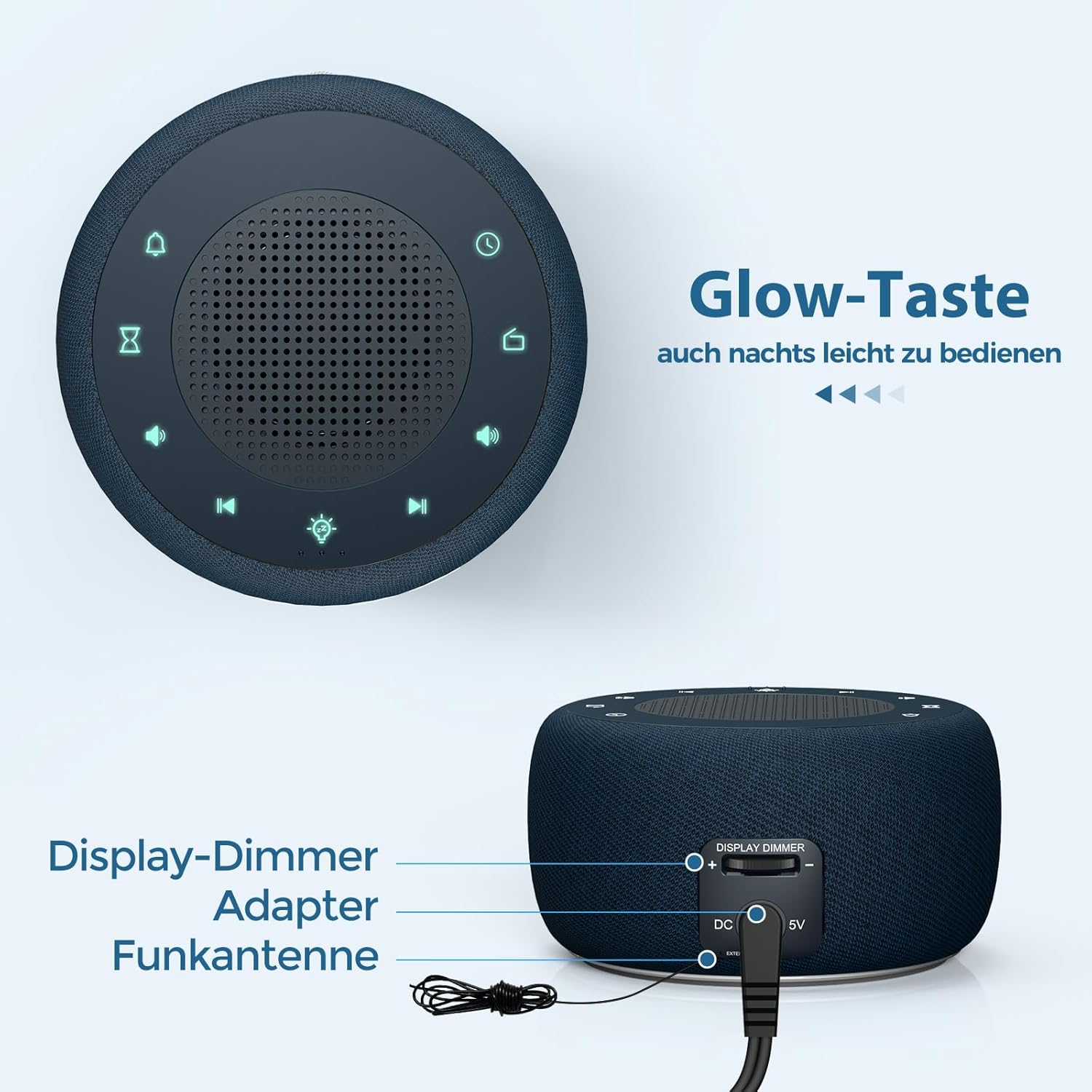
Зураг 3: Rear panel connections, showing the display dimmer control, DC 5V power input, and FM antenna port.
Ашиглалтын заавар
1. Цагийг тохируулах
- Press and hold the 'Time Set' button (often indicated by a clock icon) until the hour digits begin to flash.
- Цагийг тохируулахын тулд '+' ба '-' товчлууруудыг ашиглана уу.
- Press the 'Time Set' button again to switch to minute adjustment. Use '+' and '-' to set the minutes.
- Press 'Time Set' once more to confirm and exit time setting mode.
2. Сэрүүлгийг тохируулах
- Press and hold the 'Alarm Set' button (often indicated by an alarm clock icon) until the alarm hour digits flash.
- Сэрүүлгийн цагийг тохируулахын тулд '+' ба '-' товчлууруудыг ашиглана уу.
- Press 'Alarm Set' again to switch to alarm minute adjustment. Use '+' and '-' to set the alarm minutes.
- Press 'Alarm Set' to select the alarm tone. Options include: Bird sounds, Piano, Beep, or FM Radio.
- Press 'Alarm Set' once more to confirm and exit alarm setting mode.
- To activate/deactivate the alarm, briefly press the 'Alarm Set' button. An alarm icon will appear/disappear on the display.

Зураг 4: Wake-up options with four distinct alarm tones, including the option to wake to your favorite radio station.
3. Радио ажиллагаа (FM)
- Press the 'Radio' button (often indicated by a radio icon) to turn the FM radio on or off.
- Use the 'Previous Track' and 'Next Track' buttons (often indicated by ◀◀ and ▶▶ icons) to tune to different FM stations.
- Press and hold the 'Previous Track' or 'Next Track' buttons to automatically scan for the next available station.
- Adjust the volume using the 'Volume Up' and 'Volume Down' buttons (often indicated by '+' and '-' speaker icons). The volume can be adjusted in 16 levels.

Зураг 5: Enjoying the radio alarm clock, featuring a 0-120 minute sleep timer and 0-30 levels of adjustable volume.
4. Шөнийн гэрлийн функц
- Press the 'Night Light' button (often indicated by a light bulb icon) to turn the night light on or off.
- Press the 'Night Light' button repeatedly to cycle through the 7 available colors.
- To activate the sleep timer for the night light (or radio), press the 'Sleep Timer' button (often indicated by an hourglass icon).
- Use the '+' and '-' buttons to set the desired duration (0-120 minutes). The night light/radio will automatically turn off after the set time.

Зураг 6: The 7-color night light feature, with options to turn on/off and change colors.
5. Display Brightness Adjustment (Dimmer)
The display brightness can be adjusted from 0% to 100% to suit your preference.
- Locate the 'Display Dimmer' control on the back of the unit (refer to Figure 3).
- Slide the control to increase or decrease the display brightness.
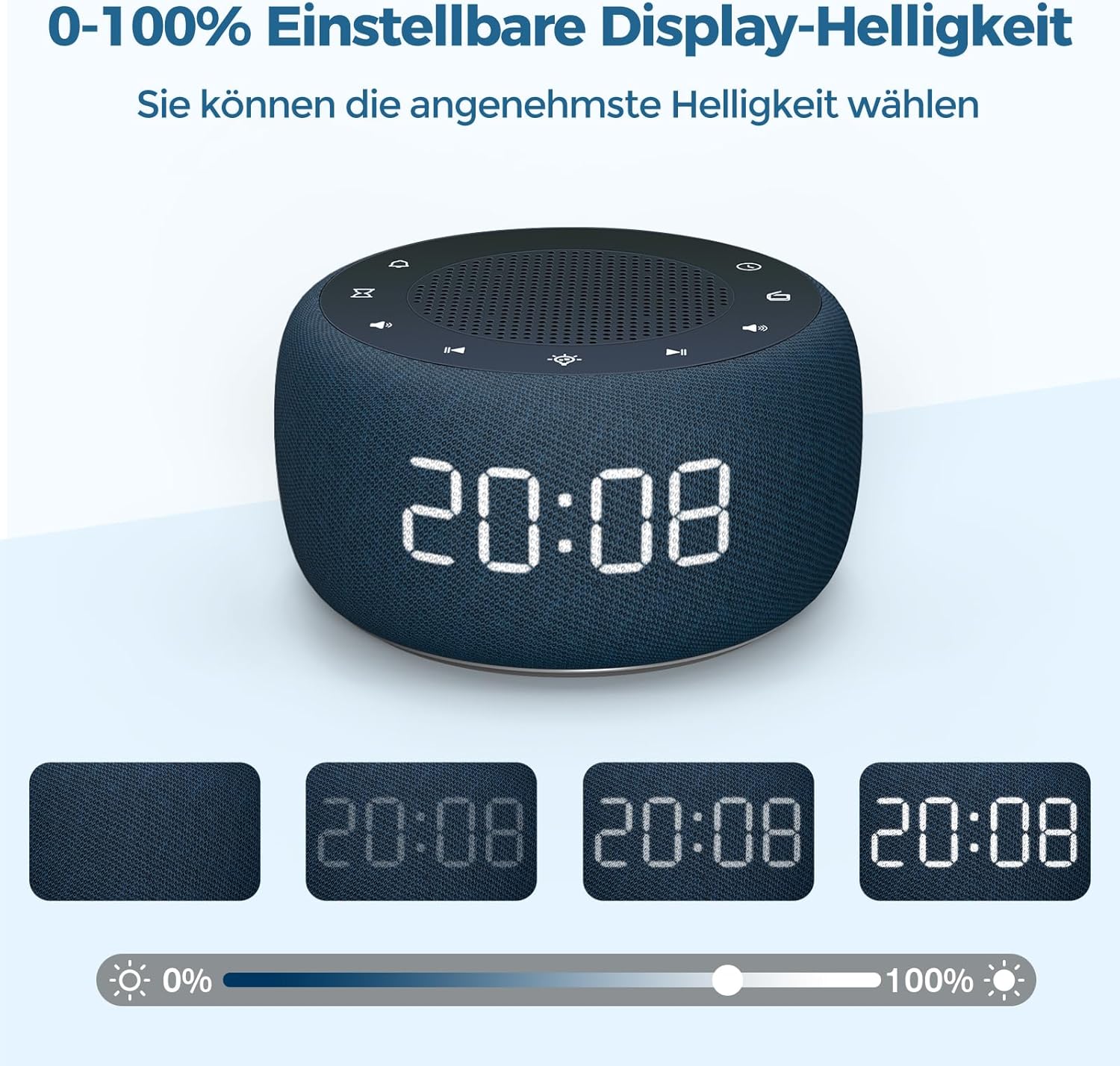
Зураг 7: Demonstrating the 0-100% adjustable display brightness, allowing users to select their preferred comfort level.
6. Luminous Buttons
The control buttons on the top of the unit are designed to illuminate for 5 seconds when pressed, making operation easier in low-light conditions.
7. 12/24 цагийн формат
To switch between 12-hour and 24-hour time formats, briefly press the '12/24H' button (if available, or often combined with the 'Time Set' button by a quick press after setting time).
Засвар үйлчилгээ
- Цэвэрлэгээ: Зөөлөн, хуурай даавуугаар сэрүүлэгтэй цагны гадаргууг цэвэрлэ. Шингэн цэвэрлэгч болон зүлгүүрийн материалыг бүү ашигла.
- Хадгалах: If storing the device for an extended period, disconnect it from power and remove the backup battery. Store in a cool, dry place.
- Зай солих: The CR2032 backup battery should be replaced periodically (e.g., every 1-2 years) to ensure settings are retained during power outages.
Алдааг олж засварлах
| Асуудал | Боломжит шалтгаан | Шийдэл |
|---|---|---|
| Дэлгэц хоосон байна. | Цахилгаан холболт байхгүй. | Ensure the DC power adapter is securely plugged into the unit and a working wall outlet. |
| Сэрүүлэг дуугарахгүй байна. | Сэрүүлэг идэвхжээгүй эсвэл дууны түвшин хэт бага байна. | Check if the alarm icon is visible on the display. Increase alarm volume. |
| Радио хүлээн авалт муу. | FM antenna not extended or poor signal area. | Extend the FM antenna fully. Reposition the unit for better reception. |
| Цахилгаан унтраасны дараа алдагдсан цаг/тохиргооtage. | Нөөц батерей дууссан эсвэл суурилуулаагүй байна. | Install or replace the CR2032 backup battery. |
Үзүүлэлтүүд
- Загвар: RS11
- Брэнд: BUFFBEE
- Хэмжээ (L x W x H): 9.5 x 3.81 x 6 см (ойролцоогоор 3.74 x 1.5 x 2.36 инч)
- Жин: 340 грамм (ойролцоогоор 0.75 фунт)
- Эрчим хүчний гаралт: 5 ватт
- FM давтамж: 87.5-108 МГц
- Дэлгэцийн төрөл: Дижитал
- Шөнийн гэрлийн өнгө: 7
- Нөөц батерей: CR2032 (орсон)
- Эрчим хүчний эх үүсвэр: Cable Electric (DC Adapter)
Баталгаат болон дэмжлэг
This product comes with a standard manufacturer's warranty. For specific warranty details, please refer to the documentation provided at the time of purchase or contact BUFFBEE customer support. If you encounter any issues not covered in this manual, please contact our customer service for assistance.