
Танилцуулга
Thank you for choosing the Thunderobot K87 Wired Mechanical Keyboard. This manual provides essential information for the proper setup, operation, maintenance, and troubleshooting of your new keyboard. Please read this manual thoroughly before using the product to ensure optimal performance and longevity.

Зураг 1: Өнцөг view of the Thunderobot K87 Mechanical Keyboard.
Тохиргоо
Багцын агуулга
Before proceeding, please verify that your package contains the following items:
- Thunderobot K87 Wired Mechanical Keyboard
- USB кабель
- Хэрэглэгчийн гарын авлага (энэ баримт бичиг)
Гарыг холбох
- Unpack the Thunderobot K87 keyboard and the included USB cable.
- Connect the USB-C end of the cable to the port located on the keyboard.
- Кабелийн USB-A төгсгөлийг компьютер дээрээ байгаа USB порт руу холбоно уу.
- Гарыг таны үйлдлийн систем автоматаар таних болно. Үндсэн функцуудад нэмэлт драйвер шаардлагагүй байдаг.

Зураг 2: Доод талд view of the keyboard, illustrating adjustable feet and cable management options.
Ашиглалтын заавар
Үндсэн функцууд
The Thunderobot K87 is a standard 87-key (TKL) layout mechanical keyboard. Simply plug it into your computer, and it is ready for typing. The keyboard features Red mechanical switches, known for their linear feel and quiet operation, making them suitable for both typing and gaming.
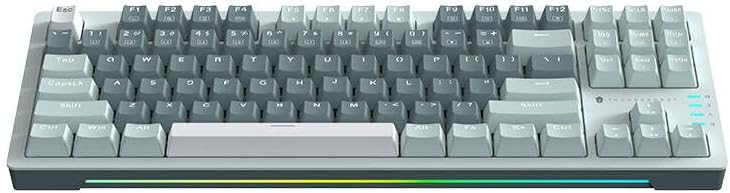
Зураг 3: Дээрээс доош view of the Thunderobot K87 keyboard layout.
Мультимедиа болон функцийн товчлуурууд
The keyboard includes a Function (Fn) key, typically located near the right Alt key. This key, when pressed in combination with the F1-F12 keys, activates various multimedia and system functions. Refer to the keycap legends for specific functions.
- Fn + F1-F12: Typically control media playback, volume, and other system shortcuts.
- Fn + Windows товчлуур: Тоглоомын үеэр санамсаргүй дарахаас сэргийлж Windows товчлуурыг түгждэг/тайлдаг.
Арын гэрэлтүүлгийн хяналт
The Thunderobot K87 keyboard features customizable RGB backlighting. Specific key combinations allow you to change lighting modes, brightness, and speed. Consult the keyboard's keycap legends or the manufacturer's website for detailed instructions on lighting customization.

Зураг 4: Урд view showing the RGB lighting strip.

Зураг 5: Side profile view demonstrating keycap height and keyboard angle.
Засвар үйлчилгээ
Гарыг цэвэрлэх
Тогтмол цэвэрлэгээ хийх нь гарны харагдах байдал, ажиллагааг хадгалахад тусалдаг.
- Салгах: Цэвэрлэхийн өмнө компьютерээсээ гарыг үргэлж салгаж байгаарай.
- Тоос арилгах: Түлхүүрийн тагны хоорондох тоос шороо, хог хаягдлыг үлээж цэвэрлэхийн тулд шахсан агаар ашиглана уу.
- Гадаргууг цэвэрлэх: Товчлуурын таг болон гарын гадаргууг зөөлөн, хөвөнгүй даавуугаар зөөлөн арчина.ampус эсвэл зөөлөн, үрэлтгүй цэвэрлэгээний уусмалаар арчина. Хэт их чийгнээс зайлсхий.
- зайлсхийх: Do not use harsh chemicals, solvents, or abrasive materials, as these can damage the keyboard's finish or keycap legends.
Хадгалах
When not in use for extended periods, store the keyboard in a dry, cool place away from direct sunlight and extreme temperatures. Consider covering it to prevent dust accumulation.
Алдааг олж засварлах
If you encounter issues with your Thunderobot K87 keyboard, please refer to the following common solutions:
| Асуудал | Боломжит шалтгаан | Шийдэл |
|---|---|---|
| Гар хариу өгөхгүй байна | Сул USB холболт, буруу USB порт, драйверын асуудал. | Ensure USB cable is securely connected. Try a different USB port on your computer. Restart your computer. |
| Тусгай товчлуурууд ажиллахгүй байна | Debris under keycap, switch malfunction. | Use compressed air to clear debris. If the issue persists, contact customer support. |
| Backlighting not working or incorrect | Lighting mode disabled, software conflict. | Check keyboard's lighting control key combinations (Fn + specific keys). Ensure no conflicting software is running. |
| Keyboard input lag | USB port issues, system performance. | Try a different USB port. Close unnecessary background applications. |
If the problem persists after trying these solutions, please contact Thunderobot customer support for further assistance.
Үзүүлэлтүүд
| Онцлог | Дэлгэрэнгүй |
|---|---|
| Загварын дугаар | JM03NQ002 |
| Брэнд | Thunderobot |
| Холболт | Утастай (USB) |
| Шилжүүлэгчийн төрөл | Улаан механик унтраалга |
| Зохион байгуулалт | 87 түлхүүртэй (Түлхүүргүй) |
| Арын гэрэлтүүлэг | RGB |
| Үйлдвэрлэгч | Thunderobot |
| ASIN | B0CWS77B83 |
| Баталгаат хугацаа | 2 years manufacturer |
Баталгаат хугацааны мэдээлэл
The Thunderobot K87 Wired Mechanical Keyboard (Model JM03NQ002) comes with a Үйлдвэрлэгчийн 2 жилийн баталгаат хугацаа from the date of purchase. This warranty covers defects in materials and workmanship under normal use. It does not cover damage caused by accident, misuse, abuse, neglect, unauthorized modification, or improper installation.
To claim warranty service, please retain your proof of purchase. For detailed warranty terms and conditions, or to initiate a warranty claim, please contact Thunderobot customer support.
Дэмжлэг
For technical assistance, product inquiries, or warranty claims, please visit the official Thunderobot website or contact their customer support team. Please have your product model number (JM03NQ002) and proof of purchase ready when seeking support.
Official Thunderobot Webсайт: www.thunderobot.com (Анхаарна уу: Энэ бол орлуулагч юм URL тодорхой дэмжлэг байхгүй тул URL was provided in the product data. Refer to your product packaging or official Thunderobot documentation for the correct support contact information.)


