
Танилцуулга
This manual provides detailed instructions for setting up and operating your Majority Frameo Snap10 WiFi Digital Picture Frame. This 10.1-inch digital frame allows you to display photos and videos shared via the Frameo app, offering a convenient way to share memories with family and friends. It features a touchscreen, 32GB of internal storage, auto-rotate functionality, and a motion sensor for efficient use.

The Majority Frameo Snap10 Digital Picture Frame, showcasing a family photo on its 10.1-inch screen.
Хайрцагт юу байна
Бүх зүйл байгаа эсэхийг шалгахын тулд багцын агуулгыг шалгана уу:
- Majority Frameo Snap10 Digital Picture Frame
- Хөшүүрэг
- Эрчим хүчний адаптер
- Алсын удирдлага
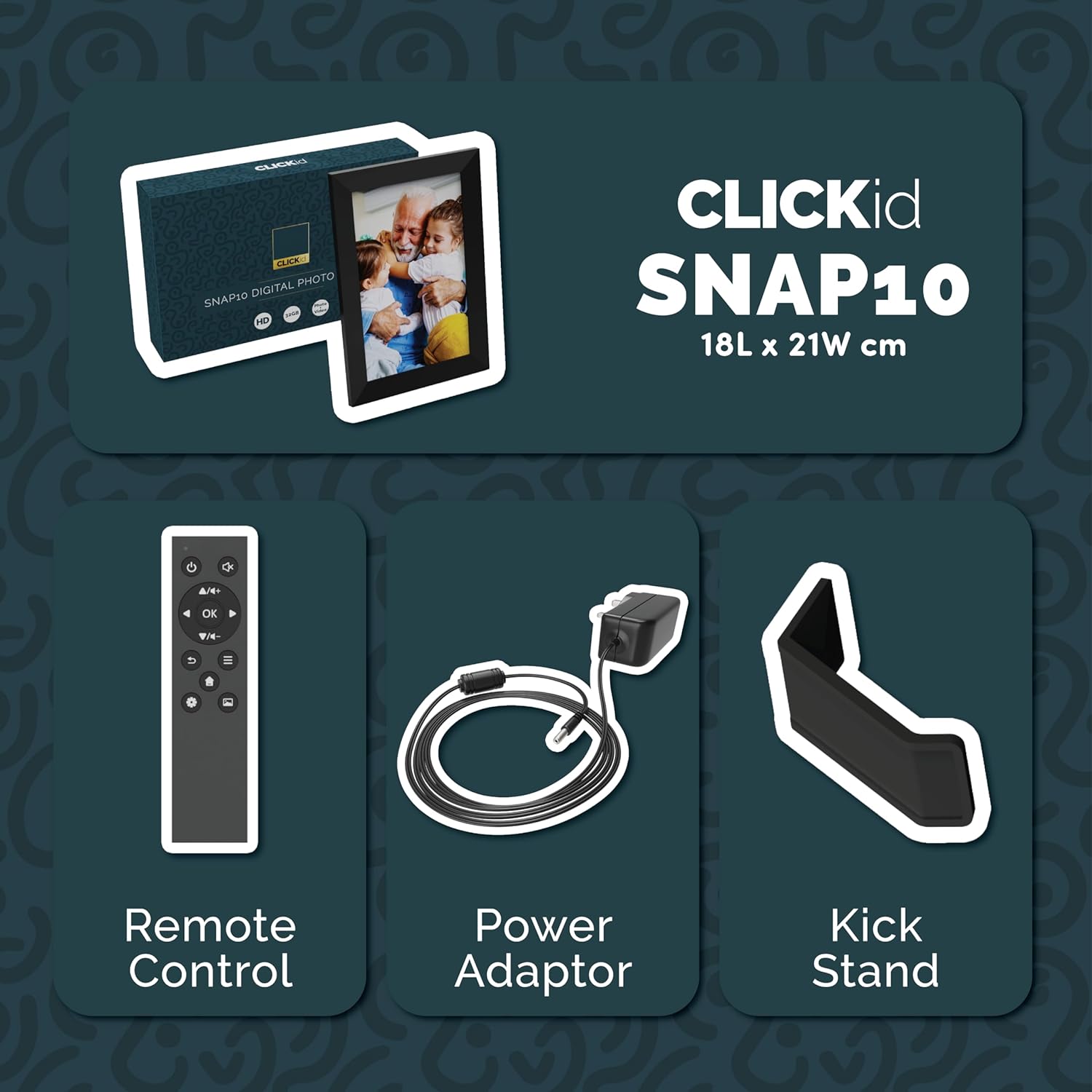
Included accessories: Remote Control, Power Adapter, and Kickstand.
Тохируулах гарын авлага
- Хүрээг задлах: Дижитал зургийн жааз болон бүх дагалдах хэрэгслийг савлагаанаас болгоомжтой авч хая.
- Attach the Kickstand: Insert the kickstand into the designated slot on the back of the frame. The frame supports both horizontal and vertical orientations.
- Эрчим хүчийг холбох: Plug the power adapter into the DC port on the back of the frame, then connect it to a power outlet. The frame will automatically power on.
- Анхны тохиргоо: Follow the on-screen instructions to select your language, time zone, and connect to a Wi-Fi network.
- Install Frameo App: Download the "Frameo" app from your smartphone's app store (available for iOS and Android).
- Connect Frame to App: Open the Frameo app and create an account. On your digital frame, tap "Add Friend" to get a unique code. Enter this code into the Frameo app on your smartphone to link the devices.

The back of the frame features essential ports for power, USB, and Micro SD card.
Ашиглалтын заавар
Зураг болон видео илгээх
Once your frame is connected to the Frameo app, you can easily send photos and short videos from your smartphone.
- Ухаалаг утсан дээрээ Frameo програмыг нээнэ үү.
- Илгээхийг хүссэн зураг эсвэл видеогоо сонгоно уу.
- Choose the connected digital frame as the recipient.
- Add a caption if desired, then tap "Send."

The Frameo app simplifies photo and video uploads from your smartphone.
Мэдрэгч дэлгэцийг ашиглах
The 10.1-inch LCD touchscreen allows for intuitive navigation. Swipe left or right to browse photos, tap to view options, and pinch to zoom.
Алсын удирдлагын функцууд
The included remote control provides convenient access to various frame functions from a distance.
- Навигац: Use arrow keys to move through menus and photos.
- OK/Оруулах: Сонголтыг баталгаажуулна уу.
- Буцах: Өмнөх дэлгэц рүү буцах.
- Тоглуулах/түр зогсоох: Control slideshows or video playback.
- Эзлэхүүн: Adjust audio for videos.

The included remote control for convenient operation.
Хөдөлгөөн мэдрэгч
The integrated motion sensor can be enabled to automatically turn the display on when movement is detected and off when the area is vacant, conserving energy. This setting can be adjusted in the frame's system settings.
Автомат эргүүлэх функц
The frame automatically adjusts the photo orientation (portrait or landscape) based on how the frame is positioned. Ensure the auto-rotate feature is enabled in the settings for optimal display.

The auto-rotate feature adjusts display based on frame orientation.
Онцлогууд дууссанview
- 10.1 инчийн LCD мэдрэгчтэй дэлгэц: Provides a clear display and interactive control.
- 32 ГБ дотоод санах ой: Ample space to store thousands of photos and videos.
- Wi-Fi холболт: Enables seamless photo and video sharing from anywhere via the Frameo app.
- Frameo App Integration: Manage your frame, send media, and invite friends/family to share their moments.
- Хөдөлгөөн мэдрэгч: Automatically turns the screen on/off to save energy.
- Автоматаар эргүүлэх: Adjusts photo orientation automatically.
- Weather and Calendar Display: Integrated widgets provide current weather and calendar information.
- Санах ойн картны үүр: Supports Micro SD cards for additional storage or direct media import.
Засвар үйлчилгээ
- Цэвэрлэгээ: Дэлгэц болон хүрээг цэвэрлэхдээ зөөлөн, хуурай даавуу ашиглаарай. Зүлгүүрийн цэвэрлэгч эсвэл шүршигчийг дэлгэцэн дээр шууд түрхэхээс зайлсхий.
- Програм хангамжийн шинэчлэлтүүд: The frame may receive automatic software updates via Wi-Fi. Ensure your frame is connected to the internet to receive the latest features and improvements.
- Хадгалах менежмент: Үе үе дахинview your stored photos and videos. You can delete unwanted media directly from the frame or through the Frameo app to free up space.
Алдааг олж засварлах
- Хүрээ асахгүй байна:
- Цахилгаан адаптер нь хүрээ болон ажиллаж байгаа цахилгааны залгуурт найдвартай холбогдсон эсэхийг шалгаарай.
- Wi-Fi-д холбогдох боломжгүй:
- Verify your Wi-Fi password. Ensure the frame is within range of your Wi-Fi router. Try restarting your router and the frame.
- Photos not appearing on the frame:
- Confirm that the frame is connected to Wi-Fi and linked to your Frameo app account. Check the Frameo app to ensure photos were successfully sent. Allow some time for photos to download, especially large batches.
- Frame is stuck on a white screen with a loading bar:
- This may indicate a software issue. Try performing a soft reset by disconnecting the power for 30 seconds and then reconnecting. If the issue persists, a factory reset might be necessary (refer to the frame's settings for this option, noting it will erase all data).
- Алсын удирдлага ажиллахгүй байна:
- Check if the batteries in the remote control need replacement. Ensure there are no obstructions between the remote and the frame's IR receiver.
Үзүүлэлтүүд
| Брэнд | Олонхи |
| Загварын дугаар | Snap10 |
| Өнгө | Хар |
| Дэлгэцийн хэмжээ | 10.1 инч |
| Шийдвэр | 800*1280 |
| Харьцаа | 2.10:1 |
| Санах ойн хадгалах багтаамж | 32 ГБ |
| Холболтын технологи | Wi-Fi |
| Хяналтын арга | App, Touchscreen, Remote |
| Эрчим хүчний эх үүсвэр | Утастай цахилгаан |
| Зүйлийн жин | 491 грамм |
| Хэмжээ (L x W) | 7.08"L x 8.26"W |
Баталгаат болон дэмжлэг
The Majority Frameo Snap10 Digital Picture Frame comes with a 2 жилийн өргөтгөсөн баталгаа. Registration is required to activate the extended warranty. Please refer to the product packaging or the manufacturer's webБүтээгдэхүүнээ хэрхэн бүртгүүлэх талаар дэлгэрэнгүй мэдээллийг сайтаас авна уу.
For technical support, troubleshooting assistance, or warranty claims, please contact Majority customer service through their official webсайт эсвэл таны бүтээгдэхүүний баримт бичигт заасан холбоо барих мэдээлэл.
Бүтээгдэхүүний видео
This video demonstrates the ease of sharing photos and videos with the Frameo app and viewing them on the digital picture frame, highlighting its use for connecting family members.