
1. Танилцуулга
This manual provides detailed instructions for the safe and effective operation of your Andoer Mini WiFi Action Camera L11. This compact digital video camera is designed for capturing high-quality 1080P video at 30 frames per second, featuring a 0.96-inch LCD screen, built-in rechargeable battery, motion detection, and versatile mounting options. Please read this manual thoroughly before using the device.
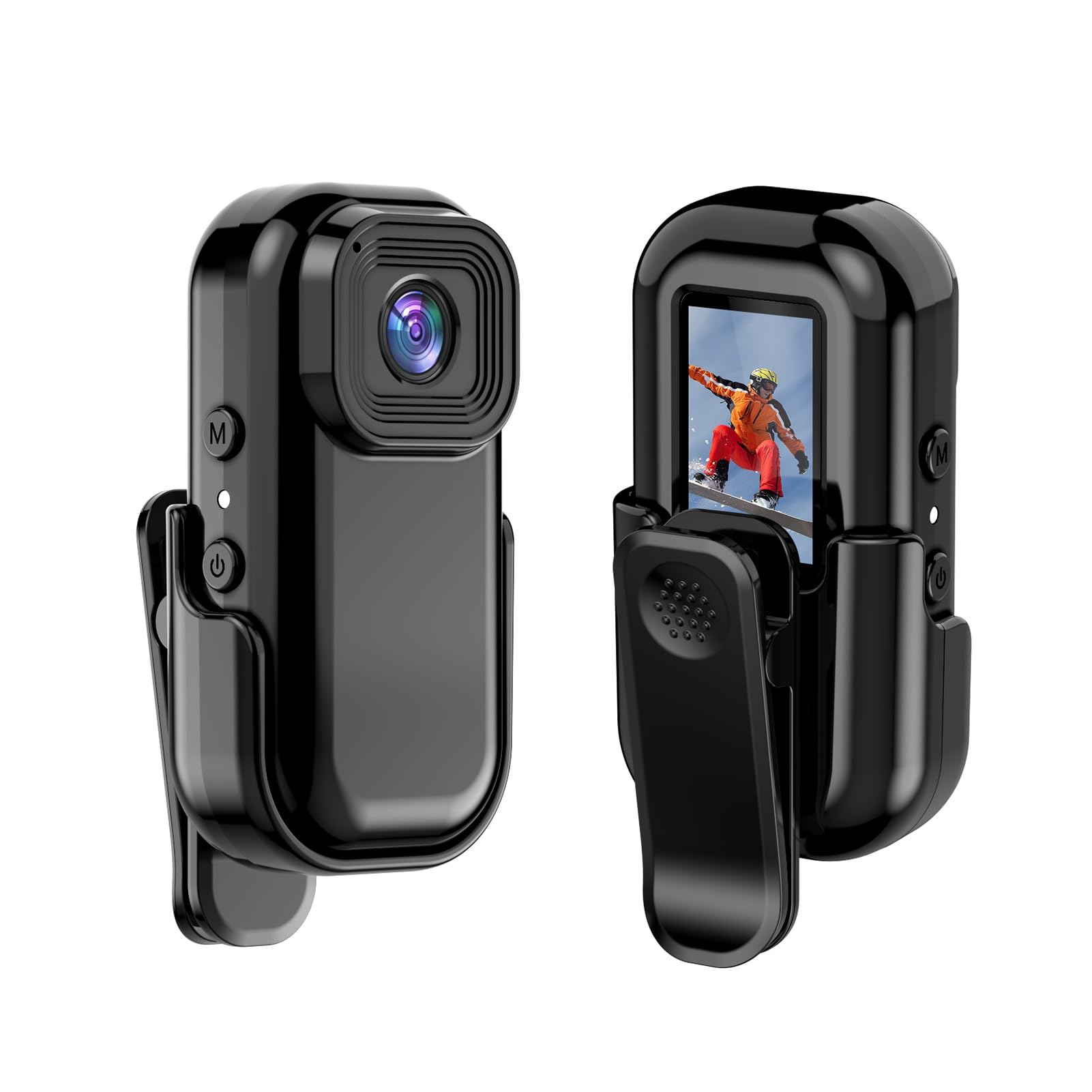
Зураг: Урд ба хойд view of the Andoer Mini WiFi Action Camera L11, showing the lens and the 0.96-inch LCD screen.
2. Багцын агуулга
Доор жагсаасан бүх зүйл таны багцад байгаа эсэхийг шалгаарай. Хэрэв ямар нэгэн зүйл дутуу эсвэл эвдэрсэн бол хэрэглэгчийн дэмжлэгтэй холбоо барина уу.
- 1 x Andoer Mini WiFi Action Camera L11
- 1 x Хамгаалалтын бүрээс
- 1 x 1/4in Adapter Mount
- 1 x Back Clip Mount
- 1 х карт уншигч
- 1 x Type-C кабель
- 1 х хэрэглэгчийн гарын авлага (энэ баримт бичиг)
3. Бүтээгдэхүүний онцлог
- Өндөр чанартай видео: Records in 1080P at 30 frames per second, suitable for various applications including live broadcasting and video conferencing.
- Авсаархан, зөөврийн: Super mini size allows for easy portability and discreet placement.
- Magnetic Body: Features a magnetic base for secure attachment to smooth metal surfaces.
- Seamless WiFi Connectivity: Connects wirelessly to a dedicated app for live view болон хяналт.
- Олон талын суурилуулалт: Includes a 1/4-inch adapter mount and a back clip mount for diverse installation options.

Зураг: Жишээ ньamples of application scenarios for the camera, including parachute jumping, cycling, parent-child activities, and skiing.

Image: The camera being used as a portable video recorder in various outdoor activities like camping, cycling, climbing, and sports.
4. Тохиргоо
4.1 Зайг цэнэглэх
Before first use, fully charge the camera's built-in 400mAh battery. Connect the provided Type-C cable to the camera's USB port and the other end to a standard USB power adapter (5V, ≥1A). The charging indicator light will typically show the charging status and turn off or change color when fully charged.
4.2 Санах ойн карт оруулах
The camera supports TF (Micro SD) cards up to 128GB. Ensure the card is formatted to FAT32 for optimal performance. Gently insert the TF card into the designated slot until it clicks into place. To remove, press the card in slightly until it springs out.
Note: A memory card is required for recording video and taking photos.
4.3 Асаах/унтраах
- Асаахын тулд: Press and hold the Power button (usually marked with a power symbol) for a few seconds until the screen illuminates.
- Унтраахын тулд: Press and hold the Power button again for a few seconds until the screen turns off.
5. Ашиглалтын заавар
5.1 Үндсэн үйл ажиллагаа
The 0.96-inch color display provides visual feedback for modes and settings. Use the navigation buttons (if present, typically 'M' for Mode and another for selection/shutter) to cycle through options and confirm selections.
5.2 Видео бичлэг хийх
In video mode, press the Shutter/Record button to start recording. Press it again to stop. Videos are saved in AVI format at 1920x1080P resolution. The camera supports loop recording with 3-minute segments.

Image: The camera's screen displaying a family scene, indicating video recording at 1920x1080P resolution.
5.3 Зураг авах
Switch to photo mode using the Mode button. Press the Shutter button to capture a still image. Photos are saved in JPG format.

Image: Icons representing photo, video, and audio recording modes, illustrating the camera's ability to capture various moments.
5.4 Хөдөлгөөн илрүүлэх
The camera features motion detection capabilities. Refer to the on-screen menu or the dedicated app for instructions on how to activate and configure this feature. When enabled, the camera will automatically begin recording when motion is detected within its field of view.
6. WiFi холболт
The Andoer L11 camera supports wireless WiFi connectivity for remote control and live viewing via a smartphone application. Follow these general steps:
- Download the official Andoer camera app from your device's app store (iOS or Android).
- Power on the camera and activate its WiFi mode (refer to the camera's on-screen menu).
- On your smartphone, go to WiFi settings and connect to the camera's WiFi network (SSID and password will be displayed on the camera screen or in the app).
- Open the Andoer app. You should now see a live view from the camera and be able to control recording and settings remotely.

Image: A smartphone displaying a live view from the camera, demonstrating the WiFi connectivity feature.
7. Суурилуулах сонголтууд
The Andoer L11 offers flexible mounting solutions:
- Соронзон бэхэлгээ: The camera body has a magnetic feature, allowing it to be securely attached to smooth metal surfaces like refrigerator doors or metal poles.
- 1/4-inch Adapter Mount: Use the included 1/4-inch adapter mount to attach the camera to standard tripods, monopods, or other accessories with a 1/4-inch screw.
- Back Clip Mount: The back clip mount allows you to attach the camera to clothing, backpacks, or other thin objects for hands-free recording.
8. Засвар үйлчилгээ
- Цэвэрлэгээ: Use a soft, dry cloth to clean the camera body. For the lens, use a specialized lens cleaning cloth and solution. Avoid harsh chemicals.
- Хадгалах: Камерыг нарны шууд тусгал, хэт температураас хол, сэрүүн, хуурай газар хадгална.
- Батерейны арчилгаа: For long-term storage, charge the battery to about 50% every few months to maintain its health.
- Програм хангамжийн шинэчлэлтүүд: Check the official Andoer webоновчтой гүйцэтгэл болон шинэ функцуудыг хангахын тулд боломжтой програм хангамжийн шинэчлэлтүүдийг үе үе сайтаас авна уу.
9. Алдаа засах
| Асуудал | Боломжит шийдэл |
|---|---|
| Камер асахгүй байна. | Ensure the battery is fully charged. Connect to a power source and try again. |
| Видео бичих/зураг авах боломжгүй. | Check if a TF card is inserted and properly formatted. Ensure there is sufficient storage space. |
| WiFi холболтын асуудал. | Ensure WiFi is enabled on the camera and your smartphone. Restart both devices. Verify the correct app is installed. |
| Poor video/image quality. | Ensure the lens is clean. Check lighting conditions. Verify camera settings are correct (e.g., resolution). |
| Камер хөлддөг эсвэл хариу өгөхгүй байна. | Perform a soft reset by holding the power button until it turns off, then restart. If persistent, remove and reinsert the memory card. |
10. Техникийн үзүүлэлтүүд
| Онцлог | Дэлгэрэнгүй |
|---|---|
| Машины төрөл | L11 |
| Линзний өнцөг | 140 градус |
| TFT дэлгэц | 0.96 инчийн өнгөт дэлгэц |
| Видеоны нягтрал | 1920 * 1080P |
| Батерей | 400 мАч |
| Видео File Формат | AVI |
| Фото зургийн формат | JPG |
| Видео давталт | 3 минут |
| Бичлэг хийж байна File Формат | WAV (Audio) |
| Ажлын чийгшил | 30% |
| Ашиглалтын температур | -25-аас + 75 ° C (-13-аас + 167 ° F) |
| Эрчим хүчний хангамж | USB ботьtage 5V, гүйдэл ≥1А |
| Санах ойн карт | TF карт, 128G хүртэл дэмждэг |
| Холболтын технологи | Wi-Fi |
| Form Factor | Компакт |
| Зүйлийн жин | 4.2 унц (ойролцоогоор 119 гр) |
| Багцын хэмжээ | 3.94 x 2.36 x 1.97 инч |
11. Аюулгүй байдлын мэдээлэл
- Do not expose the camera to extreme temperatures outside the specified operating range (-25°C to +75°C).
- Avoid operating the camera in humidity levels exceeding 30%.
- Keep the device away from water and other liquids unless explicitly stated as waterproof.
- Do not attempt to disassemble or modify the camera, as this will void the warranty and may cause damage.
- Use only the specified power supply (USB 5V, ≥1A) for charging.
- Хүүхдийн гар хүрэхгүй газар хадгална.