
1. Танилцуулга
This manual provides detailed instructions for the installation, operation, and maintenance of the Intellinet 48-Port L3 Managed Gigabit PoE+ Switch, Model 562041. This device is designed for enterprise networks requiring efficient and scalable routing solutions with high-powered Power over Ethernet (PoE) capabilities.
2. Аюулгүй байдлын мэдээлэл
Observe the following safety precautions to prevent damage to the device and injury to personnel:
- Төхөөрөмжийн зөв газардуулгатай эсэхийг шалгаарай.
- Do not expose the switch to water or excessive humidity.
- Төхөөрөмжийг тогтоосон температур, чийгшлийн хүрээнд ажиллуулна.
- Use only the power cable provided or a compatible replacement.
- Do not open the switch casing; мэргэшсэн боловсон хүчинд үйлчилгээ үзүүлэх.
- Ensure adequate ventilation around the switch to prevent overheating.
3. Багцын агуулга
Бүх зүйл багцад байгаа эсэхийг шалгана уу:
- Intellinet 48-Port L3 Managed Gigabit PoE+ Switch (Model 562041)
- Цахилгаан кабель
- 19" rackmount brackets
- Резинэн хөл
- Заавар (энэ гарын авлага)
4. Бүтээгдэхүүн дууссанview
The Intellinet 562041 is a robust Layer 3 managed switch featuring 48 Gigabit PoE+ ports and six 10G SFP+ uplink slots. It supports a total power budget of 850 watts for PoE devices.
4.1 Урд самбар
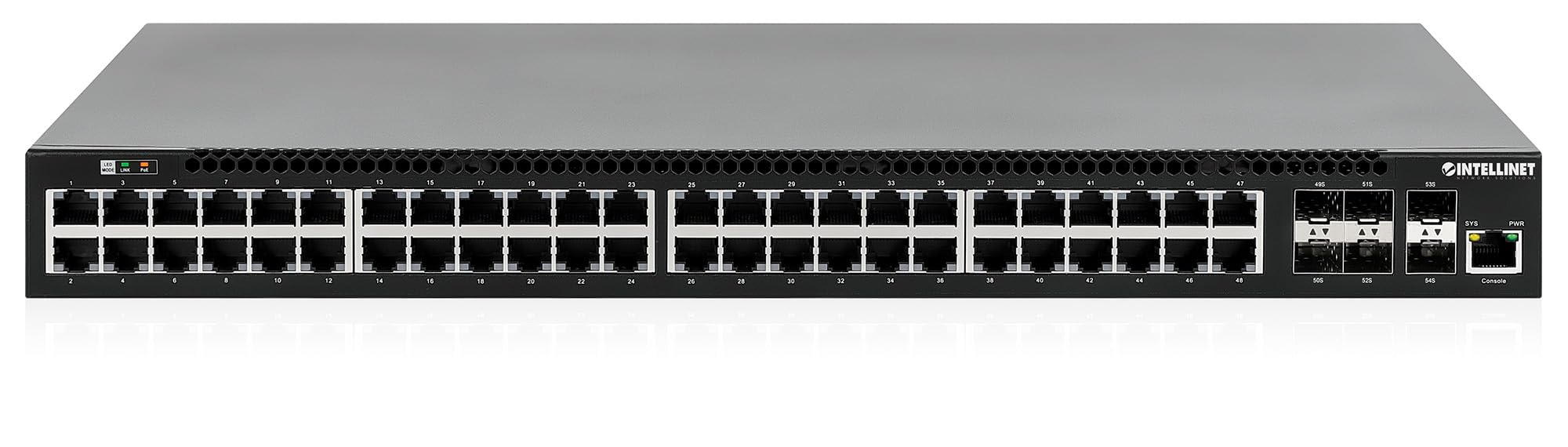
Урд самбар нь дараахь зүйлийг агуулна.
- 48 x 10/100/1000 Mbps RJ45 Ports: These ports support Power over Ethernet Plus (PoE+) for connecting compatible devices.
- 6 x 10 Gigabit SFP+ Slots: For high-speed uplink connections to other network devices.
- LED үзүүлэлтүүд: Provide status information for power, system, link activity, and PoE status.
- Консол порт: Орон нутгийн удирдлага болон тохиргоонд зориулагдсан.


4.2 Арын самбар

The rear panel typically includes the AC power input and cooling fans for heat dissipation.

5. Тохиргоо
5.1 Физик суурилуулалт
The switch can be installed in a standard 19-inch equipment rack or placed on a desktop.
- Rackmount суурилуулалт: Attach the provided rackmount brackets to the sides of the switch using the included screws. Secure the switch into a standard 19-inch rack.
- Ширээний суулгац: Attach the provided rubber feet to the bottom of the switch to prevent scratching and ensure stability. Place the switch on a flat, stable surface.
5.2 Эрчим хүчний холболт
Connect the provided power cable to the AC power input on the rear panel of the switch and then to a grounded electrical outlet. Ensure the power switch is in the OFF position before connecting the power cable.
5.3 Сүлжээний холболтууд
- PoE төхөөрөмжүүд: Connect PoE-compatible devices (e.g., IP cameras, VoIP phones, wireless access points) to any of the 48 Gigabit RJ45 ports. The switch will automatically detect and provide power to these devices.
- Uplink холболтууд: Insert compatible SFP+ transceivers into the 10 Gigabit SFP+ slots and connect them to your core network or other high-speed devices using appropriate fiber optic cables.
- Консолын холболт: For initial configuration or direct management, connect a console cable from your computer to the console port on the switch.
5.4 Анхны тохиргоо
Refer to the separate software configuration guide for detailed instructions on accessing the switch's management interface (web-based GUI or command-line interface via console port) and performing initial setup, including IP address assignment, user accounts, and basic network settings.
6. Ашиглалтын заавар
6.1 Layer 3 Routing
This switch offers dynamic Layer 3 IP routing capabilities, including OSPF (Open Shortest Path First), RIP (Routing Information Protocol), and VRRP (Virtual Router Redundancy Protocol). These protocols enable efficient and scalable routing within complex network environments.

6.2 Ethernet дээрх цахилгаан хангамж (PoE+)
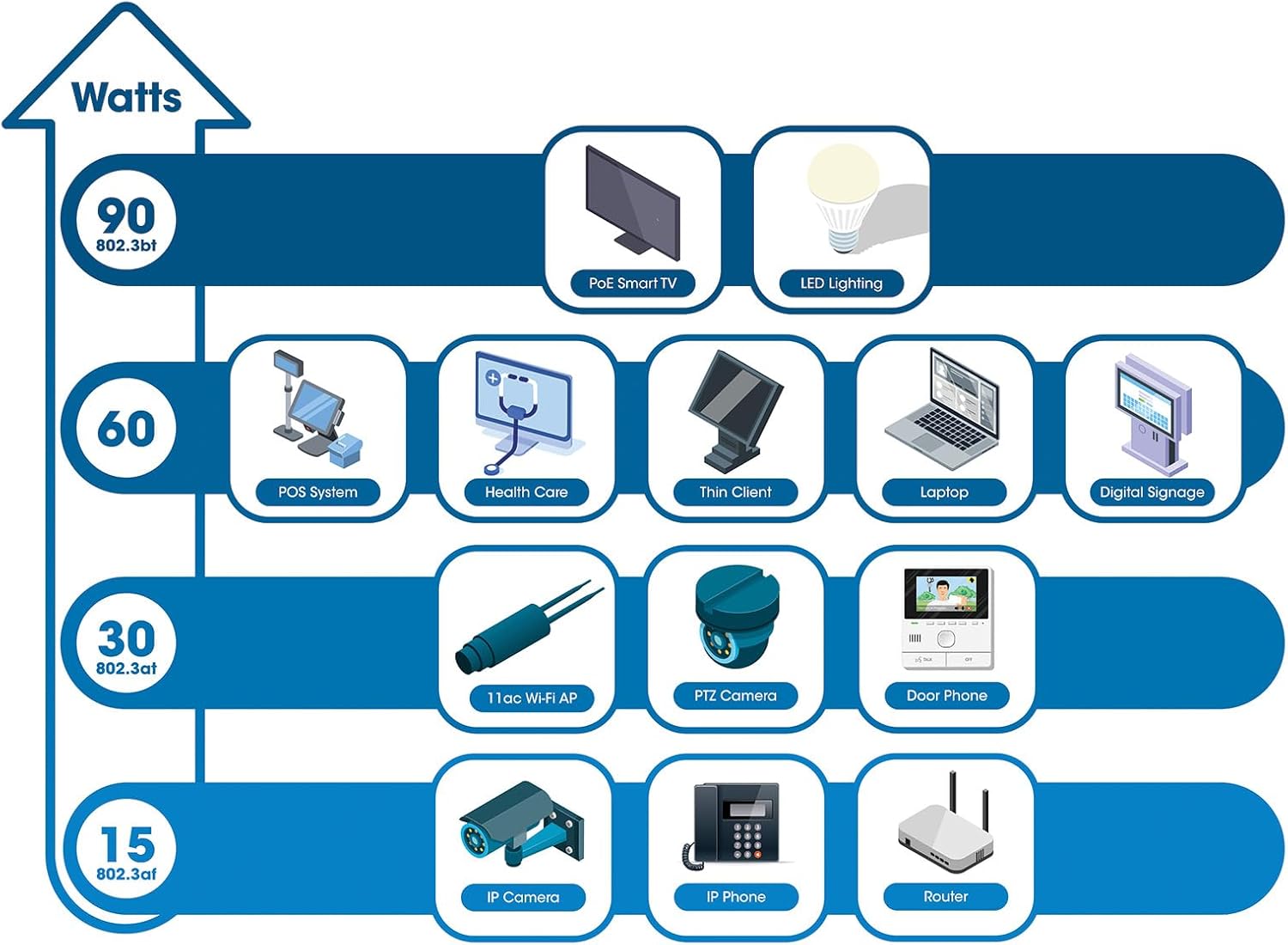
The switch provides up to 30 watts of power per port across its 48 PoE+ ports, with a total power budget of 850 watts. This allows for seamless integration of various PoE devices without the need for separate power adapters.
6.3 PoE Scheduling
The switch supports PoE scheduling, allowing administrators to define specific times for powering on, powering off, or rebooting connected PoE devices. This feature can optimize power consumption and enhance network security.


6.4 Self-Healing Functionality (PDM)
The Powered Device Monitor (PDM) feature enables the switch to proactively monitor the status of connected PoE devices. If a device becomes unresponsive, the PDM can automatically restart the PoE port to restore functionality, minimizing downtime and maintaining network integrity.
6.5 Үүлний менежмент
The switch supports cloud management capabilities, allowing for remote configuration, monitoring, and troubleshooting of the device from a centralized platform. Refer to the cloud management documentation for setup and usage details.
7. Засвар үйлчилгээ
7.1 Програм хангамжийн шинэчлэлтүүд
Regularly check the Intellinet Network Solutions website for the latest firmware updates. Applying firmware updates can improve performance, add new features, and address security vulnerabilities. Follow the instructions provided with the firmware update package carefully.
7.2 Цэвэрлэгээ
To clean the switch, power it off and disconnect all cables. Use a soft, dry cloth to wipe the exterior. Do not use liquid or aerosol cleaners. Ensure ventilation openings are free from dust and debris.
7.3 Байгаль орчны асуудал
Ensure the switch operates within its specified temperature and humidity ranges. Avoid placing the switch in direct sunlight, near heat sources, or in areas with high dust accumulation.
8. Алдаа засах
Энэ хэсэгт шилжүүлэгчтэй холбоотой тулгарч болох нийтлэг асуудлуудыг авч үзэх болно.
8.1 Эрчим хүчгүй
- Verify the power cable is securely connected to both the switch and a working electrical outlet.
- Арын самбар дээрх цахилгаан унтраалга асаалттай байрлалд байгаа эсэхийг шалгаарай.
- Check the power outlet with another device to confirm it is functional.
8.2 Порт дээр холбоос байхгүй
- Check the Ethernet cable connection at both ends. Ensure it is securely plugged in.
- Кабель гэмтээгүй эсэхийг шалгана уу. Өөр кабель туршиж үзнэ үү.
- Холбогдсон төхөөрөмж асаалттай, зөв ажиллаж байгаа эсэхийг шалгаарай.
- Шилжүүлэгчийн удирдлагын интерфэйс дэх портын төлөвийг шалгана уу.
8.3 PoE төхөөрөмж тэжээл авахгүй байна
- Confirm the connected device is a PoE-compatible device.
- Тодорхой портын PoE төлөвийн LED-ийг шалгана уу.
- Verify the total PoE power budget (850W) is not exceeded by all connected devices.
- Utilize the Powered Device Monitor (PDM) feature to automatically restart the port if the device is unresponsive.
- Check PoE settings in the switch's management interface.
9. Техникийн үзүүлэлтүүд
| Онцлог | Тодорхойлолт |
|---|---|
| Загварын дугаар | 562041 |
| Брэнд | INTELLINET NETWORK SOLUTIONS |
| Портын тоо | 54 (48 x Gigabit PoE+, 6 x 10G SFP+) |
| Интерфейсийн төрөл | PoE, SFP |
| Maximum Power (PoE Budget) | 850 ватт |
| Өгөгдөл дамжуулах хурд | 10 Gigabits Per Second (SFP+ uplinks) |
| Зүйлийн жин | 6.2 килограмм (13.64 фунт) |
| Бүтээгдэхүүний хэмжээ (L x W x H) | 13.78 x 17.32 x 1.73 инч |
| Дээд температурын үнэлгээ | Фаренгейтийн 104 хэм (40 хэм) |
| Доод температурын үнэлгээ | Фаренгейтийн 32 хэм (0 хэм) |
| Тохиромжтой төхөөрөмжүүд | Desktop, Router, PoE devices (IP cameras, VoIP phones, WAPs) |
| Оруулсан бүрэлдэхүүн хэсгүүд | 19" rackmount brackets, Instructions, Rubber feet, power cable |
| UPC | 766623562041 |
10. Баталгаат хугацаа ба дэмжлэг
10.1 Баталгаат хугацааны мэдээлэл
This Intellinet Network Solutions product is covered by a 3 жилийн үйлдвэрлэгчийн баталгаа. Баталгаат заргад зориулж худалдан авалтаа нотлох баримтаа үлдээнэ үү. Баталгаат хугацаа нь ердийн ашиглалтын үед хийгдсэн материал, хийцийн согогийг хамарна.
10.2 Техникийн дэмжлэг
For technical assistance, product documentation, or to register your product, please visit the official Intellinet Network Solutions webсайтад хандах эсвэл тэдний хэрэглэгчийн дэмжлэгтэй холбогдоно уу. Холбоо барих мэдээллийг ихэвчлэн үйлдвэрлэгчийн хаягаас олж болно. webсайт эсвэл бүтээгдэхүүний савлагаанд .