
T-Wolf GG-G530
T-Wolf RoboCop Competitive Gaming Mouse GG-G530 User Manual
Model: GG-G530
Танилцуулга
This manual provides essential information for the setup, operation, and maintenance of your T-Wolf RoboCop Competitive Gaming Mouse GG-G530. Please read this manual thoroughly before using the product to ensure optimal performance and longevity.
Багцын агуулга
- 1 x T-Wolf RoboCop Competitive Gaming Mouse GG-G530
- 1 х хэрэглэгчийн гарын авлага (энэ баримт бичиг)
Бүтээгдэхүүний онцлог
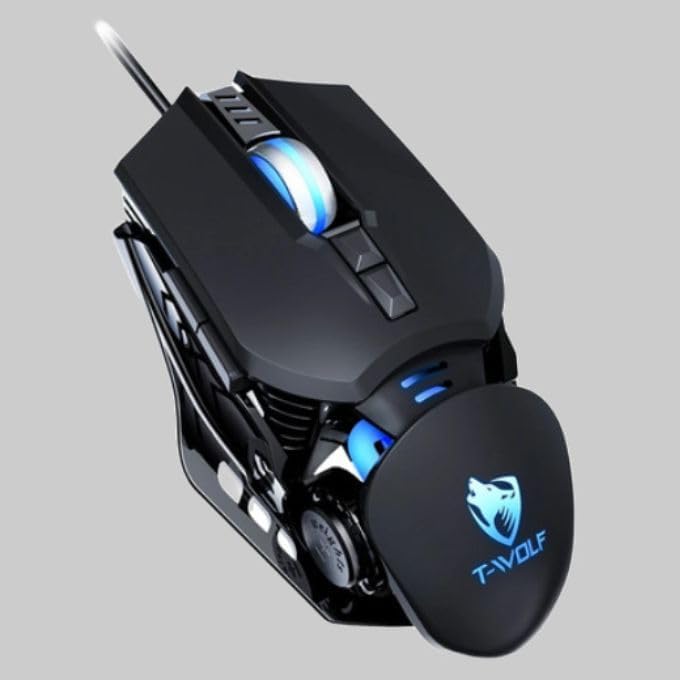
The T-Wolf RoboCop Competitive Gaming Mouse GG-G530 is designed for precision and comfort, suitable for both gaming and office use. Key features include:
- Optical Engine Design: Ensures stable operation and high sensitivity.
- Mechanical Armored Modeling: Distinctive and robust design.
- Symmetrical DIY Counterweight: Allows for adaptable weight adjustment.
- 7 Товчлуур: Includes left click, right click, scroll wheel, DPI switcher, and additional programmable buttons.
- Ухаалаг холболт: Plug-and-play functionality with automatic driver installation.
- Тохируулах DPI: Four levels of sensitivity (1200/2400/3200/6400 DPI) for precise control.
- Эргономик дизайн: Provides comfortable use for extended periods without fatigue.
- Four-Color Light Effect: Dynamic lighting for visual appeal.
- Утастай холболт: Reliable USB interface with a 150cm cable.
- Системийн нийцтэй байдал: Windows болон Mac үйлдлийн системүүдийг дэмждэг.
Тохиргоо
- Хулгана холбоно уу: Insert the USB connector of the T-Wolf RoboCop Gaming Mouse into an available USB port on your computer.
- Автомат драйвер суулгах: The operating system will automatically detect the mouse and install the necessary drivers. This process typically takes a few moments. No manual driver installation is required.
- Ашиглахад бэлэн: Драйверуудыг суулгасны дараа хулгана шууд ашиглахад бэлэн болно.
Ашиглалтын заавар
The T-Wolf RoboCop Gaming Mouse features 7 buttons for various functions. Familiarize yourself with their basic operations:
- Зүүн товшилтын товчлуур: Анхдагч сонголт ба харилцан үйлчлэл.
- Баруун товчлуур дээр дарна уу: Accesses contextual menus and secondary functions.
- Гүйлгэх дугуй: Баримт бичгүүдийг гүйлгэх ба web хуудаснууд. Мөн дунд товшилтын товчлуураар ажиллах боломжтой.
- DPI Switcher Button: Хулганы мэдрэмжийг (DPI) тохируулна.
- Нэмэлт товчлуурууд: The remaining buttons can be assigned specific functions through your operating system's mouse settings or compatible third-party software (note: no macro programming is natively supported by the mouse hardware).

DPI тохируулга
The mouse features an adjustable DPI (Dots Per Inch) setting, allowing you to change the cursor sensitivity on the fly. This is particularly useful for different tasks, such as precise aiming in games or fast navigation in general use.
- -ийг олох DPI Switcher Button, typically positioned behind the scroll wheel.
- Press the DPI Switcher Button to cycle through the available DPI settings: 1200 DPI, 2400 DPI, 3200 DPI, and 6400 DPI.
- Each press will change the sensitivity, allowing you to find the setting that best suits your current activity.

Засвар үйлчилгээ
To ensure the longevity and optimal performance of your T-Wolf RoboCop Gaming Mouse, follow these simple maintenance guidelines:
- Цэвэрлэгээ: Хулганы гадаргууг зөөлөн, хуурай даавуугаар арчина. Зөрүүд шороонд бага зэрэг dampдаавууг ус эсвэл зөөлөн цэвэрлэх уусмалаар хийнэ. Хүчтэй химийн бодис, зүлгүүрийн материалаас зайлсхий.
- Оптик мэдрэгч: Periodically clean the optical sensor on the underside of the mouse with a cotton swab to prevent dust buildup, which can affect tracking performance.
- Кабель арчилгаа: Avoid sharply bending or pulling the USB cable to prevent internal damage.
- Хадгалах: Ашиглаагүй үед хулганыг хэт өндөр температураас хол, цэвэр, хуурай орчинд хадгална.
Алдааг олж засварлах
If you encounter issues with your T-Wolf RoboCop Gaming Mouse, refer to the following common solutions:
- Хулгана хариу өгөхгүй байна:
- USB кабелийг компьютер дээрээ ажиллаж байгаа USB портод найдвартай залгасан эсэхийг шалгаарай.
- Хулганаа өөр USB порт руу залгаад үзээрэй.
- Компьютерээ дахин эхлүүлнэ үү.
- Cursor Movement is Erratic or Jumpy:
- Хулганы доод талд байрлах оптик мэдрэгчийг цэвэрлэ.
- Ensure you are using the mouse on a clean, non-reflective, and uniform surface. Mouse pads are recommended.
- DPI Adjustment Not Working:
- Ensure you are pressing the correct DPI switcher button.
- The mouse cycles through fixed DPI settings; there is no visual indicator on the mouse itself for the current DPI level, only the change in cursor speed.
- Товчлуур ажиллахгүй байна:
- Check your operating system's mouse settings to ensure buttons are enabled and configured correctly.
- Test the mouse on another computer to rule out a software or system issue.
Үзүүлэлтүүд
| Загвар | GG-G530 |
| Материал | ABS + Electroplating |
| Хяналтын систем | Оптик |
| Холболт | Утастай |
| Кабелийн урт | 150 см |
| Интерфейсийн төрөл | USB |
| DPI тохиргоо | 1200 / 2400 / 3200 / 6400 (Тохируулж болно) |
| Товчлуурын тоо | 7 |
| Үйлчилгээний хугацаа | Approximately three years |
| Ажлын арга | Фотоэлектрик |
| Гэрлийн эффект | Four-color cycling |
| Барааны хэмжээ | 130 x 80 x 35 мм |
| Зүйлийн жин | 160 гр |
| Дэмжигдсэн системүүд | Windows, Mac |
Баталгаат болон дэмжлэг
Your T-Wolf RoboCop Competitive Gaming Mouse GG-G530 comes with a 6 сарын үйлдвэрлэгчийн баталгаа худалдан авсан өдрөөс.
This warranty covers defects in materials and workmanship under normal use. It does not cover damage caused by accident, misuse, abuse, unauthorized modification, or external causes such as liquid damage.
For warranty claims or technical support, please contact your retailer or the point of purchase. Please retain your proof of purchase for warranty validation.

Холбогдох баримт бичиг - GG-G530
 |
T-Wolf V1 Mouse Instruction Manual User manual for the T-Wolf V1 wired optical mouse, featuring setup instructions, button functions, and care guidelines for optimal performance. |
 |
T-Wolf X4 Game Mouse User Manual User manual for the T-Wolf X4 Three-Mode Bluetooth Wireless Gaming Mouse. Includes warnings, precautions, and after-sales service information. |
 |
FREE WOLF A3 Wireless Mouse User Manual User manual for the FREE WOLF A3 wireless mouse, detailing its features, specifications, button functions, connection modes (USB and Bluetooth), and usage instructions. Features include 4000 DPI, Type-C charging, and dual-mode connectivity. |
 |
Ubique Group Table Base and Tabletop Assembly Instructions & Safety Guidelines Detailed assembly instructions, parts lists, and safety guidelines for Ubique Group restaurant table bases (X-Base, T-Base, Round-Base) and 30x60 commercial tabletops. Includes contact information and warranty details. |
 |
Ubique Group Table Base and Tabletop Assembly Instructions & Safety Guidelines Assembly instructions and safety guidelines for Ubique Group restaurant table bases (X-Base, T-Base, Round-Base) and 30x60 commercial tabletops. Includes parts list, assembly steps, and important safety warnings. |
 |
Ubique Group Table Base and Commercial Tabletop Assembly & Safety Guide Comprehensive assembly instructions and safety guidelines for Ubique Group restaurant table bases (X-Base, T-Base, Round-Base) and 24x30 commercial tabletops. Includes parts list, step-by-step assembly, product features, and important safety warnings for furniture stability and use. |
Ask a question about this manual
Ask about setup, troubleshooting, compatibility, parts, safety, or missing instructions. Manuals+ will review the question and use this page’s manual context to help answer it.