
1. Танилцуулга
This manual provides essential information for the installation, operation, maintenance, and troubleshooting of your Balboa Water Group VL401 Topside Control Panel. The VL401 is a genuine Balboa Water Group 4-button electronic control panel designed for use with VS/GS series spa control systems. Please read these instructions carefully before proceeding with installation or operation to ensure proper function and longevity of your unit.
2. Тохиргоо ба суурилуулалт
The Balboa Water Group VL401 topside control panel is designed for straightforward replacement or new installation in compatible spa systems. Ensure the spa's power is disconnected before beginning any installation work.
- Эрчим хүчийг салгах: Turn off all power to the spa at the main breaker before attempting any installation or service.
- Хуучин самбарыг (хэрэв байгаа бол) ав: Carefully detach the existing topside control panel from its mounting location. Disconnect the RJ45 (8-wire) cord from the spa pack.
- Шинэ самбар холбох: Connect the RJ45 (8-wire) cord of the new VL401 panel to the corresponding port on your spa's VS/GS control system. Ensure the connection is secure. The cord length is 7 feet.
- Шинэ самбар суурилуулах: Position the new VL401 panel in the desired location. The panel is rectangular, with dimensions of 6-3/8" x 2-1/4". Secure it using appropriate mounting hardware or adhesive, ensuring a watertight seal if necessary.
- Эрчим хүчийг сэргээх: Once the panel is securely installed and connected, restore power to the spa at the main breaker.
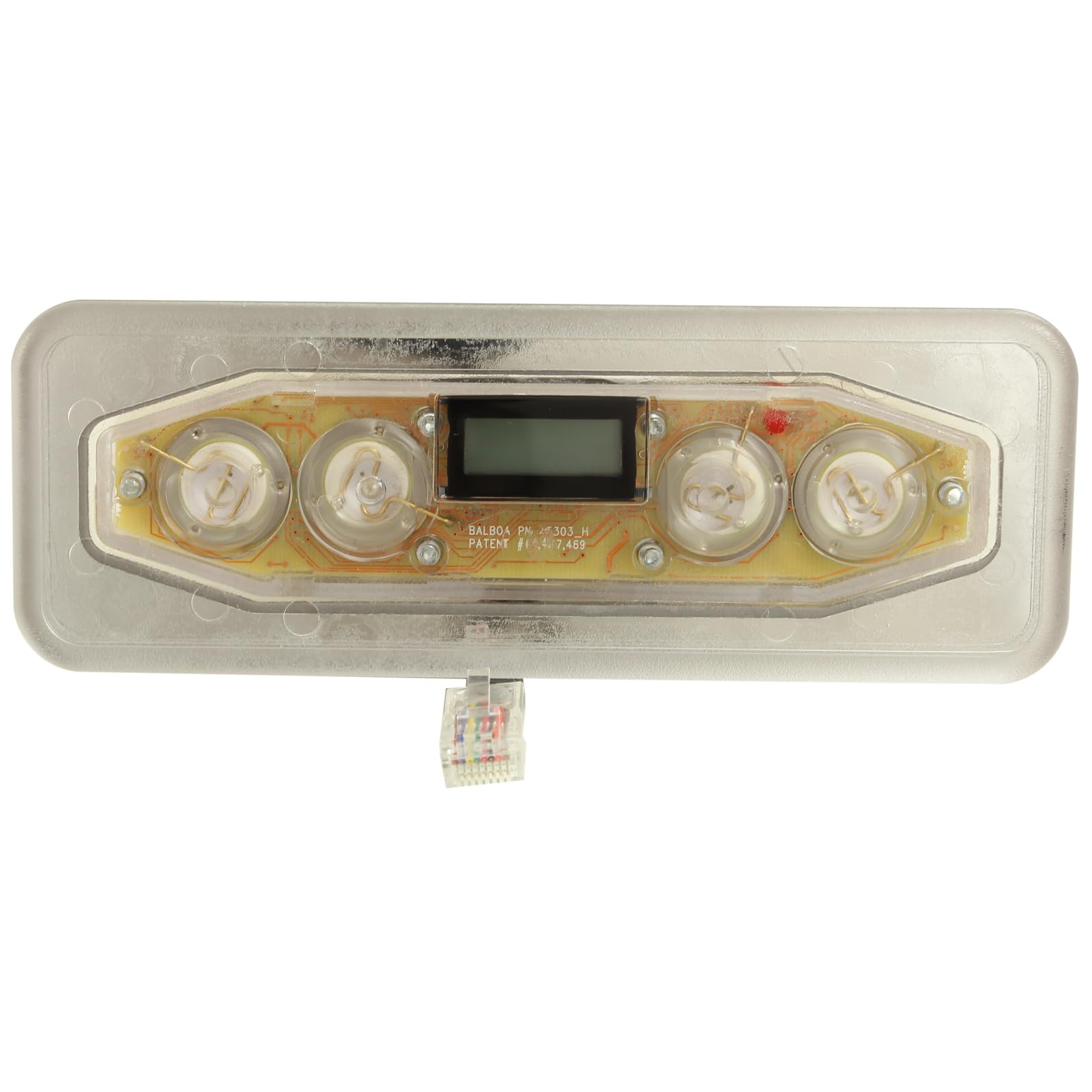
Зураг 2.1: Урд view of the Balboa Water Group VL401 Topside Control Panel, showing the display, 4 buttons, and the RJ45 connection cable.
3. Ашиглалтын заавар
The VL401 topside control panel features a simple 4-button interface for managing your spa's functions. Specific button functions may vary slightly depending on your spa's configuration and the VS/GS control system it is paired with. Refer to your spa's main owner's manual for detailed function descriptions.
- Температурын тохируулга: Typically, two buttons are dedicated to increasing (Up arrow) and decreasing (Down arrow) the desired water temperature. Pressing these buttons will adjust the set temperature displayed on the screen.
- Jets Control: One button usually controls the spa's jet pump(s). Pressing it cycles through different jet speeds or turns the jets on/off.
- Гэрлийн хяналт: Another button is commonly used to control the spa's lighting system, cycling through colors or turning the light on/off.
- Дэлгэц: The integrated display shows the current water temperature, set temperature, and various status indicators.
4. Засвар үйлчилгээ
Зөв засвар үйлчилгээ хийснээр дээд талын удирдлагын самбарын урт наслалт, оновчтой ажиллагааг хангана.
- Цэвэрлэгээ: Clean the panel surface regularly with a soft, damp cloth. Avoid abrasive cleaners, solvents, or harsh chemicals, as these can damage the display and buttons.
- Усанд өртөх: While designed for spa environments, avoid prolonged direct exposure to strong sunlight or extreme weather conditions if possible, as this can degrade the plastic over time.
- Утасны үзлэг: Periodically inspect the RJ45 cord for any signs of wear, damage, or fraying. If damage is observed, disconnect power and replace the panel.
5. Алдаа засах
If you encounter issues with your VL401 topside control panel, consider the following common troubleshooting steps:
- Самбар хариу өгөхгүй байна:
- Ensure the spa has power and the main breaker is on.
- Check the RJ45 cord connection at both the panel and the spa pack for a secure fit.
- If the issue persists, a power cycle (turning off and on the spa's main breaker) may resolve minor glitches.
- Display Issues (Blank, Flickering, Incorrect Readings):
- Verify the cord connection is secure.
- A power cycle may help.
- If the display remains problematic, the panel or the spa pack may require professional service or replacement.
- Товчлуур ажиллахгүй байна:
- Товчлуурууд гацаагүй эсвэл бөглөрөөгүй эсэхийг шалгаарай.
- A power cycle can sometimes reset button functionality.
- If only specific buttons are unresponsive, the panel may be faulty.
For persistent issues, consult a qualified spa technician or contact Balboa Water Group customer support.
6. Техникийн үзүүлэлтүүд
Detailed specifications for the Balboa Water Group VL401 Topside Control Panel (G8241):
| Үйлдвэрлэгч | Балбоа усны бүлэг |
| Загвар | VL401 (G8241) |
| Topside Type | Цахим |
| Товчлуурын тоо | 4 |
| Topside Shape | Тэгш өнцөгт |
| Самбарын хэмжээ | 6-3/8" x 2-1/4" |
| Cord Connector Type | RJ45, 8 утастай |
| Утасны урт | 7 фут |
| Бүтээгдэхүүний хэмжээс | 6.45 x 3.3 x 2 инч |

Зураг 6.1: Буцах view of the Balboa Water Group VL401 Topside Control Panel, showing mounting points and adhesive backing.
7. Баталгаат хугацааны мэдээлэл
For specific warranty details regarding your Balboa Water Group VL401 Topside Control Panel, please refer to the documentation provided with your spa system or contact Balboa Water Group directly. Warranty coverage typically applies to manufacturing defects and is subject to terms and conditions.
8. Дэмжлэг
If you require further assistance, technical support, or have questions not covered in this manual, please contact Balboa Water Group customer service or your authorized spa dealer. When contacting support, please have your product model number (VL401) and any relevant spa system information readily available.