
1. Танилцуулга
Thank you for choosing the Hama DR2002BT Digital Radio. This device offers a comprehensive audio experience with FM, DAB/DAB+ digital radio reception, and Bluetooth connectivity. Its user-friendly design, featuring large buttons and a clear 4.3-inch TFT color display, makes it suitable for all users. This manual will guide you through the setup, operation, and maintenance of your new digital radio.
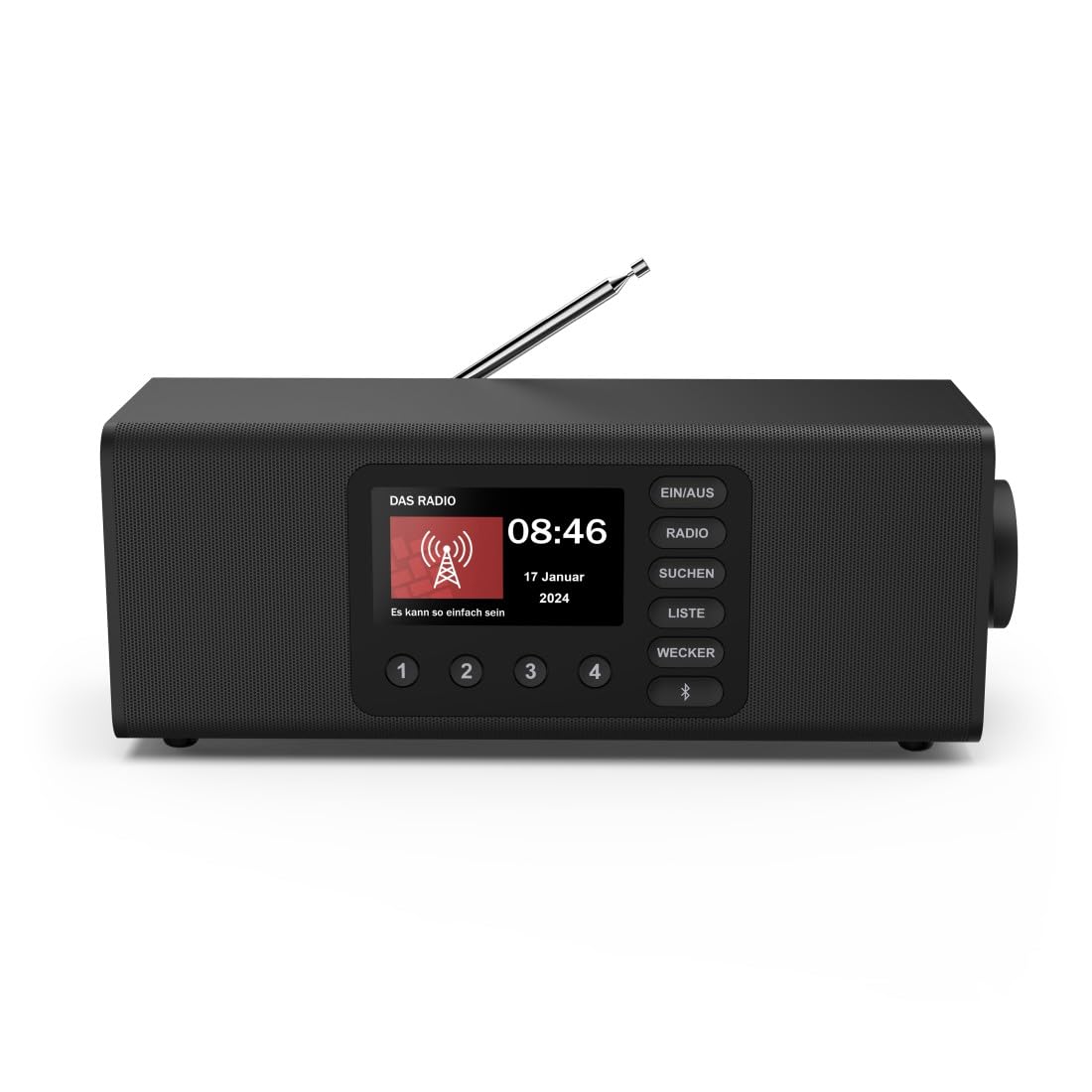
Зураг: Урд view of the Hama DR2002BT Digital Radio, showcasing түүний дэлгэц болон удирдлагын товчлуурууд.
2. Аюулгүй байдлын мэдээлэл
Төхөөрөмжийг ашиглахаасаа өмнө эдгээр аюулгүй байдлын зааврыг анхааралтай уншина уу. Энэ гарын авлагыг цаашид лавлах зорилгоор хадгална уу.
- Төхөөрөмжийг чийг, бороо, хэт өндөр температурт бүү тавь.
- Төхөөрөмжийг дулааны эх үүсвэрийн ойролцоо эсвэл нарны шууд тусгалд байрлуулахаас зайлсхий.
- Төхөөрөмжийг нээж болохгүй casing. Засварыг зөвхөн мэргэшсэн боловсон хүчин хийх ёстой.
- Зөвхөн өгсөн тэжээлийн адаптерийг ашиглана уу.
- Төхөөрөмжийн эргэн тойронд агааржуулалт сайтай байх ёстой.
3. Багцын агуулга
Савлахдаа бүх зүйл байгаа эсэхийг шалгана уу:
- Hama DR2002BT Digital Radio
- Эрчим хүчний адаптер
- Хэрэглэгчийн гарын авлага
4. Бүтээгдэхүүн дууссанview
4.1 Урд самбарын удирдлага ба дэлгэц

Image: Front panel of the radio highlighting the display and control buttons, with icons for Bluetooth, DAB+, and Alarm functions.
The front panel features a 4.3-inch TFT color display, large control buttons, and a rotary knob for easy navigation and selection. Key buttons include:
- EIN/AUS (ON/OFF): Төхөөрөмжийг асаах эсвэл унтраах.
- РАДИО: Switches between FM and DAB/DAB+ modes.
- SUCHEN (SEARCH): Станцын сканыг эхлүүлнэ.
- LISTE (LIST): Боломжтой станцуудын жагсаалтад хандана.
- WECKER (ALARM): Configures alarm settings.
- Bluetooth товчлуур: Bluetooth хослуулах горимыг идэвхжүүлнэ.
- Урьдчилан тохируулсан товчлуурууд (1-4): Хадгалсан дуртай станцууд руу хурдан хандах.
- Эргэдэг бариул (LAUTSTÄRKE/NAVIGIEREN): Controls volume and navigates menus.
4.2 Арын самбарын холболтууд
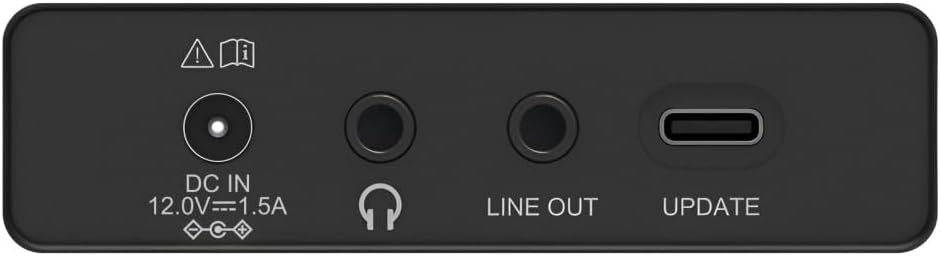
Image: Close-up of the rear panel showing the DC IN, Headphone, Line Out, and UPDATE (USB-C) ports.
Арын самбар нь холболтын чухал сонголтуудыг санал болгодог:
- DC IN 12.0V --- 1.5A: Power input for the external adapter.
- Чихэвчний залгуур (3.5 мм): Хувийн сонсох зориулалттай.
- ШУГАМ: Audio output for connecting to external ampчангалагч эсвэл чанга яригч.
- UPDATE (USB-C): Програм хангамжийн шинэчлэлтийн хувьд.
- Телескоп антен: For FM and DAB/DAB+ reception.

Зураг: Ар талд view of the Hama DR2002BT Digital Radio with its telescopic antenna extended for optimal signal reception.
5. Тохиргоо
5.1 Эрчим хүчний холболт
- Өгөгдсөн тэжээлийн адаптерийг холбоно уу DC IN радиогийн ар талд байрлах порт.
- Цахилгаан адаптерийг тохирох цахилгаан залгуурт холбоно уу.
- Радио автоматаар асах эсвэл зогсолтын горимд орно.
5.2 Антенны байршил
For optimal FM and DAB/DAB+ reception, fully extend the telescopic antenna. Position the radio near a window if reception is poor.
5.3 Анхны тохиргоо (анхны хэрэглээ)
Upon first power-on, the radio may guide you through an initial setup process, including language selection and an automatic DAB station scan. Follow the on-screen prompts.
6. Ашиглалтын заавар
6.1 Асаах/унтраах
дээр дарна уу EIN/AUS радиог асаах, унтраах товчийг дарна уу.
6.2 DAB/DAB+ Radio Mode
- дээр дарна уу РАДИО товчийг дарж DAB горимыг сонгоно.
- If this is the first time in DAB mode or if you want to rescan, press СУЧЕН to perform a full scan for available stations.
- Use the rotary knob to navigate through the station list. Press the knob to select a station.
- руу view the station list, press the ЖАГСААЛТ товч.
6.3 FM радио горим
- дээр дарна уу РАДИО товчийг дарж FM горимыг сонгоно.
- дарна уу СУЧЕН to automatically scan for the next available FM station.
- Alternatively, use the rotary knob to manually tune to a frequency.
6.4 Storing and Recalling Presets
The radio allows you to store up to 4 favorite stations using the dedicated preset buttons (1-4).
- Tune to the desired station (DAB or FM).
- Press and hold one of the preset buttons (1-4) until the display confirms the station has been saved.
- To recall a preset station, simply press the corresponding preset button (1-4).
6.5 Bluetooth-ийн ажиллагаа

Зураг: Урд view of the radio with Bluetooth and stereo speaker icons, indicating its wireless audio streaming capability.
The Hama DR2002BT can stream audio from your smartphone, tablet, or laptop via Bluetooth 5.0.
- Press the Bluetooth button on the front panel to enter Bluetooth pairing mode. The display will show a pairing indicator.
- Гадаад төхөөрөмж дээрээ (ухаалаг утас, таблет) Bluetooth-г асаагаад боломжтой төхөөрөмжүүдийг хайгаарай.
- Select "Hama DR2002BT" from the list of devices to pair.
- Once paired, you can play audio from your device, and it will be output through the radio's speakers.
6.6 Сэрүүлэгтэй цагны функц

Image: A person waking up with the Hama DR2002BT Digital Radio placed on a bedside table, illustrating its alarm clock functionality.
The radio features two independent alarm settings.
- дээр дарна уу ВЕККЕР button to access alarm settings.
- Use the rotary knob to select Alarm 1 or Alarm 2.
- Configure the alarm time, source (buzzer or radio station), and repetition (once, daily, weekdays, weekends, or specific days).
- Press the rotary knob to confirm each setting.
- To quickly activate/deactivate an alarm, press the ВЕККЕР button and use the rotary knob to toggle the alarm status.

Image: A person interacting with the Hama DR2002BT Digital Radio, demonstrating its ease of use for setting functions like alarms or tuning stations.
7. Засвар үйлчилгээ
To ensure the longevity and optimal performance of your Hama DR2002BT Digital Radio, follow these maintenance guidelines:
- Цэвэрлэгээ: Use a soft, dry, lint-free cloth to clean the exterior of the radio. Do not use abrasive cleaners, waxes, or solvents.
- Тоос: Regularly dust the device to prevent accumulation in vents and ports.
- Хадгалах: Хэрэв радиог удаан хугацаагаар хадгалах бол цахилгаанаас салгаад сэрүүн, хуурай газар хадгална уу.
- Антен: Нугалах эсвэл хугарахаас сэргийлж дурангийн антенныг болгоомжтой барь.
8. Алдаа засах
Хэрэв та радиотой холбоотой асуудалтай тулгарвал дараах нийтлэг асуудал болон шийдлүүдийг үзнэ үү.
| Асуудал | Боломжит шалтгаан | Шийдэл |
|---|---|---|
| Хүч чадалгүй | Цахилгаан адаптер холбогдоогүй; Цахилгаан залгуур гэмтэлтэй | Цахилгаан адаптерийн холболтыг шалгана уу; Өөр залгуурыг туршаад үзээрэй. |
| Радио хүлээн авалт муу (DAB/FM) | Antenna not extended; Weak signal area; Interference | Fully extend the telescopic antenna; Reposition the radio (e.g., near a window); Perform a new station scan. |
| Bluetooth холболт амжилтгүй боллоо | Bluetooth not enabled on external device; Radio not in pairing mode; Device too far | Ensure Bluetooth is on and visible on your device; Press the Bluetooth button on the radio; Move devices closer (within 10m). |
| Дуу алга | Дууны хэмжээ хэт бага; Дууг хаахыг идэвхжүүлсэн; Буруу эх сурвалж сонгосон | Increase volume using the rotary knob; Check if mute is active; Ensure the correct mode (DAB, FM, Bluetooth) is selected. |
| Сэрүүлэг дуугарахгүй байна | Alarm not activated; Incorrect alarm time/day set | Verify alarm is enabled in settings; Check alarm time and repetition settings. |
9. Техникийн үзүүлэлтүүд

Image: Diagram showing the dimensions of the Hama DR2002BT Digital Radio: 35 cm (width), 12.5 cm (depth), and 13 cm (height).
| Онцлог | Дэлгэрэнгүй |
|---|---|
| Загварын дугаар | DR2002BT (00054298) |
| Хүлээн авалт | DAB, DAB+, FM |
| Bluetooth хувилбар | 5.0 |
| Гаралтын хүч (RMS) | 10 W (Stereo) |
| Дэлгэц | 4.3 инчийн TFT өнгөт дэлгэц |
| Холболтууд | 3.5mm Jack (Headphone), USB-C (Update), Line Out, DC IN |
| Эрчим хүчний хангамж | Гадаад цахилгаан адаптер |
| Хэмжээ (W x D x H) | 35 x 12.5 x 13 см |
| Жин | 1788 грамм |
| Материал | Хуванцар |
| Өнгө | Хар |
| Нэмэлт онцлогууд | Alarm Function (2 alarms), Direct Selection Keys |
10. Баталгаат хугацаа ба дэмжлэг
Hama GmbH & Co KG provides a warranty for this product. Please refer to the warranty card included in your package or visit the official Hama webнарийвчилсан баталгаат нөхцөлийг сайтаас авна уу.
For technical support, troubleshooting assistance, or spare parts, please contact Hama customer service or visit their website. The availability of spare parts in the EU is guaranteed for 7 years.
- Үйлдвэрлэгч: Hama GmbH & Co KG
- Гарал үүслийн улс: Герман
- ЕХ-ны сэлбэг хэрэгслийн бэлэн байдал: 7 жил