
1. Танилцуулга
This manual provides detailed instructions for the installation, operation, and maintenance of your Junsun 11.5-inch Touch Screen Car Radio Stereo. This unit is designed to enhance your in-car entertainment and navigation experience with features such as wireless CarPlay, Android Auto, GPS, and Bluetooth connectivity. Please read this manual thoroughly before installation and use to ensure proper function and safety.
Applicable Car Models:
- Jeep Wrangler: 2007-2018
- Jeep Compass: 2009-2016
- Jeep Patriot: 2009-2016
- Jeep Grand Cherokee: 2005-2011
- Jeep Liberty: 2008-2011
- Jeep Commander: 2008-2011
- Chrysler Sebring: 2007-2010
- Chrysler Town&Country: 2007-2010
- Dodge Grand Caravan: 2011-2014
- Dodge Charger: 2008-2010
- Dodge Ram Pickup 1500/2500/3500: 2009-2012

Image 1.1: The Junsun 11.5-inch Touch Screen Car Radio Stereo installed in a vehicle dashboard.
2. Аюулгүй байдлын мэдээлэл
- Always operate the device responsibly. Distracted driving can lead to accidents.
- Ensure all wiring is correctly connected to prevent electrical shorts or damage.
- Төхөөрөмжийг задлах, өөрчлөхийг бүү оролдоорой. Энэ нь баталгааг хүчингүй болгож, гэмтэл учруулж болзошгүй.
- Тодорхой харагдах байдлыг хангахын тулд дэлгэцийг цэвэрхэн, саадгүй байлга.
- Хэрэв та ямар нэгэн алхам хийхдээ эргэлзэж байвал суулгахын тулд мэргэжлийн хүнтэй зөвлөлдөнө үү.
3. Багцын агуулга
Суулгаж эхлэхээс өмнө багцад бүх бүрэлдэхүүн хэсгүүд байгаа эсэхийг шалгана уу.
- 11.5-inch Car Radio Stereo Unit
- Микрофон
- GPS модуль
- USB кабель (x2)
- 4G Antenna (for 4G-Model, if applicable)
- Can Bus Box
- Power Cable (Plug and Play harness)
- RCA Cable Set
- Reversing Line (for optional backup camera)
- Халив
- Crowbar (for trim removal)
- Антенны адаптерийн кабель
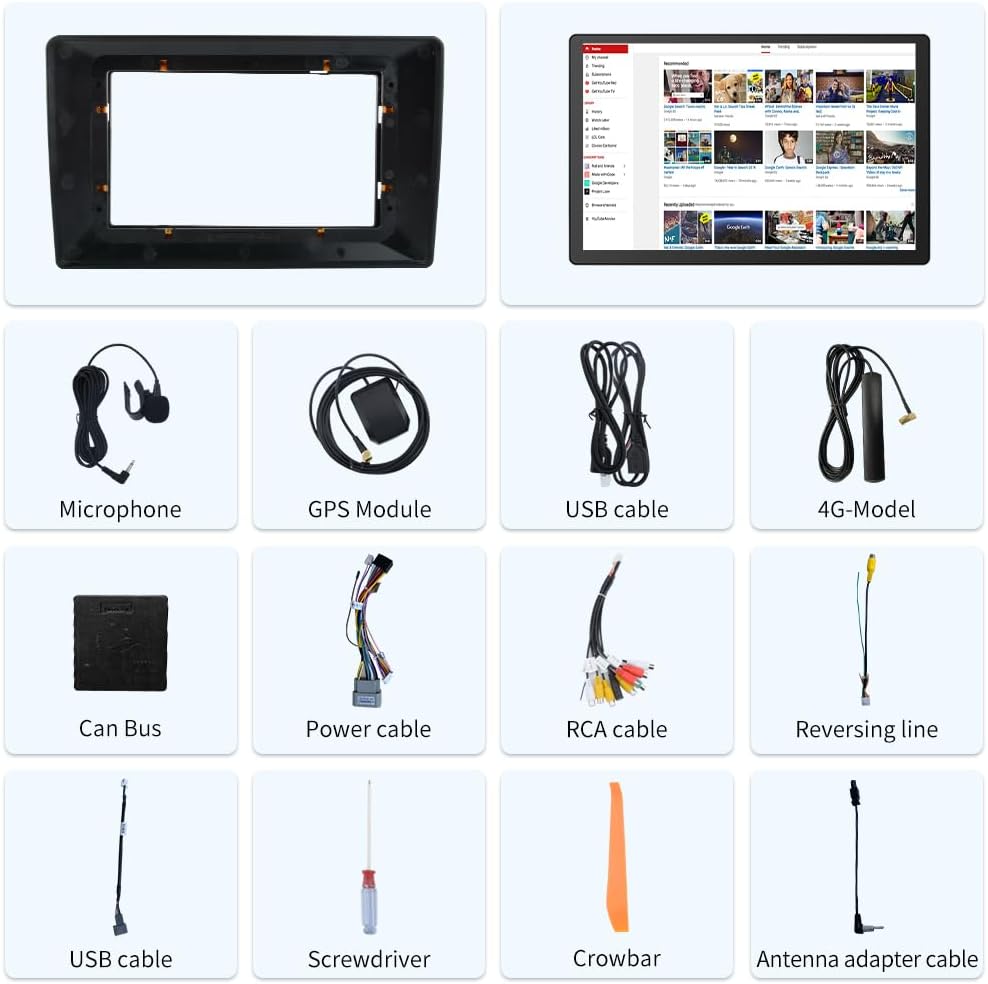
Image 3.1: Included components of the Junsun 11.5-inch Car Radio Stereo package.
4. Тохиргоо ба суурилуулалт
The Junsun car radio stereo is designed for dashboard mounting and features a plug-and-play power harness for simplified installation. It supports existing steering wheel controls and factory backup cameras in compatible vehicles.
4.1 утас холболт
Refer to the wiring diagram below for proper connection of all cables. Ensure all connections are secure before powering on the unit.
- Цахилгаан хэрэгсэл: Connect the plug-and-play power harness to your vehicle's wiring.
- GPS модуль: Connect the GPS module and position it in a location with a clear view дохиог оновчтой хүлээн авахын тулд тэнгэрийн .
- USB кабель: Connect the provided USB cables for external device connectivity.
- RCA кабель: Use the RCA cable set for audio/video input/output connections, including front camera input, video output, auxiliary input, and subwoofer output.
- Микрофон: Connect the external microphone for improved call quality and voice commands.
- Антенны адаптер: Connect your vehicle's radio antenna using the provided adapter.
- Can Bus Box: Connect the Can Bus box to enable integration with vehicle features like steering wheel controls.

Image 4.1: Wiring diagram for the Junsun 11.5-inch Car Radio Stereo.
4.2 Анхдагч асаалт ба тохиргоо
After installation, turn on your vehicle's ignition. The unit should power on automatically. Follow the on-screen prompts for initial setup, including language selection and time zone settings.
5. Ашиглалтын заавар
5.1 Дэлгэц ба интерфэйс
The unit features an 11.5-inch touch screen with a resolution of 2000*1200 pixels, providing a clear and responsive interface.

Image 5.1: Display resolution comparison for the 11.5-inch screen.
5.2 Утасгүй CarPlay болон Android Auto
Connect your smartphone wirelessly via Bluetooth to access CarPlay or Android Auto. This allows for voice control and integration of phone functions such as music, navigation, calls, and messages directly on the car stereo display.
- Хослуулах: Enable Bluetooth on your smartphone and the car stereo. Select your phone from the stereo's Bluetooth menu to pair.
- Идэвхжүүлэх: Once paired, CarPlay or Android Auto should automatically launch or be selectable from the main menu.

Image 5.2: CarPlay and Android Auto interfaces.
5.3 GPS навигаци
The unit includes a built-in GPS module that supports both online and offline navigation applications from the Google Play app market. Ensure the GPS antenna is properly installed for accurate positioning.
- Online Navigation: Requires a Wi-Fi connection or mobile hotspot for real-time traffic data and map updates.
- Offline Navigation: Download maps for offline use to navigate without an internet connection.

Image 5.3: GPS Navigation interface.
5.4 Bluetooth холболт
Utilize Bluetooth for hands-free calling and audio streaming. The built-in microphone allows for clear communication during calls.
- Гар чөлөөтэй дуудлага: Pair your phone to make and receive calls directly from the stereo.
- Bluetooth хөгжим: Stream audio from your paired device to the car stereo.

Image 5.4: Bluetooth phone and music interface.
5.5 Жолооны хүрдний удирдлага
The unit supports integration with your vehicle's existing steering wheel controls, allowing you to manage audio and calls without taking your hands off the wheel. Configuration may be required in the settings menu.

Image 5.5: Steering wheel control functionality.
5.6 FM радио
Access local radio stations with the built-in FM tuner. Scan for stations and save your favorites for quick access.

Image 5.6: FM Radio interface.
5.7 Дэлгэц хуваах функц
The split-screen feature allows you to run two applications simultaneously on the display, such as navigation and music playback.

Image 5.7: Split Screen mode.
5.8 Audio Equalizer (DSP)
Adjust audio settings using the built-in Digital Sound Processor (DSP) and equalizer to customize your sound experience.

Image 5.8: Built-in DSP and Equalizer interface.
6. Засвар үйлчилгээ
- Дэлгэц цэвэрлэх: Use a soft, lint-free cloth to clean the touch screen. For stubborn smudges, lightly dampдаавуугаар усаар эсвэл дэлгэцэнд аюулгүй цэвэрлэгчээр угаана. Зүлгүүрийн материал эсвэл хатуу химийн бодисоос зайлсхий.
- Ерөнхий цэвэрлэгээ: Keep the unit and surrounding dashboard area free from dust and debris.
- Програм хангамжийн шинэчлэлтүүд: Periodically check for available software updates to ensure optimal performance and access to new features. Updates can typically be found through the unit's settings menu or the manufacturer's webсайт.
7. Алдаа засах
If you encounter issues with your Junsun car radio stereo, refer to the following common troubleshooting steps:
| Асуудал | Боломжит шалтгаан | Шийдэл |
|---|---|---|
| Төхөөрөмж асахгүй байна. | Incorrect wiring, blown fuse, vehicle ignition off. | Check power cable connections. Verify vehicle ignition is on. Inspect vehicle fuses. |
| Дуу алга. | Дууны түвшин хэт бага, дууг нь хаасан, чанга яригчийн холболт буруу байна. | Increase volume. Check if mute is active. Verify speaker connections. |
| GPS дохио алдагдсан эсвэл буруу. | GPS antenna improperly placed or disconnected. | GPS-ийн антен нь тунгалаг байгаа эсэхийг шалгаарай view of the sky and is securely connected. |
| Bluetooth холболт тогтворгүй байна. | Interference, phone too far, software glitch. | Ensure phone is close to the unit. Re-pair the Bluetooth device. Restart both devices. |
| Жолооны хүрдний удирдлага ажиллахгүй байна. | Can Bus box not connected, incorrect configuration. | Verify Can Bus box connection. Check steering wheel control settings in the unit's menu. Some vehicles may require specific configuration. |
| CarPlay/Android Auto холбогдохгүй байна. | Bluetooth issue, phone compatibility, software glitch. | Ensure Bluetooth is active and paired. Restart phone and stereo. Check phone compatibility with CarPlay/Android Auto. |
8. Техникийн үзүүлэлтүүд
| Онцлог | Дэлгэрэнгүй |
|---|---|
| Дэлгэцийн хэмжээ | 11.5 инч |
| Дэлгэцийн нягтрал | 2000*1200 |
| Үйлдлийн систем | Android |
| Холболтын технологи | Bluetooth |
| Онцлог шинж чанар | Мэдрэгчтэй дэлгэц |
| Суурилуулах төрөл | Хяналтын самбарын бэхэлгээ |
| Аудио гаралтын горим | Стерео |
| Дуут команд | Микрофон, Мэдрэгчтэй дэлгэц |
| Газрын зургийн төрөл | Хойд Америк |
| Зүйлийн жин | 4.69 фунт |
| Багцын хэмжээ | 13.58 x 11.42 x 6.57 инч |
9. Баталгаат хугацаа ба дэмжлэг
9.1 Баталгаат хугацааны мэдээлэл
This Junsun car radio stereo comes with a 1 жилийн баталгаат хугацаа from the date of purchase. Please retain your proof of purchase for warranty claims. The warranty covers manufacturing defects but does not cover damage caused by improper installation, misuse, accidents, or unauthorized modifications.
9.2 Техникийн дэмжлэг
For technical assistance, installation questions, or troubleshooting beyond what is covered in this manual, please contact Junsun Car Electronics directly. You can typically find contact information on the seller's page where you purchased the product or through the official Junsun webсайт.

Image 9.1: How to contact Junsun Car Electronics for support.