
1. Танилцуулга
Thank you for choosing the KUIDAMOS P1 OCS-P1 Digital Hanging Crane Scale. This manual provides essential information for the safe and efficient operation, setup, and maintenance of your new weighing tool. This scale is designed for precise measurement in various industrial settings, including warehousing, textile, and metallurgy, with a maximum capacity of 1000KG (2000LB).

Зураг 1.1: Урд view of the KUIDAMOS P1 OCS-P1 Digital Hanging Crane Scale, displaying '500.0' on its digital screen, indicating its weighing capability.
2. Аюулгүй байдлын мэдээлэл
- Always ensure the scale is securely attached before loading any weight.
- Do not exceed the maximum weighing capacity of 1000KG (2000LB).
- Avoid dropping or subjecting the scale to severe impacts, as this may damage the internal sensor.
- Keep the scale away from strong electromagnetic fields, which can affect accuracy.
- Жинлүүрийг өөрөө задлах, засах гэж бүү оролдоорой. Үйлчилгээ авахын тулд мэргэшсэн ажилтнуудтай холбоо барина уу.
- Ensure proper battery installation and disposal according to local regulations.
3. Бүтээгдэхүүний бүрэлдэхүүн хэсгүүд
The KUIDAMOS P1 OCS-P1 Digital Hanging Crane Scale package includes the following items:
- 1 x Digital Hanging Crane Scale (Main Unit)
- 1 x Алсын удирдлага
3.1 Scale Features
- Дижитал дэлгэц: Clear LCD screen for weight readings.
- Strong Steel Hook: Durable hook for secure attachment of loads.
- Aluminium Alloy Casing: Robust and lightweight housing.
- Мэдрэмтгий мэдрэгч: Ensures accurate and reliable measurements.
- Хяналтын товчлуурууд: Power, HOLD/UNIT, TARE/ZERO.

Зураг 3.1: Нарийвчилсан view of the high-strength steel hook, designed for secure load handling.
3.2 Алсын удирдлага
The remote control allows for convenient operation of the scale from a distance of approximately 30 to 50 meters (98.43 to 164.04 feet).
4. Техникийн үзүүлэлтүүд
| Онцлог | Тодорхойлолт |
|---|---|
| Загвар | OCS-P1 |
| Өнгө | Улбар шар |
| Материал | Хөнгөн цагаан хайлш, зэвэрдэггүй ган |
| Жинлэлтийн хүрээ | 1000KG (2000LB) |
| Хамгийн бага хүчин чадал | 500 гр |
| Scale Power Supply | 2 x AA 1.5V батерей (оруулаагүй) |
| Алсын удирдлагатай батерей | 1 x 23A 12V battery (built-in, 50mAh capacity) |
| Scale Battery Usage Time | ≥ 65 цаг |
| Алсын удирдлагын хүрээ | Approx. 30 ~ 50m / 98.43 ~ 164.04ft |
| Хэрэглээ | Warehousing, Textile, Metallurgy, etc. |
5. Тохиргоо
5.1 Battery Installation (Scale)
- Жингийн арын хэсэгт зайны тасалгааг ол.
- Зайны тагийг нээ.
- Зөв туйлшралыг (+/-) хангаж, 2 ширхэг AA 1.5V батерейг оруулна уу.
- Зайны тагийг сайтар хаа.
5.2 алсын удирдлагатай батерей
The remote control comes with a built-in 23A 12V battery. No user installation is required for this component.
5.3 Attaching the Scale
Securely attach the top shackle of the crane scale to a suitable, load-bearing lifting mechanism. Ensure the lower hook is free to receive the item to be weighed.
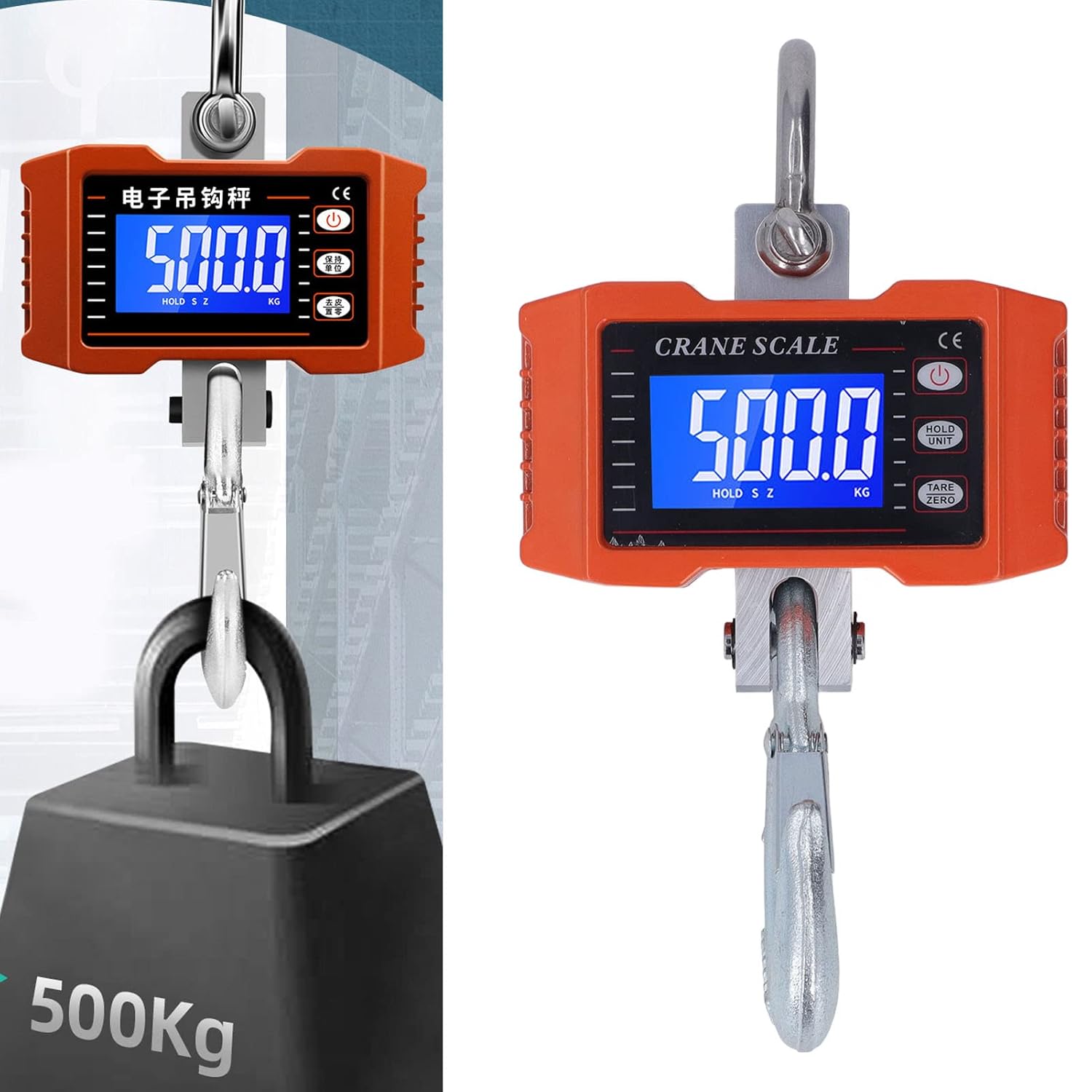
Image 5.1: The crane scale accurately weighing a 500KG load, demonstrating its application.
6. Ашиглалтын заавар
6.1 Асаах/унтраах
- Асаах: дээр дарна уу ХҮЧ button on the scale or remote control. The display will light up.
- Унтраах: -г удаан дар ХҮЧ дэлгэц унтрах хүртэл товчийг хэдэн секундын турш дарна уу.
6.2 Жинлэх журам
- Ensure the scale is powered on and shows '0.0' or '0.00'. If not, press ТАР/ТЭГ.
- Carefully attach the item to be weighed to the lower hook.
- Wait for the reading on the digital display to stabilize. This is the weight of the item.
6.3 Нэгжийн хувиргалт
To switch between kilograms (KG) and pounds (LB):
- дээр дарна уу HOLD/UNIT button briefly. The unit displayed will change.
6.4 Таар/Тэг функц
The Tare function allows you to subtract the weight of a container or previous load:
- With an empty container or previous load on the hook, press the ТАР/ТЭГ товчлуур. Дэлгэц '0.0' болж дахин тохируулагдана.
- Now, add the item you wish to weigh into the container; only the net weight of the item will be displayed.
6.5 Баривчлах функц
To hold the current weight reading on the display:
- While an item is being weighed, press and hold the HOLD/UNIT button until 'HOLD' appears on the display. The reading will be locked.
- дарна уу HOLD/UNIT again to release the hold function.
6.6 Алсын удирдлагатай ажиллагаа
The remote control mirrors the functions of the buttons on the scale:
- Use the corresponding buttons on the remote for Power On/Off, Unit Conversion, Tare/Zero, and Hold functions.
- Ensure you are within the effective range of 30-50 meters for reliable operation.
7. Засвар үйлчилгээ
7.1 Цэвэрлэгээ
- Жинлүүрийг зөөлөн арчих, damp даавуу. Зүлгүүрийн цэвэрлэгч хэрэглэж болохгүй, масштабыг усанд дүрж болохгүй.
- Ensure the display and buttons are free from dust and debris.
7.2 Хадгалалт
- Жинлүүрийг хуурай, сэрүүн газар, нарны шууд тусгал болон хэт өндөр температураас хол хадгална уу.
- If storing for an extended period, remove the AA batteries from the scale to prevent leakage.
7.3 Battery Replacement (Scale)
When the display indicates low battery, replace the 2 x AA 1.5V batteries following the installation steps in Section 5.1.
8. Алдаа засах
| Асуудал | Боломжит шалтгаан | Шийдэл |
|---|---|---|
| Хэмжээ асахгүй байна. | Дууссан эсвэл буруу суурилуулсан батерей. | АА батерейг сольж, зөв туйлшралыг хангана уу. |
| Буруу уншилтууд. | Scale not zeroed, unstable environment, or overloaded. | Press TARE/ZERO. Ensure stable conditions. Do not exceed capacity. |
| Алсын удирдлага ажиллахгүй байна. | Out of range, or remote battery depleted. | Move closer to the scale. The remote control battery is built-in and has a long lifespan; if issues persist, contact support. |
| Display shows 'O-L' or 'ERR'. | Хэт ачаалал. | Remove the load immediately. Do not exceed 1000KG. |
9. Баталгаат хугацаа ба дэмжлэг
KUIDAMOS products are manufactured to high-quality standards. For warranty information, technical support, or service inquiries, please refer to the contact information provided at the point of purchase or visit the official KUIDAMOS webсайт. Баталгаат заргад зориулж худалдан авалтаа нотлох баримтаа үлдээнэ үү.