
Танилцуулга
This manual provides essential information for the proper setup, operation, and maintenance of your ONN 24-inch FHD Gaming Monitor, model 100027813. Please read this manual thoroughly before using the product to ensure optimal performance and safety. This monitor is designed to deliver a high-quality gaming experience with its 1080p resolution, 165Hz refresh rate, 1ms response time, and FreeSync technology.
Аюулгүй байдлын мэдээлэл
Always observe the following safety precautions to prevent damage to the monitor and ensure user safety:
- Галын болон цочролын аюулаас зайлсхийхийн тулд мониторыг бороо, чийгэнд бүү тавь.
- Мониторыг нээж болохгүй casing. Дотор нь хэрэглэгчийн засвар үйлчилгээ хийх хэсэг байхгүй. Бүх үйлчилгээг мэргэшсэн үйлчилгээний ажилтнуудад шилжүүлээрэй.
- Мониторыг унахаас сэргийлж тогтвортой, тэгш гадаргуу дээр байрлуул.
- Мониторын эргэн тойронд агааржуулалт сайтай байх ёстой. Агааржуулалтын нүхийг хааж болохгүй.
- Зөвхөн монитортой хамт ирдэг тэжээлийн адаптерийг ашиглана уу.
- Аянга шуурганы үед эсвэл удаан хугацаагаар ашиглаагүй үед мониторыг цахилгааны залгуураас салга.
Багцын агуулга
Бүх зүйл багцад байгаа эсэхийг шалгана уу:
- ONN 24-inch FHD Gaming Monitor
- Мониторын тавиур (суурь ба хүзүү)
- Эрчим хүчний адаптер
- DisplayPort Cable (6 ft)
- HDMI Cable (6 ft)
- Хэрэглэгчийн гарын авлага (энэ баримт бичиг)

Image: Retail box of the ONN 24-inch Gaming Monitor, highlighting key features like 165Hz, 1ms response time, DisplayPort, HDMI, and Adaptive-Sync.
Тохиргоо
1. Стенд угсрах
- Монитор болон тавиурын эд ангиудыг савлагаанаас болгоомжтой авч хая.
- Attach the stand neck to the stand base. Secure it with the provided screw, if applicable.
- Align the assembled stand with the mounting slot on the back of the monitor. Gently push until it clicks into place or secure with screws as per the design.
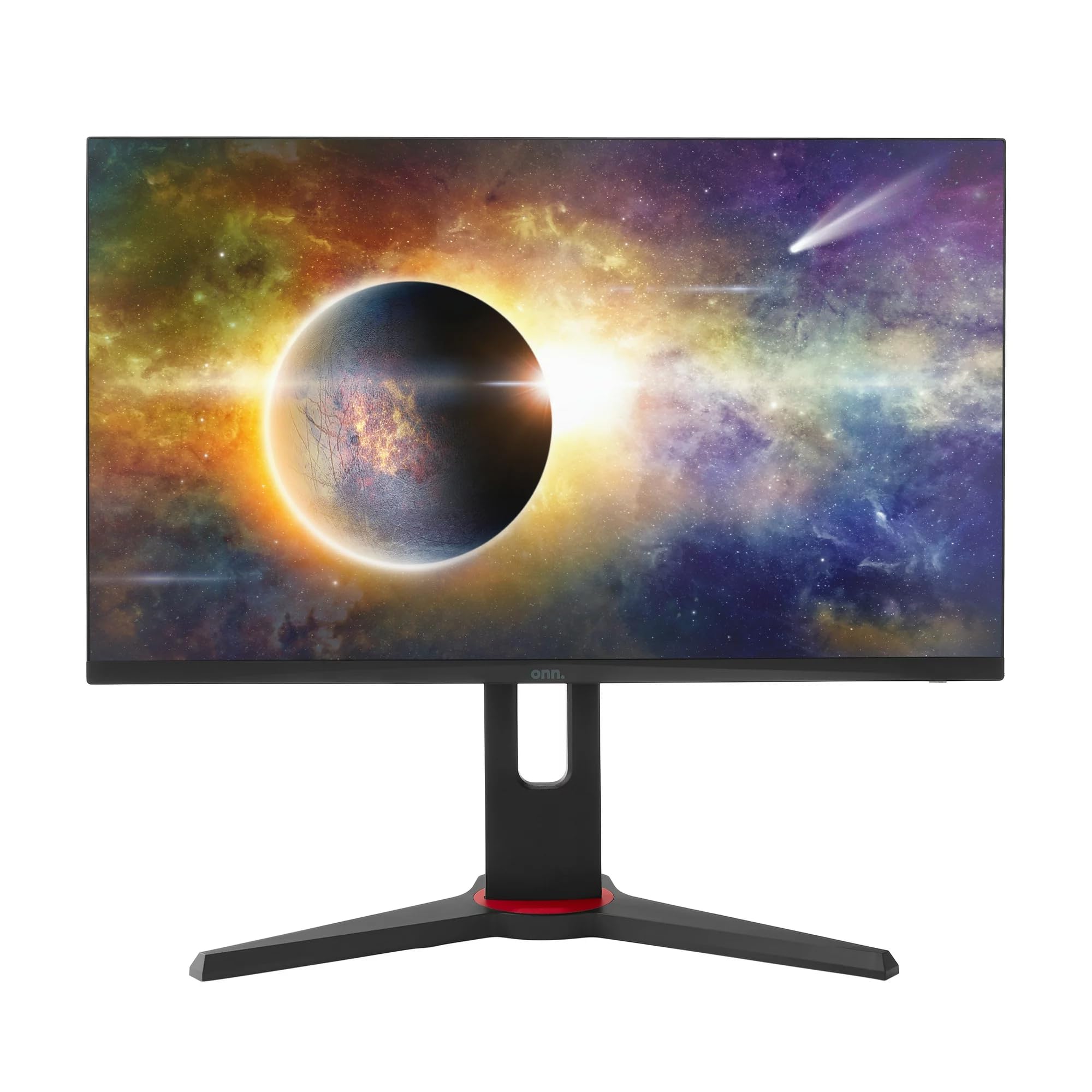
Зураг: Урд view of the ONN 24-inch Gaming Monitor, fully assembled with its stand.

Зураг: Ар талд view of the ONN 24-inch Gaming Monitor, illustrating the stand attachment and cable management area.
2. Холбох кабель
Locate the input ports on the back of your monitor:
- Эрчим хүч: Цахилгаан адаптерийг мониторын тэжээлийн оролтод, дараа нь цахилгаан залгуурт холбоно.
- Видео оруулах: Connect one end of the provided DisplayPort or HDMI cable to the corresponding port on your computer's graphics card and the other end to the monitor. The monitor supports 2 HDMI inputs and 1 DisplayPort input.
- Аудио гаралт (заавал биш): If your monitor has a 3.5mm audio jack, you can connect external speakers or headphones.

Зураг: Ойролцоогоор view of the monitor's rear ports, including HDMI 1, HDMI 2, DisplayPort (DP), and power input.
3. Анхдагч асаалт
- Бүх кабель найдвартай холбогдсон эсэхийг шалгаарай.
- Press the power button on the monitor (usually located on the back or bottom right).
- The monitor should display the ONN logo and then search for an input signal.
- If no image appears, ensure your computer is powered on and the correct input source is selected on the monitor (see Operating section).
Ажиллаж байна
1. Асаах/унтраах
Press the power button to turn the monitor on or off. The power indicator light will show the monitor's status (e.g., blue for on, amber for standby).
2. Дэлгэц дээрх дэлгэц (OSD) цэсийн навигаци
Your monitor features an OSD menu for adjusting various settings. Typically, buttons on the back or bottom of the monitor control the OSD:
- Цэсийн товчлуур: OSD цэсийг нээнэ.
- Навигацийн товчлуурууд (дээш/доошоо/зүүн/баруун): Цэсний сонголтуудаар дамжуулан навигаци хийхэд ашигладаг.
- Сонгох/Нэвтрэх товч: Сонголтыг баталгаажуулах эсвэл дэд цэс рүү орно.
- Гарах товч: Одоогийн цэс эсвэл OSD-ээс гарна.
3. Тохиргоог тохируулах
OSD цэсээр дамжуулан тохируулж болох гол тохиргоонууд нь:
- Гэрэлтүүлэг/Ялгарал: Гэрэл ба бараан хэсгийн ерөнхий гэрэлтүүлэг болон ялгааг тохируулна уу.
- Өнгөний тохиргоо: Өнгөний температур, гамма болон хувь хүний RGB түвшинг өөрчлөх.
- Оролтын эх сурвалж: HDMI 1, HDMI 2, эсвэл DisplayPort оролтуудын хооронд гараар сонгоно уу.
- Сэргээх хурд: Ensure your graphics card and monitor are set to 165Hz for the smoothest experience. This is usually configured in your operating system's display settings.
- Хариу өгөх хугацаа: Adjust the monitor's response time setting (e.g., 1ms) for reduced motion blur in fast-paced games.
- FreeSync технологи: Enable FreeSync in the OSD menu and in your AMD graphics card settings to synchronize the monitor's refresh rate with your GPU's frame rate, eliminating screen tearing and stuttering.
- Зургийн горимууд: Select from preset modes optimized for different content (e.g., Standard, Game, Movie, Text).

Image: The ONN 24-inch Gaming Monitor displayed in a typical desk setup, connected to a laptop with gaming peripherals.
Засвар үйлчилгээ
Мониторыг цэвэрлэх
- Цэвэрлэхийн өмнө мониторыг үргэлж салга.
- Зөөлөн, хөвөнгүй даавууг хөнгөн хэрэглээрэй dampусаар эсвэл зөөлөн, зүлгүүргүй дэлгэц цэвэрлэгчээр дүүргэнэ.
- Цэвэрлэгч бодисыг дэлгэц рүү шууд цацаж болохгүй. Эхлээд даавуунд түрхээрэй.
- Хүчтэй химийн бодис, зүлгүүрийн дэвсгэр, уусгагч хэрэглэхээс зайлсхий.
Хадгалах
Хэрэв мониторыг удаан хугацаагаар хадгалах бол бүх кабелийг салгаж, анхны савлагаанд нь (хэрэв байгаа бол) савлаж, нарны шууд тусгал, хэт температураас хол, сэрүүн, хуурай газар хадгална уу.
Алдааг олж засварлах
Хэрэв танд монитортой холбоотой асуудал тулгарвал дараах нийтлэг асуудал, шийдлүүдийг үзнэ үү.
| Асуудал | Боломжит шийдэл |
|---|---|
| Дэлгэц дээр зураг алга |
|
| Image is flickering or distorted |
|
| No sound (if using monitor speakers/audio out) |
|
| Monitor not reaching 165Hz |
|
Үзүүлэлтүүд
Detailed technical specifications for the ONN 24-inch FHD Gaming Monitor (Model 100027813):
| Онцлог | Тодорхойлолт |
|---|---|
| Загварын дугаар | 100027813 |
| Дэлгэцийн хэмжээ | 24 инч |
| Шийдвэр | FHD 1080p (1920x1080) |
| Сэргээх хурд | 165 Гц |
| Хариу өгөх хугацаа | 1 миллисекунд |
| Дэлгэцийн технологи | IPS |
| Дасан зохицох синк | FreeSync |
| Харьцаа | 16:9 |
| Ялгаатай харьцаа | 2000:1 |
| Дэлгэцийн гадаргуу | Matte, Anti-glare with low blue light setting |
| Холболт | 2 x HDMI, 1 x DisplayPort |
| Бүтээгдэхүүний хэмжээ (D x W x H) | 61.3 x 11.3 x 37.3 см |
| Зүйлийн жин | 6.1 кг |
| Өнгө | Хар |
| Суурилуулах төрөл | Ширээ |
| Тодорхой хэрэглээ | Entertainment, Gaming |
Баталгаат хугацаа
This ONN 24-inch FHD Gaming Monitor is a renewed product. Warranty terms and conditions for renewed products may vary. Please refer to the specific warranty information provided by the seller or retailer at the time of purchase. It is recommended to retain your proof of purchase for any warranty claims.
Дэмжлэг
For technical assistance, troubleshooting beyond this manual, or warranty inquiries, please contact the retailer or the Amazon Renewed support channel where the product was purchased. Have your model number (100027813) and proof of purchase ready when contacting support.