
1. Танилцуулга
The Betopper LPC010N-4 is a professional 54x4W RGBW (Red, Green, Blue, White) LED Par Light designed for various stage, event, and photography lighting applications. Featuring a high Color Rendering Index (CRI) of over 90, this light ensures accurate and vibrant color reproduction. It delivers up to 5500 lumens of brightness and offers multiple control modes for versatile lighting effects.
2. Аюулгүй байдлын мэдээлэл
- Бэхэлгээг үргэлж газардуулгатай хэлхээнд холбоно уу.
- Эрчим хүчний хэмжээг баталгаажуулна ууtage үнэлэгдсэн ботьтой таарч байнаtagбэхэлгээний e.
- Do not open the housing; there are no user-serviceable parts inside. Refer servicing to qualified personnel.
- Нүдний гэрлийн эх үүсвэрт шууд өртөхөөс зайлсхий.
- Keep the fixture away from rain or moisture.
- Хэт халалтаас урьдчилан сэргийлэхийн тулд бэхэлгээний эргэн тойронд хангалттай агааржуулалтыг хангана.
- Тохирох хэрэгслийг ашиглан бэхэлгээг найдвартай суурилуулна ууamps болон аюулгүйн кабель.
3. Багцын агуулга
Each Betopper LPC010N-4 package includes:
- Betopper LPC010N-4 LED Par Light unit(s)
- Цахилгаан кабель
- Хэрэглэгчийн гарын авлага
4. Бүтээгдэхүүн дууссанview
4.1 Гол онцлогууд
- High CRI (>90): Provides exceptional color accuracy for natural and vibrant object and skin tone reproduction, ideal for photography and video.
- Дээд зэргийн тод байдал: Equipped with 54*4W LED bulbs, delivering up to 5500 lumens for large venues.
- RGBW Full Color: 4-in-1 LED sources (Red, Green, Blue, White) offer brighter and purer colors than traditional RGB lights.
- Flexible Control Modes: Supports DMX, automatic, and sound-activated modes, along with multiple pre-set colors.
- Өргөн хэрэглээний хүрээ: Suitable for parties, discos, bars, clubs, weddings, churches, live performances, studios, and more.
4.2 Физик бүрэлдэхүүн хэсгүүд


The fixture features a robust aluminum housing, a cooling fan for heat dissipation, and a digital display with four control buttons (MENU, UP, DOWN, ENTER) for easy navigation. It includes DMX In/Out ports for external control and Power In/Out for daisy-chaining multiple units.
5. Тохиргоо
5.1 Суурилуулалт
The LPC010N-4 can be mounted in various ways:
- Шалны бэхэлгээ: Use the adjustable bracket to position the light on a flat surface.
- T-Bar/Truss Mount: Secure the fixture to a T-bar or lighting truss using appropriate clamps (not included) and a safety cable. Ensure the mounting surface can support the weight of the fixture.

5.2 Эрчим хүчний холболт
Connect the provided power cable to the 'POWER IN' port on the rear of the fixture and then to a suitable AC100-240V power outlet. Multiple units can be daisy-chained using the 'POWER OUT' port to connect to the 'POWER IN' of the next fixture.
5.3 DMX холболт (заавал биш)
For DMX control, connect a DMX cable from your DMX controller's output to the 'DMX IN' port of the first fixture. To daisy-chain multiple DMX fixtures, connect the 'DMX OUT' of the first fixture to the 'DMX IN' of the next, and so on.
6. Үйлдлийн горимууд
6.1 Хяналтын самбарын навигаци
The rear control panel features a digital display and four buttons:
- Цэс: Үндсэн цэсийн сонголтуудаар эргэлддэг.
- ДЭЭШ: Increases values or navigates up through menu options.
- ДООШ: Decreases values or navigates down through menu options.
- ОРУУЛАХ: Сонголтыг баталгаажуулах эсвэл дэд цэс рүү орно.

6.2 DMX хяналтын горим
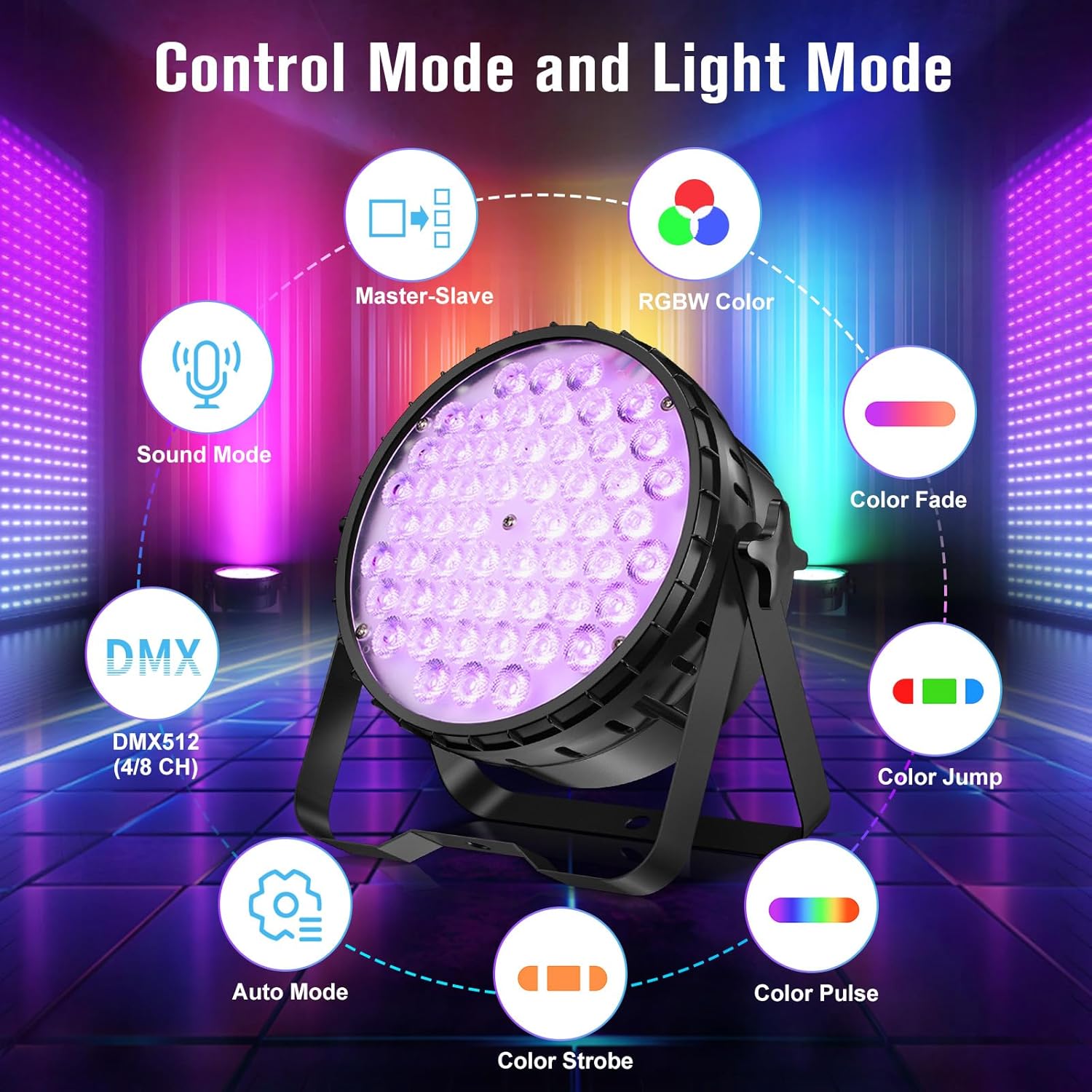
The fixture supports DMX512 protocol with 4 or 8 channel modes. Refer to the DMX channel chart in the appendix (not provided in this manual) for specific channel functions. Set the DMX address using the control panel.
6.3 Автомат горим
The automatic mode features pre-programmed light shows and color sequences. Use the MENU button to select 'Auto' mode and then UP/DOWN to choose different auto programs.
6.4 Дуугаар идэвхжүүлсэн горим
In sound-activated mode, the light reacts to ambient sound or music. Use the MENU button to select 'Sound' mode. The fixture's built-in microphone will detect audio and trigger dynamic lighting effects.
6.5 Master-Slave горим
Connect multiple fixtures via DMX cables. Set one fixture as the 'Master' (e.g., in Auto or Sound mode) and the others as 'Slave' units. The slave units will then synchronize their effects with the master unit.
7. Гэрлийн эффектүүд
The LPC010N-4 offers a variety of dynamic lighting effects:
- Строб: Rapid flashing of light.
- Gradual Fading Change: Өнгө хоорондын жигд шилжилт.
- Үсрэх: Instantaneous changes between colors.
- Pulse Change: Rhythmic changes in light intensity or color.


7.1 CRI Comparison
The high CRI (>90) of the LPC010N-4 ensures that colors appear more natural and true to life compared to lights with lower CRI values.

7.2 Brightness Comparison
The 54x4W configuration provides significantly higher brightness compared to lights with fewer or lower wattage LED.

7.3 Видео үзүүлбэрүүд
8. Засвар үйлчилгээ
- Цэвэрлэгээ: Regularly clean the lens and housing with a soft, lint-free cloth. Do not use abrasive cleaners.
- Сэнсний засвар үйлчилгээ: Ensure the cooling fan is free from dust and debris to maintain optimal performance and prevent overheating.
- Хадгалах: Ашиглаагүй үед бэхэлгээг хуурай, тоосгүй орчинд хадгална уу.
- Шалгалт: Periodically check all cables, connections, and mounting hardware for any signs of wear or damage.
9. Алдаа засах
| Асуудал | Боломжит шалтгаан | Шийдэл |
|---|---|---|
| Хүч чадалгүй | Power cable disconnected; no power from outlet; fuse blown. | Check power cable connection; test outlet; replace fuse if necessary. |
| Гэрлийн гаралт байхгүй | Fixture in blackout mode; incorrect mode selected; internal fault. | Check control panel settings; cycle through modes; contact support if fault persists. |
| DMX удирдлага ажиллахгүй байна | DMX хаяг буруу байна; DMX кабель эвдэрсэн; DMX хянагчийн асуудал; DMX горим буруу байна. | Verify DMX address; check DMX cable integrity; test with another controller; ensure fixture is in DMX mode. |
| Гэрэл анивчих | Unstable power supply; DMX signal interference; loose connection. | Ensure stable power; check DMX termination; secure all connections. |
10. Техникийн үзүүлэлтүүд
| Онцлог | Дэлгэрэнгүй |
|---|---|
| Загварын дугаар | LPC010N |
| Гэрлийн эх үүсвэрийн төрөл | Гэрэл ялгаруулах диод (LED) |
| Гэрлийн эх үүсвэрийн тоо | 54 |
| Ватtage (per LED) | 4W |
| Нийт ваттtage | 216 ватт |
| Хамгийн их гэрлийн гаралт | 5500 люмен |
| Өнгө дүрслэх индекс (CRI) | 95 (CRI>90) |
| Өнгөний температур | 4500 Келвин |
| Булцууны онцлог | CRI>90, RGBW full color, DMX, automatic, sound-activated |
| Материал | Хөнгөн цагаан |
| Төгсгөлийн төрөл | Сойзтой |
| Суурилуулах төрөл | Шалны уул |
| Эрчим хүчний эх үүсвэр | Утастай цахилгаан |
| Бүтээгдэхүүний хэмжээс | 9.84"L x 4.5"W x 9.84"H |
| Зүйлийн жин | 16.06 фунт |
| Батерейнууд багтсан | Үгүй |
11. Баталгаат хугацаа ба дэмжлэг
For warranty information, technical support, or service inquiries, please contact Betopper customer service. Keep your purchase receipt as proof of purchase.
Visit the official Betopper store for more information: BetopperDirect Store