
H3C H3C Magic NX15-UK
H3C Magic NX15 AX1500 Dual Band Gigabit Wi-Fi 6 Router User Manual
Model: H3C Magic NX15-UK
1. Танилцуулга
The H3C Magic NX15 is a high-performance Gigabit Wi-Fi 6 router designed to provide a fast and reliable internet experience. Featuring a vertical design, full gigabit network ports, and Wi-Fi 6 (802.11ax) technology on the 5GHz band, it ensures high-speed connectivity. Equipped with four high-gain external antennas and EasyMesh compatibility, it offers wide and flexible network signal coverage. Enhanced security is provided through WPA3 encryption. This manual provides essential information for setting up, operating, and maintaining your H3C Magic NX15 router.
2. Багцын агуулга
Сав баглаа боодлын агуулгыг сайтар шалгана уу. Хэрэв ямар нэгэн зүйл алга болсон эсвэл гэмтсэн бол жижиглэн худалдаа эрхлэгчтэйгээ холбоо барина уу.
- H3C Magic NX15 AX1500 Dual Band Gigabit Wi-Fi 6 Router
- Эрчим хүчний адаптер
- Ethernet кабель
- Хурдан суурилуулах гарын авлага (энэ гарын авлага)
3. Бүтээгдэхүүн дууссанview
Familiarize yourself with the components and interfaces of your H3C Magic NX15 router.
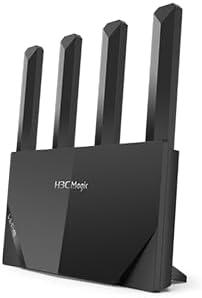
Зураг 3.1: Урд view of the H3C Magic NX15 router, showcasing its vertical design and four external antennas.
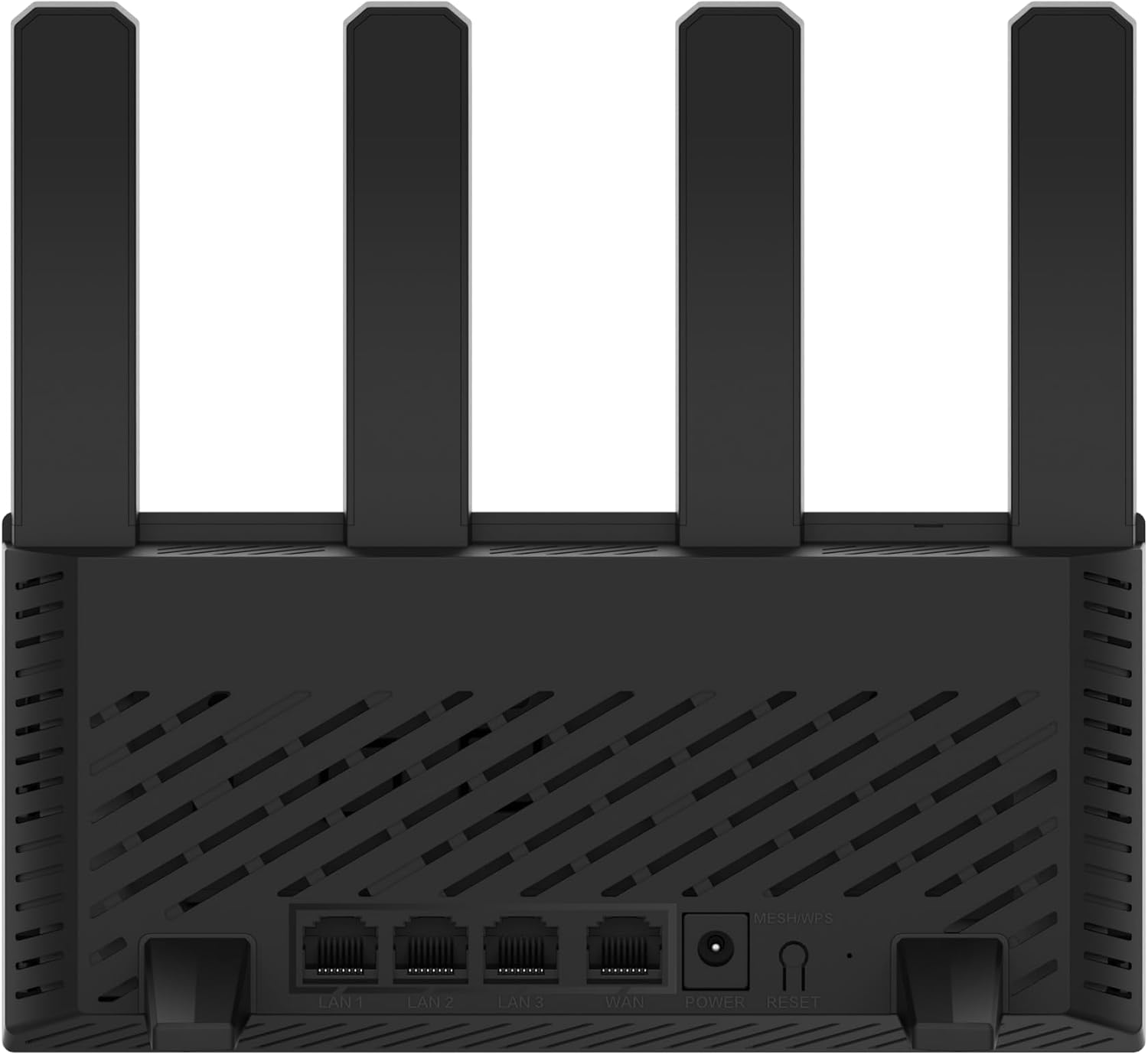
Зураг 3.2: Арын view of the H3C Magic NX15 router, displaying the LAN ports, WAN port, power input, and Reset/WPS button.

Зураг 3.3: Топ view of the H3C Magic NX15 router, highlighting the ventilation design for heat dissipation.

Зураг 3.4: Хажуу тал view of the H3C Magic NX15 router, showing the sleek profile and additional ventilation slots.
Port and Button Descriptions:
- WAN порт: Таны модем эсвэл интернет үйлчилгээ үзүүлэгчийн (ISP) сүлжээнд холбогдоно.
- LAN портууд (LAN1, LAN2, LAN3): Компьютер, тоглоомын консол эсвэл ухаалаг ТВ зэрэг утастай төхөөрөмжүүдэд холбогдоно уу.
- Эрчим хүчний порт: Дагалдах тэжээлийн адаптерт холбогдоно.
- Дахин тохируулах/WPS товч:
- Press briefly to activate WPS (Wi-Fi Protected Setup) for easy connection of compatible devices.
- Press and hold for approximately 5-10 seconds to restore the router to factory default settings.
- Антенууд: Four high-gain external antennas for optimal Wi-Fi signal coverage.
4. Тохируулах гарын авлага
Follow these steps to set up your H3C Magic NX15 router for the first time.
- Чиглүүлэгчийг задлах: Чиглүүлэгч болон бүх дагалдах хэрэгслийг савлагаанаас болгоомжтой авч хая.
- Чиглүүлэгчийг байрлуулах: Place the router in a central location in your home or office, away from obstructions and sources of interference (e.g., microwaves, cordless phones). Ensure good ventilation.
- Цахилгаанд холбогдох: Connect the included power adapter to the router's power port and then plug the adapter into a power outlet. Wait for the router to power on and its indicator lights to stabilize.
- Модем руу холбогдох: Connect one end of the provided Ethernet cable to the WAN port on your H3C Magic NX15 router and the other end to your modem's LAN port.
- Төхөөрөмжүүдийг холбох (заавал биш): For wired connections, connect an Ethernet cable from one of the router's LAN ports to your computer or other network device.
- Wi-Fi-д холбогдох:
- Компьютер эсвэл мобайл төхөөрөмж дээрээ боломжтой Wi-Fi сүлжээг хайж олоорой.
- Чиглүүлэгчийнхээ доод талд байгаа шошгон дээр хэвлэгдсэн Wi-Fi сүлжээний нэрийг (SSID) сонгоно уу.
- Enter the Wi-Fi password (also printed on the router's label) when prompted.
- Чиглүүлэгчийн удирдлагын хуудас руу нэвтрэх:
- Нээлттэй a web хөтөч (жишээлбэл, Chrome, Firefox, Edge).
- Анхдагч IP хаягийг бичнэ үү (ихэвчлэн
192.168.1.1orh3cmagic.com) into the address bar and press Enter. Refer to the router's label for the exact address. - Follow the on-screen instructions to complete the initial setup, including setting a new administrator password and configuring your internet connection type (e.g., PPPoE, DHCP, Static IP).
5. Ашиглалтын заавар
This section details the key features and how to operate your H3C Magic NX15 router.
5.1 Dual-Band Wi-Fi Operation
The H3C Magic NX15 supports dual-band Wi-Fi (2.4GHz and 5GHz) for optimal performance. It features intelligent band steering, which automatically directs your devices to the best available band (2.4GHz for wider coverage, 5GHz for higher speeds) without manual selection.
- 2.4 GHz зурвас: Provides wider coverage and better penetration through walls, suitable for general browsing and devices further from the router.
- 5 GHz зурвас: Offers higher speeds and lower latency, ideal for streaming 4K video, online gaming, and high-bandwidth applications, typically for devices closer to the router.
5.2 Intelligent Management via Mobile App
Manage your router conveniently using the dedicated H3C mobile application. The app allows for easy network settings configuration, network speed optimization, and various other operations.
- Апп татаж авах: хайх the "H3C Magic" app in your device's app store (Google Play Store for Android or Apple App Store for iOS).
- Суулгах ба эхлүүлэх: Програмаа суулгаад нээнэ үү.
- Нэвтрэх: Use your router's administrator credentials to log in to the app.
- Тохиргоог удирдах: Аппликейшнээс та:
- Change Wi-Fi names and passwords.
- Холбогдсон төхөөрөмжүүдийг хянах.
- Эцэг эхийн хяналтыг тохируулна уу.
- Configure guest Wi-Fi networks.
- Optimize network performance.
5.3 EasyMesh for Whole-Home Wi-Fi
The H3C Magic NX15 supports EasyMesh technology, allowing you to expand your Wi-Fi coverage by adding additional compatible H3C mesh units. This creates a seamless whole-home Wi-Fi network, eliminating dead zones in large or complex house types.
- Refer to the EasyMesh setup guide provided with your additional mesh units for detailed instructions on expanding your network.
- Ensure all mesh units are compatible with the EasyMesh standard.
5.4 Сүлжээний аюулгүй байдлын онцлогууд
The router includes multiple functions to enhance your private network's security:
- WPA3 шифрлэлт: Provides the latest and strongest Wi-Fi security protocol.
- Access Allowlist/Denylist: Control which devices can connect to your network based on their MAC addresses.
- Зочин Wi-Fi: Зочдод зориулж тусдаа Wi-Fi сүлжээ үүсгэн, үндсэн сүлжээгээ аюулгүй, нууцлалтай байлгаарай.
- Эцэг эхийн хяналт: Manage internet access times and block inappropriate content for specific devices.
These security features can be configured via the router's web management interface or the H3C mobile app.
6. Засвар үйлчилгээ
Proper maintenance ensures the longevity and optimal performance of your H3C Magic NX15 router.
- Байршил: Keep the router in a well-ventilated area, away from direct sunlight, heat sources, and moisture. The stereoscopic heat dissipation design with a large metal heat sink helps maintain stable operation.
- Цэвэрлэгээ: Regularly dust the router's exterior and ventilation slots with a soft, dry cloth. Do not use liquid cleaners or aerosols.
- Програм хангамжийн шинэчлэлтүүд: Чиглүүлэгчийн програм хангамжийн шинэчлэлтийг үе үе шалгаж, суулгаж байгаарай web management interface or the mobile app. Firmware updates often include performance improvements, new features, and security patches.
- Дахин ачаалж байна: Хэрэв танд сүлжээний асуудал тулгарвал тэжээлийн адаптерийг 10 секундын турш салгаад дахин залгаж чиглүүлэгчээ дахин ачаална уу.
- Аюулгүй байдал: Өөрийн Wi-Fi нууц үг болон чиглүүлэгчийн администраторын нууц үгийг хүчтэй, өвөрмөц хослол болгон тогтмол соль.
7. Алдаа засах
Энэ хэсэгт танд тохиолдож болох нийтлэг асуудлуудыг авч үзэж, шийдвэрлэх арга замыг зааж өгнө.
| Асуудал | Боломжит шалтгаан | Шийдэл |
|---|---|---|
| Интернет холболт байхгүй |
|
|
| Wi-Fi Signal Weak or Unstable |
|
|
| Чиглүүлэгчийн удирдлагын хуудас руу нэвтрэх боломжгүй |
|
|
| Forgot Router Administrator Password | Нууц үг алдагдсан | Press and hold the Reset/WPS button on the router for 5-10 seconds to restore factory default settings. You will then need to reconfigure the router. |
8. Техникийн үзүүлэлтүүд
Detailed technical specifications for the H3C Magic NX15 router.
| Онцлог | Дэлгэрэнгүй |
|---|---|
| Загварын нэр | H3C Magic NX15 |
| Загварын дугаар | H3C Magic NX15-UK |
| Брэнд | H3C |
| Утасгүй стандарт | 802.11ax (Wi-Fi 6) |
| Давтамжийн зурвасын ангилал | Хос зурвас (2.4GHz & 5GHz) |
| Антенууд | 4 High-Gain External Antennas |
| Портууд | Gigabit WAN, Gigabit LAN (x3) |
| Онцлог шинж чанарууд | Access Point Mode, EasyMesh, WPA3 Security, Parental Control, Guest Wi-Fi, App Management |
| Хэмжээ (багц) | 21 x 19.4 x 6.3 см |
| Жин (багц) | 500 гр |
| Үйлдвэрлэгч | H3C |
| Гарал үүслийн улс | Хятад |
| Эхний боломжтой огноо | 24 оны наймдугаар сарын 2024 |
9. Баталгаат хугацаа ба дэмжлэг
The H3C Magic NX15 router comes with a standard manufacturer's warranty. For specific warranty terms and conditions, please refer to the warranty card included in your product packaging or visit the official H3C webсайт.
Техникийн дэмжлэг:
If you encounter any issues or have questions regarding your H3C Magic NX15 router, please contact H3C technical support.
- Онлайн дэмжлэг: Visit the official H3C support webТүгээмэл асуултууд, алдааг олж засварлах гарын авлага, драйвер/програм хангамж татаж авах сайт.
- Холбоо барих мэдээлэл: Refer to the H3C webбүс нутгийн холбоо барих дугаар болон имэйл дэмжлэгийн талаарх мэдээллийг сайт эсвэл таны бүтээгдэхүүний баримт бичигт оруулна уу.
Please have your product model number (H3C Magic NX15-UK) and serial number ready when contacting support.
Ask a question about this manual
Ask about setup, troubleshooting, compatibility, parts, safety, or missing instructions. Manuals+ will review the question and use this page’s manual context to help answer it.