
Танилцуулга
This manual provides detailed instructions for the operation and maintenance of your Casio G-Shock GM2110D-4A Octagonal Orange Stainless Steel Watch. Please read this manual carefully to ensure proper use and to fully utilize all features of your watch. Keep this manual for future reference.
Бүтээгдэхүүн дууссанview
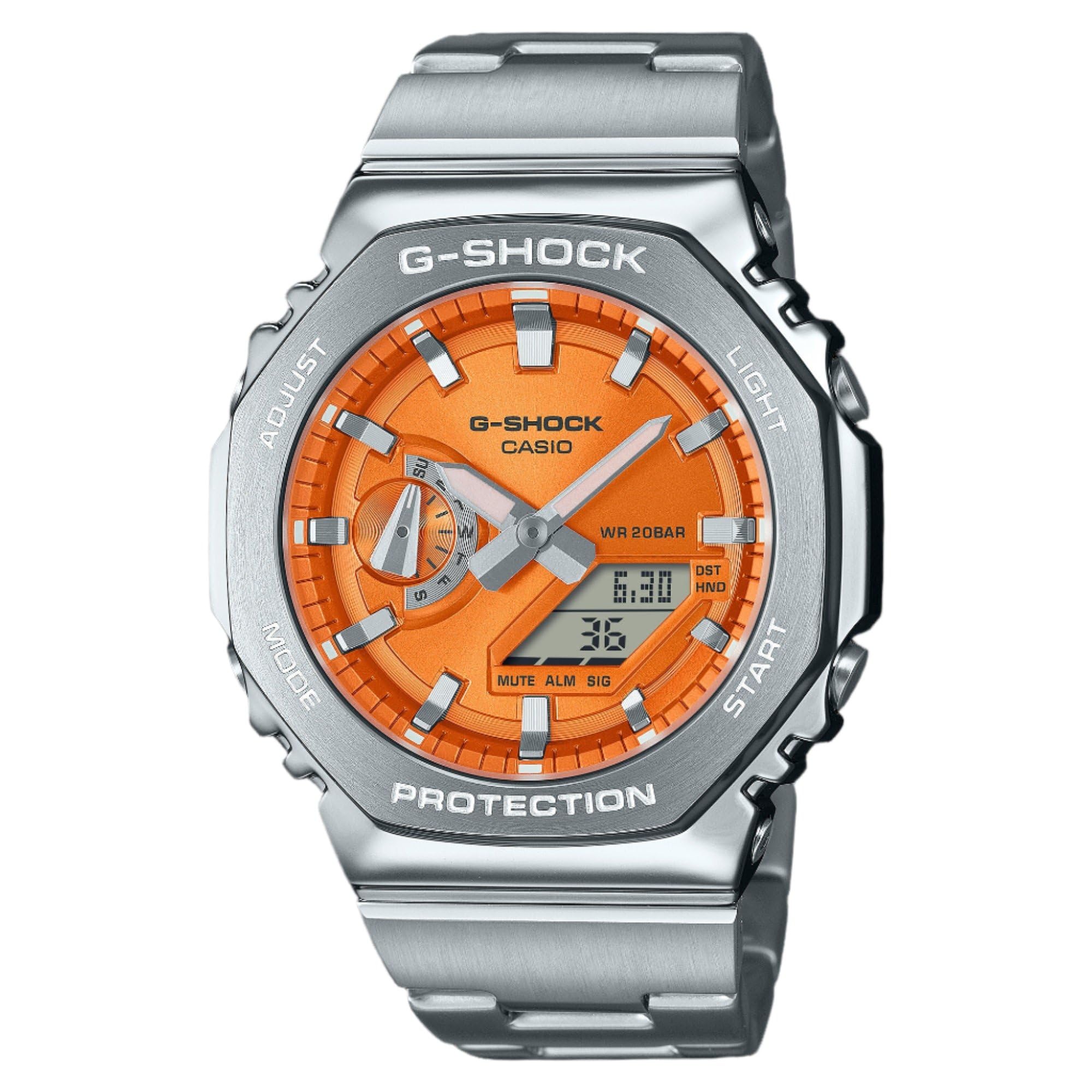
Зураг 1: Casio G-Shock GM2110D-4A Octagonal Orange Stainless Steel Watch. This image shows the watch with its octagonal silver-tone stainless steel case and band, featuring an orange analog-digital dial. The dial displays the time 6:30 and the date 36, with 'G-SHOCK CASIO' and 'WR 20BAR PROTECTION' clearly visible. The watch's functional buttons, labeled 'ADJUST', 'MODE', 'LIGHT', and 'START', are positioned around the case.
The Casio G-Shock GM2110D-4A is a robust analog-digital watch designed for durability and functionality. It features an orange dial with silver-tone hands, housed within a silver-tone stainless steel case and band. Key features include quartz movement, 200-meter water resistance, and a scratch-resistant mineral crystal. The watch also includes various functions such as alarm, light, shock resistance, and a timer.
Тохиргоо
1. Анхны цагийн тохиргоо
- Цаг хэмжилтийн горимд товчийг дараад барина уу ТОХИРУУЛАХ button (top left) until the city code starts to flash in the digital display. This indicates the setting mode.
- -г ашиглана уу MODE button (bottom left) to cycle through the settings: City Code → DST → 12/24-hour format → Seconds → Hour → Minute → Year → Month → Day.
- -г ашиглана уу START button (bottom right) or ГЭРЭЛ button (top right) to change the flashing value.
- After configuring all settings, press the ТОХИРУУЛАХ button to exit the setting mode. The analog hands will automatically adjust to the digital time.
2. Home City Selection
Selecting your Home City is crucial for correct timekeeping and World Time functions. Follow the initial time setting steps to select your desired city code.
Ашиглалтын заавар
1. Навигацийн горим
дээр дарна уу MODE button (bottom left) to cycle through the watch's various modes:
- Timekeeping Mode (current time and date)
- World Time Mode (times in different cities)
- Секундомер горим
- Таймер горим
- Сэрүүлгийн горим
2. Цагийн горим
This mode displays the current time and date. Use the ТОХИРУУЛАХ button to enter setting mode for time and date adjustments as described in the "Setup" section.
3. Дэлхийн цагийн горим
In World Time Mode, use the START button (bottom right) to scroll through different city codes and view their current times.
4. Секундомер горим
- дарна уу START цагийг эхлүүлэх.
- дарна уу START дахин түр зогсоох/үргэлжлүүлэх.
- дарна уу ТОХИРУУЛАХ to reset the stopwatch to zero while it is paused.
5. Таймер горим
- Цаг хэмжигч горимд, дараад барина уу ТОХИРУУЛАХ тохиргооны горимд орохын тулд.
- Ашиглах MODE цаг, минут эсвэл секундыг сонгохын тулд
- Ашиглах START or ГЭРЭЛ утгуудыг өөрчлөх.
- дарна уу ТОХИРУУЛАХ тохиргооны горимоос гарахын тулд.
- дарна уу START тооллогыг эхлүүлэх.
6. Сэрүүлгийн горим
- In Alarm Mode, press and hold ТОХИРУУЛАХ тохиргооны горимд орохын тулд.
- Ашиглах MODE цаг эсвэл минут сонгохын тулд.
- Ашиглах START or ГЭРЭЛ утгуудыг өөрчлөх.
- дарна уу ТОХИРУУЛАХ тохиргооны горимоос гарахын тулд.
- дарна уу START to toggle the alarm ON/OFF. An indicator will show when the alarm is active.
7. Illumination (Light)
дээр дарна уу ГЭРЭЛ цагийн нүүрийг хялбархан гэрэлтүүлэх товчлуур (баруун дээд талд) viewгэрэл багатай нөхцөлд.
Засвар үйлчилгээ
1. Цэвэрлэгээ
Wipe the watch regularly with a soft, dry cloth to remove dirt and moisture. For stainless steel parts, a slightly damp cloth can be used, followed by a dry cloth. Avoid using chemical cleaners or solvents.
2. Усны эсэргүүцэл
This watch is water resistant to 200 meters (20 BAR). This means it is suitable for recreational scuba diving. Do not operate buttons while the watch is submerged in water. After exposure to saltwater, rinse the watch with fresh water and wipe it dry.
3. Зай солих
The watch is powered by a battery. When the display becomes dim or functions become erratic, it may be time for a battery replacement. It is recommended to have the battery replaced by an authorized Casio service center to ensure proper sealing and water resistance.
Алдааг олж засварлах
- Digital display is blank or dim: The battery may be low. Consider battery replacement.
- Цаг буруу байна: Ensure your Home City setting is correct and adjust the time as described in the "Setup" section. Check for DST (Daylight Saving Time) settings.
- Analog hands do not match digital time: Perform a hand alignment correction. Refer to the full Casio module manual for detailed steps, typically involving holding specific buttons in Timekeeping Mode to enter hand adjustment.
- Watch stops working after exposure to water: Immediately take the watch to an authorized service center. Do not attempt to open the watch yourself.
Үзүүлэлтүүд
| Онцлог | Дэлгэрэнгүй |
|---|---|
| Загварын дугаар | GM2110D-4A |
| Хөдөлгөөн | Кварц (Аналог-Дижитал) |
| Кейсийн материал | Зэвэрдэггүй ган |
| Хамтлаг материал | Зэвэрдэггүй ган |
| Кристал | Зурагдахад тэсвэртэй эрдэс бодис |
| Усны эсэргүүцэл | 200 метр (20 бар) |
| Кейсийн диаметр | 44 мм |
| Кейсийн зузаан | 11.8 мм |
| Хамтлагийн өргөн | 25 мм |
| Өнгө залгах | Улбар шар |
| Нэмэлт онцлогууд | Alarm, Light, Shock Resistant, Timer, World Time |
Баталгаат болон дэмжлэг
This Casio G-Shock watch comes with a limited warranty. For specific warranty terms, conditions, and duration, please refer to the warranty card included with your purchase or visit the official Casio website. For technical support, service, or inquiries, please contact Casio customer service directly.
You can find more information and support resources on the official Casio webсайт: www.casio.com