
SURPEER K2-K500-980
SURPEER K2-K500-980 хэт улаан туяаны термометр болон K хэлбэрийн термопар хэрэглэгчийн гарын авлага
Model: K2-K500-980 | Brand: SURPEER
1. Танилцуулга
The SURPEER K2-K500-980 is a versatile temperature measurement device designed for various applications. It combines non-contact infrared (IR) temperature measurement with a K-Type thermocouple probe for internal temperature readings. Additionally, it features ambient temperature and humidity detection, making it a comprehensive tool for industrial, culinary, and HVAC uses.

Figure 1: SURPEER K2-K500-980 Infrared Thermometer with accessories.
2. Аюулгүй байдлын мэдээлэл
- Лазерын аюулгүй байдал: Do not look directly into the laser beam. Avoid pointing the laser at people or animals.
- Not for Human Body Temperature: This device is not intended for measuring human body temperature.
- Зөв хэрэглээ: Use the device only as described in this manual. Misuse may result in damage or injury.
- Батерейтай харьцах: Ensure correct battery polarity. Do not mix old and new batteries. Remove batteries if the device will not be used for an extended period.
3. Багцын агуулга
Доор жагсаасан бүх зүйл таны багцад байгаа эсэхийг шалгаарай.
- Хэт улаан туяаны термометрийн буу
- K-Type Thermocouple Probe
- Tool Box (Storage Bag)
- 2 х AAA батерей
- Хэрэглэгчийн гарын авлага
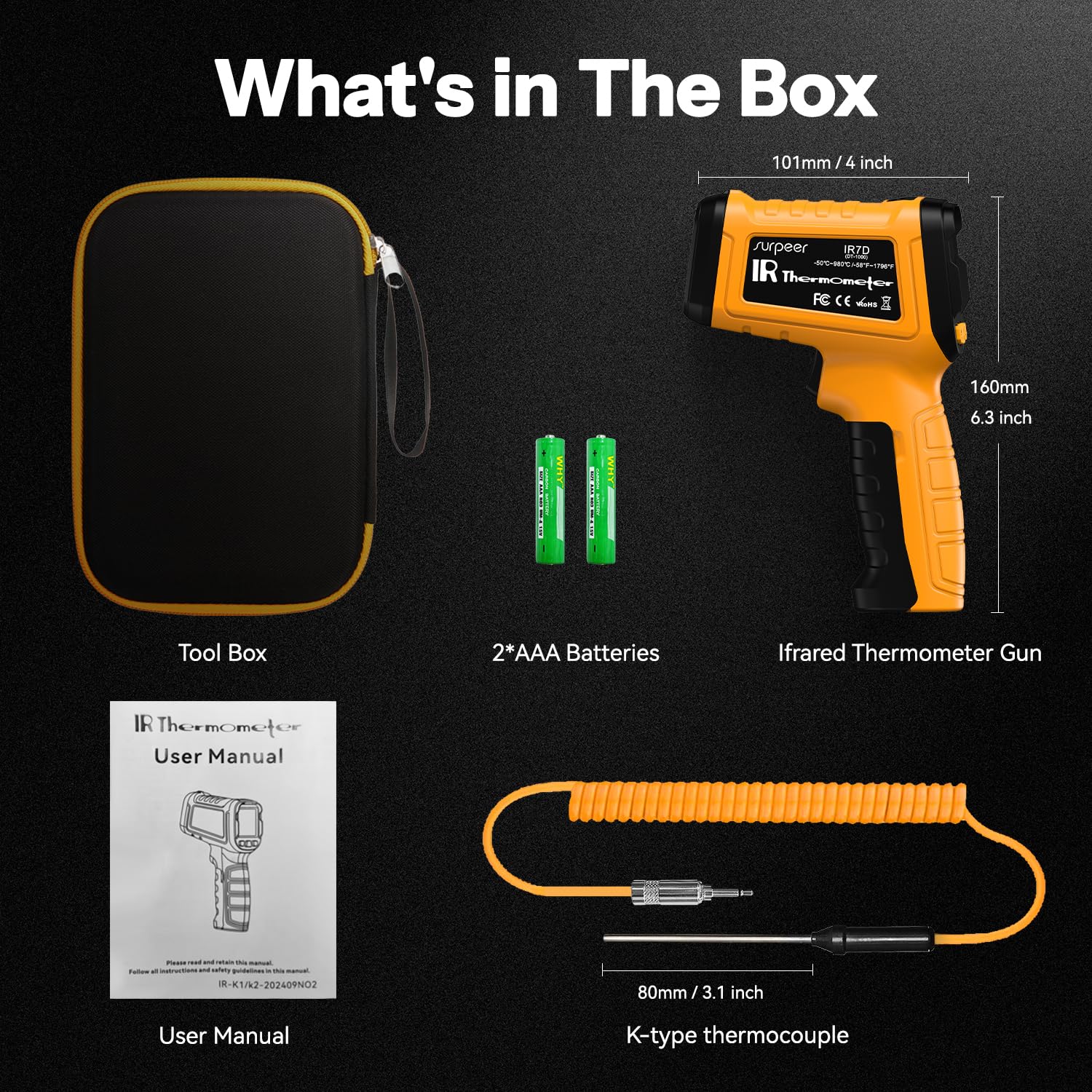
Зураг 2: Бүтээгдэхүүний багцад багтсан зүйлс.
4. Бүтээгдэхүүн дууссанview
Familiarize yourself with the components and display of your SURPEER K2-K500-980 thermometer.

Figure 3: Product display and button layout.
- 1. Testing Indicator: Shows when a measurement is active.
- 2. Temperature Measurement Value (K-Type Mode): Displays temperature from the K-Type probe.
- 3. Чийгшил: Shows ambient humidity percentage.
- 4. Surface Temperature (Infrared Mode): Displays temperature measured by the IR sensor.
- 5. Laser Indication Button: Activates/deactivates the laser pointer.
- 6. Buzzer Symbol Button: Toggles the audible alarm.
- 7. Өгөгдөл хадгалах: Indicates when the current reading is held on the display.
- 8. Laser Indicator: Visual confirmation of laser activity.
- 9. Buzzer Symbol: Сэрүүлгийн төлөвийг заана.
- 10. Battery Under Voltage: Батарей бага байгааг анхааруулж байна.
- 11. High Temperature (HAL): High alarm threshold indicator.
- 12. Low Temperature (LAL): Low alarm threshold indicator.
- 13. Emissivity (default value 0.95): Current emissivity setting.
- 14. °C/°F Conversion Button: Switches between Celsius and Fahrenheit.
5. Тохиргоо
5.1 Батерей суурилуулах
- Термометрийн бариул дээрх батерейны тасалгааг олоорой.
- Тасалгааны тагийг нээ.
- Хоёр AAA батерейг зөв туйлшруулж (+/-) оруулаарай.
- Зайны тасалгааны тагийг сайтар хаа.
5.2 K-Type Thermocouple Connection
To use the K-Type thermocouple probe for internal temperature measurements:
- Locate the K-Type input port on the side of the thermometer.
- Insert the two prongs of the K-Type thermocouple probe into the corresponding slots in the input port.
- Ensure the connection is firm. The display will indicate when the probe is connected and ready for use.

Figure 4: K-Type Thermocouple connection.
6. Ашиглалтын заавар
6.1 Асаах/унтраах
Press the trigger to power on the device. The device features a 15-second automatic shutdown to conserve battery life.
6.2 Infrared (IR) Temperature Measurement
- Point the thermometer's laser at the target surface.
- Press and hold the trigger. The laser will activate (if enabled), and the surface temperature will be displayed instantly.
- The device has a 50:1 distance-to-spot ratio, allowing for accurate measurements from a distance.

Figure 5: Understanding the 50:1 Distance-to-Spot Ratio.
6.3 K-Type Thermocouple Measurement
With the K-Type probe connected:
- Insert the probe into the substance or area you wish to measure internally.
- Press the 'MODE' button to switch to K-Type measurement mode. The display will show the internal temperature.
6.4 Ambient Temperature and Humidity Detection
The device automatically displays ambient temperature and humidity levels on the screen, providing environmental context for your measurements.

Figure 6: Ambient temperature and humidity detection in use.
6.5 Нэгжийн хөрвүүлэлт (°C/°F)
Press the °C/°F button to toggle between Celsius and Fahrenheit temperature units.

Figure 7: Temperature unit conversion.
6.6 Ялгаруулалтын тохируулга
Emissivity (E) is a measure of an object's ability to emit infrared energy. Different materials have different emissivity values. For accurate readings, adjust the emissivity setting to match the target material. The default value is 0.95, suitable for most organic materials and painted surfaces. Refer to common emissivity tables for specific materials.
Press the 'EMS' button to adjust the emissivity value.
6.7 High/Low Temperature Alarm (HAL/LAL)
The device can be set to alert you when temperatures exceed or fall below a specified range.
- Press the 'MODE' button repeatedly until 'HAL' or 'LAL' appears.
- Use the up/down arrows to set the desired high or low temperature threshold.
- An audible and visual alarm will activate if the measured temperature crosses these thresholds.

Figure 8: High/Low Temperature Alarm indicators.
6.8 Мэдээлэл хадгалах
Тайлсны дарааasing the trigger, the last measured temperature will be held on the display for a few seconds, indicated by the 'HOLD' symbol.
6.9 Лазер заагч
The 13-point laser pointer helps to accurately target the measurement area. Activate or deactivate the laser using the dedicated laser button.

Figure 9: Laser aiming for precise measurement.
7. Хэрэглээний хувилбарууд
The SURPEER K2-K500-980 is suitable for a wide range of professional and household applications:
- Аж үйлдвэрийн: High-temperature testing for pizza ovens, furnaces, kilns, forging, and welding.
- Хоол хийх: Measuring surface temperatures of cooking surfaces, and internal temperatures of food using the K-Type probe.
- HVAC: Checking temperatures in log houses, HVAC interiors, and equipment maintenance.
- Ерөнхий хэрэглээ: Wood and wall temperature/humidity checks.

Figure 10: Dual temperature measurement methods in action.

Figure 11: Versatile applications of the thermometer.
8. Техникийн үзүүлэлтүүд
| Онцлог | Дэлгэрэнгүй |
|---|---|
| IR температурын хүрээ | -58°F - 1796°F (-50°C - 980°C) |
| K-Type Thermocouple Range | -4°F - 932°F (-20°C - 500°C) |
| IR нарийвчлал | +/- 2% |
| K-Type Accuracy | +/- 1.5% |
| Цэг хүртэлх зайны харьцаа | 50:1 |
| Хариу өгөх хугацаа | 0.5 секунд |
| Эмиссия | Adjustable (default 0.95) |
| Онцлог шинж чанарууд | 13-point laser, High/Low Temperature Alarm, Auto Off, Dual Probe, Humidity Measurement |
| Эрчим хүчний эх үүсвэр | 2 x AAA батерей (дагсан) |
| Бүтээгдэхүүний хэмжээс | 16 x 8.64 x 4.83 см; 176.9 гр |
| Материал | Хуванцар |
| Дэлгэцийн төрөл | Дижитал |
9. Засвар үйлчилгээ
- Цэвэрлэгээ: Төхөөрөмжийг зөөлөн, d-ээр арчиж цэвэрлэнэ үүamp даавуу. Зүлгүүрийн цэвэрлэгч хэрэглэж болохгүй, төхөөрөмжийг усанд дүрж болохгүй.
- Хадгалах: Store the thermometer in its provided tool box in a dry, cool place when not in use.
- Зай солих: Дэлгэц дээр цэнэг багатай үзүүлэлт гарч ирэх үед батерейгаа солино уу.
10. Алдаа засах
If you encounter issues with your SURPEER K2-K500-980, consider the following:
- Буруу уншилтууд:
- Check the emissivity setting for the target material.
- Линз нь цэвэр, саадгүй байгаа эсэхийг шалгаарай.
- Verify the K-Type probe is fully inserted and not damaged.
- Дэлгэц ажиллахгүй байна:
- Зайны түвшинг шалгаж, шаардлагатай бол солих.
- Батерейг зөв туйлшралтайгаар оруулсан эсэхийг шалгаарай.
- Лазер идэвхжихгүй байна:
- Ensure the laser function is enabled via its dedicated button.
11. Баталгаат хугацаа ба дэмжлэг
SURPEER provides excellent after-sales service and technical support. For any inquiries or assistance, please contact customer service for a timely reply within 24 hours.
For more information or to explore other products, visit the SURPEER Store.
Ask a question about this manual
Ask about setup, troubleshooting, compatibility, parts, safety, or missing instructions. Manuals+ will review the question and use this page’s manual context to help answer it.