
Танилцуулга
Thank you for choosing the Cuifati Mini Body Camera. This manual provides detailed instructions for the proper use, setup, and maintenance of your device. Please read this manual thoroughly before operating the camera to ensure optimal performance and longevity.
Багцын агуулга
- 1 x Wearable Camera
- 1 x үүрэх цүнх
- 1 х хэрэглэгчийн гарын авлага
- 1 x оосор
- 1 x Back Shell Bracket
- 1 х Tripod
- 1 x USB кабель
- 1 х цэвэрлэгээний даавуу

Figure 1: Cuifati Mini Body Camera and included accessories.

Figure 2: Multi-scenario application examples for the body camera.
Бүтээгдэхүүн дууссанview
Familiarize yourself with the components and controls of your Cuifati Mini Body Camera.
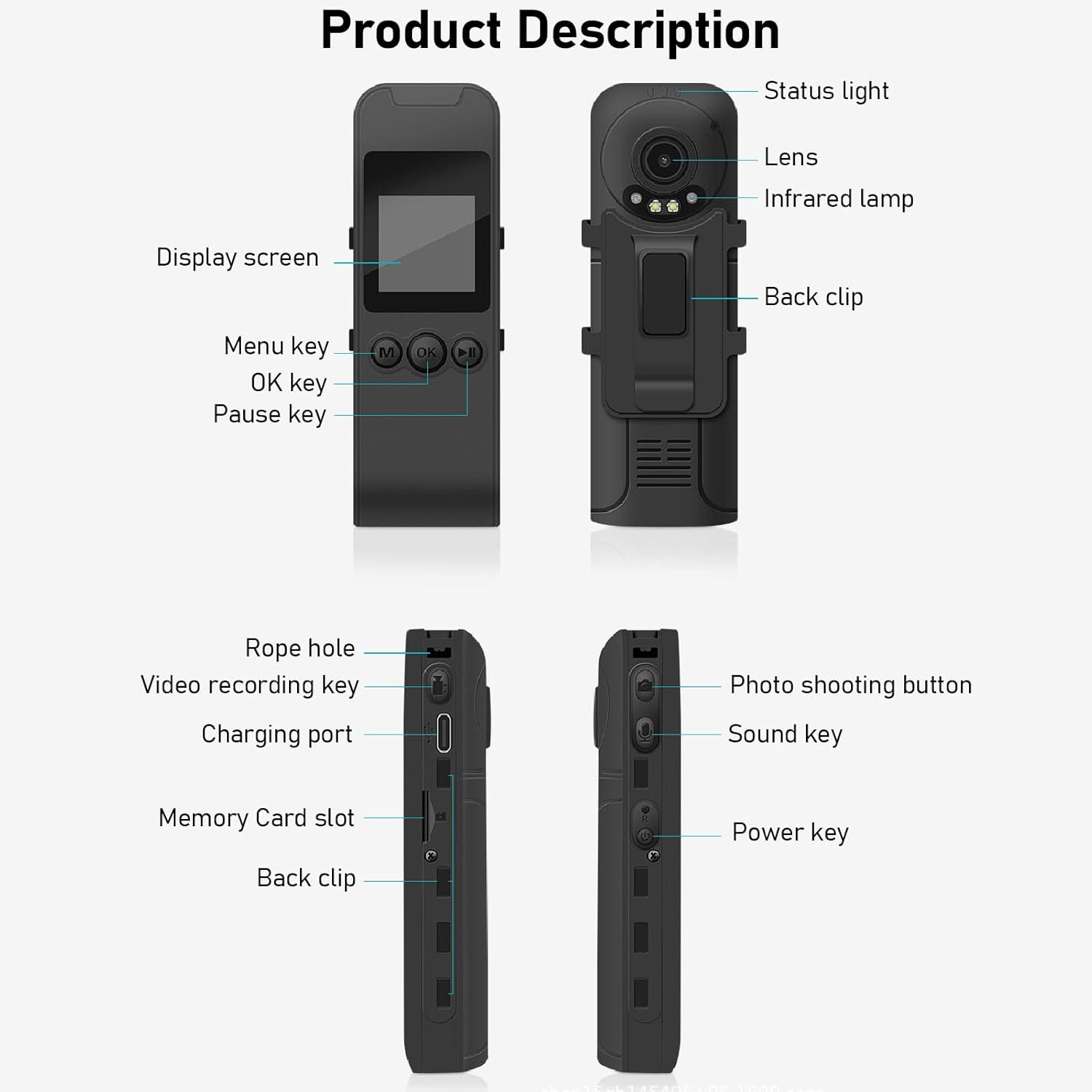
Figure 3: Labeled components of the Cuifati Mini Body Camera.
- Төлөвийн гэрэл: Indicates device status (e.g., recording, charging).
- Линз: Main camera lens for video and photo capture.
- Хэт улаан туяаны Л.amp: Шөнийн харааны гэрэлтүүлгийг хангадаг.
- Буцах клип: For attaching the camera to clothing or other surfaces.
- Дэлгэц: Шууд дамжуулалтад зориулсан 1.3 инчийн LCD дэлгэц view, тоглуулах, цэсийн навигац.
- Цэсний товчлуур (M): Төхөөрөмжийн тохиргоонд ханддаг.
- OK Түлхүүр: Confirms selections or starts/stops functions.
- Түр зогсоох түлхүүр: Pauses playback or recording.
- Rope Hole: Attachment point for the lanyard.
- Video Recording Key: Видео бичлэгийг эхлүүлж, зогсооно.
- Цэнэглэх порт (C төрөл): Төхөөрөмжийг цэнэглэж, компьютерт холбох зориулалттай.
- Санах ойн картны үүр: Insert microSD card for storage.
- Photo Shooting Button: Хөдөлгөөнгүй зураг авдаг.
- Sound Key: Controls audio recording.
- Цахилгаан товч: Төхөөрөмжийг асаах эсвэл унтраана.
Тохиргоо
1. Батерейг цэнэглэж байна
Before first use, fully charge the camera's built-in lithium-ion battery. Connect the camera to a power source using the provided Type-C USB cable. The status light will indicate charging status. A full charge provides approximately 20 hours of work time and 10 hours of video recording.
Figure 4: Built-in 1200mAh battery for extended use.
2. Санах ойн карт оруулах
The camera supports up to a 256GB memory card (not included). Locate the memory card slot on the side of the camera. Gently insert the microSD card with the gold contacts facing down until it clicks into place. To remove, push the card in slightly until it springs out.

Figure 5: Memory card slot for storage expansion.
Ашиглалтын заавар
1. Асаах/унтраах
- Асаахын тулд: Press and hold the Power Key until the display screen illuminates.
- Унтраахын тулд: Press and hold the Power Key until the device shuts down.
2. Видео бичлэг хийх
The camera records in 1440P HD at 30 frames per second with a 120° wide-angle lens and infrared night vision.
- Бичлэг хийж эхлэхийн тулд: Press the Video Recording Key. The status light will change, and a recording indicator will appear on the screen.
- Бичлэгийг зогсоохын тулд: Press the Video Recording Key again.
- Давталтын бичлэг: Камер нь давталттай бичлэгийг дэмждэг бөгөөд хамгийн хуучин бичлэгийг автоматаар дарж бичдэг fileсанах ойн карт дүүрсэн үед.
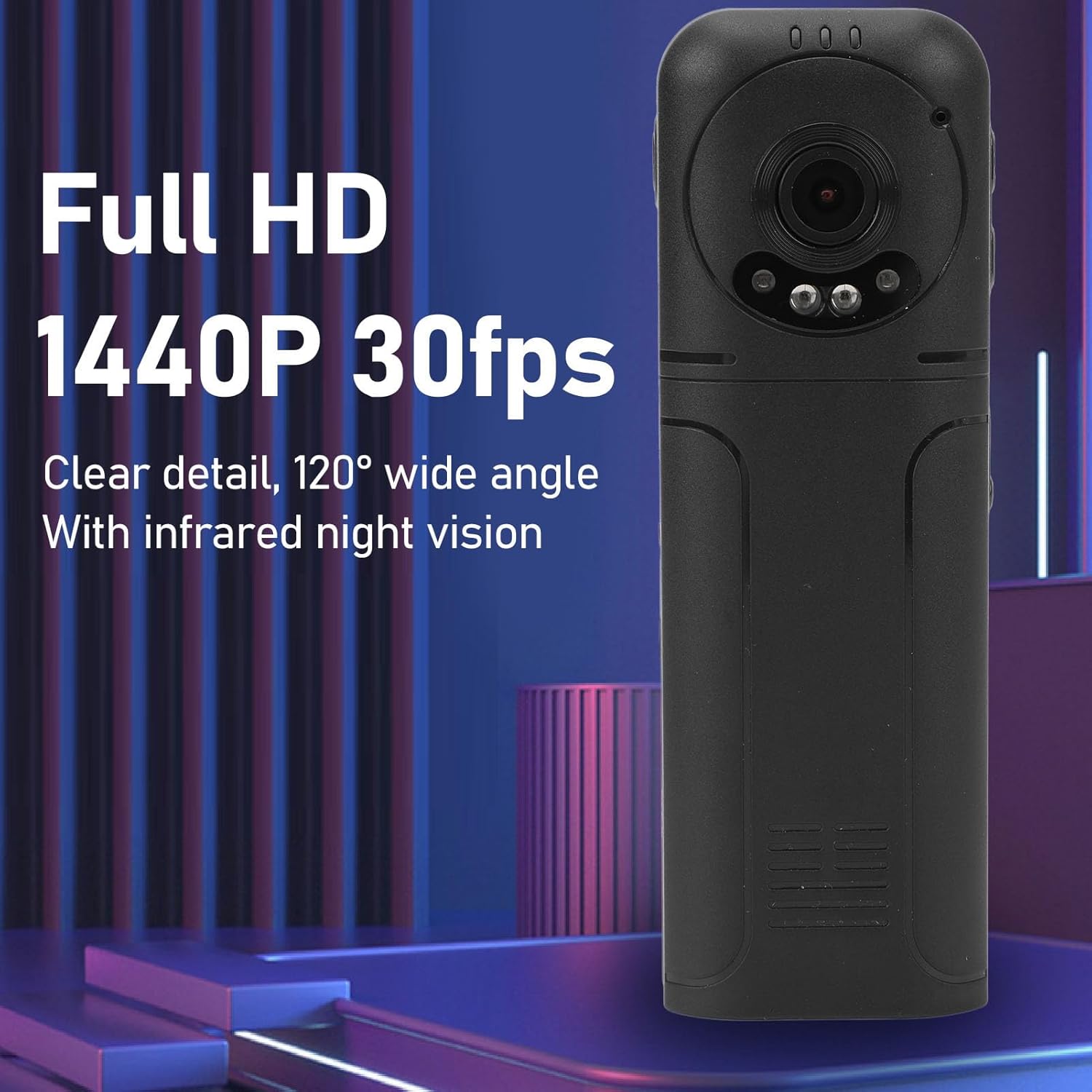
Figure 6: 1440P HD video recording with night vision.
3. Photo Taking
- Зураг авахын тулд: In standby mode, press the Photo Shooting Button.
4. Аудио бичлэг
- To Start Audio Recording: Press the Sound Key.
- To Stop Audio Recording: Press the Sound Key again.

Figure 7: Audio recording functionality.
5. Тоглуулах ба File Менежмент
The 1.3-inch LCD screen supports live playback, browsing, and pausing of videos, photos, and recordings directly on the device.

Figure 8: 1.3-inch color screen for on-device playback.
- Төхөөрөмж дээр тоглуулах: Use the Menu, OK, and Pause keys to navigate and play fileдэлгэцэн дээр.
- Компьютерт холбогдох: Connect the camera to a computer via the Type-C USB cable to transfer, view, or delete files.
- OTG функц: If your mobile phone supports OTG, you can connect the camera directly to your phone for playback and file удирдлага.
Засвар үйлчилгээ
1. Цэвэрлэгээ
- Use the provided cleaning cloth or a soft, dry cloth to wipe the camera body and lens.
- Шингэн цэвэрлэгч болон уусгагчийг бүү ашигла, учир нь тэдгээр нь төхөөрөмжийг гэмтээж болзошгүй.
2. Хадгалах
- Камерыг нарны шууд тусгал, хэт температураас хол, сэрүүн, хуурай газар хадгална.
- Remove the memory card if storing for extended periods.
Алдааг олж засварлах
Хэрэв танд камертай холбоотой асуудал тулгарвал дараах нийтлэг асуудал, шийдлүүдийг үзнэ үү.
| Асуудал | Шийдэл |
|---|---|
| Камер асахгүй байна. | Батерейг цэнэглэсэн эсэхийг шалгаарай. Эрчим хүчний эх үүсвэрт холбогдоод дахин оролдоно уу. |
| Cannot record video/photo. | Check if a memory card is inserted correctly and has sufficient free space. Format the memory card if necessary (this will erase all data). |
| Санах ойн карт танигдаагүй. | Ensure the memory card is inserted correctly. Try a different compatible memory card. Format the card using the camera's menu or a computer. |
| Видео/аудио чанар муу. | Ensure the lens is clean. Check lighting conditions. For audio, ensure the microphone is not obstructed. |
| Төхөөрөмж хөлдөх эсвэл хариу өгөхгүй байна. | Press and hold the Power Key for 10-15 seconds to force a restart. |
Үзүүлэлтүүд
Below are the technical specifications for the Cuifati Mini Body Camera (Model CUIFATI2vg0ri8moa):
- Барааны төрөл: Wearable Camera
- Материал: ABS
- Шөнийн хараа: 2pcs Night Vision Light Beads
- Видеоны нягтрал: 1440P (Maximum)
- Хүрээний хурд: 30 FPS
- Зайны төрөл: Лити ион батерей
- Зайны багтаамж: 1200mAh (Суурилуулсан)
- Хадгалах дэмжлэг: Maximum 256GB Memory Card (Not Included)
- Цэнэглэх порт: Төрөл-C
- APP нэр: For RoadCam (if applicable for advanced features)
- Загварын нэр: CUIFATI2vg0ri8moa
- Үйлдвэрлэгч: CUIFATI
Баталгаат болон дэмжлэг
For warranty information or technical support, please refer to the documentation provided at the time of purchase or contact Cuifati customer service directly. Keep your purchase receipt as proof of purchase.