
1. Танилцуулга
Худалдан авалт хийсэнд баярлалааasing the LONPOO Mini Hi-Fi Ampнастан AMP-615B. This 2-channel stereo ampliifier нь өндөр чанартай дуу гаргах зориулалттай amplification for your passive speakers, offering versatile connectivity options including Bluetooth 5.3, Optical, Coaxial, USB, and AUX inputs. This manual provides detailed instructions for setup, operation, and maintenance to ensure optimal performance and longevity of your device.
2. Аюулгүй ажиллагааны заавар
- Эрчим хүчний эх үүсвэр: -ийг баталгаажуулах amplifier is connected to a power supply within the specified voltage range (AC 100-240V ~ 50/60Hz).
- Агааржуулалт: Агааржуулалтын нүхийг хааж болохгүй. Хэт халалтаас урьдчилан сэргийлэхийн тулд төхөөрөмжийн эргэн тойронд хангалттай агаарын урсгалыг хангана.
- Чийг: -г хадгал amplifier away from water, moisture, and high humidity environments. Do not operate with wet hands.
- Дулаан: Төхөөрөмжийг радиатор, дулааны төхөөрөмж, зуух болон бусад дулаан ялгаруулах төхөөрөмж зэрэг дулааны эх үүсвэрийн ойролцоо байрлуулахаас зайлсхий.
- Цэвэрлэгээ: Цэвэрлэхийн өмнө цахилгааны утсыг салга. Хуурай, зөөлөн даавуу ашиглана уу. Шингэн цэвэрлэгч эсвэл аэрозоль цэвэрлэгч хэрэглэж болохгүй.
- Үйлчилгээ: Энэ бүтээгдэхүүнд өөрөө үйлчлэх гэж бүү оролдоорой. Бүх засвар үйлчилгээг мэргэшсэн үйлчилгээний ажилтнуудад хандаарай.
- Байршил: Унахаас сэргийлэхийн тулд төхөөрөмжийг тогтвортой, тэгш гадаргуу дээр байрлуулна.
3. Багцын агуулга
Хайрцгийг болгоомжтой задалж, доор жагсаасан бүх зүйлс байгаа бөгөөд сайн нөхцөлд байгаа эсэхийг шалгаарай. Хэрэв ямар нэгэн зүйл алга болсон эсвэл гэмтсэн бол худалдагчтайгаа холбогдоно уу.

The package includes the LONPOO Mini Hi-Fi Amplifier, a remote control for convenient operation, an AC power cord, an optical cable for digital audio, and a quick start guide.
- 1x LONPOO Mini Hi-Fi Ampилүү амьд (AMP-615B)
- 1x Алсын удирдлага
- 1х AC цахилгаан утас
- 1x Optical Cable
- 1x User Manual (Quick Start Guide)
4. Бүтээгдэхүүн дууссанview
4.1 Урд самбар

The front panel features Treble and Bass controls, a multi-function knob for volume and input selection, AUX IN, USB input, IR receiver, and an indicator light.
- Гурвалсан хяналт: Өндөр давтамжийн дууны түвшинг тохируулна.
- BASS хяналт: Бага давтамжийн дууны түвшинг тохируулна.
- Multi-Function Knob (VOLUME +/- / MODE / POWER ON/OFF):
- Rotate: Adjusts volume.
- Short Press: Cycles through input modes (Bluetooth, AUX, USB, Coaxial, Optical).
- Long Press: Powers the unit On/Off.
- AUX IN (3.5мм): Audio input for devices with a 3.5mm audio jack.
- USB оруулах: Аудио тоглуулах зориулалттай files from a USB flash drive (supports MP3, WAV formats).
- IR (Infrared) Receiver: Алсын удирдлагаас дохио хүлээн авдаг.
- Заагч гэрэл: Displays the current status/input mode:
- Red: Standby (Power Off)
- Blue: Bluetooth Input
- Green: AUX Input
- Yellow: Coaxial Input
- Light Blue: Optical Input
4.2 Арын самбар
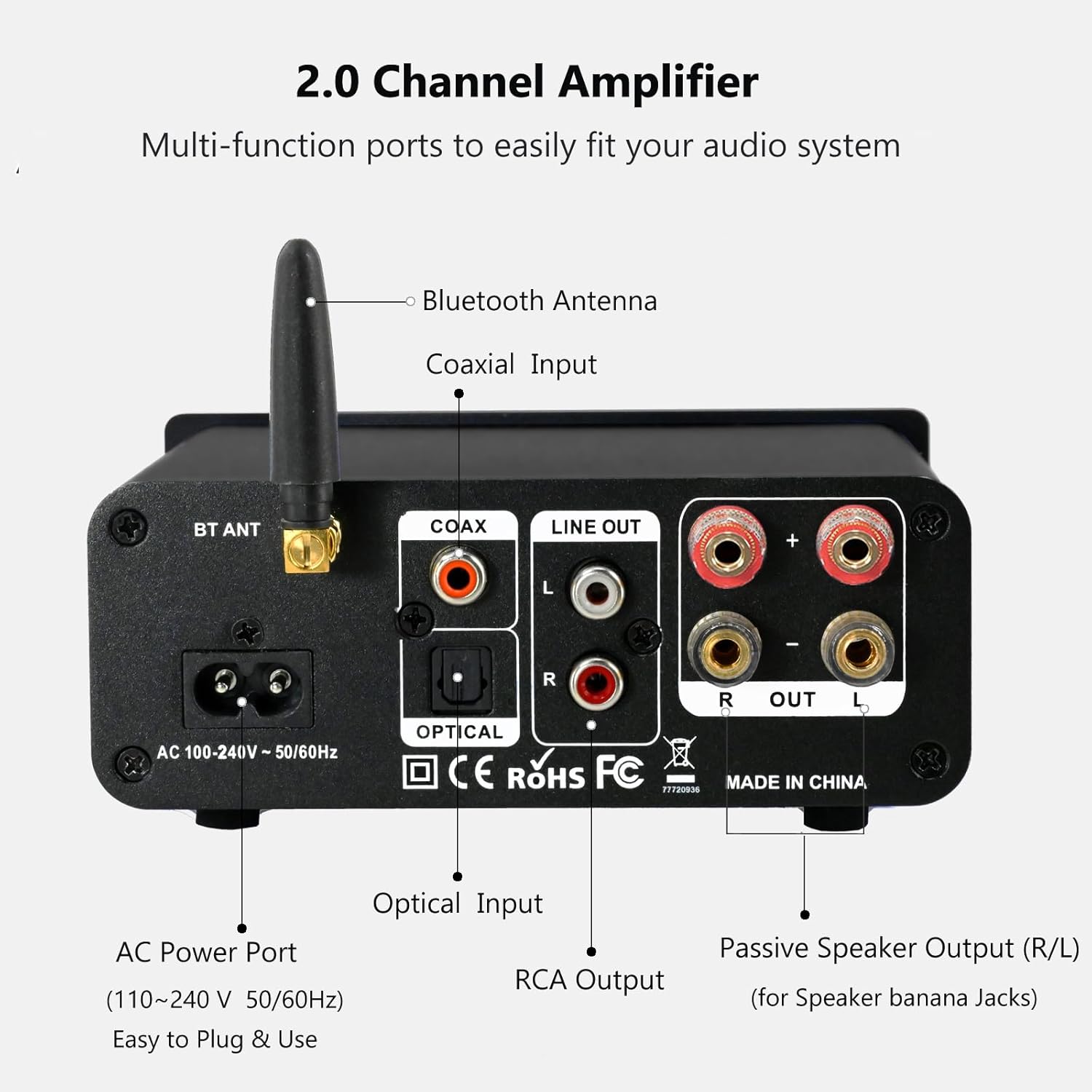
The rear panel provides connections for the Bluetooth antenna, Coaxial and Optical inputs, RCA Line Out, passive speaker outputs, and the AC power port.
- BT ANT (Bluetooth Antenna): Connect the included Bluetooth antenna for optimal wireless range and stability.
- COAX (Coaxial Input): Digital audio input for devices with a coaxial output.
- OPTICAL (Optical Input): Digital audio input for devices with an optical (Toslink) output.
- LINE OUT (RCA L/R): Analog audio output for connecting to powered speakers or a subwoofer.
- PASSIVE SPEAKER OUTPUT (R/L): Connect passive speakers using banana plugs or bare speaker wire.
- AC POWER PORT: Connect the supplied AC power cord (100-240V ~ 50/60Hz).
5. Тохиргоо
5.1 Чанга яригчийг холбох

The LONPOO Mini Hi-Fi Amplifier seamlessly integrates with your home audio setup, providing clear sound to passive bookshelf speakers.
- Идэвхгүй чанга яригч: Connect your passive bookshelf speakers to the PASSIVE SPEAKER OUTPUT (R/L) terminals on the rear panel. Ensure correct polarity (+ to + and - to -) for each speaker. You can use banana plugs or strip the speaker wire ends and insert them into the terminals.
- Powered Speakers/Subwoofer: If you wish to connect powered speakers or a subwoofer, use an RCA cable to connect them to the LINE OUT (RCA L/R) хойд самбар дээрх портууд.
5.2 Аудио эх сурвалжийг холбох
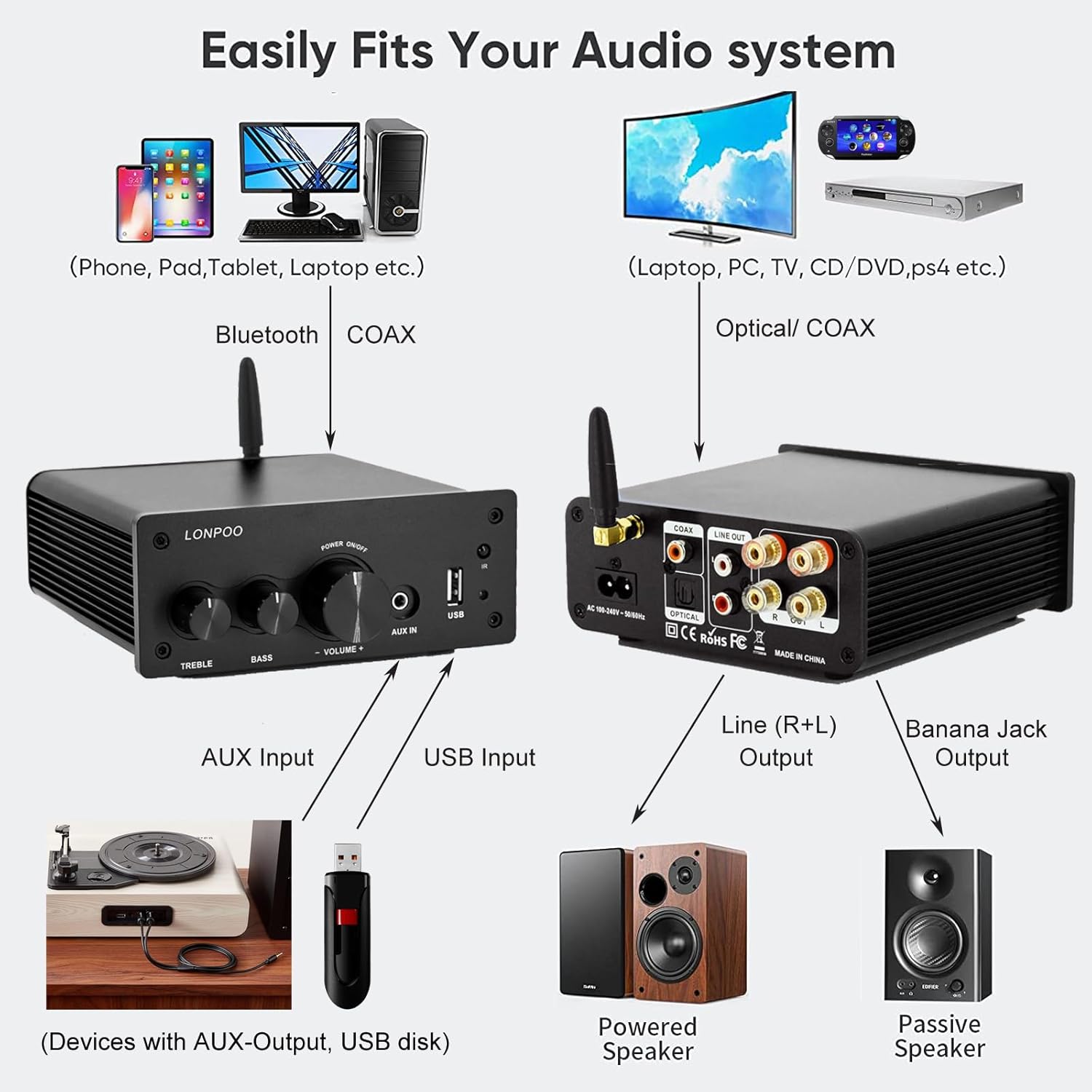
This diagram illustrates how the amplifier connects to a wide range of audio sources and output devices, including phones, PCs, TVs, CD players, powered speakers, and passive speakers.
- Bluetooth: Ensure the Bluetooth antenna is connected to the BT ANT порт.
- AUX оролт: Connect your smartphone, tablet, or other audio device using a 3.5mm audio cable to the AUX ДАХЬ урд самбар дээрх порт.
- USB оруулах: MP3 эсвэл WAV аудио агуулсан USB флаш дискийг оруулна уу files руу USB оролт урд самбар дээрх порт.
- Оптик оролт: Connect your TV, CD player, or game console with an optical output to the ОПТИК port on the rear panel using the provided optical cable.
- Коаксиаль оролт: Connect your TV, DVD player, or other audio source with a coaxial output to the COAX хойд самбар дээрх порт.
5.3 Эрчим хүчний холболт
Нийлүүлсэн хувьсах гүйдлийн тэжээлийн утсыг холбоно уу AC POWER PORT on the rear panel of the amplifier, then plug the other end into a wall outlet.
6. Ашиглалтын заавар
6.1 Асаах/унтраах
асаахын тулд ampөргөгч, удаан дар нь Олон үйлдэлт бариул on the front panel. The indicator light will illuminate. To power off, удаан дар the knob again.
6.2 Оролтын сонголт
To select an audio input source, богино дар нь Олон үйлдэлт бариул. Each short press will cycle through the available inputs: Bluetooth, AUX, USB, Coaxial, and Optical. The Заагч гэрэл will change color to reflect the active input mode (refer to Section 4.1 for color codes).
6.3 Дууны тохируулга
-г эргүүл Олон үйлдэлт бариул дууг нэмэгдүүлэхийн тулд цагийн зүүний дагуу, багасгахын тулд цагийн зүүний эсрэг эргүүлнэ үү.
6.4 Аяны хяналт
-г ашиглана уу ТРЕБЛ болон басс knobs on the front panel to adjust the high and low frequencies of the audio output according to your preference.
6.5 Bluetooth холболт

Connect your smartphone or other Bluetooth-enabled devices wirelessly to the amplifier for convenient audio streaming.
- Ensure the Bluetooth antenna is securely connected.
- асаалттай amplifier and select the Bluetooth input mode (the indicator light will turn blue).
- Bluetooth идэвхжүүлсэн төхөөрөмж дээрээ (жишээ нь, ухаалаг утас, таблет) боломжтой Bluetooth төхөөрөмжүүдийг хайгаарай.
- Select "LONPOO AMP-615" from the list to pair.
- Хос болсны дараа amplifier will play a confirmation sound, and you can stream audio wirelessly.
6.6 USB тоглуулах

The amplifier supports direct audio input via 3.5mm AUX and USB, allowing for plug-and-play functionality with various devices.
USB флаш дискийг дотор нь оруулна уу USB оролт порт. The amplifier will automatically detect and begin playing supported audio files (MP3, WAV). Use the remote control for playback functions like play/pause, next/previous track.
6.7 Алсын удирдлага
Дагалдах алсын удирдлага нь төхөөрөмжийг хялбархан ажиллуулах боломжийг олгодог amplifier from a distance. Functions include:
- Асаах/унтраах
- Дууны хэмжээг нэмэгдүүлэх/доошруулах
- Дууг хаах
- Input Source Selection (BT, AUX, USB, COAX, OPT)
- USB Playback Controls (Play/Pause, Next/Previous Track)
7. Алдаа засах
If you encounter any issues with your LONPOO Mini Hi-Fi Amplifier, please refer to the following troubleshooting guide:
| Асуудал | Боломжит шалтгаан | Шийдэл |
|---|---|---|
| Дууны гаралт байхгүй |
|
|
| Poor sound quality (distortion, low volume) |
|
|
| Bluetooth холболтын асуудал |
|
|
| Optical/Coaxial audio dropouts or no sound |
|
|
| Хувцаслах эсвэл дуугарах чимээ |
|
|
8. Техникийн үзүүлэлтүүд
| Загварын дугаар | AMP-615 |
| Гаралтын хүч | 100W + 100W (200W total) |
| Сувгууд | 2.0 Стерео |
| Bluetooth хувилбар | 5.3 |
| Оролтууд | Bluetooth, Optical, Coaxial, USB, 3.5mm AUX |
| Гаралт | RCA Line Out (L/R), Passive Speaker Output (Banana Jack compatible) |
| Эрчим хүчний хангамж | Хувьсах гүйдэл 100-240V ~ 50/60Hz |
| Хэмжээ (Ө x Ө x D) | 132 мм x 55 мм x 140 мм (ойролцоогоор 5.19 x 2.16 x 5.51 инч) |
| Жин | 1.09 кг (ойролцоогоор 2.4 фунт) |
| Оруулсан бүрэлдэхүүн хэсгүүд | Hi-Fi Amplifier, AC Cable, Remote Control, Optical Cable |
9. Засвар үйлчилгээ
- Цэвэрлэгээ: Disconnect the power before cleaning. Use a soft, dry cloth to wipe the exterior of the ampөргөгч. Зүлгүүрийн цэвэрлэгч эсвэл уусгагч хэрэглэж болохгүй.
- Хадгалах: Хэрэв хадгалж байгаа бол ampөргөгчийг удаан хугацаагаар халаавал цахилгаан тэжээлээс салгаад сэрүүн, хуурай газар хадгална уу.
- Кабелийн менежмент: Бүх кабелийг цэвэрхэн байрлуулж, гэмтээхээс сэргийлж чангалаагүй эсэхийг шалгаарай.
10. Баталгаат хугацаа ба дэмжлэг
This product comes with a standard manufacturer's warranty. For specific warranty details, please refer to the documentation provided with your purchase or contact your retailer. For technical support, troubleshooting assistance, or inquiries regarding spare parts, please contact LONPOO customer service or your authorized dealer. Information regarding spare parts availability is currently unavailable.