
Танилцуулга
The MXR M307 Layers Harmonic Sustain Electric Guitar Effects Pedal is designed to enrich your guitar's sound with organic sustain and harmonic depth. This pedal allows for the creation of multi-layered soundscapes, extending the creative potential of your instrument. It enables complex chord voicings, transcendent melodies, and harmonic ensembles within a compact MXR housing.

Image: The MXR M307 Layers Harmonic Sustain Pedal shown with its included accessories, such as patch cables, a multi-tool, Dunlop picks, and a 9V power supply.
Гол онцлогууд
- Rich, Organic Sustain: Provides high-fidelity sustain that enhances every note and chord.
- Multi-Layering Capability: Creates up to three simultaneous layers of sustain with natural decay.
- Dynamic Triggering: Layers can be engaged via footswitch or automatically triggered by playing dynamics.
- Зөн совингийн удирдлага: Features Mix, Trig, Attack, and Decay knobs for precise sound shaping.
- Sub Octave Switch: Adds a subterranean octave to one or more layers for a deeper sound.
- Нарийвчилсан програмчлал: Offers customization options for modulation intensity, delay time, diffusion, and more.
- External Control Options: Supports external sustain pedals or switches (e.g., MXR Split + Tap) and expression pedals.
- Олон талт холболт: Supports Stereo Input, Stereo Output, and Dry/Wet Split modes.
Тохиргоо
Follow these steps to connect your MXR M307 pedal to your guitar and ampнастан.
- Эрчим хүчний холболт: Connect a 9V DC power supply (center negative, 300mA minimum) to the power input jack on the side of the pedal.
- Оролтын холболт: Connect your guitar to the "IN" jack on the right side of the pedal using a standard 1/4-inch instrument cable.
- Гаралтын холболт: Дөрөөний зүүн талд байрлах "OUT" залгуурыг таны дөрөөтэй холбоно уу amplifier's input using a standard 1/4-inch instrument cable.
- Optional External Control: For advanced functionality, connect an expression pedal or external footswitch to the "CTR" jack on the left side.
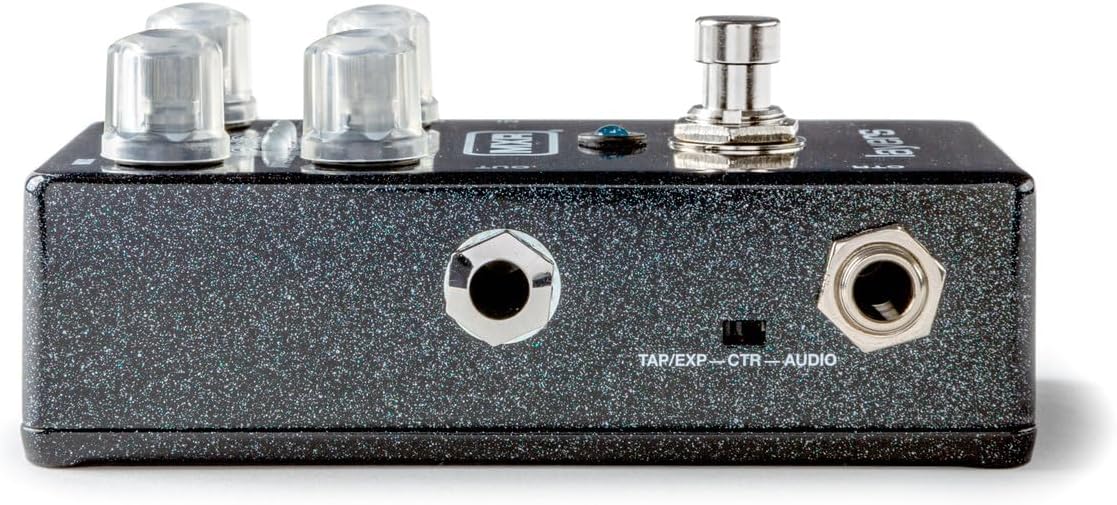
Зураг: Баруун талд view of the MXR M307 pedal, illustrating the 9V power input and the instrument input (IN) jack.
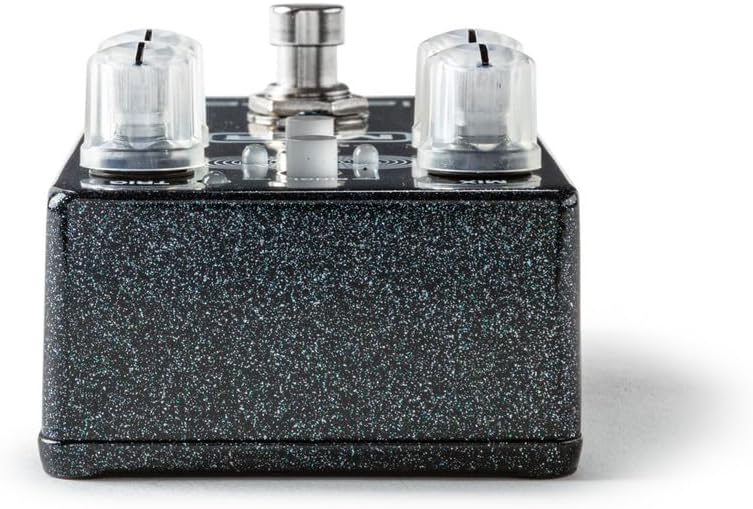
Зураг: зүүн тал view of the MXR M307 pedal, showing the instrument output (OUT) jack and the CTR (Control) jack for external devices.
Ашиглалтын заавар
Хяналтview

Зураг: дээд view of the MXR M307 pedal, highlighting its various controls with corresponding numbers.
- CTR Jack: Used to connect an expression pedal or external footswitch, or to send a dry output signal when using Dry/Wet Split mode (see Advanced Operation).
- Хөлийн унтраалга: Governs the creation and deletion of sustain layers.
- Pressing the footswitch engages a layer.
- Holding the footswitch holds a layer indefinitely until released.
- Upon release, the layer fades out according to the МӨХДӨЛ тохиргоо.
- A double tap clears all layers and bypasses the pedal.
- ДОВТОЛГООНЫ ХЯНАЛТ: Adjusts the fade-in time of each layer.
- MIX товчлуур: Controls the level of the wet signal (the volume of your layers).
- SINGLE Button: Limits the sustain effect to a single layer. By default, there are three simultaneous layers that can overlap. When ГАНЦ is engaged, only one layer will be active at a time.
- TRIG Knob: Sets the sensitivity for auto-triggering layers with your pick attacks.
- Хэзээ ТРИГ is in the OFF position (fully counter-clockwise), auto-triggering is disabled, and only the footswitch can activate layers.
- The TRIG LED is red by default when auto-triggering is enabled; when the input signal exceeds the set threshold, the TRIG LED ногоон болж хувирна.
- For a layer to be triggered, the signal must exceed the threshold (i.e., the TRIG LED is green), and the pedal must detect a pick attack.
- DECAY бариул: Sets the fade-out time of the layers, mimicking natural string vibrations by decaying high frequencies first.
- SUB OCT Switch: Engages a sub-octave effect, taking one or more of your layers down an octave for a deeper, subterranean sound.
Layering Mechanics
- The pedal supports up to three active layers, each indicated by its own mini LED.
- Layers can be triggered manually by the footswitch or automatically based on your playing dynamics (controlled by the ТРИГ бариул).
- To hold a layer with the footswitch: Play a note or chord, then press and hold the footswitch. Release to allow the layer to fade.
- To auto-trigger layers: Adjust the ТРИГ knob to set the sensitivity. Layers will be created in response to your attack.
- Combining methods: With ГАНЦ mode disengaged, you can hold a layer with the footswitch and then auto-trigger additional layers over it.
Нарийвчилсан үйл ажиллагаа
The MXR M307 offers extensive customization through its programming functions. These allow you to adjust parameters beyond the front panel controls.
- Програмчлагдах параметрүүд: Adjust modulation intensity, delay time, diffusion, and other advanced settings. Refer to the full MXR M307 manual (available online) for detailed programming instructions.
- External Sustain/Tap Control: Use a keyboard sustain pedal or an off-board switch (e.g., MXR Split + Tap) connected to the CTR jack to trigger layers.
- Илэрхийллийн дөрөө нэгтгэх: Connect an expression pedal to the CTR jack to blend setting configurations, such as with the Volume(X) 8 Pedal.
- Stereo and Dry/Wet Modes: The pedal supports Stereo Input, Stereo Output, and Dry/Wet Split modes for enhanced routing flexibility. Consult the comprehensive manual for setup details on these modes.
Засвар үйлчилгээ
- Цэвэрлэгээ: Дөрөөний гадна талыг цэвэрлэхийн тулд зөөлөн, хуурай даавуу ашиглаарай. Зүлгүүрийн цэвэрлэгч эсвэл уусгагчаас зайлсхий.
- Эрчим хүчний хангамж: Always use a regulated 9V DC power supply with a center-negative polarity and a minimum current rating of 300mA. Using an incorrect power supply can damage the unit and void the warranty.
- Хадгалах: Ашиглаагүй үедээ дөрөөг сэрүүн, хуурай газар, нарны шууд тусгал болон хэт өндөр температураас хол хадгална уу.
- Кабелийн холболтууд: Ensure all cables are securely connected. Periodically check cables for wear and tear.
Алдааг олж засварлах
| Асуудал | Боломжит шалтгаан | Шийдэл |
|---|---|---|
| No sound or weak signal. | Incorrect cable connections, faulty cables, incorrect power supply, pedal in bypass mode. |
|
| Layers are not triggering automatically. | TRIG knob set to OFF, insufficient input signal, SINGLE mode engaged. |
|
| Layers fade too quickly or too slowly. | DECAY knob setting. | -ийг тохируулна уу МӨХДӨЛ knob to achieve the desired fade-out time. |
| Undesired noise or hum. | Газардуулгын гогцоо, цахилгаан хангамжийн эвдрэл, бусад электроникийн хөндлөнгийн оролцоо. |
|
Үзүүлэлтүүд
| Параметр | Үнэ цэнэ |
|---|---|
| Загварын дугаар | M307 |
| Зүйлийн жин | 1.33 фунт (ойролцоогоор 0.6 кг) |
| Багцын хэмжээ | 5.9 x 4.8 x 2.75 инч (ойролцоогоор 15 x 12.2 x 7 см) |
| Эрчим хүчний эх үүсвэр | Утастай цахилгаан |
| Ботьtage | 9 вольт DC |
| Ampарилгах | 300 саяamps (minimum) |
| Дохионы формат | Аналог |
| Тоног төхөөрөмжийн интерфейс | HP-HSC |
| Өнгө | Black (sparkle finish) |
Баталгаат болон дэмжлэг
For specific warranty information, please refer to the documentation included with your purchase or visit the official MXR website. MXR products typically come with a limited warranty covering manufacturing defects.
FCC дагаж мөрдөх: Энэ төхөөрөмж нь FCC дүрмийн 15-р хэсэгт нийцдэг. Ашиглалт нь дараах хоёр нөхцлийн дагуу явагдана: (1) Энэ төхөөрөмж нь хортой хөндлөнгийн оролцоо үүсгэхгүй, (2) энэ төхөөрөмж нь хүсээгүй ажиллагааг үүсгэж болзошгүй хөндлөнгийн оролцоо зэрэг хүлээн авсан аливаа хөндлөнгийн оролцоог хүлээн авах ёстой.

Зураг: Доод талд view of the MXR M307 pedal, displaying the FCC compliance sticker.
For technical support or further assistance, please contact MXR customer service through their official channels.