
1. Танилцуулга
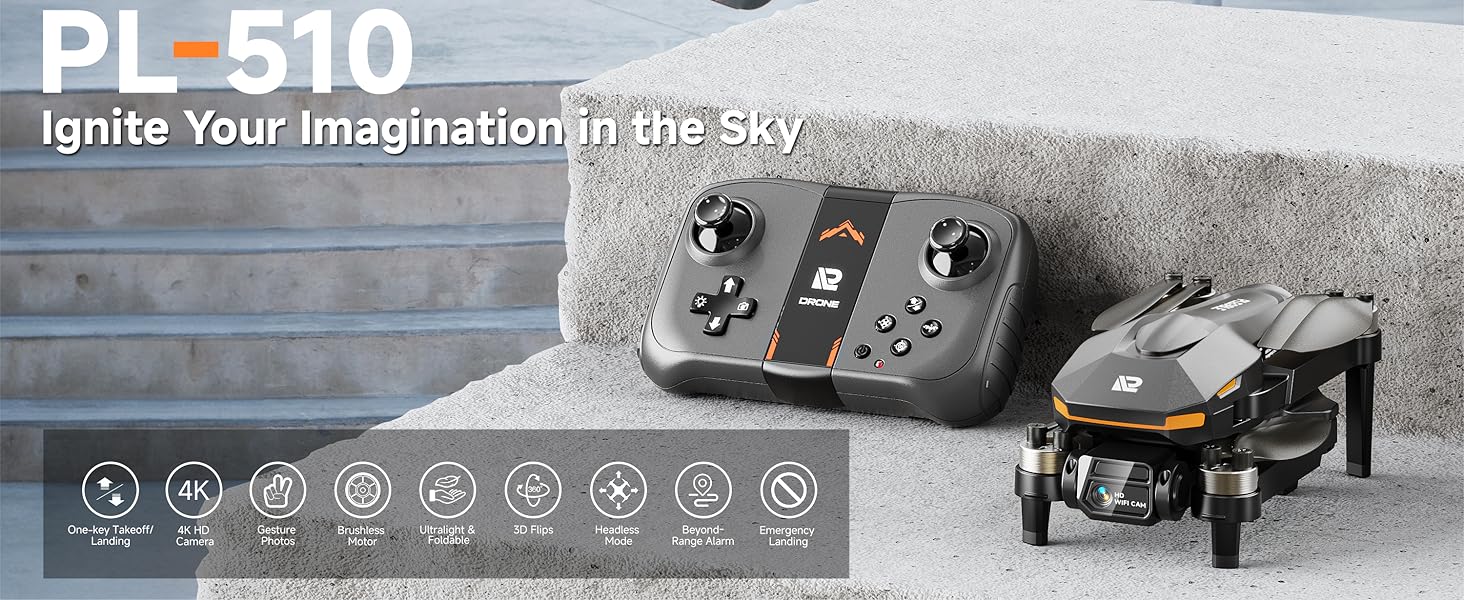
Welcome to the user manual for your PLEGBLE PL-510 Drone. This drone is designed for both beginners and experienced users, featuring a 4K HD camera, brushless motors for stable flight, and a foldable design for portability. Please read this manual thoroughly before operating your drone to ensure safe and optimal performance.

The PLEGBLE PL-510 drone and its complete set of accessories.
2. Хайрцагт юу байна
Your PLEGBLE PL-510 Drone package includes the following components:
- Зөөврийн цүнх
- Propeller (Spare set)
- Алсын удирдлага
- Халив
- Screw (Spare set)
- 2 х Лити Полимер батерей
- USB цэнэглэгч кабель
All included components of the PLEGBLE PL-510 Drone.
3. Бүтээгдэхүүн дууссанview
The PLEGBLE PL-510 drone is equipped with advanced features for an enhanced flying experience:
- 4K HD Camera with FPV: Capture crisp 3840 x 2160 resolution videos and photos. Features a shock-absorbing mount for smooth footage and a 90° adjustable lens for immersive FPV transmission.
- Сойзгүй мотор: Provides superior performance, longer life, and greater energy efficiency compared to traditional brushed motors. Designed for higher flight speeds and less power consumption.
- Өргөтгөсөн нислэгийн хугацаа: Dual-battery system offers up to 30 minutes of continuous flight. Batteries support USB-C/PD for faster charging and are UL-certified for up to 500 recharge cycles.
- Ultra-Lightweight & Foldable: Weighs less than 250 grams, making it easy to carry and fly without FAA or Remote ID registration in the U.S. The foldable design enhances portability.
- Multifunctional Control: Supports remote controller, app, and voice control. Features include responsive gesture photo, optical flow positioning for stable flight, automatic altitude adjustment, one-key takeoff/landing, emergency stop, and altitude hold.
- Beyond-Range and Data Loss Alert: Provides alerts when the drone is beyond its control range (328-492ft) or when the battery is low, minimizing the risk of loss.
4K HD Camera with adjustable lens.

Dual batteries for extended flight.

Efficient brushless motor technology.

Ultra-lightweight and foldable design.
4. Тохиргоо
Follow these steps for initial setup of your PLEGBLE PL-510 Drone:
- Батерейг цэнэглэх: Ensure both drone batteries are fully charged using the provided USB charging cable. The indicator light on the battery will turn green when fully charged.
- Батерейг суулгах: Insert a charged battery into the drone until it clicks securely into place.
- Unfold Drone Arms: Gently unfold all four propeller arms until they lock into position.
- Алсын удирдлагын батерейг суурилуулах: Алсын удирдлагад 2 AAA батерей (багцад ороогүй) оруулна уу.
- Асаах: Turn on the drone and then the remote control. The drone's LED will flash, then become steady once synchronized.
- Шалгалт тохируулга: Place the drone on a flat, level surface. Press the Trimmer Mode button on the remote control to calibrate the gyroscope. The drone's LED will change from flashing to steady light, indicating successful calibration.
- Апп холболт (заавал биш): Download the official PLEGBLE drone app on your smartphone. Connect your phone to the drone's Wi-Fi network (usually named 'PLEGBLE-XXXX'). This allows for FPV viewing and additional control options.

Visual guide for quick setup steps.
Тохиргооны видео заавар
This video demonstrates the unboxing, initial setup, and basic flight of the PLEGBLE PL-510 drone, including battery installation and controller functions.
5. Дроныг ажиллуулах
The PLEGBLE PL-510 offers intuitive controls for a seamless flying experience.
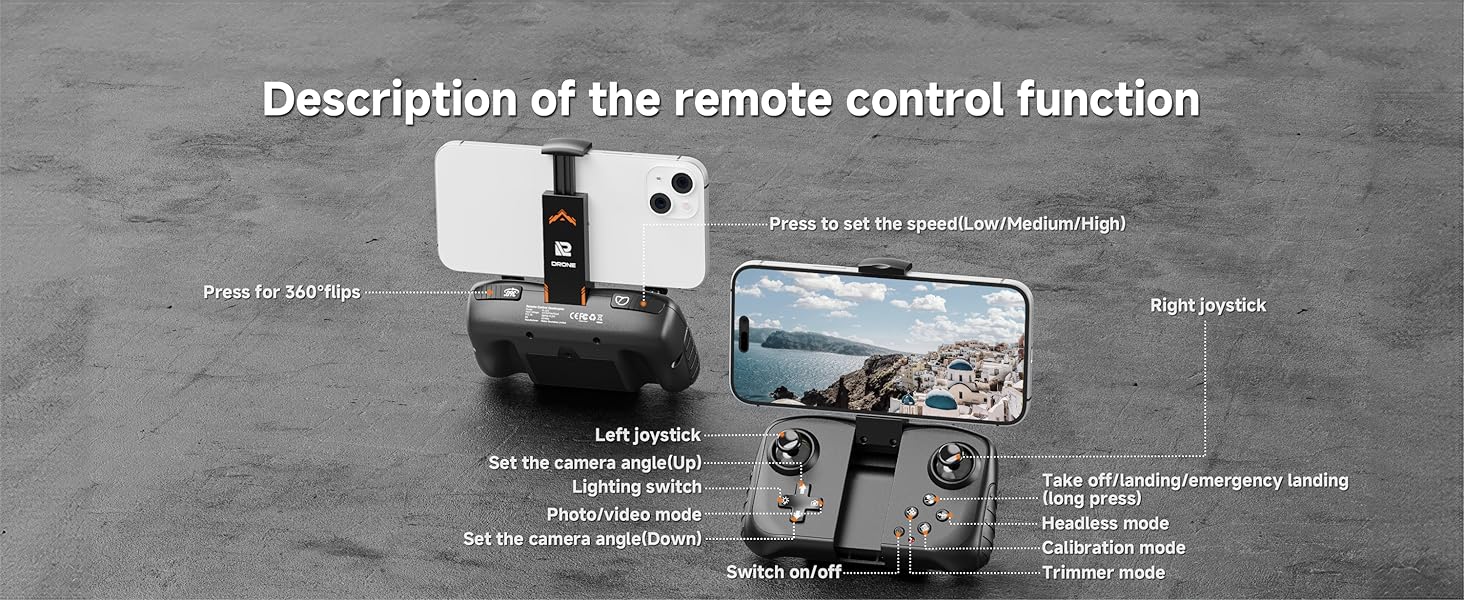
Алсын удирдлагын функцууд

Дэлгэрэнгүйview of the remote control layout and functions.
- Нэг түлхүүрээр хөөрөх/буух: Press the dedicated button for automatic takeoff or landing.
- Жойстик: Control drone movement (forward/backward, left/right, ascend/descend, rotate).
- Хурдны тохируулга: Cycle through low, medium, and high-speed modes to suit your flying environment and skill level.
- Камерын өнцгийн тохируулга: Use the designated buttons to adjust the camera's vertical angle during flight.
- Фото/Видео горим: Switch between taking photos and recording videos.
- 360° эргэлтүүд: Ганц товчлуур дарахад гайхалтай агаарын үзүүлбэрүүдийг гүйцэтгээрэй.
App Control (FPV)
For an immersive First Person View (FPV) experience, attach your smartphone to the remote control and connect via the PLEGBLE drone app. The app provides a real-time view from the drone's camera and additional control features like
Ask a question about this manual
Ask about setup, troubleshooting, compatibility, parts, safety, or missing instructions. Manuals+ will review the question and use this page’s manual context to help answer it.