
1. Танилцуулга
Welcome to the user manual for your Emerson CKSS7071 Sunrise Smartset Alarm Clock Radio. This device is designed to enhance your daily routine with its unique features, including a sunrise simulation, soothing sound options, Bluetooth connectivity, and an 8-color dimmable LED display. Please read this manual thoroughly to understand the full functionality and ensure proper use and care of your new alarm clock radio.
Видео 1: Дууслааview of the Emerson CKSS7071 Sunrise Smartset Alarm Clock Radio. This video demonstrates the key features and design of the product.
2. Аюулгүй байдлын чухал мэдээлэл
- Төхөөрөмжийг ажиллуулахаас өмнө бүх зааврыг уншина уу.
- Эдгээр зааврыг цаашид лавлах зорилгоор хадгална уу.
- Энэ төхөөрөмжийг усны ойролцоо бүү ашигла.
- Зөвхөн хуурай даавуугаар цэвэрлэ.
- Агааржуулалтын нүхийг хааж болохгүй. Үйлдвэрлэгчийн зааврын дагуу суурилуулна.
- Радиатор, халаалтын төхөөрөмж, зуух болон бусад төхөөрөмж (үүнд ampөргөгч) дулаан үүсгэдэг.
- Цахилгааны утсыг гишгэх, хавчихаас хамгаалаарай, ялангуяа залгуур, залгуур, төхөөрөмжөөс гарах цэг дээр.
- Зөвхөн үйлдвэрлэгчээс заасан хавсралт/дагалдах хэрэгслийг ашиглана уу.
- Аянга шуурганы үед эсвэл удаан хугацаагаар ашиглаагүй үед энэ төхөөрөмжийг цахилгааны залгуураас салга.
- Бүх үйлчилгээг мэргэшсэн үйлчилгээний ажилтнуудад шилжүүлээрэй. Төхөөрөмж нь цахилгаан тэжээлийн утас, залгуур гэмтсэн, шингэн асгарсан, эд зүйл унасан, бороо, чийгэнд өртсөн, хэвийн ажиллахгүй байгаа тохиолдолд засвар үйлчилгээ хийх шаардлагатай. , эсвэл хасагдсан.
3. Багцын агуулга
Багцыг нээхэд бүх зүйл байгаа эсэхийг шалгана уу:
- Emerson CKSS7071 Sunrise Smartset Alarm Clock Radio
- АС тэжээлийн хувиргагч
- Хэрэглэгчийн гарын авлага
4. Бүтээгдэхүүн дууссанview
4.1 Урд хэсэг View

Зураг 1: Урд view of the alarm clock, featuring the digital time display and the sunrise simulation light panel.
The front of the unit features the main 1.2-inch LED time display and the large circular light panel for sunrise simulation and ambient lighting. Indicators for AM/PM, Alarm 1/2, and Bluetooth status are also visible.
4.2 тал View (Хяналт)
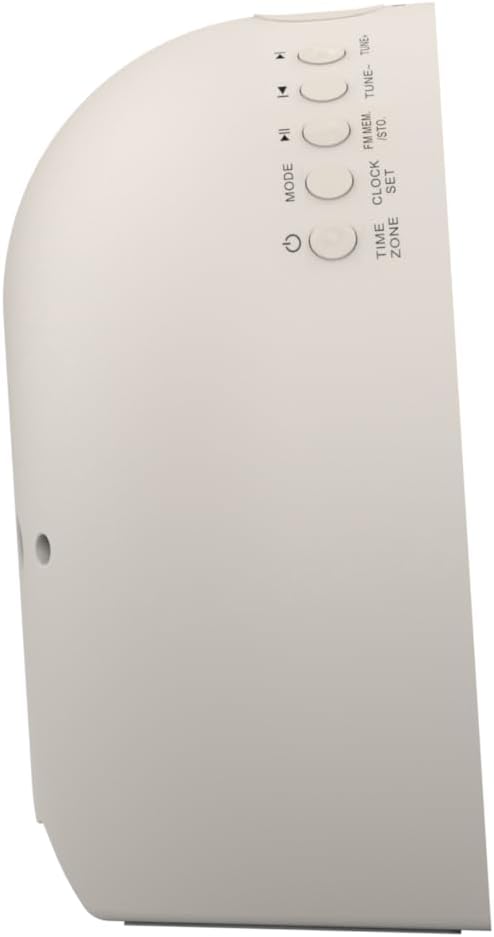
Зураг 2: Хажуу тал view of the alarm clock, highlighting the control buttons for various functions.
The side panel houses the primary control buttons, including Power, Mode, Clock Set, Time Zone, Tune/Skip, and Volume controls. These buttons are used for setting time, alarms, and navigating audio functions.
4.3 Арын View

Зураг 3: Арын view of the alarm clock, showing the speaker grille and power connection port.
The rear of the unit features the main speaker grille and the power input port for connecting the AC adapter.
5. Тохиргоо
5.1 Эрчим хүчний холболт
- Plug the AC power adapter into the DC IN jack located on the back of the unit.
- Plug the other end of the adapter into a standard wall outlet (AC 100-240V, 50/60Hz).
- Төхөөрөмж автоматаар асах болно.
5.2 SmartSet Automatic Time Setting
The SmartSet system automatically sets the correct time and date as soon as you plug in the unit. It also maintains time and alarm settings during power disruptions or outages, provided the button cell battery is installed.
5.3 Зайны нөөц суурилуулах
A button cell battery (CR2032, included) is required for battery backup. This ensures that time and alarm settings are retained during a power outage.
- Төхөөрөмжийн доод хэсэгт зайны тасалгааг ол.
- Зайны тасалгааны тагийг нээ.
- Insert one CR2032 button cell battery, ensuring the correct polarity (+/-).
- Зайны тасалгааны тагийг сайтар хаа.
6. Ашиглалтын заавар
6.1 Цагийг гараар тохируулах
- -г удаан дар ЦАГИЙН ЦЭВЭР товч. Цагийн тоо анивчих болно.
- -г ашиглана уу TUNE -/+ цагийг тохируулах товчлуурууд. дарна уу ЦАГИЙН ЦЭВЭР баталгаажуулах.
- The minute digits will flash. Use the TUNE -/+ Минутыг тохируулахын тулд товчлууруудыг дарна уу. ЦАГИЙН ЦЭВЭР баталгаажуулах.
- Continue this process to set the year, month, and day.
- дарна уу ЦАГИЙН ЦЭВЭР цаг тохируулах горимоос гарахын тулд дахин дарна уу.
6.2 Дохиоллын тохиргоо (Дохиоллын 1 ба Дохиоллын 2)
The unit features dual alarms. Follow these steps for each alarm:
- -г удаан дар Сэрүүлэг 1 or Сэрүүлэг 2 товч. Сэрүүлгийн цагийн тоо анивчих болно.
- -г ашиглана уу TUNE -/+ Сэрүүлгийн цагийг тохируулахын тулд тус тусын товчлууруудыг дарна уу. СЭРҮҮЛЭГ товчийг дарж баталгаажуулна уу.
- Сэрүүлгийн минутын цифрүүд анивчих болно. Ашиглах TUNE -/+ buttons to adjust the alarm minutes. Press the respective СЭРҮҮЛЭГ товчийг дарж баталгаажуулна уу.
- Select the alarm source (Buzzer, FM Radio, or Soothing Sound). Press the respective СЭРҮҮЛЭГ товчийг дарж баталгаажуулна уу.
- Adjust the alarm volume using the VOL -/+ buttons. Press the respective СЭРҮҮЛЭГ товчийг дарж баталгаажуулна уу.
- The alarm is now set. The alarm indicator (AL1 or AL2) will appear on the display.
6.3 Нар мандах симуляци
The sunrise simulation feature gradually brightens the light panel before your set alarm time, mimicking a natural sunrise to gently wake you.
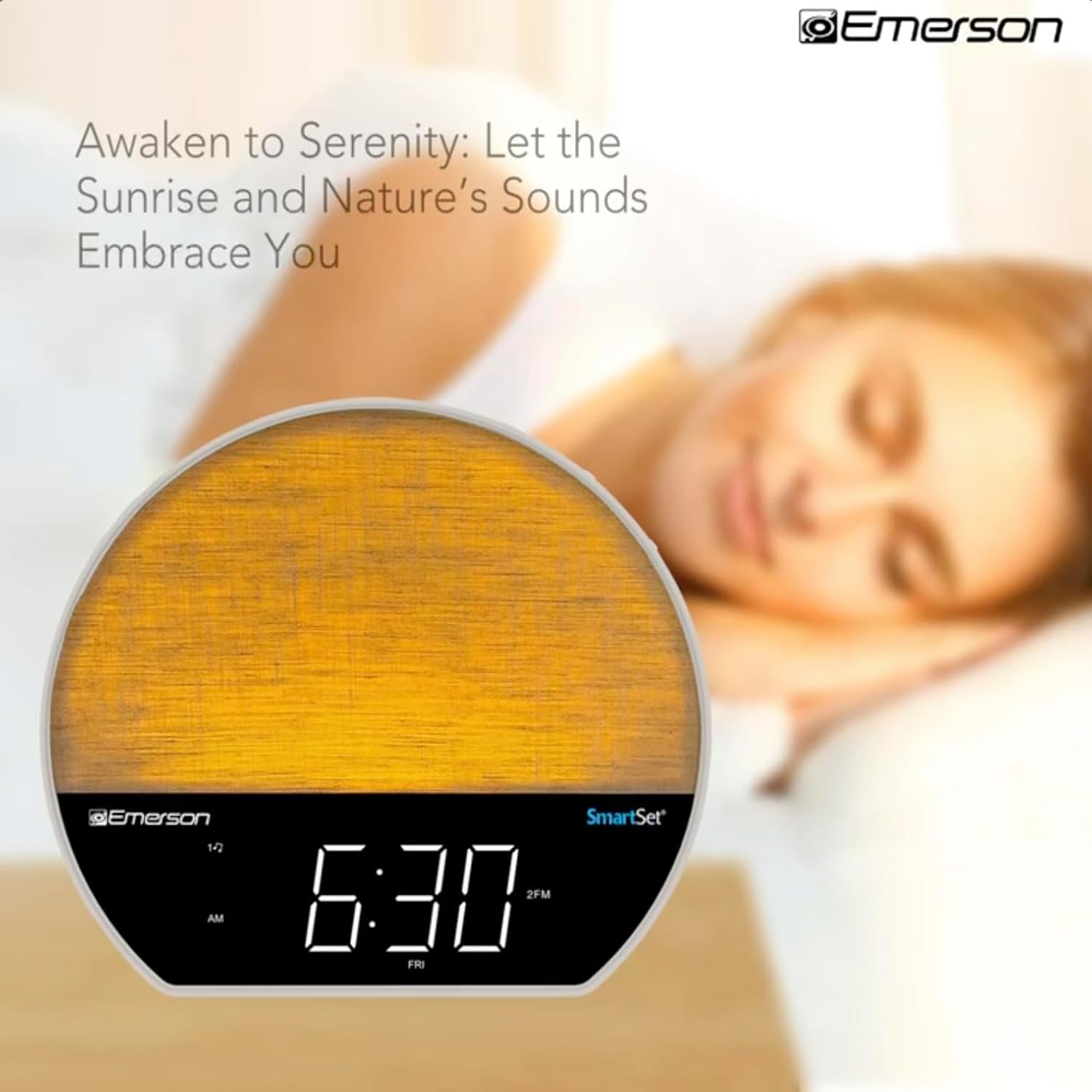
Зураг 4: The alarm clock simulating a sunrise with a warm, increasing гэрлийн эрчим.
To activate, ensure the sunrise option is selected during alarm setup. The light will begin to brighten 30 minutes before the alarm sounds.
6.4 Soothing Sounds and White Noise
The unit includes 6 soothing sounds and white noise to help with relaxation or waking up.
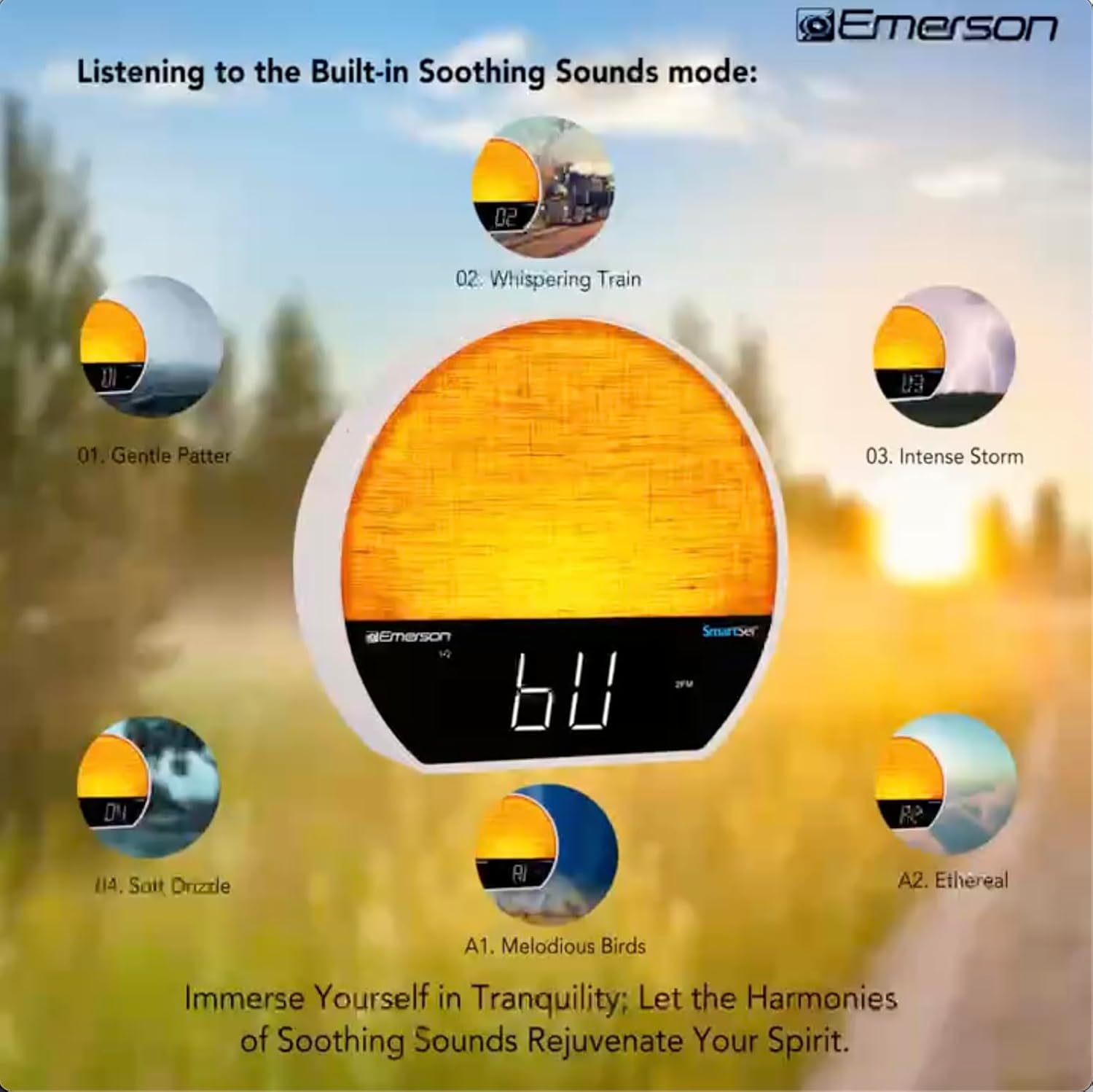
Зураг 5: Visual representation of the six soothing sound modes available on the alarm clock.
- дээр дарна уу MODE button repeatedly until the Soothing Sound mode is selected.
- -г ашиглана уу TUNE -/+ buttons to cycle through the available sounds (e.g., Gentle Patter, Whispering Train, Intense Storm, Soft Drizzle, Melodious Birds, Ethereal, White Noise).
- Ашиглан дууны хэмжээг тохируулна уу VOL -/+ товчлуурууд.
6.5 Bluetooth чанга яригчийн функц
Connect your smartphone or other Bluetooth-enabled device to stream audio wirelessly.

Зураг 6: The alarm clock in Bluetooth mode, paired with a mobile device for audio streaming.
- дээр дарна уу MODE button until 'BT' appears on the display, indicating Bluetooth mode.
- On your device, enable Bluetooth and search for 'Emerson CKSS7071'.
- Select the device to pair. A confirmation tone will sound upon successful pairing.
- Та одоо сэрүүлгийн чанга яригчаар дамжуулан төхөөрөмжөөсөө аудио тоглуулах боломжтой.
6.6 FM радиогийн ажиллагаа
Tune into your favorite FM radio stations.
- дээр дарна уу MODE Дэлгэц дээр 'FM' гарч иртэл товчийг дарна уу.
- дээр дарна уу TUNE -/+ buttons briefly to manually tune to a station.
- -г удаан дар TUNE -/+ Дараагийн боломжтой станцыг автоматаар хайх товчлуурууд.
- Станцыг хадгалахын тулд товчийг удаан дарна уу FM MEM Урьдчилан тохируулсан тоо анивчих хүртэл товчийг дарна уу. TUNE -/+ урьдчилан тохируулсан дугаарыг сонгоод дараа нь дарна уу FM MEM дахин хадгалах.
6.7 LED Decor and Dimmer Control
Customize the ambient light with 8 different colors and adjust the brightness.

Зураг 7: The alarm clock demonstrating its 8-color dimmable LED decor options.
- дээр дарна уу ГЭРЭЛ button to cycle through the 8 available colors or turn the light off.
- To adjust the brightness of the LED decor light, press and hold the ГЭРЭЛ button. The brightness will cycle through 5 levels. Release the button at your desired brightness.
6.8 Дэлгэцийн бүдэгрүүлэгчийн удирдлага
Adjust the brightness of the 1.2-inch LED time display.

Зураг 8: The alarm clock illustrating the five distinct levels of display luminescence.
дээр дарна уу ДИММЕР button (often combined with another function, refer to button labels) to cycle through 4 levels of display brightness (Bright, Moderate, Dim, Faint).
6.9 Унтах цаг хэмжигч
Set a timer for the audio to automatically turn off after a specified duration.

Зураг 9: The alarm clock set for a sunset sleep timer, providing a harmonious end to the day.
- While audio is playing (FM or Soothing Sound), press the УНТАХ товч.
- дээр дахин дахин дарна уу УНТАХ button to cycle through available sleep timer durations (e.g., 15, 30, 60, 90 minutes, or OFF).
- The audio will automatically turn off after the selected time.
6.10 Түр хойшлуулах функц
Сэрүүлэг дуугарах үед товчийг дарна уу УНТАХ товчлуурыг (ихэвчлэн дээд талд нь том товчлуур) дарж хэдэн минутын турш сэрүүлгийн дууг түр хаах боломжтой. Түр хойшлуулсны дараа сэрүүлэг дахин дуугарна.
7. Засвар үйлчилгээ
7.1 Цэвэрлэгээ
- Цэвэрлэхийн өмнө төхөөрөмжийг цахилгааны залгуураас үргэлж салга.
- Гаднах гадаргууг цэвэрлэхийн тулд зөөлөн, хуурай даавуу ашиглана уу.
- Do not use liquid cleaners, abrasive cleaners, or chemical sprays, as these may damage the finish.
7.2 Батерейг солих
If the time and alarm settings are not retained during a power outage, the button cell backup battery may need to be replaced. Follow the instructions in section 5.3 to replace the CR2032 battery.
8. Алдаа засах
| Асуудал | Боломжит шалтгаан | Шийдэл |
|---|---|---|
| Төхөөрөмж асахгүй байна. | Цахилгаан адаптер холбогдоогүй эсвэл алдаатай байна. | АС адаптер нь төхөөрөмж болон ажиллаж байгаа ханын залгуурт найдвартай залгагдсан эсэхийг шалгаарай. |
| Цахилгаан унтарсны дараа цаг/дохиоллын тохиргоо алдагдсанtage. | Нөөц батерей дууссан эсвэл суурилуулаагүй байна. | Install or replace the CR2032 button cell battery (see section 5.3). |
| Сэрүүлэг дуугарахгүй байна. | Сэрүүлэг идэвхжээгүй эсвэл дууны түвшин хэт бага байна. | Ensure the alarm is set and activated (AL1/AL2 indicator on). Increase alarm volume. |
| Bluetooth төхөөрөмжийг холбох боломжгүй. | Unit not in Bluetooth mode or device too far. | Ensure the unit is in Bluetooth mode ('BT' displayed). Move your device closer to the unit. Try unpairing and re-pairing. |
| FM радио хүлээн авах чадвар муу. | Антен сунгагдаагүй эсвэл хөндлөнгийн оролцоо. | Extend the FM wire antenna fully and reposition it for better reception. Avoid placing near other electronic devices. |
| Дэлгэц хэт тод/бүдэг байна. | Display dimmer setting needs adjustment. | дээр дарна уу ДИММЕР button to cycle through brightness levels (see section 6.8). |
9. Техникийн үзүүлэлтүүд
| Онцлог | Дэлгэрэнгүй |
|---|---|
| Загварын дугаар | CKSS7071 |
| Эрчим хүчний эх үүсвэр | AC 100-240V, 50/60Hz (via AC adapter) |
| Зайны нөөцлөлт | 1 x CR2032 Button Cell Battery (included) |
| Дэлгэцийн төрөл | 1.2 инчийн LED дэлгэц |
| Bluetooth хувилбар | V5.4 |
| Тайвшруулах дуу чимээ | 6 Nature Sounds + White Noise |
| LED Decor Colors | 8 Dimmable Colors |
| Бүтээгдэхүүний хэмжээ (W x D x H) | 7.09" x 3.15" x 6.37" |
| Жин | Тодорхойлоогүй |
10. Баталгаат хугацааны мэдээлэл
Emerson products are manufactured to the highest quality standards. This product is covered by a limited warranty against defects in materials and workmanship for a period of one (1) year from the original date of purchase. This warranty does not cover damage caused by misuse, accident, unauthorized modification, or normal wear and tear. Proof of purchase is required for all warranty claims. Please retain your receipt.
11. Хэрэглэгчийн дэмжлэг
If you have any questions, require assistance, or experience issues with your Emerson CKSS7071 Sunrise Smartset Alarm Clock Radio, please contact our customer support team.
- Webсайт: Visit the official Emerson webТүгээмэл асуултууд болон туслах эх сурвалжуудын сайт.
- Имэйл: Бүтээгдэхүүнийхээ сав баглаа боодол эсвэл албан ёсны төлөөлөгчөөс лавлана уу webхарилцагчийн үйлчилгээний имэйл хаягийн сайт.
- Утас: Бүтээгдэхүүнийхээ сав баглаа боодол эсвэл албан ёсны төлөөлөгчөөс лавлана уу webХарилцагчийн үйлчилгээний утасны дугаарын сайт.
Please have your model number (CKSS7071) and proof of purchase ready when contacting support.