
1. Бүтээгдэхүүн дууссанview
The Generic A19 is a compact and portable 1080P recording camera designed for various applications, including conference recording, outdoor sports, and general surveillance. Featuring a magnetic back clip and a 90-degree rotatable lens, it offers versatile mounting and recording angles. This device is equipped with a built-in microphone for audio capture and supports external memory cards for storage.

Image 1.1: The A19 camera's compact size, shown held in a hand, highlighting its portability.
2. Багцын агуулга
Хайрцагнаас задлахдаа багцын агуулгыг шалгана уу. Хэрэв ямар нэг зүйл дутуу эсвэл гэмтсэн бол хэрэглэгчийн дэмжлэгтэй холбоо барина уу.
- Generic A19 Portable Recording Camera
- USB цэнэглэгч кабель
- Хэрэглэгчийн гарын авлага
Жич: A memory card is not included and must be purchased separately.

Image 2.1: Contents of the product package, showing the camera, user manual, and USB cable.
3. Бүтээгдэхүүний онцлог
- High-Definition Recording: Captures video in 1080P resolution (1920x1080) for clear visuals.
- Wide-Angle Rotatable Lens: Features a GC1054 100° wide-angle lens that can rotate 90° for flexible recording perspectives.
- Суурилагдсан микрофон: Omnidirectional capacitor MIC for clear audio recording (WAV format, 512KBPS).
- Соронзон арын хавчаар: Allows for easy attachment to clothing or metallic surfaces.
- Зөөврийн дизайн: Compact and lightweight for discreet and convenient use.
- Extended Storage Support: Supports TF (MicroSD) cards up to 128GB (not included).
- Батерейны урт наслалт: Equipped with a 400mAh battery, providing approximately 150 minutes of continuous video recording.
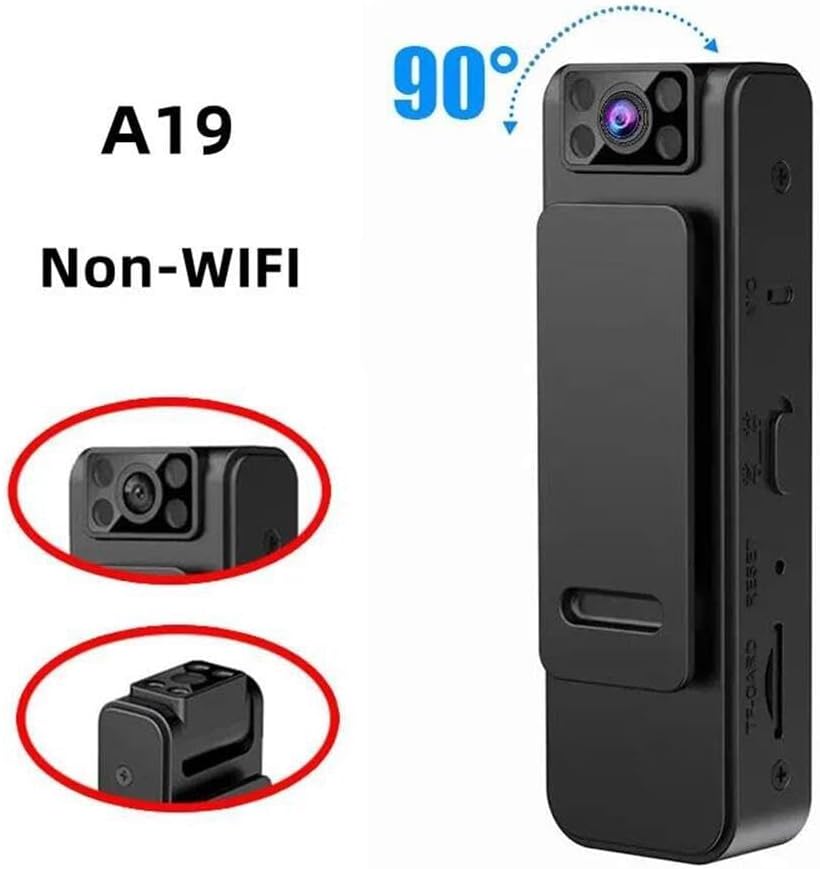
Image 3.1: The A19 camera demonstrating its 90-degree rotatable lens feature.
4. эд ангиудыг тодорхойлох
Familiarize yourself with the various parts and controls of your A19 recording camera:

Image 4.1: Multiple views of the A19 camera, highlighting its various buttons, ports, and features.
- Линз: The camera's recording lens, capable of 90-degree rotation.
- Заагч гэрэл: Displays device status (e.g., charging, recording, standby).
- Эрчим хүч / горим товч: Used to power the device on/off and switch between recording modes.
- Бичлэг хийх товч: Initiates and stops video or audio recording.
- TF-CARD Slot: Insert your MicroSD memory card here.
- USB Port (Micro USB): Төхөөрөмжийг цэнэглэж, компьютерт холбох зориулалттай.
- MIC: Built-in microphone for audio capture.
- Дахин тохируулах товч: Used to reset the device in case of malfunction.
- Буцах клип: Magnetic clip for attaching the camera to various surfaces.
5. Тохиргоо
5.1 Санах ойн карт оруулах
- Камер унтарсан эсэхийг шалгаарай.
- Locate the TF-CARD slot on the side of the device.
- Gently insert a MicroSD (TF) card (up to 128GB, Class 10 or higher recommended) into the slot with the gold contacts facing down until it clicks into place.
- Авахын тулд картыг гартал нь бага зэрэг түлхэх хэрэгтэй.
5.2 Төхөөрөмжийг цэнэглэх
- Connect the provided USB cable to the camera's Micro USB port.
- Connect the other end of the USB cable to a USB power adapter (DC5V-1A recommended) or a computer's USB port.
- The indicator light will illuminate during charging and typically change color or turn off when fully charged.
- Бүрэн цэнэглэхэд ойролцоогоор 2-3 цаг зарцуулагдана.
6. Ашиглалтын заавар
6.1 Асаах/унтраах
- Асаах: Press and hold the Power/Mode button for approximately 3 seconds until the indicator light turns on.
- Унтраах: Press and hold the Power/Mode button for approximately 3 seconds until the indicator light turns off.
6.2 Видео бичлэг хийх
- Ensure the camera is powered on and in video recording mode (check indicator light status, refer to specific light patterns in a full manual if available).
- Press the Recording button once to start video recording. The indicator light will typically flash slowly to indicate recording is in progress.
- To stop recording, press the Recording button again. The indicator light will return to standby mode.
- Videos are saved as AVI files (1920x1080) on the inserted memory card.
6.3 Audio Recording (Voice Recorder Mode)
If your device supports a dedicated audio recording mode:
- With the camera powered on, press the Power/Mode button briefly to switch to audio recording mode (indicator light pattern will change).
- Press the Recording button once to start audio recording.
- Press the Recording button again to stop audio recording.
- Аудио files are saved as WAV files (512KBPS).
6.4 Компьютерт холбогдох
- Камер унтарсан эсэхийг шалгаарай.
- USB кабель ашиглан камераа компьютертээ холбоно уу.
- The camera will be recognized as a removable disk. You can then access the recorded video and audio files.
6.5 Линзийг эргүүлэх
The camera lens can be manually rotated up to 90 degrees to adjust your recording angle. Gently pivot the lens assembly to the desired position.
7. Засвар үйлчилгээ
- Цэвэрлэгээ: Use a soft, dry cloth to clean the camera body. For the lens, use a specialized lens cleaning cloth and solution if necessary. Avoid harsh chemicals.
- Хадгалах: Store the camera in a cool, dry place away from direct sunlight, extreme temperatures, and high humidity.
- Батерейны арчилгаа: Зайны ашиглалтын хугацааг уртасгахын тулд зайгаа ойр ойрхон бүрэн цэнэггүй болгохоос зайлсхий. Төхөөрөмжийг удаан хугацаагаар ашиглаагүй байсан ч тогтмол цэнэглэ.
- Санах ойн карт: Periodically format the memory card to maintain optimal performance and prevent data corruption. Back up important files форматлахын өмнө.
8. Алдаа засах
- Төхөөрөмж асахгүй байна: Ensure the battery is charged. If fully charged, try pressing the Reset button with a small pin.
- Бичлэг хийх боломжгүй: Check if a memory card is inserted correctly and if it has sufficient free space. Ensure the card is not corrupted; try formatting it (after backing up data).
- Computer does not recognize the device: Ensure the USB cable is properly connected. Try a different USB port or cable. Ensure the camera is powered off before connecting.
- Poor video/audio quality: Ensure the lens is clean. Check recording settings if adjustable. Ensure the microphone is not obstructed.
- Батерейны богино хугацаа: Ensure the device is fully charged. Battery performance can degrade over time. Avoid operating in extreme temperatures.
9. Техникийн үзүүлэлтүүд

Image 9.1: Dimensions of the A19 portable recording camera.
| Онцлог | Тодорхойлолт |
|---|---|
| Загварын нэр | KLIW002 |
| Линз | GC1054, 100° Wide-angle, 90° Rotation |
| Видео бичлэгийн нягтрал | 1080P (1920 x 1080) |
| Видео формат | AVI |
| Аудио формат | WAV (512KBPS) |
| Суулгасан MIC | Omnidirectional Capacitor MIC |
| Батерей | 402050 / 400 мАч |
| Видео бичлэг хийх хугацаа | Ойролцоогоор 150 минут |
| USB интерфейс | Micro USB / DC5V-1A |
| Санах ойн картны дэмжлэг | Up to 128GB TF (MicroSD) card |
| Ажлын температур | -20 хэмээс 50 хэм хүртэл |
| Зүйлийн хэмжээ | Approx. 8.2cm x 2.6cm x 1.9cm (3.2in x 1.0in x 0.5in) |
10. Баталгаат хугацаа ба дэмжлэг
Энэ бүтээгдэхүүн нь үйлдвэрлэгчийн стандарт баталгаатай ирдэг. Баталгаат хугацааны тодорхой нөхцөл, болзлыг худалдан авах үед өгсөн баримт бичгээс лавлана уу эсвэл жижиглэн худалдаа эрхлэгчтэйгээ холбогдоно уу.
For technical support, troubleshooting assistance, or inquiries about replacement parts, please contact the seller or manufacturer directly through the platform where the product was purchased.