
1. Танилцуулга
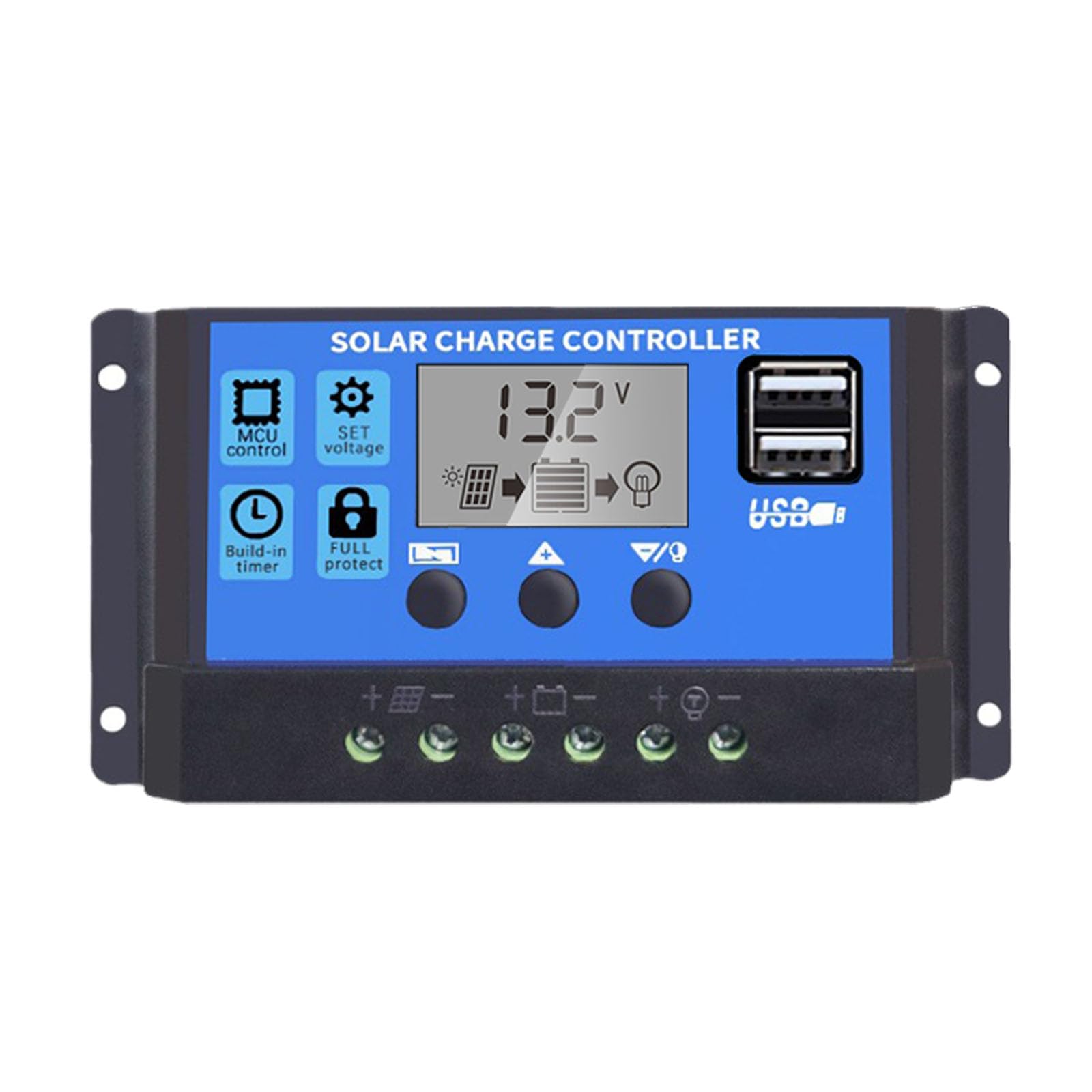
This manual provides essential instructions for the safe and efficient operation of your Saooer Solar Charge Controller. This device is designed to manage the power flow from your solar panel to your battery, ensuring optimal charging and protecting your battery from overcharge and over-discharge. It is compatible with both 12V and 24V solar systems and features a 30A discharge current capacity.
2. Аюулгүй ажиллагааны заавар
Please read all safety instructions carefully before installation and operation. Failure to follow these instructions may result in damage to the controller, battery, or other components, and may cause personal injury.
- Зайны цэнэгийг баталгаажуулна ууtage is sufficient for the controller to recognize the battery type before the first installation.
- The charge controller is suitable for lead-acid batteries (OPEN, AGM, GEL) and lithium-ion batteries. Do not use it for other battery types.
- Install the charge controller indoors, away from direct sunlight, high temperatures, and humid environments.
- Хянагч ажиллах явцад халах болно; сайн агааржуулалтыг хангах.
- The controller's positive and negative terminals should be connected correctly. Reverse connection may damage the device.
- Always connect the battery first, then the solar panel, and finally the load. Disconnect in the reverse order: load, then solar panel, then battery.
3. Бүтээгдэхүүний онцлог
- Системийн ботьtage нийцтэй байдал: Automatically detects 12V or 24V systems.
- Цэнэглэх гүйдэл: 30А хүчин чадалтай.
- Integrated Micro Controller: Manages solar panel and battery operation efficiently.
- Хос USB порт: Supports mobile phone charging (5V/2A output).
- Иж бүрэн хамгаалалт: Includes short-circuit protection, open-circuit protection, reverse polarity protection, and over-load protection to enhance system efficiency and battery lifespan.
- LCD дэлгэц: Provides clear indication of status and data, allowing for convenient mode switching and parameter configuration.
- Тохируулах параметрүүд: User-configurable settings for various battery types and operational needs.
- Баригдсан цаг хэмжигч: For load control.
4. Багцын агуулга
- 1x Saooer Solar Charge Controller (30A)
5. Тохиргоо ба суурилуулалт
Follow these steps for proper installation of the solar charge controller. Incorrect connection order can damage the controller.
- Батерейг холбоно уу: Connect the battery to the charge regulator first. Ensure correct polarity (positive to positive, negative to negative). This allows the controller to recognize the battery voltage.
- Нарны хавтанг холбох: Connect the solar panel to the solar charge controller. Ensure correct polarity.
- Ачааллыг холбоно уу: Connect the consumer or load to the charge controller regulator. Ensure correct polarity.
Important Disconnection Note:
When disconnecting the system, always remove the solar panel connection first, then the load connection, and finally the battery connection. This prevents potential damage to the controller.

6. Ашиглалтын заавар
The controller features an LCD display and three buttons for operation: Цэс, UP, ба ДООШ.
6.1. LCD дэлгэц
The LCD display shows real-time system status and data, including battery voltage, charging current, discharging current, and various parameter settings.
6.2. Товчлуурын функцууд
- MENU товч: Press to cycle through different display modes and enter parameter setting mode. Long press to exit setting mode.
- UP товчлуур: In setting mode, press to increase the parameter value.
- Доошлох товч: In setting mode, press to decrease the parameter value.
6.3. Параметрийн тохиргоо
To adjust parameters (e.g., battery type, charge/discharge voltage limits, load timer settings):
- дээр дарна уу Цэс button until the desired parameter display appears.
- дээр удаан дар Цэс button until the displayed value starts flashing.
- -г ашиглана уу UP болон ДООШ утгыг тохируулах товчлуурууд.
- Once the desired value is set, long press the Цэс button again to save the setting and exit the flashing state.
Refer to the specific icons on the LCD for detailed parameter identification.

7. Засвар үйлчилгээ
Тогтмол засвар үйлчилгээ нь таны нарны цэнэгийн зохицуулагчийн урт наслалт, оновчтой ажиллагааг баталгаажуулдаг.
- Цэвэр байдал: Удирдагчийг тоос шороо, хог хаягдалгүй цэвэр байлгаарай. Цэвэрлэхийн тулд хуурай даавуу ашиглана уу.
- Холболтууд: Periodically check all wiring connections to ensure they are tight and free from corrosion. Loose connections can cause power loss and overheating.
- Агааржуулалт: Ensure the installation area has adequate ventilation to prevent overheating of the controller.
- Шалгалт: Inspect the controller for any signs of physical damage or unusual operation.
8. Алдаа засах
Хэрэв та нарны цэнэг хянагчтайгаа холбоотой асуудалтай тулгарвал дараах нийтлэг алдааг олж засварлах алхмуудыг анхаарч үзээрэй.
- Дэлгэцгүй/Цахилгаангүй: Батерейны холболтыг шалгаж, хангалттай хэмжээний цэнэгтэй эсэхийг шалгаарайtage. Verify all wiring is correct and secure.
- Батерейг цэнэглэхгүй байна: Check solar panel connections and ensure the panel is receiving adequate sunlight. Verify solar panel voltage and current. Ensure the controller's charging parameters are correctly set for your battery type.
- Ачаалах ажиллахгүй байна: Check load connections. Ensure the load is not exceeding the controller's rated current. Check the load timer settings if applicable. The controller may have entered protection mode due to over-discharge or over-load; check the display for error codes or indicators.
- Хэт ботьtagд/Доор-Ботьtage Сэрүүлэг: Зайны хэмжээг шалгана ууtage. Ensure solar panel open-circuit voltage нь хянагчийн хамгийн их оролтын хэмжээнээс хэтрэхгүй байнаtage.
Хэрэв эдгээр шалгалтыг хийсний дараа асуудал арилахгүй бол хэрэглэгчийн дэмжлэгтэй холбогдоно уу.
9. Техникийн үзүүлэлтүүд
| Онцлог | Тодорхойлолт |
|---|---|
| Брэнд | Saooer |
| Загвар | 30А нарны цэнэгийн хянагч |
| Системийн ботьtage | 12V / 24V Auto-sensing |
| Цэнэглэх гүйдэл | 30 А |
| Материал | Металл, хуванцар |
| Дэлгэцийн төрөл | LCD |
| USB гаралт | Dual USB, 5V/2A |
| Оруулсан бүрэлдэхүүн хэсгүүд | 1x Solar Charge Controller |

10. Баталгаат хугацаа ба дэмжлэг
For warranty information, please refer to the documentation provided with your purchase or contact your retailer. For technical support or inquiries, please contact Saooer customer service through their official channels.