
Танилцуулга
The YDS-USB1A-GC1054 V1.0 is a compact 1-megapixel USB camera module designed for various applications requiring high-speed, 720P resolution imaging. This module features a 1/4" GC1054 image sensor and a fixed-focus M12 lens, making it suitable for integration into small devices. It offers plug-and-play functionality via USB 2.0 and is UVC compliant, ensuring broad compatibility with different operating systems.
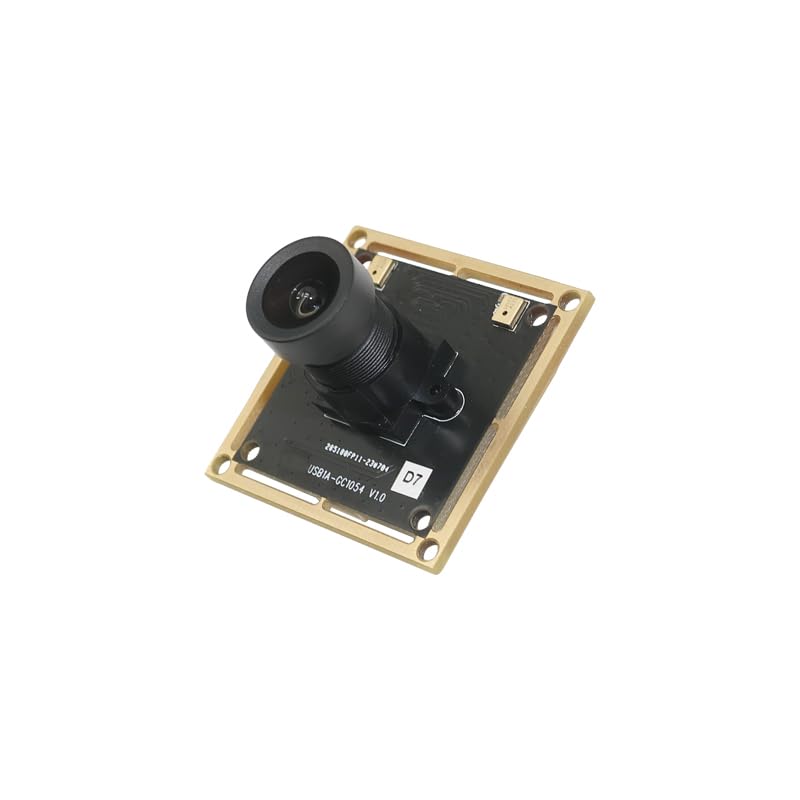
Зураг: хажуу тал view of the YDS-USB1A-GC1054 V1.0 USB camera module, showing the lens assembly extending from the PCB.
Гол онцлогууд
- Шийдвэр: 720P (1280 x 720 pixels) with GC1054 sensor.
- Холболт: High-speed USB 2.0, Plug and Play.
- Гаралтын формат: MJPG.
- Эрчим хүч: Эрчим хүчний хэрэглээ бага.
- Дизайн: Компакт хэмжээ.
- Тохиромжтой байдал: UVC compliant with Windows, Linux, and macOS.
- Нэмэлт дэмжлэг: USB OTG (On-The-Go) support.
Багцын агуулга
Таны багцад бүх зүйл байгаа эсэхийг шалгана уу:
- YDS-USB1A-GC1054 V1.0 Camera Module
- USB Cable (if included in your specific kit)

Зураг: өнцөгтэй view of the YDS-USB1A-GC1054 V1.0 USB camera module, showing the lens and the square PCB with mounting holes.
Тохируулах заавар
- USB кабелийг холбоно уу: If your module came with a separate USB cable, connect one end to the USB port on the camera module.
- Хост төхөөрөмжид холбогдох: Plug the other end of the USB cable into an available USB 2.0 port on your computer (Windows, Linux, macOS) or compatible device (e.g., Raspberry Pi, Android device with OTG support).
- Драйвер суурилуулах: The camera module is UVC (USB Video Class) compliant. This means that in most modern operating systems (Windows XP SP2/SP3, Vista, 7, 8, 10, 11, Android, Mac OS, Linux), drivers will be installed automatically upon connection. No manual driver installation is typically required.
- Холболтыг баталгаажуулах: After connecting, the operating system should recognize the camera. You can verify this in your device manager (Windows) or system information (macOS/Linux).
Ашиглалтын заавар
Once connected and recognized by your system, the camera module can be used with various camera applications.
- Select Camera Input: Open your preferred camera software (e.g., AMCAP, Webкамер Viewer, VLC Player, OBS Studio, or built-in camera applications). In the software settings, select the "YDS-USB1A-GC1054 V1.0" or similar name as your video input device.
- Тохиргоог тохируулах: Most camera applications allow you to adjust video settings such as resolution, brightness, contrast, saturation, white balance, and exposure. The module supports auto-control for saturation, contrast, acutance, white balance, and exposure.
- Тогтмол фокус: This module features a fixed-focus lens. Manual focus adjustment is not required or possible. Ensure your subject is within the optimal focal range for clear images.
- Хамгийн оновчтой гүйцэтгэл: For best performance, ensure adequate lighting in your environment.

Зураг: дээд view of the YDS-USB1A-GC1054 V1.0 USB camera module, showing the lens and the main components on the PCB.
Засвар үйлчилгээ
- Цэвэрлэгээ: Use a soft, dry cloth to gently clean the lens and the module's surface. Avoid using liquid cleaners or abrasive materials.
- Хадгалах: When not in use, store the camera module in a clean, dry, and dust-free environment.
- Харьцуулах: Handle the module by its edges to avoid touching the lens or electronic components.
- Температур: Operate and store the module within the specified operating temperature range of -30°C to +80°C.

Зураг: Доод талд view of the YDS-USB1A-GC1054 V1.0 USB camera module, displaying the electronic components and connectors on the PCB.
Алдааг олж засварлах
- Камер илрээгүй:
- Ensure the USB cable is securely connected to both the module and the host device.
- Компьютер дээрээ өөр USB порт ашиглаж үзнэ үү.
- Боломжтой бол өөр USB кабелиар туршиж үзээрэй.
- Компьютер эсвэл хост төхөөрөмжөө дахин ачаална уу.
- Check your device manager (Windows) or system information (macOS/Linux) to see if the device is listed.
- Зураг байхгүй эсвэл хар дэлгэц байхгүй:
- Verify that the correct camera is selected in your camera application settings.
- Ensure there is sufficient lighting in the environment.
- Close other applications that might be using the camera.
- Зургийн чанар муу:
- Clean the lens gently with a soft, dry cloth.
- Ensure the subject is within the optimal focal range for the fixed-focus lens.
- Adjust brightness, contrast, and exposure settings in your camera software.
- Хангалттай гэрэлтүүлэг байгаа эсэхийг шалгана уу.
- Завсарлагатай холболт:
- USB холболт тогтвортой, сулараагүй эсэхийг шалгаарай.
- Avoid using excessively long or unshielded USB extension cables.
- Check for power fluctuations if using a USB hub.
Үзүүлэлтүүд
| Загварын дугаар | YDS-USB1A-GC1054 V1.0 |
| Зургийн мэдрэгч | GC1054 |
| Мэдрэгчийн төрөл | CMOS, 1/4" |
| Үр дүнтэй шийдэл | 0.9 МП |
| Видео бичлэгийн нягтрал | 1280 x 720 (720P) |
| Пикселийн хэмжээ | 3.0 мкм x 3.0 мкм |
| Линзний төрөл | M12 Fixed Focus, 650nm IR Cut |
| EFL (Effective Focal Length) | 3.75 мм |
| View Өнцөг | 79.0° (DFOV), 67.0° (HFOV), 38° (VFOV) |
| Хамгийн их диафрагм | 2.15 f |
| Холболт | USB 2.0 |
| Гаралтын формат | MJPG |
| Оролтын хэмжээtage | DC 5V |
| Ажиллаж буй гүйдэл | Хамгийн ихдээ 500мА |
| Ашиглалтын температур | -30 хэмээс +80 хэм хүртэл |
| ПХБ хэмжээ | 38.00 x 38.00 мм (1.5" x 1.5") |
| Линзний хэмжээс | 13.00 x 13.00 x 24.31 мм |
| Системийн нийцтэй байдал | Windows XP (SP2, SP3), Vista, 7, 8, 10, 11, Android, Mac OS, Linux, or OS with UVC Driver (e.g., Raspberry Pi by USB Port) |
| Програм хангамжийн нийцтэй байдал | AMCAP, Webкамер Viewer, V4L2 Controls, Contacam, VLC Player, MotionEye OS, iSpy, ZoneMinder, Yawcam |
Баталгаат болон дэмжлэг
Энэ бүтээгдэхүүн нь хамт ирдэг 1 жилийн баталгаатай as specified by the manufacturer, YDSCAM.
For technical support or warranty claims, please contact the seller, YingDeShun Co. Ltd., through the platform where the product was purchased. Ensure you have your purchase details and model number (YDS-USB1A-GC1054 V1.0) available when contacting support.