1. Танилцуулга
This manual provides detailed instructions for the installation, operation, and maintenance of your ZUMIMALL BK05 3MP Outdoor Security Camera. Please read this manual thoroughly before using the product to ensure proper functionality and safety.
Багцын агуулга
Доор жагсаасан бүх зүйл таны багцад байгаа эсэхийг шалгаарай.
- BK05 Camera x1
- Хэрэглэгчийн гарын авлага x1
- Charging Set (10ft USB-C Cable & Adapter) x1
- Шургийн багц x1
- Warning Card x1
- Байршлын наалт x1

Image: Contents of the ZUMIMALL BK05 Security Camera package.
2. Бүтээгдэхүүн дууссанview
The ZUMIMALL BK05 is a 3MP outdoor security camera designed for comprehensive surveillance. It features 360° PTZ (Pan-Tilt-Zoom) auto-tracking, 24/7 continuous recording, dual-band 2.4G/5G WiFi connectivity, color night vision with a built-in floodlight, and two-way audio communication. The camera is also compatible with Alexa for voice control.
Гол онцлогууд
- 3MP нягтрал: Тодорхой бөгөөд хурц видео бичлэгийг хүргэж байнаtage.
- 360° PTZ Auto-Tracking: Automatically follows moving targets with 355° horizontal and 90° vertical rotation.
- 24/7 тасралтгүй бичлэг: Wired power ensures constant surveillance.
- Хос зурвасын WiFi: Supports both 2.4GHz and 5GHz networks for flexible connectivity.
- Өнгөт шөнийн хараа: Built-in floodlight enables full-color video even in low-light conditions.
- Хоёр талын аудио: Integrated microphone and speaker for real-time communication.
- Motion & Noise Detection: Sends real-time alerts upon detecting activity.
- IP66 цаг агаарт тэсвэртэй: Гаднах янз бүрийн цаг агаарын нөхцөл байдлыг тэсвэрлэх зориулалттай.

Image: Visual comparison highlighting the detail captured by the ZUMIMALL 3MP camera.
3. Тохиргоо ба суурилуулалт
3.1 Физик суурилуулалт
The camera supports both ceiling and wall mounting. Use the included positioning sticker and screw set to mark and secure the installation location.
- Choose an ideal spot for mounting, ensuring a clear view болон цахилгаан залгуурт нэвтрэх.
- Use the positioning sticker to mark drill holes.
- Нүх өрөмдөж, шаардлагатай бол хананд бэхэлгээ хийнэ.
- Secure the camera base with the provided screws.
- Connect the camera to the power adapter using the 10ft USB-C cable and plug it into a power outlet. Ensure the Type-C cable connector is waterproofed.

Image: Illustration of the two-step installation process for wall or ceiling mounting.
3.2 App Connection and Wi-Fi Setup
The ZUMIMALL BK05 camera connects via dual-band 2.4GHz or 5GHz Wi-Fi. For optimal performance, check signal stability via the ZUMIMALL app before setup.
- Download the ZUMIMALL app from your device's app store.
- Бүртгэл үүсгэх эсвэл нэвтэрнэ үү.
- Tap 'Add Device' and select your camera model (BK05).
- Follow the in-app instructions to connect the camera to your Wi-Fi network. You will be prompted to select either a 2.4GHz or 5GHz network and enter the password.
- Утсан дээрээ гарч ирсэн QR кодыг камерын линзээр уншуулна уу.
- Once connected, the camera will indicate successful pairing, and you can begin live viewing.
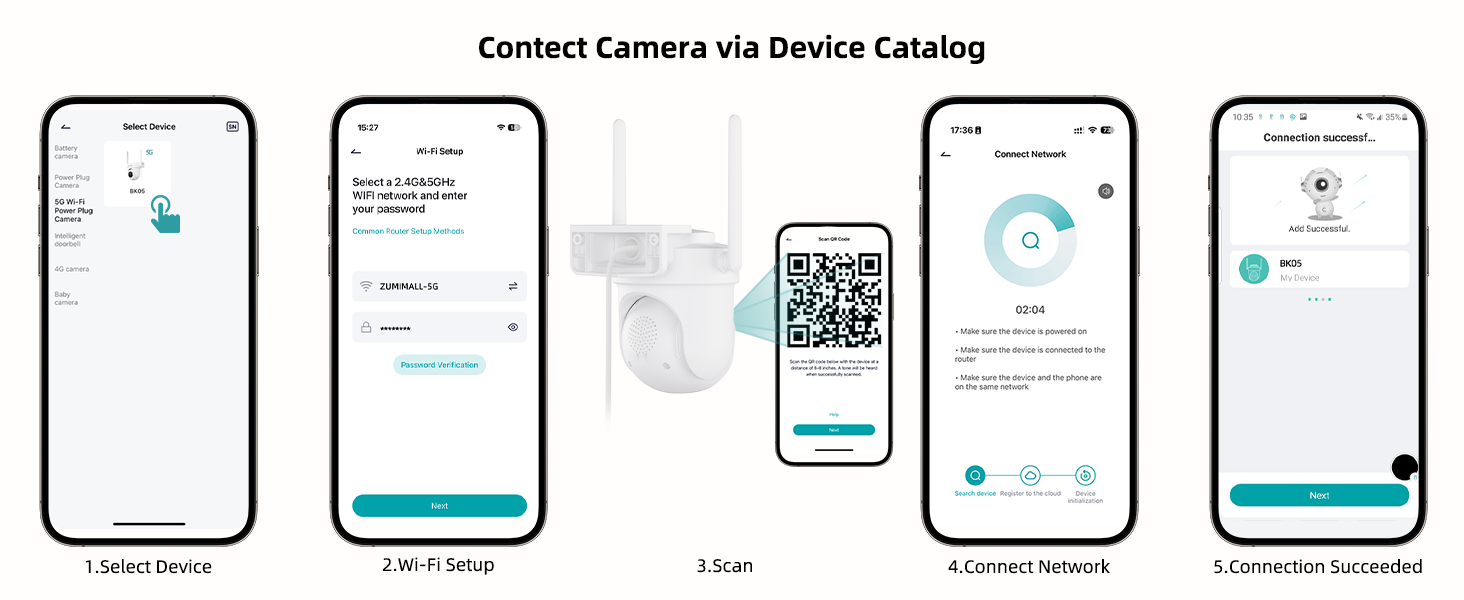
Image: Step-by-step guide for connecting the camera to the ZUMIMALL app.

Image: Explanation of dual-band Wi-Fi support (2.4GHz and 5GHz).
4. Ашиглалтын заавар
4.1 Амьд View болон PTZ хяналт
Access the live feed through the ZUMIMALL app. You can remotely control the camera's pan (horizontal) and tilt (vertical) movements to adjust the viewөнцөг.
- From the app's home screen, tap on your camera to view амьд тэжээл.
- Use the on-screen controls to pan (355°) and tilt (90°) the camera.

Image: PTZ control in action, showing the camera tracking movement.
4.2 Auto-Tracking and Motion Detection
The camera can automatically detect and track moving objects, sending alerts to your smartphone.
- Enable 'Motion Detection' and 'Auto-Tracking' in the camera settings within the app.
- Customize detection sensitivity (Low, Medium, High) to reduce false notifications.
- Set specific detection zones to monitor critical areas and ignore irrelevant ones.

Image: Demonstration of 360° motion tracking.

Image: Accurate detection settings within the app.

Image: Setting up a custom detection zone.
4.3 Бичлэг ба хадгалах
The camera supports 24/7 continuous recording and offers flexible storage options.
- Микро SD карт: Insert a Micro SD card (up to 128GB, not included) for local storage. The camera will automatically overwrite old footage карт дүүрсэн үед.
- Үүл хадгалах сан: Optional cloud storage plans are available for event recordings (6-second clips, saved for 7 days free). Premium cloud storage offers additional features.

Image: 24/7 continuous recording feature.

Image: Non-subscription storage options with Micro SD card and cloud.
4.4 Night Vision and Floodlight
The camera provides clear night vision, including full-color options with its built-in floodlight.
- The built-in floodlight provides 33ft (10 meters) of color night vision.
- Adjust night vision settings in the app to choose between infrared (black and white) or color night vision.

Image: 2K Color Night Vision with spotlight functionality.
4.5 Хоёр талын аудио
Communicate with visitors or deter intruders using the camera's two-way audio feature.
- Шууд дамжуулалтын микрофоны дүрс дээр товшино уу view камерын чанга яригчаар дамжуулан ярих интерфэйс.
- Камерын микрофон нь хяналтын хэсгээс дуу бичлэгийг бичиж авдаг.

Image: Two-way audio communication feature.
4.6 Smart AI Analysis and Audible Alarm
The camera utilizes AI for intelligent detection and can trigger audible alarms.
- The camera can differentiate between humans, pets, cars, and packages (some features may require premium cloud plans).
- An audible alarm can be triggered when noise exceeds 65 decibels, providing proactive protection.
- When motion or humanoids are detected, the camera can trigger both audio and strobe light alarms.

Image: Smart AI analysis detecting different objects.

Image: Audible alarm feature with noise sensitivity settings.

Image: Audio warning and strobe light feature.
4.7 Alexa интеграци
Connect your ZUMIMALL camera with Amazon Alexa for convenient voice control.
- Ensure the camera is already added to the ZUMIMALL app.
- Alexa програмыг нээнэ үү.
- Tap the "More" button in the bottom left corner.
- Select "Skills & Games" and search for "Zumimall."
- Click on the "Zumimall" skill, then tap "ENABLE TO USE."
- Log in to your Zumimall account and click "Authorize."

Image: Voice assistant integration with Alexa and Google Assistant.
4.8 Төхөөрөмж хуваалцах
Share access to your camera with family members or trusted individuals.
- The ZUMIMALL app allows sharing with up to 5 online devices.
- There is no limit to the number of users you can share access with.

Image: Device sharing feature for multiple users and devices.
5. Засвар үйлчилгээ
5.1 Цаг агаарын эсэргүүцэл
The ZUMIMALL BK05 camera is IP66-rated, ensuring protection against dust and water jets. It is designed to function in temperatures ranging from -20°C to 50°C.
- Ensure the camera is installed correctly, following the instructions, especially regarding the waterproof Type-C cable connector.
- Do not install the camera upside down to maintain waterproof performance and proper feed display.
5.2 Ерөнхий арчилгаа
- Regularly check the camera lens for dirt or obstructions and clean gently with a soft, dry cloth.
- Ensure the power adapter remains dry for optimal performance.
- Periodically check the mounting for stability.
6. Алдаа засах
6.1 Нийтлэг асуудал ба шийдвэрлэх арга замууд
- Камер Wi-Fi-д холбогдоогүй байна:
Ensure your Wi-Fi network is 2.4GHz or 5GHz. Check Wi-Fi signal strength at the camera's location using the ZUMIMALL app. Verify the Wi-Fi password is correct. Try restarting your router and the camera. - Байнга тасалдах:
Improve Wi-Fi signal strength by moving the camera closer to the router or using a Wi-Fi extender. Ensure there are no major obstructions (e.g., thick walls) between the camera and the router. - Хөдөлгөөн илрүүлэх сэрэмжлүүлэг хэт их/байнга байдаг:
Adjust the detection sensitivity settings in the app. Configure specific detection zones to focus on relevant areas. - Night vision is unclear:
Ensure the camera lens is clean. Check if the floodlight is enabled for color night vision. Ensure there are no reflective surfaces close to the camera that could interfere with infrared or floodlight illumination. - Хоёр талын дууны асуудал:
Check the volume settings in the app. Ensure there are no obstructions blocking the microphone or speaker on the camera. Verify your phone's microphone permissions for the ZUMIMALL app. - Camera not recording 24/7:
Ensure the camera is continuously powered via the included adapter. If using an SD card, verify it is inserted correctly, formatted, and has sufficient storage capacity.
7. Техникийн үзүүлэлтүүд
| Онцлог | Тодорхойлолт |
|---|---|
| Загварын нэр | BK05 |
| Видео бичлэгийн нягтрал | 3 МП (2К) |
| Холболтын технологи | Wireless (2.4G & 5G Wi-Fi), Plug-in Power |
| Viewing өнцөг | 360 градус (355° тогших, 90° хазайх) |
| Шөнийн харааны хүрээ | 10 метр (33 фут) |
| Хадгалах сонголтууд | Micro SD (128 ГБ хүртэл), Cloud Storage |
| Цаг агаарын эсэргүүцэл | IP66 |
| Ашиглалтын температур | -20 хэмээс 50 хэм хүртэл |
| Тохиромжтой төхөөрөмжүүд | Alexa, Smartphone (Android, iOS) |
| Эрчим хүчний эх үүсвэр | Утастай цахилгаан |
| Хэмжээ (L x W x H) | 5.9 x 5 x 5 инч |
| Зүйлийн жин | 16 унц (0.45 килограмм) |
8. Баталгаат хугацаа ба дэмжлэг
ZUMIMALL is committed to providing quality products and customer support.
8.1 Хэрэглэгчийн дэмжлэг
For any technical queries or assistance, please contact ZUMIMALL customer support. The brand offers one-on-one online support to ensure you receive the help you need.
8.2 Хамгаалалтын төлөвлөгөө
Extended protection plans are available for purchase to cover your device beyond the standard warranty period:
- 2 жилийн хамгаалалтын төлөвлөгөө
- 3 жилийн хамгаалалтын төлөвлөгөө
- Бүрэн хамгаалах (эрхтэй худалдан авалтыг хамарсан сарын төлөвлөгөө)
For details on these plans, please refer to the product listing or contact ZUMIMALL directly.


