
Танилцуулга
Thank you for choosing the Casio MWA-300H Series watch. This manual provides essential information regarding the setup, operation, and maintenance of your new timepiece. Please read this manual carefully to ensure proper use and to fully understand the features of your watch.
The Casio MWA-300H is an analog watch featuring a chronograph, 100-meter water resistance, and luminous hands for enhanced readability. It is designed for versatile wear, suitable for both daily use and recreational water activities.
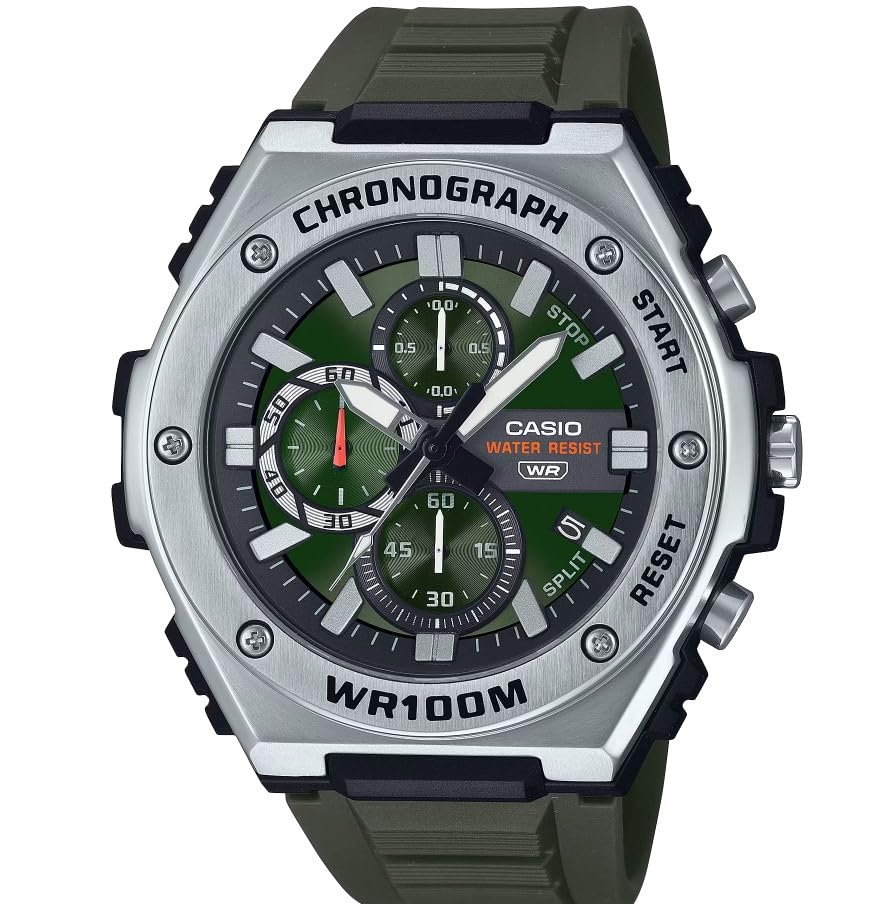
Зураг: Урд view of the Casio MWA-300H Series watch, highlighting its green dial, chronograph sub-dials, and black resin band.
Setup: Initial Settings
Цагийг тохируулах
- Pull the crown out to the second click (time setting position). The second hand will stop.
- Rotate the crown to set the hour and minute hands. Ensure the AM/PM setting is correct if your watch has a 24-hour indicator or date changes at midnight.
- Титэмийг буцааж хэвийн байрлалд нь оруулна уу. Секунд гар хөдөлгөөнийг үргэлжлүүлнэ.
Огноог тохируулах
- Pull the crown out to the first click (date setting position).
- Rotate the crown to set the date. Avoid setting the date between 9:00 PM and 1:00 AM, as this may interfere with the automatic date change mechanism.
- Титэмийг буцааж хэвийн байрлал руу нь түлхээрэй.
Батерейны мэдээлэл
Your Casio MWA-300H watch is powered by 1 LR44 battery, which is included. The battery life is approximately 3 years. When the battery runs low, the watch may exhibit irregular movement or stop. It is recommended to have the battery replaced by a qualified watch technician to maintain water resistance.
Operating: Watch Functions
Хронограф (секундомер) ашиглах нь
The chronograph function allows for precise timing of events. Your watch features a 1/10-second stopwatch that captures elapsed, split, and 1st/2nd place times across three dedicated sub-dials.
- Starting the Stopwatch: Press button A (typically the upper right button) to start the stopwatch.
- Stopping the Stopwatch: Press button A again to stop the stopwatch.
- Resetting the Stopwatch: After stopping, press button B (typically the lower right button) to reset the stopwatch hands to zero.
- Цаг хуваах хэмжилт: While the stopwatch is running, press button B to measure split times. The stopwatch hands will momentarily stop to indicate the split time, then resume timing. Press button B again to release the split time and display the current elapsed time.
Note: Refer to the specific button layout on your watch for exact button assignments.
Water Resistance (100 Meters)
Your Casio MWA-300H watch is water resistant up to 100 meters (330 feet). This rating means the watch is suitable for swimming, showering, and recreational water activities. It is not suitable for diving or snorkeling where significant water pressure changes occur.
- Do not operate the crown or buttons while the watch is wet or submerged.
- Давстай усанд орсны дараа цагийг цэвэр усаар зайлж, арчиж хатаана.
Гэрэлтэгч гар ба тэмдэглэгээ
The watch features luminous hands and markers that absorb light and glow in the dark, providing readability in low-light conditions. The intensity and duration of the glow depend on the amount and type of light exposure.
Засвар үйлчилгээ
Ерөнхий арчилгаа
- Шороо болон чийгийг арилгахын тулд цагийг зөөлөн, хуурай даавуугаар тогтмол арчина.
- Цагийг хэт өндөр температурт, нарны шууд тусгалд удаан хугацаагаар эсвэл хүчтэй соронзон орон руу оруулахаас зайлсхий.
- Keep the watch away from solvents, detergents, perfumes, and cosmetics, as these can damage the resin materials.
Зай солих
When the battery needs replacement, it is highly recommended to take your watch to an authorized Casio service center or a reputable watch repair shop. This ensures that the watch is properly sealed and its water resistance is maintained after battery replacement.
Water Resistance Checks
To maintain the water resistance of your watch, it is advisable to have it inspected periodically (e.g., every 2-3 years) by an authorized service center, especially if it is frequently exposed to water.
Алдааг олж засварлах
| Асуудал | Боломжит шалтгаан | Шийдэл |
|---|---|---|
| Watch hands do not move or move irregularly. | Батерей бага. | Батерейг солино уу. Мэргэжлийн цагны техникчтэй зөвлөлдөнө үү. |
| Цаг буруу байна. | Time not set correctly; watch has stopped and restarted. | Reset the time according to the "Setting the Time" instructions. |
| Огноо шөнө дунд биш, харин үд дунд өөрчлөгдөнө. | AM/PM тохиргоо буруу байна. | Цагийг 12 цагаар урагшлуул. |
| Хронографын гар нь тэг рүү буцдаггүй. | Chronograph hands misalignment. | Consult the full Casio module manual for chronograph hand adjustment procedures, or contact customer support. |
| Цагны доторх чийгшил. | Crown or buttons operated underwater; seals compromised. | Цаашид эвдрэлээс урьдчилан сэргийлэхийн тулд цагийг үзлэг, засвар хийлгэхээр эрх бүхий үйлчилгээний төвд нэн даруй аваачина уу. |
Үзүүлэлтүүд
| Загварын нэр | MWA-300H |
| Дэлгэцийн төрөл | Аналог |
| Хөдөлгөөний төрөл | Кварц |
| Усны эсэргүүцлийн гүн | 100 метр (330 фут) |
| Нэмэлт онцлогууд | Chronograph, Date Display, Luminous Hands |
| Эрчим хүчний эх үүсвэр | Батерейгаар ажилладаг (1 x LR44 багтсан) |
| Кейсийн материал | Давирхай |
| Хамтлаг материал | Давирхай |
| Кристал материал | Давирхай |
| Кейсийн диаметр | 50.9 миллиметр |
| Кейсийн зузаан | 14.3 миллиметр |
| Хамтлагийн өргөн | 22 миллиметр |
| Тэврэлтийн төрөл | Тэврэлт |
Баталгаат болон дэмжлэг
Хязгаарлагдмал баталгаат хугацаа
Your Casio MWA-300H watch comes with a limited warranty. Please refer to the warranty card included with your purchase for specific terms, conditions, and duration of coverage. The warranty typically covers manufacturing defects under normal use.
Хэрэглэгчийн дэмжлэг
For further assistance, technical support, or warranty claims, please contact Casio customer service. You can find contact information on the official Casio webсайт эсвэл цагтайгаа хамт өгсөн баримт бичигт байгаа болно.
For more detailed information, including specific module operations or advanced settings, please visit the official Casio support website or refer to the full module manual for your watch.