
1. Танилцуулга
This manual provides comprehensive instructions for the installation, operation, and programming of your DieseRC Wireless Roller Shutter Remote Control Switch. This device is designed to wirelessly control AC motors, enabling forward, reverse, and stop functions for applications such as garage doors, electric gates, and roller shutters. Please read this manual carefully before use to ensure proper functionality and safety.
2. Багцын агуулга
- 1 x Relay Receiver Board
- 2 x Transmitters (battery included)
- 1 x Бүтээгдэхүүний гарын авлага
3. Техникийн үзүүлэлтүүд
| Онцлог | Тодорхойлолт |
|---|---|
| Receiver Working Voltage | Хувьсах гүйдэл 90V~250V |
| Тайван гүйдэл | <10 мА |
| Макс. Одоогийн | 3A (Inductive Load), 10A (Resistive Load) |
| RF давтамж | 433 МГц |
| Ашиглалтын температур | -30 хэмээс +80 хэм хүртэл |
| Хүлээн авах мэдрэмж | > 97 дБм |
| Number of Storable Remotes | 20 хүртэл |
| Кодлох дэмжлэг | 1527 Learning-Code |
| RF-ийн ажиллах горим | ASK Superheterodyne Wireless Reception |
| Хүлээн авах хүрээ | Approx. 20 ~ 50 meters (open area) |
| Үйлдлийн горимууд | Momentary / Toggle / Latched Mode |
| Дамжуулагчийн батерей | 2 x CR2016 (багтсан) |
| Тохиромжтой төхөөрөмжүүд | Garage door, electric curtain, electric gate, roller door |
4. Тохиргоо
4.1 Аюулгүй байдлын урьдчилан сэргийлэх арга хэмжээ
- Ensure power is disconnected before any wiring.
- Wiring should be performed by a qualified electrician if you are unsure.
- Verify correct polarity (Live, Neutral) to avoid damage or short circuits.
4.2 Хүлээн авагчийн утсыг холбох
Connect the receiver to your AC motor and power supply according to the diagram below. The receiver supports AC 90V-250V input. Ensure secure connections for all wires.

Image: Receiver dimensions and wiring diagram. Note the 'Up' and 'Down' motor connections and AC 90-250V power input.
The receiver features large screw ports for easy installation and metal clips for secure wiring. A transparent flip cover allows for circuit adjustment.

Зураг: Нарийвчилсан view of the receiver's screw terminals and cable compatibility.
4.3 Анхдагч асаалт
After wiring, apply power to the receiver. The indicator light on the receiver will illuminate, indicating it is ready for operation or programming.
4.4 Бүтээгдэхүүн дууссанview Видео
Видео: Энэ видео нь визуал дүрслэлийг өгдөгview of the DieseRC 2201COM receiver and KT03 remote control, highlighting their design and features.
5. Үйлдлийн горимууд
The DieseRC remote control switch supports three main operating modes: Momentary, Toggle, and Latched. All products are set to Toggle mode before shipment. If you wish to change the operating mode, you must first reset the receiver (see Section 6.2).
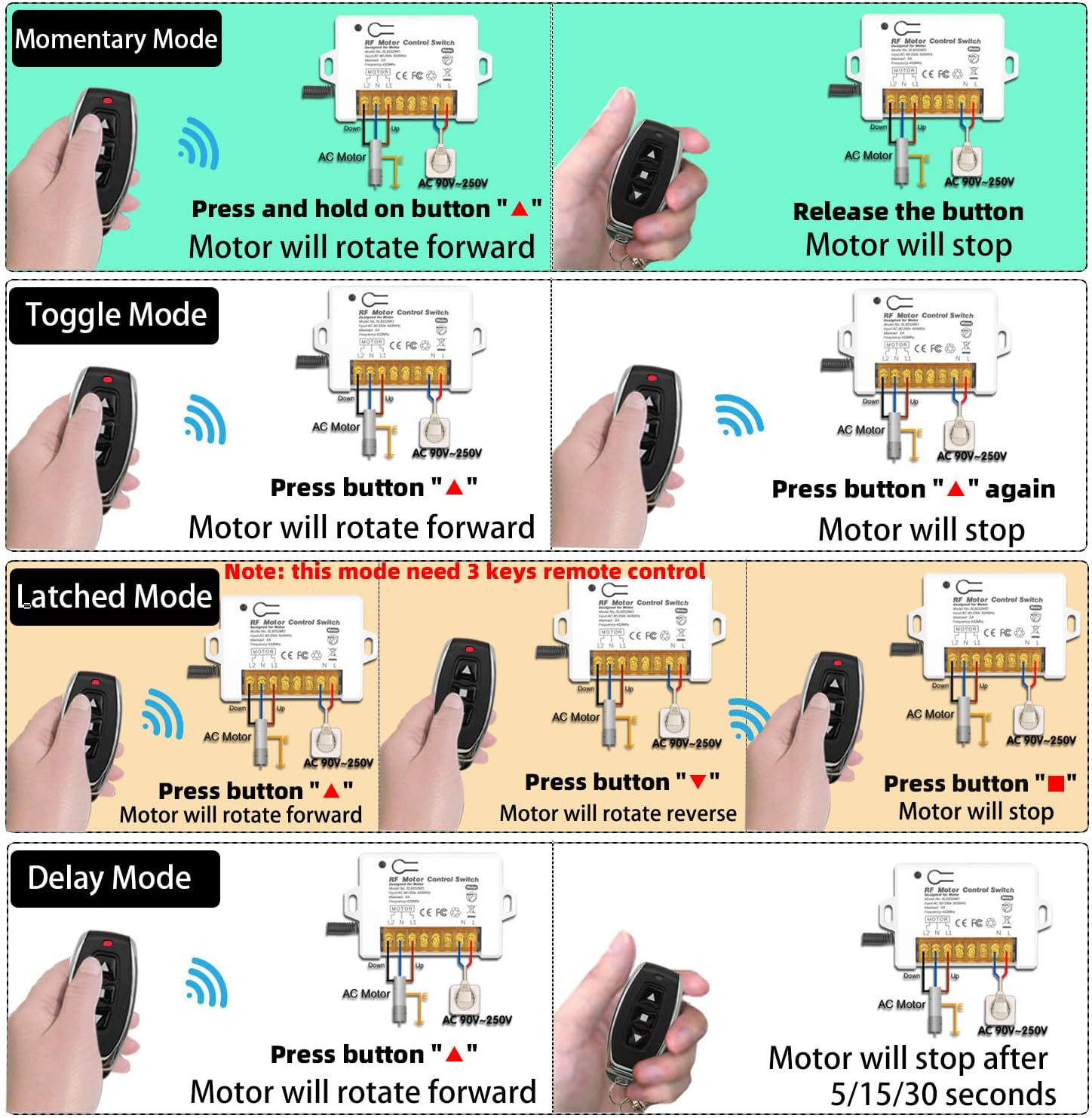
Image: Visual representation of Momentary, Toggle, Latched, and Delay operating modes.
5.1 Түр зуурын горим
- Press and hold the "▲" button: The motor rotates forward.
- Release the button: The motor stops.
5.2 Тоглуулах горим
- "-г дар.▲" button once: The motor rotates forward.
- "-г дар.▲" button again: The motor stops.
5.3 Түгжээтэй горим
- "-г дар.▲" button: The motor rotates forward.
- "-г дар.▼" button: The motor rotates backward.
- "-г дар.■" button: The motor stops.
5.4 Өргөдөлamples

Зураг: Жишээ ньample of the remote control switch used for a garage door.
Video: This video demonstrates various applications of the DieseRC Wireless Roller Shutter Remote Control Switch, showcasing its functionality in controlling different types of AC motors.
6. Алсын удирдлагыг програмчлах
The receiver can store up to 20 transmitters. Follow these steps to program your remote control to the desired operating mode.

Image: Step-by-step programming instructions for different modes.
6.1 Learning a Remote Control
- Press the learning button on the receiver:
- дарна уу 1 удаа for Momentary Mode.
- дарна уу 2 удаа for Toggle Mode.
- дарна уу 3 удаа for Latched Mode.
- "-г дар.▲" button on your remote control. Wait 3 seconds.
- "-г дар.▼" button on your remote control. The programming is successful.
Note: For Latched Mode, the remote control requires 3 keys (Forward, Reverse, Stop).
6.2 Хүлээн авагчийг дахин тохируулах
To clear all programmed remote controls from the receiver's memory:
- Хүлээн авагч дээрх сургалтын товчийг дарна уу 8 удаа.
Important: After resetting, all previously programmed remote controls will no longer work and must be re-programmed.
6.3 Програмчлалын үзүүлэх видео
Video: A step-by-step video guide on how to program the DieseRC 2201COM receiver, covering the different operating modes and remote control pairing.
7. Засвар үйлчилгээ
7.1 Transmitter Battery Replacement
The remote control transmitters use 2 x CR2016 batteries. If the remote's range decreases or it becomes unresponsive, replace the batteries. Refer to the transmitter image for visual guidance.

Image: DieseRC remote control transmitter.
7.2 Цэвэрлэгээ
Wipe the receiver and transmitters with a dry, soft cloth. Do not use abrasive cleaners or solvents.
7.3 Байгаль орчны нөхцөл
Avoid exposing the device to extreme temperatures, high humidity, or direct sunlight. Ensure the receiver is installed in a location with adequate ventilation.
8. Алдаа засах
- Алсын удирдлага хариу өгөхгүй байна:
- Check the battery in the transmitter. Replace if necessary.
- Ensure the receiver has power.
- If the receiver was recently reset, re-program the remote control (see Section 6.1).
- Ensure the remote is within the effective operating range (20-50 meters).
- Motor not moving:
- Бүх холболтууд найдвартай, зөв байгаа эсэхийг шалгана уу (4.2-р хэсгийг үзнэ үү).
- Check the power supply to the receiver and motor.
- Ensure the motor itself is functioning correctly.
- хөндлөнгийн оролцоо:
- While multiple remote control sets can be used in the same area without interference (except in Momentary mode), strong local RF interference might affect performance. Try relocating the receiver if possible.
9. Баталгаат хугацаа ба дэмжлэг
DieseRC products are manufactured to high-quality standards. For specific warranty information, please refer to the product packaging or contact your retailer. If you encounter any issues or require technical assistance, please reach out to DieseRC customer support through the vendor's contact information provided at the point of purchase.