
1. Танилцуулга
This manual provides detailed instructions for the installation, configuration, and operation of your GoodTop GT-ST024M 6 Port 2.5Gb Web Managed Switch. Please read this manual thoroughly before using the device to ensure proper functionality and to maximize its performance.
The GoodTop GT-ST024M is a high-performance web-managed switch designed for small office and home network environments. It features 4 x 2.5 Gigabit Ethernet ports and 2 x 10 Gigabit SFP+ slots, offering flexible connectivity and high-speed data transfer capabilities.
2. Бүтээгдэхүүн дууссанview
2.1 Гол онцлогууд
- Өндөр хурдны холболт: Equipped with 4 x 2.5GbE RJ45 ports and 2 x 10G SFP+ slots for versatile network connections.
- Web Удирдлага: Хялбаршуулсан web interface for configuration of VLAN (802.1Q), QoS, IGMP Snooping, Loop Prevention, MAC address management, and Trunk Group settings.
- Холбоосыг нэгтгэх (LACP): Supports dynamic link aggregation (IEEE 802.3ad) with up to two groups and a maximum of 3 ports per group to increase bandwidth.
- Үр дүнтэй гүйцэтгэл: Utilizes the RTL8372N master chip for low power consumption (approx. 1.3W idle, 12W full load) and reduced heat generation.
- Бат бөх дизайн: Fanless metal housing ensures silent operation and efficient heat dissipation through vents.
- Уян хатан суурилуулалт: Features mounting holes for wall or desk mounting, and includes non-slip mats for stable desktop placement.
2.2 Багцын агуулга
- GoodTop GT-ST024M 2.5Gb Web Удирдах шилжүүлэгч
- Цахилгаан хангамж (DC 12V 1A)
- Non-slip Mats (4 pieces)
2.3 Техник хангамж дууссанview

Image: The GoodTop GT-ST024M switch shown with its retail packaging. The switch is a compact black metal device with front-facing ports and indicators.

Image: Diagram illustrating the front and rear panels of the GoodTop GT-ST024M switch. The front panel features a Power Indicator, 4 x 2.5G RJ45 Ports, and 2 x 10G SFP+ Ports. The rear panel shows the DC 12V 1A power input. A note indicates that this simplified web-managed version does not have a physical reset button and only supports web-based reset.
- PWR LED: Эрчим хүчний төлөвийг заана.
- RJ45 портууд (1-4): 2.5GbE Ethernet ports. Support 10/100/1000M/2.5G adaptive speed and Auto MDI/MDIX.
- SFP+ портууд (5-6): 10G SFP+ slots. Support 10M/100M/1G/2.5G/10G speed. Compatible with RJ45 copper modules, optical fiber modules, DAC, and AOC cables. Note: Does not support GPON/XGSPON modules.
- DC 12V 1A Power Input: Энд багтсан цахилгаан адаптерийг холбоно уу.
3. Тохиргоо
3.1 Физик суурилуулалт
- Байршил: Choose a stable, well-ventilated location for the switch. Ensure it is within reach of power outlets and network cables. The fanless design allows for quiet operation.
- Суулгах (заавал биш):
- Ширээний: Attach the included non-slip mats to the bottom of the switch to prevent movement.
- Хана: Use appropriate screws (not included) to mount the switch using the mounting holes on the bottom panel. The mounting hole spacing is 75mm.

Зураг: Ойролцоогоор view of the bottom of the GoodTop GT-ST024M switch, showing how to attach the non-slip mats to the designated circular indentations.
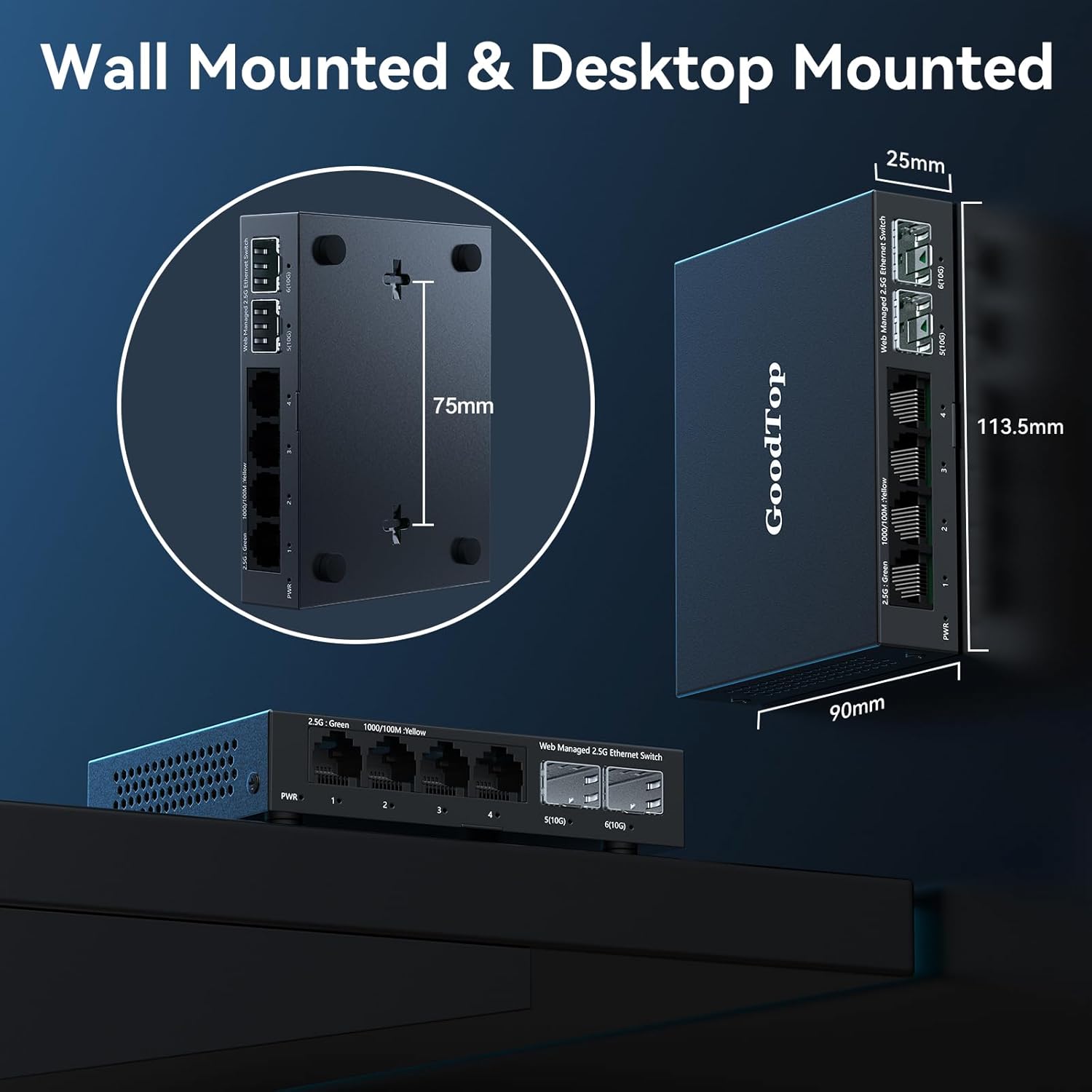
Image: Illustration demonstrating both wall-mounted and desktop-mounted configurations for the GoodTop GT-ST024M switch. Key dimensions are provided: 113.5mm length, 90mm width, 25mm height, and 75mm spacing for wall-mount holes.
- Сүлжээний кабель холбох: Connect your network devices (PCs, NAS, routers, etc.) to the RJ45 ports (1-4) using Cat5e, Cat6, or Cat7 Ethernet cables. For 10G SFP+ connections, insert compatible SFP+ modules (e.g., optical fiber, DAC, AOC) into ports 5-6 and connect your devices.
- Эрчим хүчийг холбох: Plug the power adapter into the DC 12V 1A input on the switch, then plug the adapter into a power outlet. The PWR LED will illuminate.
3.2 Анхдагч Web Интерфейсийн хандалт
Шилжүүлэгч нь web-managed. To access the web interface for configuration:
- Компьютер холбох: Connect a PC directly to any of the switch's RJ45 ports.
- Configure PC IP Address: Set your PC's IPv4 address to be in the same network segment as the switch's default IP address (e.g., 192.168.2.x, where x is not 1). For example, set your PC's IP to 192.168.2.100 with a subnet mask of 255.255.255.0.
- Нээлттэй Web Хөтөч: Нээлттэй a web browser (e.g., Chrome, Firefox) and enter the default IP address of the switch: 192.168.2.1
- Нэвтрэх: Өгөгдмөл итгэмжлэлүүдийг оруулна уу:
Хэрэглэгчийн нэр: админ
Нууц үг: админ

Image: A visual guide showing the steps to log into the GoodTop GT-ST024M web interface. It illustrates setting a PC's IP address to 192.168.2.x and then accessing the switch via a web browser at 192.168.2.1 with default credentials 'admin' for both username and password.
4. Ашиглалтын заавар
-д нэвтэрсний дараа web interface, you can configure various network settings.
4.1 Basic Network Settings
- IP Address Setting: Navigate to the IP Address Setting section to change the switch's IP address, subnet mask, and gateway if required for your network. Remember to click 'Apply' and then 'Save Configuration' after making changes.
- Хэрэглэгчийн удирдлага: It is recommended to change the default 'admin' password for security purposes.
4.2 VLAN Configuration (802.1Q VLAN)
VLANs allow you to segment your network into logical broadcast domains, improving security and network performance. The GT-ST024M supports 802.1Q VLANs.
- Navigate to the VLAN configuration section in the web интерфейс.
- Create new VLANs by assigning a VLAN ID and selecting the ports that will be members of that VLAN.
- Configure ports as 'Tagged' (for trunk links carrying multiple VLANs) or 'Untagged' (for access links carrying a single VLAN).
- Apply and save your configuration.

Image: An illustration demonstrating the concept of 802.1Q VLANs with the GoodTop GT-ST024M switch. It shows how different departments (Finance, R&D, Market) can be logically separated into VLAN1, VLAN2, and VLAN3, preventing direct communication between them while sharing the same physical switch.
4.3 Link Aggregation (Port Aggregate Setting)
Link Aggregation (LACP) combines multiple physical links into a single logical link, increasing bandwidth and providing redundancy.
- Access the 'Port Aggregate Setting' in the web интерфейс.
- Create a new aggregation group. The switch supports up to two groups, with a maximum of 3 ports per group.
- Select the ports you wish to aggregate. Ensure the connected device (e.g., NAS, server) is also configured for LACP on those ports.
- The switch supports Dynamic Link Aggregation (IEEE 802.3ad).
- Apply and save your configuration.

Image: An illustration depicting Link Aggregation (LACP) with the GoodTop GT-ST024M switch connected to a Network Attached Storage (NAS) device. Two Ethernet cables connect the switch to the NAS, symbolizing the aggregation of bandwidth for high-speed data transfer, ideal for high-bandwidth scenarios.
4.4 Үйлчилгээний чанар (QoS)
QoS allows you to prioritize network traffic, ensuring critical applications (e.g., VoIP, video streaming) receive sufficient bandwidth.
- Navigate to the QoS settings in the web интерфейс.
- Configure priority queues or bandwidth limits based on port, VLAN, or other criteria.
- Apply and save your configuration.
4.5 Тохиргоог хадгалах
After making any changes in the web interface, it is crucial to save the configuration to prevent loss after a reboot or power cycle.

Image: A screenshot from the GoodTop GT-ST024M web interface showing the 'IP Address Setting' page and a prompt to 'Save configuration'. This highlights the importance of saving changes to ensure they persist after a reboot.
5. Засвар үйлчилгээ
5.1 Програм хангамжийн шинэчлэлтүүд
Үйлдвэрлэгчийг үе үе шалгаж байгаарай webпрограм хангамжийн шинэчлэлтийн сайт. Програм хангамжийн шинэчлэлтүүд нь шинэ боломжууд, гүйцэтгэлийн сайжруулалт, аюулгүй байдлын сайжруулалтыг хангах боломжтой. Програм хангамжийн шинэчлэлтийн багцад өгсөн зааврыг анхааралтай дагаж мөрдөөрэй.
5.2 Цэвэрлэгээ
Ensure the switch remains free of dust and debris. Use a soft, dry cloth to clean the exterior. Do not use liquid cleaners or aerosols.
5.3 Үйлдвэрийн тохиргоонд дахин оруулах
The GT-ST024M is a simplified web-managed switch and does not have a physical reset button. To restore factory default settings, you must use the web interface. Navigate to the 'System Manage' section and locate the 'Restore Factory Default' option. Confirm the action to reset the switch to its original settings.
6. Алдаа засах
- Эрчим хүчгүй: Ensure the power adapter is securely connected to the switch and a working power outlet. Check if the PWR LED is illuminated.
- Нэвтрэх боломжгүй Web Интерфэйс:
- Verify your PC's IP address is in the same subnet as the switch (default: 192.168.2.x).
- Ensure the Ethernet cable between your PC and the switch is functional.
- Хөтөчийнхөө кэшийг цэвэрлэх эсвэл өөр хөтөч ашиглаж үзнэ үү.
- If the IP address was changed and forgotten, a factory reset via the web interface may be necessary (if accessible).
- Сүлжээний холболт байхгүй:
- Check the link/activity LEDs on the connected ports. If they are off, verify cable connections and the status of the connected device.
- Ensure the connected devices are powered on and configured correctly.
- If using SFP+ modules, ensure they are compatible and properly seated.
- Удаан гүйцэтгэл:
- Verify that your network cables are rated for the desired speed (e.g., Cat5e/Cat6/Cat7 for 2.5GbE).
- Check for network loops. The switch has Loop Prevention features that can be configured.
- Monitor port statistics in the web interface for errors or high utilization.
- Switch Running Hot: The switch is fanless and designed to dissipate heat through its metal casing. While it operates silently, it may feel warm, especially under full load with 10G SFP+ ports active. Ensure adequate ventilation around the device. The operating temperature range is 0~40°C.
7. Техникийн үзүүлэлтүүд
| Онцлог | Тодорхойлолт |
|---|---|
| Загварын дугаар | GT-ST024M |
| Портын тоо | 6 (4 x 2.5GbE RJ45, 2 x 10G SFP+) |
| RJ45 портын хурд | 10/100/1000M/2.5G adaptive |
| SFP+ Port Speed | 10M/100M/1G/2.5G/10G adaptive |
| Өгөгдөл дамжуулах хурд | 2500 Megabytes Per Second (per 2.5G port) |
| Интерфейсийн төрөл | RJ45 Ethernet Port and SFP+ Port |
| Менежмент | Web Managed (Simplified) |
| Онцлогууд | VLAN (802.1Q), QoS, IGMP Snooping, Loop Prevention, MAC Address, Trunk Group Setting, Link Aggregation (IEEE 802.3ad) |
| Чипсет | RTL8372N |
| Эрчим хүчний хэрэглээ | Approx. 1.3W (idle), Approx. 12W (full load) |
| Эрчим хүчний хангамж | DC 12V 1A |
| Ашиглалтын температур | 0 ~ 40 ° C (32 ~ 104 ° F) |
| Дээд температурын үнэлгээ | Цельсийн 50 градус |
| Бүтээгдэхүүний хэмжээ (L x W x H) | 4.47" x 3.54" x 0.98" (113.5мм x 90мм x 25мм) |
| Зүйлийн жин | 14.4 унц |
| Орон сууц | Металл, Сэнсгүй |
| Тохиромжтой төхөөрөмжүүд | Desktop, Gaming Console, Laptop, Server |
| Оруулсан бүрэлдэхүүн хэсгүүд | 2.5gb switch, power supply |
8. Баталгаат хугацаа ба дэмжлэг
For warranty information and technical support, please refer to the documentation included with your purchase or visit the official GoodTop webсайт. Баталгаат зардлаа авахын тулд худалдан авалтын баримтаа хадгална уу.