
Танилцуулга
The Grandstream GRP2613W is a powerful 6-line carrier-grade IP phone designed for efficient deployment and easy management. It integrates advanced features such as a 2.8-inch color display, built-in Wi-Fi 6, dual Gigabit Ethernet ports with Power-over-Ethernet (PoE), and enterprise-level security. This manual provides essential information for setting up, operating, maintaining, and troubleshooting your GRP2613W IP Phone.
Тохиргоо
1. Багцын агуулга
Эхлэхээсээ өмнө бүх зүйл таны багцад байгаа эсэхийг шалгаарай:
- GRP2613W IP Phone Unit
- Гар утас болон гар утасны утас
- Утасны тавиур
- 5V цахилгаан хувиргагч
- Сүлжээний кабель (Ethernet)
- Шуурхай суулгах гарын авлага
2. Физик холболт
IP утсаа холбохын тулд дараах алхмуудыг дагана уу:
- Утасны тавиурыг холбох: Securely attach the phone stand to the back of the GRP2613W unit. The stand allows for adjustable viewөнцөг.
- Гар утсыг холбоно уу: Ороомогтой утасны нэг үзүүрийг гар утсанд, нөгөө үзүүрийг утасны төхөөрөмжийн гар утасны порт руу залгана.
- Сүлжээ болон цахилгаанд холбогдох:
- PoE (Power over Ethernet) ашиглах: Connect one end of the Ethernet cable to the LAN port on the GRP2613W and the other end to a PoE-enabled switch or injector. The phone will power on automatically.
- Цахилгаан адаптер ашиглах: If PoE is not available, connect the 5V power adapter to the power port on the GRP2613W and then plug the adapter into a power outlet. Connect one end of the Ethernet cable to the LAN port on the GRP2613W and the other end to your network router/switch.

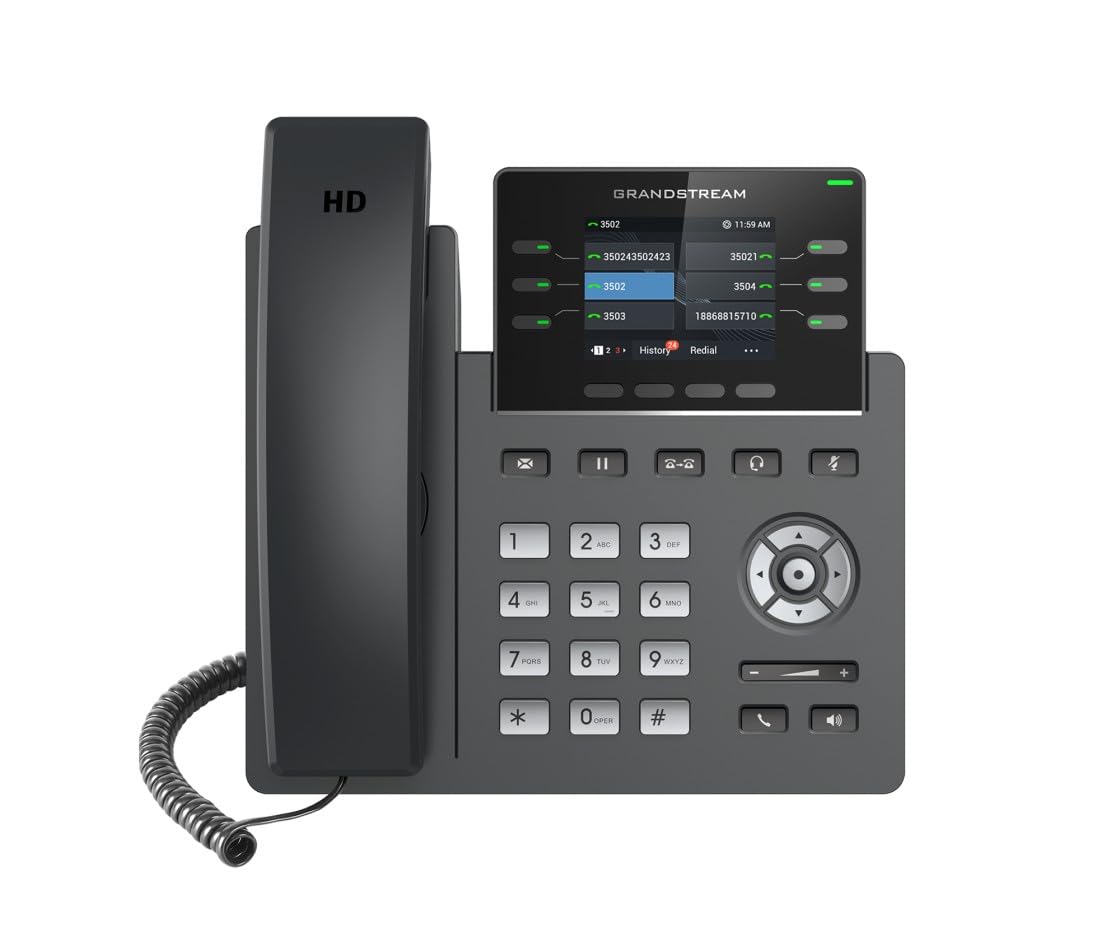
Image: Grandstream GRP2613W IP Phone, showing the main unit with the handset attached and the phone stand.
3. Анхдагч ачаалах
Upon successful connection, the phone will boot up. The LCD screen will display Grandstream's logo, followed by network information and the main idle screen. The phone will attempt to obtain an IP address via DHCP by default. If successful, the IP address will be displayed on the screen.
Гол онцлогууд
The GRP2613W IP Phone offers a robust set of features for enhanced communication:
- SIP дансууд: Supports up to 6 SIP accounts and 6 versatile line keys.
- Сүлжээний холболт: Dual 10/100/1000 Mbps Gigabit Ethernet ports with auto-sensing and integrated PoE.
- Дэлгэц: 2.8-inch (320x240) color LCD display.
- Тохируулга: Replaceable faceplate for easy logo customization.
- Аудио чанар: HD audio compatible with major codecs (G.722, Opus broadband) and noise cancellation technology.
- Програмчлагдах түлхүүрүүд: Up to 24 digital BLF (Busy Lamp Field) keys.
- Утасгүй холболт: Built-in dual-band Wi-Fi (2.4GHz and 5GHz, 802.11a/b/g/n/ac/ax) and Bluetooth.
- Аюулгүй байдал: Enterprise-level protection including secure boot, dual firmware images, and encrypted data storage.
Ашиглалтын заавар
1. Дуудлага хийх
You can make a call using the handset, speakerphone, or a connected headset:
- Pick up the handset, press the Speakerphone button
 , or press the Headset button .
 - Товчлуур ашиглан хүссэн дугаараа залгана уу.
- Press the Send button or a Line key to initiate the call.
2. Дуудлагад хариулах
Утас дуугарах үед:
- Гар утсаа ав.
- Чанга яригч товчийг дарна уу .
- Чихэвч товчийг дарна уу .
- Анивчих Line товчийг дарна уу.
3. Дуудлагын удирдлага
- Барина: During an active call, press the Hold button . Press it again to resume the call.
- Шилжүүлэх: During an active call, press the Transfer button , dial the new number, and press the Transfer button again.
- Бага хурал: During an active call, press the Conference button , dial the third party's number, and then press the Conference button again to join all parties.
- Дууг хаах: Дууг хаах товчийг дарна уу to mute your microphone during a call. Press it again to unmute.
4. Дууны тохируулга
Use the Volume Up (+) and Volume Down (-) buttons on the phone to adjust the ringtone volume when idle, or the call volume during an active call.
5. Wi-Fi болон Bluetooth
The GRP2613W supports built-in dual-band Wi-Fi and Bluetooth. These features can be configured via the phone's menu or web interface for wireless network connectivity and pairing with Bluetooth headsets.
Засвар үйлчилгээ
1. Цэвэрлэгээ
To clean your GRP2613W IP Phone, use a soft, dry cloth. Avoid using liquid cleaners or aerosol sprays directly on the device. Ensure the phone is powered off before cleaning.
2. Програм хангамжийн шинэчлэлтүүд
Firmware updates are crucial for maintaining optimal performance and security. The GRP2613W supports updates over the air (OTA) and can be managed centrally via Grandstream's Device Management System (GDMS). Consult your network administrator or Grandstream's official documentation for the latest firmware and update procedures.
Алдааг олж засварлах
If you encounter issues with your GRP2613W, try the following common troubleshooting steps:
- Эрчим хүчгүй: Ensure the power adapter is securely connected to both the phone and a working power outlet, or that the Ethernet cable is connected to a PoE-enabled port.
- Дууны ая байхгүй: Check network cable connections. Verify that the phone has obtained a valid IP address (check the LCD screen). Contact your VoIP service provider to confirm SIP account registration.
- Аудио чанар муу: Check network connection stability. Ensure the handset cord is securely connected. Adjust the call volume.
- Wi-Fi холболтын асуудал: Verify Wi-Fi settings in the phone's menu. Ensure the phone is within range of your Wi-Fi network.
- Утас бүртгэгдээгүй байна: Confirm SIP account details (username, password, server address) are correctly configured. Check network firewall settings.
For more complex issues, refer to the comprehensive online documentation or contact Grandstream support.
Үзүүлэлтүүд
| Онцлог | Дэлгэрэнгүй |
|---|---|
| SIP дансууд | 6 |
| Шугамын товчлуурууд | 6 versatile line keys |
| Дэлгэц | 2.8 inch (320x240) color LCD |
| Ethernet портууд | Dual 10/100/1000 Mbps Gigabit Ethernet with PoE |
| Wi-Fi | Built-in dual-band Wi-Fi (802.11a/b/g/n/ac/ax) |
| Bluetooth | Баригдсан Bluetooth |
| Аудио | HD audio, noise cancellation, G.722, Opus codecs |
| BLF Keys | Up to 24 digital BLF keys |
| Хэмжээ | 1.1 x 9.7 x 6.5 инч |
| Жин | 2.1 фунт |
Баталгаат хугацааны мэдээлэл
Grandstream products typically come with a limited manufacturer's warranty. Please refer to the warranty card included in your product packaging or visit the official Grandstream website for detailed warranty terms and conditions specific to the GRP2613W model.
Дэмжлэг
For technical assistance, product documentation, or further inquiries, please visit the Grandstream support portal on their official website. You can find FAQs, firmware downloads, and contact information for customer service.