
1. Танилцуулга
Thank you for choosing the JUNJIEUNVO Q16 Wireless Translation Earbuds. These open-ear design earbuds offer a comfortable listening experience, advanced Bluetooth 5.4 connectivity, IPX5 waterproof rating, and support for real-time language translation across over 100 countries. This manual provides detailed instructions on how to set up, operate, and maintain your earbuds to ensure optimal performance.
2. Багцын агуулга
Дараах зүйлсийн багцад байгаа эсэхийг шалгана уу.
- JUNJIEUNVO Q16 Wireless Translation Earbuds (Left and Right)
- Цэнэглэх хайрцаг
- Хэрэглэгчийн гарын авлага
- Charging Cable (USB-C, not always included, please check packaging)
3. Бүтээгдэхүүн дууссанview
The Q16 earbuds feature an open-ear design for comfort and situational awareness, housed in a compact charging case. The case includes a digital display for battery status.

Зураг 3.1: Q16 Earbuds in their charging case, showing the left (L) and right (R) indicators along with the digital battery display.

Зураг 3.2: The open-ear design of the Q16 earbuds, emphasizing comfort and awareness of surroundings.

Зураг 3.3: Diagram illustrating the directional sound transmission technology, designed to protect privacy and reduce sound leakage.
4. Тохиргоо
4.1 Чихэвч болон гэрийг цэнэглэх
Before first use, fully charge the earbuds and the charging case. The charging case has a 500mAh battery, and each earbud has a 40mAh battery. A full charge takes approximately 1.5 hours.
- Connect the charging cable (typically USB-C) to the charging port on the case and to a USB power source.
- The digital display on the charging case will show the charging progress.
- Place the earbuds into the charging case. Ensure they are correctly seated; the case will indicate if they are charging.
4.2 Bluetooth холболт
The Q16 earbuds use Bluetooth 5.4 for a stable and efficient connection. The pairing process is automatic upon opening the case.
- Ensure your smartphone or device's Bluetooth is turned on.
- Цэнэглэх хайрцагны тагийг нээнэ үү. Чихэвч автоматаар хослуулах горимд орно.
- On your device, search for Bluetooth devices and select "Q16" from the list.
- Холбогдсоны дараа та баталгаажуулах дууг сонсох бөгөөд чихэвч ашиглахад бэлэн болно.
- For subsequent connections, simply open the charging case, and the earbuds will automatically reconnect to the last paired device.
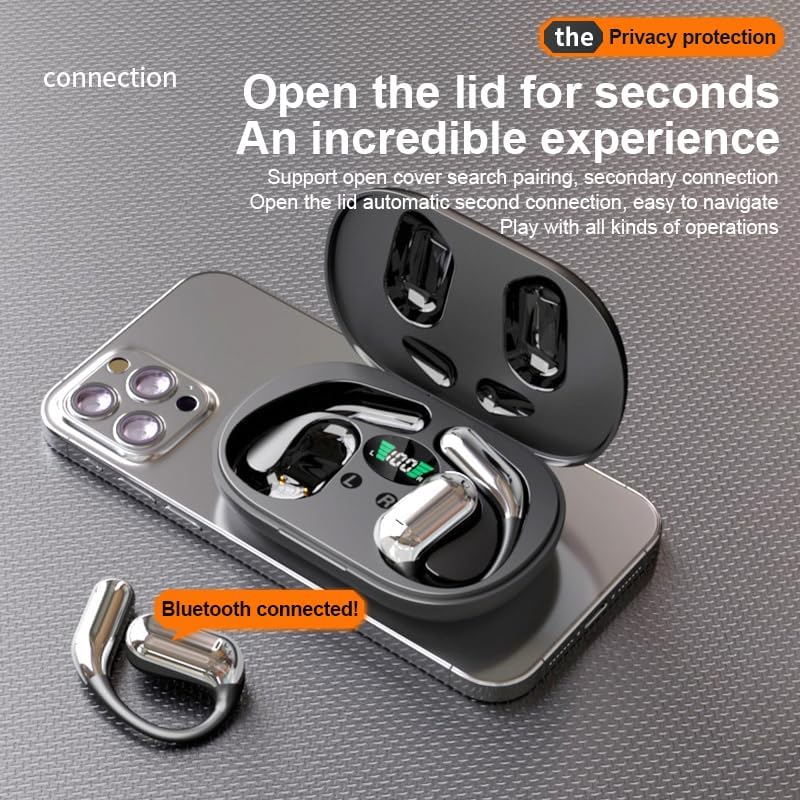
Зураг 4.1: The Q16 earbuds connected to a smartphone, indicating successful Bluetooth pairing.
5. Ашиглалтын заавар
5.1 Асаах/унтраах
- Асаах: Цэнэглэх хайрцагны тагийг нээвэл чихэвч автоматаар асна.
- Унтраах: Чихэвчийг дахин цэнэглэх хайрцагт хийж, тагийг нь хаа. Тэд автоматаар унтарч, цэнэглэж эхэлнэ.
5.2 Хөгжим тоглуулах
(Specific touch controls are not detailed in the provided product data. The following are common gestures; refer to the manufacturer's official app or website for precise controls.)
- Тоглуулах/түр зогсоох: Аль нэг чихэвчийг нэг удаа товшино уу.
- Дараагийн дуу: Баруун чихэвчийг давхар товш.
- Өмнөх бичлэг: Зүүн чихэвчийг хоёр товшино уу.
- Дууны хяналт: (Typically a long press or triple tap, specific action not provided. Adjust via your connected device if not available on earbuds.)

Зураг 5.1: Illustration of the panoramic stereo surround sound feature, enhancing the audio experience.
5.3 Дуудлагын удирдлага
- Дуудлагад хариулах/дуусах: Аль нэг чихэвчийг нэг удаа товшино уу.
- Дуудлагаас татгалзах: Чихэвчийг 2 секундын турш удаан дарна уу.
5.4 Language Translation Function
The Q16 earbuds support real-time translation for over 100 languages. This feature typically requires a dedicated translation application on your paired smartphone.
- Download and install the recommended translation app (refer to product packaging or manufacturer's website for app details) on your smartphone.
- Ensure the earbuds are connected to your smartphone via Bluetooth.
- Open the translation app and follow its instructions to initiate real-time translation. The earbuds will act as your audio input/output device for the translation.
5.5 IPX5 Усны хамгаалалттай үнэлгээ
The earbuds are rated IPX5 waterproof, meaning they are resistant to splashing water from any direction. This makes them suitable for sports and outdoor activities. Note: The charging case is not waterproof. Avoid exposing the charging case to water.
6. Засвар үйлчилгээ, арчилгаа
- Цэвэрлэгээ: Чихэвч болон цэнэглэгчийг зөөлөн, хуурай, хөвөнгүй даавуугаар зөөлөн арчина. Химийн хатуу бодис, зүлгүүрийн материалыг бүү ашигла.
- Хадгалах: Ашиглаагүй үед чихэвчийг хамгаалж, цэнэгтэй байлгахын тулд цэнэглэгчдээ хадгалаарай. Хэт их температураас хол, сэрүүн, хуурай газар хадгална.
- Уснаас зайлсхийх: While the earbuds are IPX5 waterproof, avoid submerging them in water. The charging case is not waterproof.
- Батерейны арчилгаа: Батерейны ашиглалтын хугацааг уртасгахын тулд чихэвчийг бүрэн цэнэглэж, ойр ойрхон цэнэглэж болохгүй. Байнгын хэрэглээгүй байсан ч тогтмол цэнэглэ.
7. Алдаа засах
| Асуудал | Шийдэл |
|---|---|
| Чихэвчийг төхөөрөмжтэй хослуулахгүй байна. |
|
| Чихэвчнээс чимээ гарахгүй. |
|
| Чихэвч цэнэглэхгүй байна. |
|
| Орчуулгын функц ажиллахгүй байна. |
|
8. Техникийн үзүүлэлтүүд
| Онцлог | Дэлгэрэнгүй |
|---|---|
| Загварын нэр | YYK-Q16 |
| Bluetooth хувилбар | V5.4+EDR |
| Чип | Blue Flood |
| Дэмжигдсэн протоколууд | AVRCP V1.6, A2DP V1.3, HFP V1.7 (Simultaneous LE and BR / EDR) |
| Usage/Playback Time | Ойролцоогоор 8 цаг (эзэлхүүний 80% -д) |
| Зогсоолын цаг | 80 цаг |
| Цэнэглэх хугацаа | Ойролцоогоор 1.5 цаг |
| Утасгүй зай | 10 метр |
| Чихний батерейны багтаамж | 40 мАч (тус бүр) |
| Цэнэглэх хайрцагны батерейны багтаамж | 500 мАч |
| Усны хамгаалалттай үнэлгээ | IPX5 (зөвхөн чихэвч) |
| Орчуулгын дэмжлэг | Over 100 languages |
| Чихний байрлал | On Ear (Open-ear design) |
| Эсэргүүцэл | 32 Ом |
| Цэвэр жин | 84g (total) |
9. Баталгаат хугацаа ба дэмжлэг
For warranty information and customer support, please refer to the documentation included with your purchase or visit the official JUNJIEUNVO webсайт. Хэрэв та энэхүү гарын авлагад ороогүй асуудалтай тулгарвал тусламж авахын тулд манай харилцагчийн үйлчилгээний багтай холбогдоно уу.
Үйлдвэрлэгч: НҮБ-ын Вондэ
Брэнд: JUNJIEUNVO