
1. Танилцуулга
The Fanvil V66-Pro is a professional IP phone designed for modern business communication. It features a 7-inch adjustable touch screen, supports 20 SIP lines, and includes built-in 2.4G/5G Wi-Fi (Wi-Fi 6) and a wireless Bluetooth handset. This manual provides detailed instructions for the proper installation, configuration, and operation of your Fanvil V66-Pro IP Phone.
2. Багцын агуулга
Verify that all items are present in your package. If any item is missing or damaged, contact your vendor immediately.
- Fanvil V66-Pro IP Phone Unit
- Утасгүй Bluetooth гар утас
- Гар утас
- Ethernet кабель
- Эрчим хүчний адаптер
- Ширээний тавиур
- Шуурхай суулгах гарын авлага
3. Физик хэтэрсэнview
Familiarize yourself with the components of your Fanvil V66-Pro IP Phone.
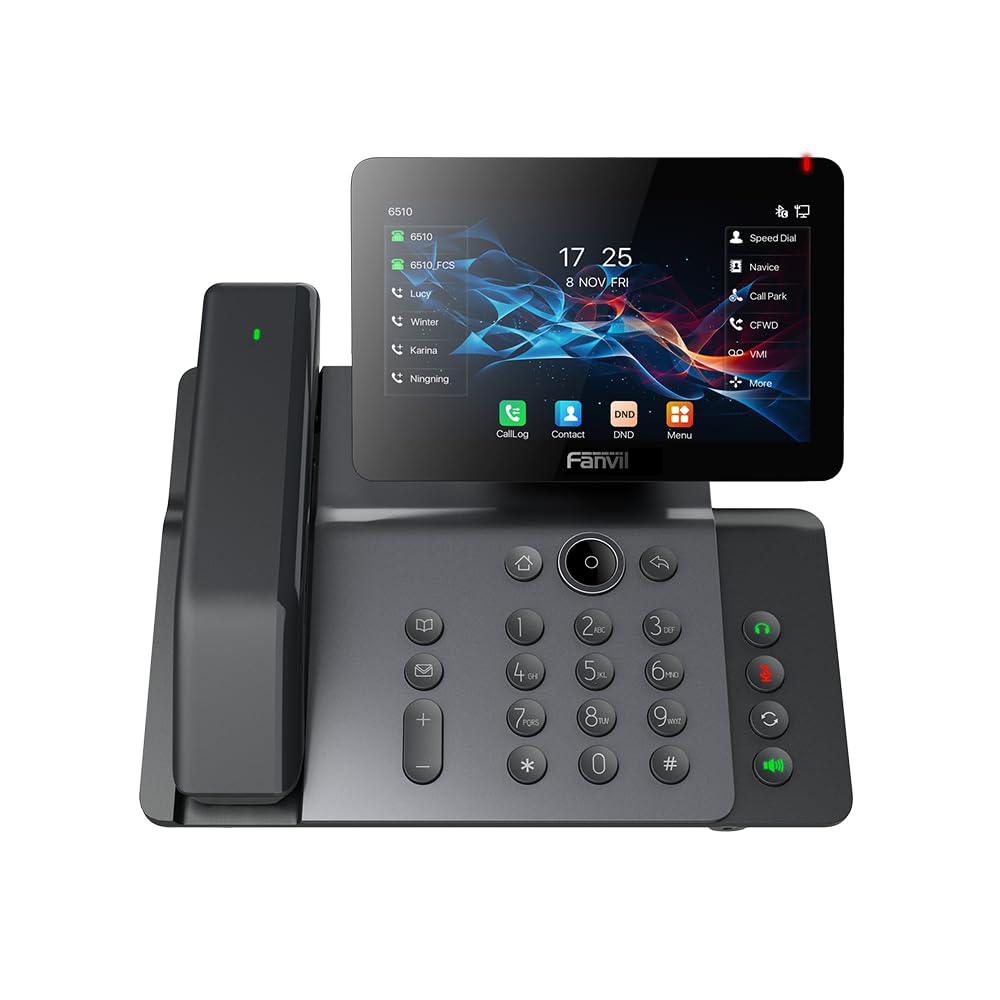
Figure 3.1: Fanvil V66-Pro IP Phone with its wireless Bluetooth handset shown separately.
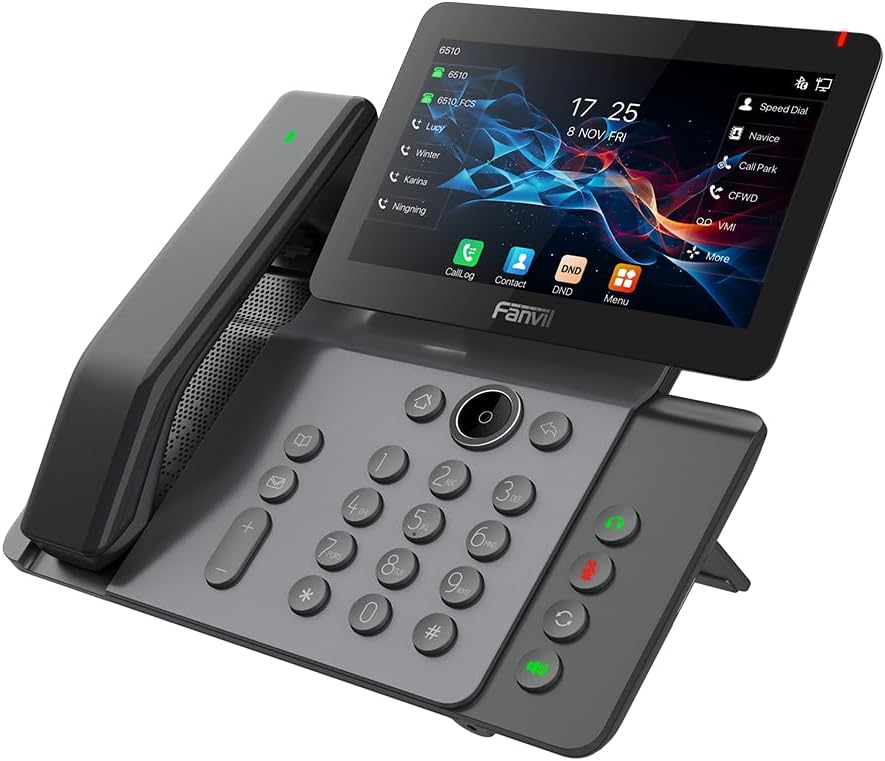
Зураг 3.2: Урд view of the Fanvil V66-Pro IP Phone with the handset attached to the main unit.
3.1 Гол бүрэлдэхүүн хэсгүүд
- Adjustable Touch Screen: 7-inch color display for navigation and information.
- Товчлуур: Standard numeric and function keys for dialing and control.
- Wireless Bluetooth Handset: For cordless communication.
- Чанга яригч: Integrated speaker and microphone for hands-free calls.
- Функцийн товчлуурууд: Dedicated buttons for common features like message, hold, transfer, and conference.
- Портууд: Ethernet ports (LAN/PC), Power port, USB port, Headset port.
4. Тохиргоо
4.1 Утсыг угсарч байна
- Attach the desk stand to the main phone unit.
- Connect the coiled handset cord to the main unit and the wired handset (if using a wired handset). For the wireless Bluetooth handset, ensure it is placed on the charging cradle.
4.2 Сүлжээ болон цахилгаанд холбогдох
- Сүлжээний холболт: Connect one end of the Ethernet cable to the LAN port on the back of the phone and the other end to your network switch or router. If connecting a PC, use the PC port on the phone.
- Эрчим хүчний холболт: Connect the power adapter to the power port on the phone and then plug it into an electrical outlet. The phone will automatically power on.
4.3 Анхны ачаалалт ба тохиргоо
Upon first power-up, the phone will display a boot-up sequence. Once complete, it will attempt to obtain network settings via DHCP. If your network requires static IP configuration or specific SIP server details, these can be configured via the phone's menu or a web interface. Consult your network administrator for specific settings.
5. Ашиглалтын заавар
5.1 Дуудлага хийх, хүлээн авах
- Дуудлага хийхийн тулд: Pick up the handset, press the speakerphone button, or press a line key. Dial the number and press the Dial soft key or #.
- Дуудлагад хариулахын тулд: Pick up the handset, press the speakerphone button, or press the Answer soft key.
- Дуудлага дуусгахын тулд: Hang up the handset, press the speakerphone button again, or press the End Call soft key.
5.2 Мэдрэгчтэй дэлгэц ашиглах
The 7-inch touch screen allows for intuitive navigation. Tap icons to access features like Call Log, Contacts, DND (Do Not Disturb), and Menu. Swipe gestures may be supported for additional screens or options.
Дуудлагын 5.3 үндсэн онцлог
- Барина: Идэвхтэй дуудлага хийх үед товчийг дарна уу Барь зөөлөн товчлуур. Дуудлагыг үргэлжлүүлэхийн тулд дахин дарна уу.
- Шилжүүлэх: Идэвхтэй дуудлага хийх үед товчийг дарна уу Дамжуулах soft key. Dial the number to transfer to, then press the Дамжуулах soft key again (blind transfer) or wait for the party to answer and then press Дамжуулах (шилжүүлэлтэд оролцсон).
- Бага хурал: Идэвхтэй дуудлага хийх үед товчийг дарна уу Бага хурал soft key. Dial the second party's number and wait for them to answer. Press the Бага хурал бүх талуудыг нэгтгэхийн тулд дахин зөөлөн түлхүүр.
5.4 Wi-Fi and Bluetooth Setup
- Wi-Fi: Navigate to the phone's menu, select 'Settings' > 'Wi-Fi'. Enable Wi-Fi, scan for available networks, select your network, and enter the password if required.
- Bluetooth: Navigate to the phone's menu, select 'Settings' > 'Bluetooth'. Enable Bluetooth. For the wireless handset, ensure it is charged and in pairing mode. Select the handset from the discovered devices list to pair.
6. Засвар үйлчилгээ
6.1 Төхөөрөмжийг цэвэрлэх
Use a soft, dry cloth to clean the phone's surface and screen. Avoid using liquid cleaners or abrasive materials, as they may damage the device. For stubborn marks, a slightly damp cloth with water may be used, ensuring no moisture enters openings.
6.2 Програм хангамжийн шинэчлэлтүүд
Periodically check for firmware updates to ensure optimal performance and access to new features. Updates can typically be performed via the phone's web interface or through your service provider's provisioning system. Consult your network administrator or service provider for guidance on updates.
7. Алдаа засах
7.1 Дуудлагын ая байхгүй
- Check all cable connections (Ethernet, power, handset).
- Ensure the phone is powered on and the screen is active.
- Сүлжээний холболтыг баталгаажуулна уу.
- Contact your service provider to confirm SIP registration status.
7.2 Cannot Connect to Network
- Ensure the Ethernet cable is securely connected to the LAN port and your network.
- Check if your network switch or router is functioning correctly.
- If using Wi-Fi, verify the correct network is selected and the password is entered accurately.
- Restart the phone and your network equipment.
7.3 Дэлгэцийн асуудал
- If the screen is blank, ensure the phone is powered on.
- Adjust screen brightness settings in the phone's menu.
- Утсаа дахин эхлүүлнэ үү.
8. Техникийн үзүүлэлтүүд
| Онцлог | Дэлгэрэнгүй |
|---|---|
| Бүтээгдэхүүний хэмжээс | 9 x 7 x 5.6 инч |
| Зүйлийн жин | 3.3 фунт |
| ASIN | B0DYKWF779 |
| Үйлдвэрлэгч | Фанвил |
| Өнгө | хар |
| Утасны төрөл | Сэрээ |
| Материал | Металл, хуванцар |
| Эрчим хүчний эх үүсвэр | Утастай цахилгаан |
| Хариулах системийн төрөл | Дижитал |
| Тохиромжтой төхөөрөмжүүд | VoIP Services, Traditional Phone Networks |
| Хурлын дуудлага хийх чадвар | Үндсэн |
| Олон шугамын ажиллагаа | Олон шугамын ажиллагаа |
9. Баталгаат хугацааны мэдээлэл
Fanvil products are typically covered by a limited manufacturer's warranty. The specific terms and duration of the warranty may vary by region and retailer. Please refer to the warranty card included with your product or visit the official Fanvil website for detailed warranty information. Keep your purchase receipt as proof of purchase for warranty claims.
10. Дэмжлэг
For technical assistance, product inquiries, or further support, please contact your vendor or visit the official Fanvil support webсайт:
Фанвил албан ёсны Webсайт: www.fanvil.com
You may find FAQs, firmware downloads, and additional documentation on their support pages.