
Танилцуулга
The MARK ADLER Expert 5.7 is an ergonomic office chair designed to provide optimal support and comfort during extended periods of sitting, whether for work or gaming. Its advanced adjustment systems allow for a personalized seating experience, promoting healthy posture and reducing fatigue. This manual provides essential information for the proper assembly, operation, and maintenance of your chair.

Image: The MARK ADLER Expert 5.7 chair, showcasing its ergonomic design and multiple adjustment points including headrest, lumbar support, armrests, and footrest.
Тохиргоо ба угсралт
Before beginning assembly, ensure all components are present and undamaged. It is recommended to assemble the chair on a soft, clean surface to prevent scratches. An Allen key is typically included for assembly.
- Бүрэлдэхүүн хэсгүүдийг задлах: Сав баглаа боодолоос бүх эд ангиудыг болгоомжтой авч, хавсаргасан эд ангиудын жагсаалттай нийцүүлэн шалгана уу.
- Дугуйг сууринд бэхлэх: Insert the five silent nylon wheels into the reinforced nylon FX base until they click securely into place.
- Хийн өргөгчийг оруулах: Place the BIFMA Class 3 gas lift cylinder into the center hole of the assembled base.
- Суудлын механизмыг угсрах: Суудлын механизмыг өгөгдсөн боолтыг ашиглан суудлын дэрний доод талд бэхлэнэ. Механизмын урд хэсэг нь суудлын урд хэсэгтэй зэрэгцэж байгаа эсэхийг шалгаарай.
- Сулгыг бэхлэх: Secure the 3D armrests to the seat base using the designated screws.
- Арын түшлэгийг холбох: Attach the backrest to the seat mechanism using the appropriate screws.
- Суудлыг хийн өргөгч дээр суурилуулах: Угсарсан суудал болон түшлэгийг хийн өргөгч цилиндр дээр болгоомжтой байрлуулж, төвд нь байрлуулж, тогтвортой байлгана.
- Install Headrest and Lumbar Support: Attach the adjustable headrest and lumbar support to the backrest as per the instructions.
- Хөлийн тулгуурыг бэхлэх: Install the retractable footrest mechanism to the underside of the seat.
Always refer to the detailed assembly diagram provided with your product for precise instructions and screw placement. Ensure all screws are tightened securely before using the chair.
Operating the Chair and Adjustments
The Expert 5.7 chair offers multiple adjustment options to customize your seating experience for optimal ergonomic support.
1. Суудлын өндрийн тохируулга
- To raise the seat: While standing, pull the lever located on the right side of the seat upwards.
- To lower the seat: While seated, pull the same lever upwards. Adjust until your feet are flat on the floor and your knees are at a 90-degree angle.
2. Tilt Mechanism (Tilt Plus)
- To recline: Pull the lever on the left side of the seat outwards. Lean back to the desired angle.
- To lock the tilt: Push the lever inwards at your desired recline position.
- To unlock and return upright: Pull the lever outwards, lean forward slightly, and the backrest will return to its upright position.
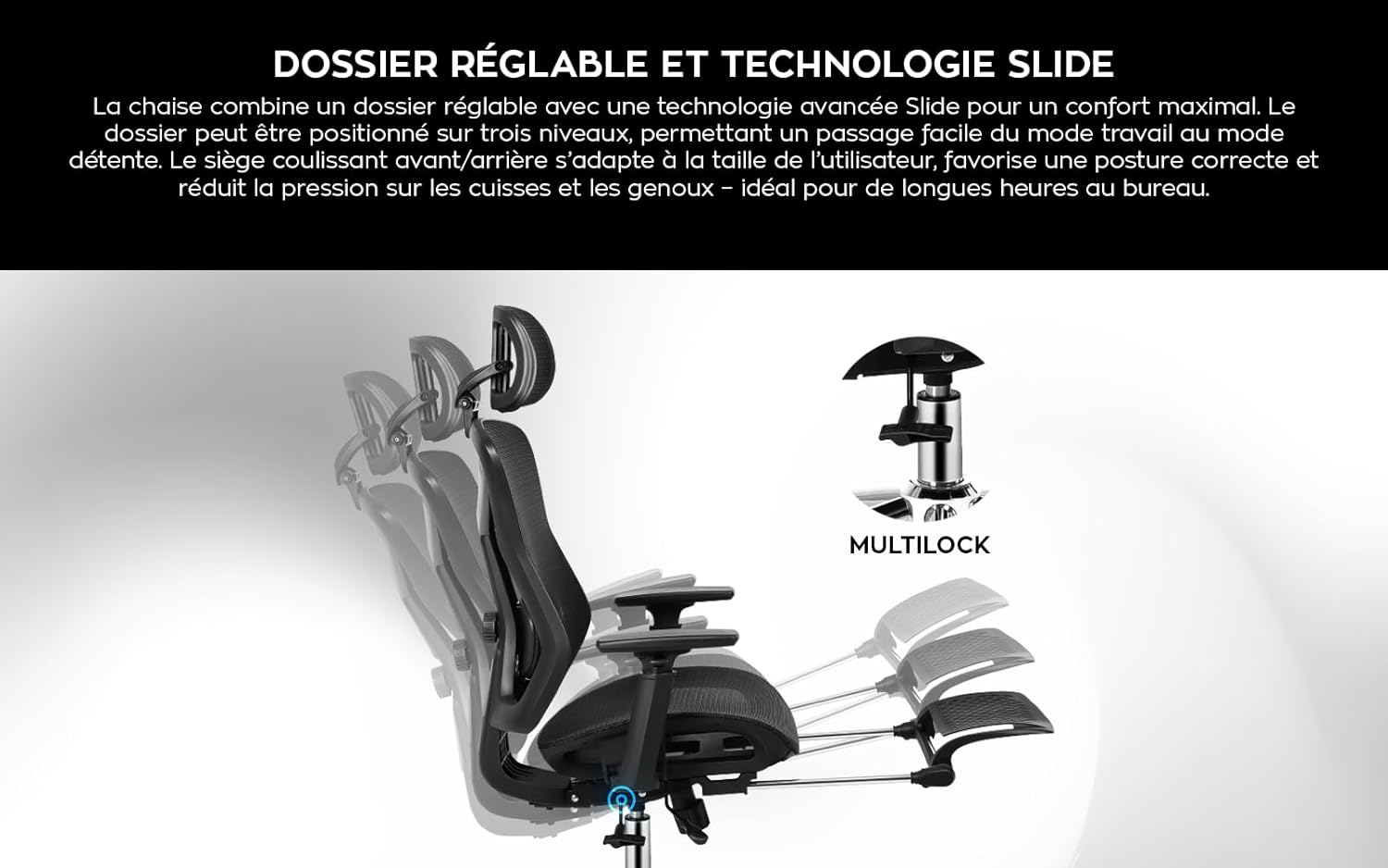
Image: Illustration of the chair's adjustable backrest and the "Multilock" tilt mechanism, allowing for various recline positions.
3. Seat Depth Adjustment (Slide Technology)
- Locate the lever or button under the seat.
- Activate the mechanism and slide the seat forward or backward to ensure a comfortable distance between the edge of the seat and your knees, reducing pressure on your legs.
4. Бүсэлхий нурууны дэмжлэгийн тохируулга
- The lumbar support can be adjusted in both height and depth. Use the knobs or levers on the backrest to position it to comfortably support the natural curve of your lower back.
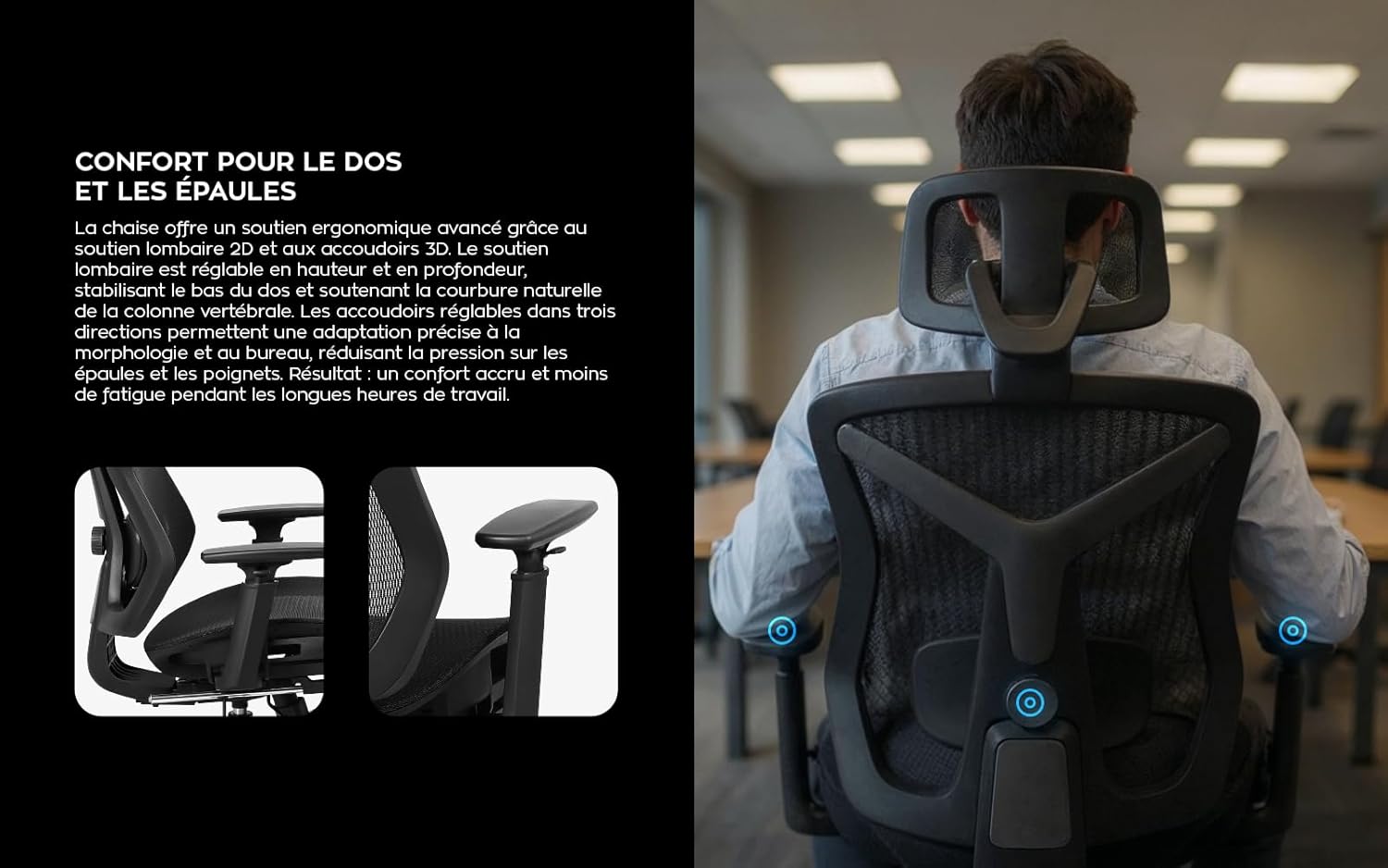
Image: A user seated in the chair, highlighting the adjustable lumbar support and the multi-directional movement of the 3D armrests for optimal back and shoulder comfort.
5. Толгойн түшлэгийн тохируулга
- The 2D adjustable headrest can be moved up and down, and tilted to provide optimal neck and head support. Adjust it to align with the curve of your neck.

Image: Close-up of the chair's adjustable headrest, demonstrating its ability to move in height and tilt for optimal cervical spine support.
6. Гар түшлэгийн тохируулга
- The 3D armrests can be adjusted in height, forward/backward, and rotated inwards/outwards. Adjust them to support your forearms comfortably, keeping your shoulders relaxed.
7. Эвхэгддэг хөлийн тавиур
- To extend the footrest: Pull the footrest mechanism out from under the seat.
- To retract the footrest: Push it back under the seat until it is fully stored. This feature is designed for relaxation during breaks.

Image: The MARK ADLER Expert 5.7 chair with its sliding footrest extended, illustrating its use for relaxation during work breaks.
Засвар үйлчилгээ
Regular maintenance will extend the life and performance of your MARK ADLER Expert 5.7 chair.
- Cleaning the Mesh Fabric: The breathable Mesh HD fabric can be cleaned with a soft cloth dampened with mild soap and water. Avoid harsh chemicals or abrasive cleaners. Allow to air dry completely.
- Cleaning the Base and Wheels: Wipe the reinforced nylon FX base and silent nylon wheels with a damp cloth. Periodically remove any hair or debris that may accumulate around the wheel casters to ensure smooth movement.
- Бүрэлдэхүүн хэсгүүдийг шалгах: Periodically check all screws and bolts to ensure they are tight. Re-tighten if necessary. Inspect the gas lift and other moving parts for any signs of wear or damage.
- Тосолгоо: Moving parts, such as the tilt mechanism, may benefit from occasional lubrication with a silicone-based spray to prevent squeaking and ensure smooth operation.
Алдааг олж засварлах
Here are solutions to common issues you might encounter with your office chair.
- Сандал хашгирах:
- Check and tighten all screws, especially those connecting the seat to the mechanism and the backrest.
- Apply a small amount of silicone lubricant to moving parts of the tilt mechanism and where the gas lift meets the base.
- Өндөр тохируулахад бэрхшээлтэй:
- Ensure the gas lift lever is fully engaged when attempting to adjust.
- If the gas lift is completely unresponsive, it may need replacement. Contact customer support.
- Дугуй жигд эргэлдэхгүй байна:
- Remove any hair, dust, or debris wrapped around the wheel casters.
- Ensure the wheels are securely inserted into the base.
- Сандал тогтворгүй санагдаж байна:
- Verify that all screws are tightened.
- Ensure the gas lift is properly seated in the base.
- Check for any damage to the base or gas lift.
Үзүүлэлтүүд
| Брэнд | МАРК АДЛЕР |
| Загвар | Мэргэжилтэн 5.7 |
| Өнгө | Хар |
| Бүтээгдэхүүний хэмжээ (L x W x H) | 64 x 64 x 132 см |
| Зүйлийн жин | 19.1 кг |
| Хамгийн их ачааллын багтаамж | 130 kg (BIFMA Class 3 Gas Lift) |
| Бүрээсийн материал | Breathable Mesh HD Fabric |
| Үндсэн материал | Reinforced Nylon FX |
| Дугуйны төрөл | Silent Nylon, Anti-scratch |
| Онцлог шинж чанарууд | Adjustable Height, 3D Armrests, Ergonomic Design, Adjustable Headrest (2D), Adjustable Lumbar Support, Retractable Footrest, Tilt Plus Mechanism, Seat Depth Adjustment (Slide Technology) |
Баталгаат болон дэмжлэг
For warranty information, technical support, or to inquire about replacement parts, please refer to the documentation included with your purchase or contact MARK ADLER customer service directly. Keep your proof of purchase for warranty claims.