
1. Танилцуулга
This manual provides detailed instructions for the installation, operation, and maintenance of your ESX Vision VMX900DAB Universal 1-DIN Multimedia Receiver. Please read this manual thoroughly before using the device to ensure proper functionality and to maximize your user experience.
The ESX Vision VMX900DAB is a versatile 1-DIN multimedia receiver featuring a 9-inch multi-angle touchscreen display. It integrates advanced connectivity options including wireless Apple CarPlay and Android Auto, DAB+ digital radio, Bluetooth hands-free calling and audio streaming, and a comprehensive media player. The unit is designed for universal compatibility and offers a removable monitor for enhanced security.
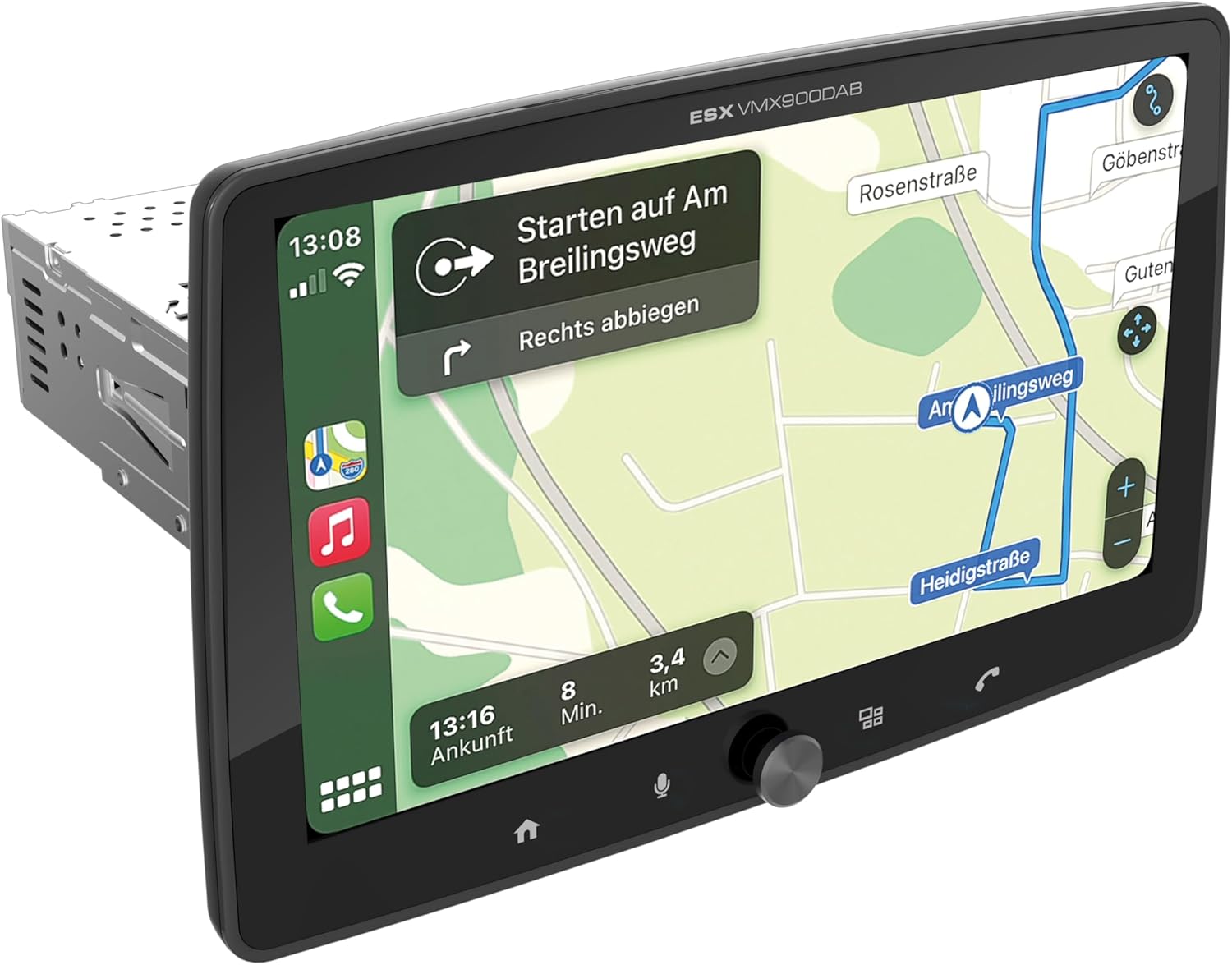
Figure 1.1: ESX Vision VMX900DAB with navigation interface.
2. Тохиргоо ба суурилуулалт
2.1 Багцын агуулга
Суулгахаасаа өмнө бүх бүрэлдэхүүн хэсгүүд байгаа эсэхийг шалгана уу:
- ESX Vision VMX900DAB Main Unit
- Detachable 9-inch Touchscreen Monitor
- Цахилгаан/чанга яригчийн утаснуудын бэхэлгээ
- Гадаад микрофон
- GPS антен
- DAB+ антен
- USB Extension Cables
- Суурилуулах хэрэгсэл (хаалт, эрэг)
- Хэрэглэгчийн гарын авлага (энэ баримт бичиг)

Figure 2.1: Included accessories and components.
2.2 Үндсэн төхөөрөмжийг суурилуулах
- Суурилуулалтыг эхлүүлэхийн өмнө тээврийн хэрэгслийн батерейг салгасан эсэхийг шалгаарай.
- Insert the 1-DIN main unit into the vehicle's dashboard opening.
- Secure the main unit using the provided mounting brackets and screws.
2.3 Мониторыг холбох
The 9-inch monitor is detachable and connects to the main unit via a click system.
- Align the monitor's connector with the slot on the main unit.
- Gently push the monitor until it clicks securely into place.
- To remove, press the release button (if applicable) and pull the monitor away.

Figure 2.2: Detachable monitor with click system.
2.4 утас холболт
Refer to the wiring diagram provided with the unit for specific connections. Key connections include:
- Power and Speakers: Connect the main wiring harness to the vehicle's power supply and speakers.
- Гадаад микрофон: Plug the external microphone into its dedicated input for optimal hands-free call quality.
- GPS антена: GPS антенныг холбоод, тунгалаг газар байрлуулна уу view зөв байрлал тогтоохын тулд тэнгэрийн .
- DAB+ Antenna: Connect the DAB+ antenna for digital radio reception.
- USB портууд: Two USB-A ports are available. One for media playback and charging (1.5A), and another specifically for Apple CarPlay/Android Auto and charging (1.5A).
- RCA өмнөхampбаталгаатай гаралт: Six 4V RCA outputs (FL/FR/RL/RR/SUB1/SUB2) are available for connecting external ampамьдрагчид.
- AUX RCA Inputs: Stereo audio and video inputs (L/R/VIDEO) for external audio/video sources.
- Camera RCA Inputs: Dedicated inputs for front and rear cameras.
- Жолооны хүрдний удирдлага: Analog steering wheel remote control input (learnable) for integration with vehicle controls.
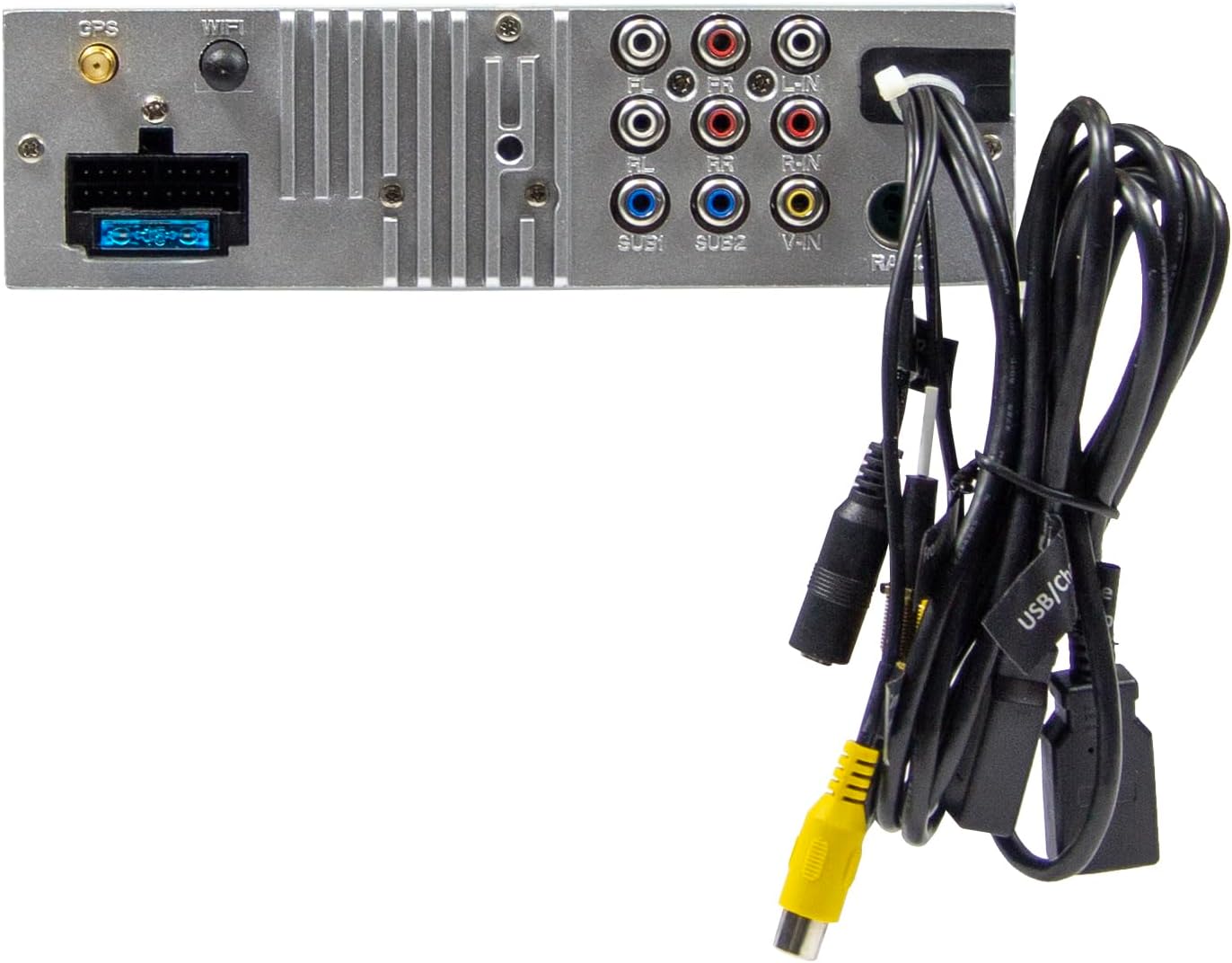
Figure 2.3: Rear connections of the main unit.
3. Ашиглалтын заавар
3.1 Асаах/унтраах ба үндсэн удирдлага
- Асаах: The unit will power on automatically with the vehicle's ignition.
- Унтраах: The unit will power off automatically with the vehicle's ignition.
- Дууны хяналт: Use the large rotary knob on the front panel to adjust the volume.
- Функцийн товчлуурууд: Four function keys on the front panel provide quick access to common features.
- Мэдрэгчтэй дэлгэц: All primary functions are controlled via the 9-inch touchscreen.
3.2 Үндсэн дэлгэц ба навигаци
The home screen provides access to all main functions and applications.

Figure 3.1: Main menu/home screen.
3.3 Apple CarPlay болон Android Auto
The VMX900DAB supports both wireless and wired (via USB) Apple CarPlay and Android Auto.
- Утасгүй холболт: Enable Bluetooth and Wi-Fi on your smartphone and follow the on-screen prompts to connect.
- Утастай холболт: Connect your smartphone to the dedicated USB-A port using a compatible USB cable.
- Once connected, your smartphone's compatible apps (navigation, music, calls, messages) will be mirrored on the receiver's display.

Зураг 3.2: Apple CarPlay интерфэйс.
3.4 Radio Functions (DAB+/FM/AM)
- DAB+ радио: Select the DAB+ icon from the home screen. The unit will scan for available digital radio stations.
- FM/AM радио: Select the Radio icon. Use the touchscreen to tune to stations, save presets, and access RDS functions.
3.5 Bluetooth Hands-Free and Audio Streaming
- Хослуулах: Enable Bluetooth on your smartphone and search for the VMX900DAB. Select the device and confirm pairing.
- Гар чөлөөтэй дуудлага: Once paired, you can make and receive calls directly through the receiver. The external microphone ensures clear voice transmission. Your phonebook can be synchronized.
- Аудио дамжуулалт: Stream music wirelessly from your smartphone to the receiver.
3.6 Медиа тоглуулах
The unit supports various audio, video, and photo formats via USB.
- Дэмжигдсэн File Форматууд: AVI, FLV, MOV, MKV, WMV, WMA, MP3, FLAC, JPEG, PNG, BMP.
- Insert a USB drive into the media USB-A port. Select the USB icon from the home screen to browse and play media files.
3.7 Monitor Adjustment
The monitor can be tilted and adjusted in height to achieve the optimal viewing angle and prevent obstruction of vehicle controls.

Figure 3.3: Adjustable monitor mechanism.
3.8 Тохируулах
- Startup Logo: Customize the startup logo in the settings menu.
- RGB Key Illumination: Select from various RGB colors and animation effects for the key illumination.
- Цэсийн хэл: Supported languages include DEU, ENG, SWE, ITA.
4. Засвар үйлчилгээ
4.1 Төхөөрөмжийг цэвэрлэх
- Use a soft, dry cloth to wipe the display and unit surfaces.
- For stubborn marks on the screen, use a screen cleaner specifically designed for electronic displays and a microfiber cloth.
- Do not use abrasive cleaners, solvents, or harsh chemicals, as these can damage the finish or screen.
4.2 Ерөнхий арчилгаа
- Төхөөрөмжийг хэт өндөр температурт, нарны шууд тусгалд удаан хугацаагаар эсвэл өндөр чийгшилд өртүүлэхээс зайлсхий.
- Хэт халалтаас урьдчилан сэргийлэхийн тулд төхөөрөмжийн эргэн тойронд агааржуулалтыг сайтар хангана.
- When removing the monitor, handle it carefully to avoid damage to the connectors.
5. Алдаа засах
If you encounter issues with your VMX900DAB, refer to the following common problems and solutions:
| Асуудал | Боломжит шалтгаан | Шийдэл |
|---|---|---|
| Хүч чадалгүй | Буруу утас; Гал хамгаалагч шатсан; Тээврийн хэрэгслийн асаалт унтарсан | Цахилгаан холболтыг шалгах; Гал хамгаалагчийг солих; Тээврийн хэрэгслийн асаалтыг асаах |
| Дуу алга | Дууны хэмжээ хэт бага; Дууг хаахыг идэвхжүүлсэн; Чанга яригчийн утастай холбоотой асуудал | Дууг нэмэгдүүлэх; Дууг хаахыг идэвхгүй болгох; Чанга яригчийн холболтыг шалгах |
| Bluetooth холбогдоогүй байна | Bluetooth off on phone/unit; Incorrect pairing process | Ensure Bluetooth is on; Re-attempt pairing process |
| Apple CarPlay/Android Auto асахгүй байна | Incorrect USB port; Faulty USB cable; Phone not compatible/configured | Use the dedicated USB port; Try a different USB cable; Check phone settings for CarPlay/Android Auto |
| Радио хүлээн авалт муу | Antenna not connected; Poor antenna placement; Weak signal area | Check antenna connection; Adjust antenna position; Try in a different location |
| Монитор харагдахгүй байна | Monitor not securely attached; Connector issue | Ensure monitor is fully clicked into place; Check for debris in connector |
If the problem persists after attempting these solutions, please contact ESX customer support or your authorized dealer.
6. Техникийн үзүүлэлтүүд
| Онцлог | Тодорхойлолт |
|---|---|
| Загварын дугаар | VMX900DAB |
| Дэлгэц | 9-inch Multi-angle Touchscreen |
| Form Factor | 1-DIN Universal |
| Холболт | USB, Bluetooth, Auxiliary |
| Онцлог шинж чанарууд | Wireless Apple CarPlay, Wireless Android Auto, Detachable Monitor with Click System |
| Радио тааруулагч | DAB+ (Digital Radio), FM/AM with RDS |
| Bluetooth | Hands-free function, Audio Streaming |
| USB портууд | 2x USB-A (1.5A charging, one dedicated for CarPlay/Android Auto) |
| Max Music Power | 4 x 80 Вт |
| Урьдчиланampбаталгаажсан гаралт | 6x RCA (4V) (FL/FR/RL/RR/SUB1/SUB2) |
| AUX оролтууд | RCA (L/R/VIDEO) |
| Камерын оролтууд | RCA (Front/Rear) |
| Дэмжигдсэн File Форматууд | AVI, FLV, MOV, MKV, WMV, WMA, MP3, FLAC, JPEG, PNG, BMP |
| Гадаад микрофон | Оруулсан |
| Жолооны хүрдний удирдлага | Analog (learnable) |
| GPS хүлээн авагч | Оруулсан |
| Цэсийн хэл | DEU, ENG, SWE, ITA |
| Нийт гаралтын чадал | 320 ватт |
| Хүрээлэн буй орчны дууны сувгийн тохиргоо | 4.2 |
| Аудио гаралтын горим | Стерео |
7. Баталгаат хугацаа ба дэмжлэг
For warranty information, please refer to the documentation provided at the time of purchase or contact your authorized ESX dealer. Warranty terms and conditions may vary by region and retailer.
For technical support or further assistance, please contact ESX customer service or visit the official ESX webтуслах нөөцийн сайт.