
1. Танилцуулга
This manual provides essential information for setting up, operating, maintaining, and troubleshooting your GIGABYTE AORUS Elite 16 BWH gaming laptop. The AORUS Elite 16 BWH is designed for high-performance gaming and demanding applications, featuring an Intel Core Ultra 9 processor, NVIDIA GeForce RTX 5070 laptop GPU, a 16-inch WQXGA 165Hz display, and Windows 11 Pro.
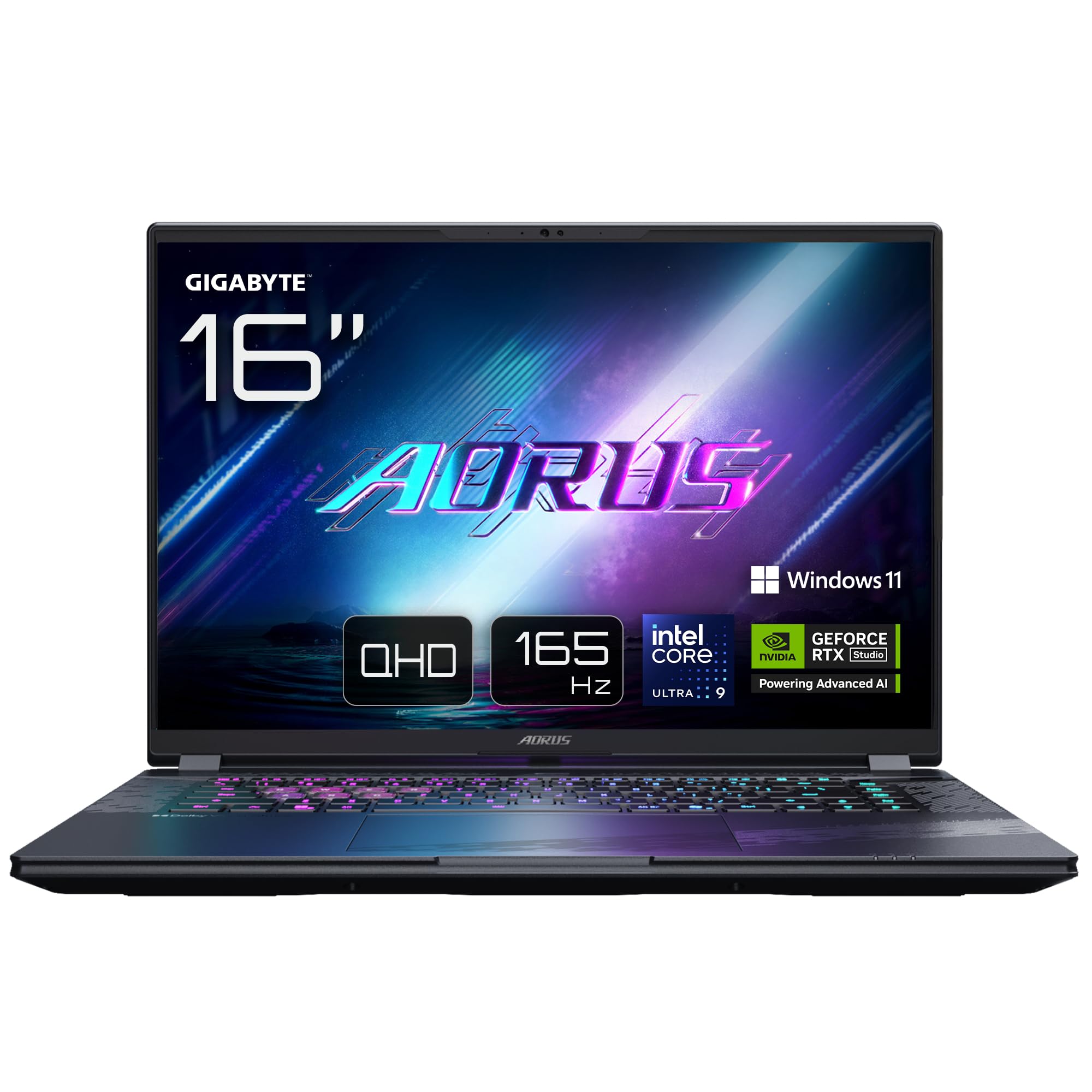
Image: The GIGABYTE AORUS Elite 16 BWH gaming laptop, showcasing its open display and keyboard.
2. Тохиргоо
2.1 Хайрцагнаас задлах, анхны үзлэг
Зөөврийн компьютер болон бүх дагалдах хэрэгслийг савлагаанаас болгоомжтой салга. "Хайрцаг дотор юу байгаа вэ" хэсэгт жагсаасан бүх эд ангиуд байгаа бөгөөд гэмтээгүй эсэхийг шалгаарай.
- GIGABYTE AORUS ELITE 16 BWHC3FRC65SP Laptop
- Цахилгаан адаптер ба кабель
- Баримт бичиг (энэ гарын авлага, баталгаат хуудас)
2.2 Цахилгааныг холбох
Connect the power adapter to the laptop's power input port and then plug the power cable into an electrical outlet. It is recommended to fully charge the battery before initial use.
2.3 Эхний асаалт
Press the power button to turn on the laptop. Follow the on-screen instructions to complete the Windows 11 Pro setup process, including language selection, network connection, and user account creation.
2.4 Connecting Peripherals and Network
The laptop features various ports for connecting external devices and networks.
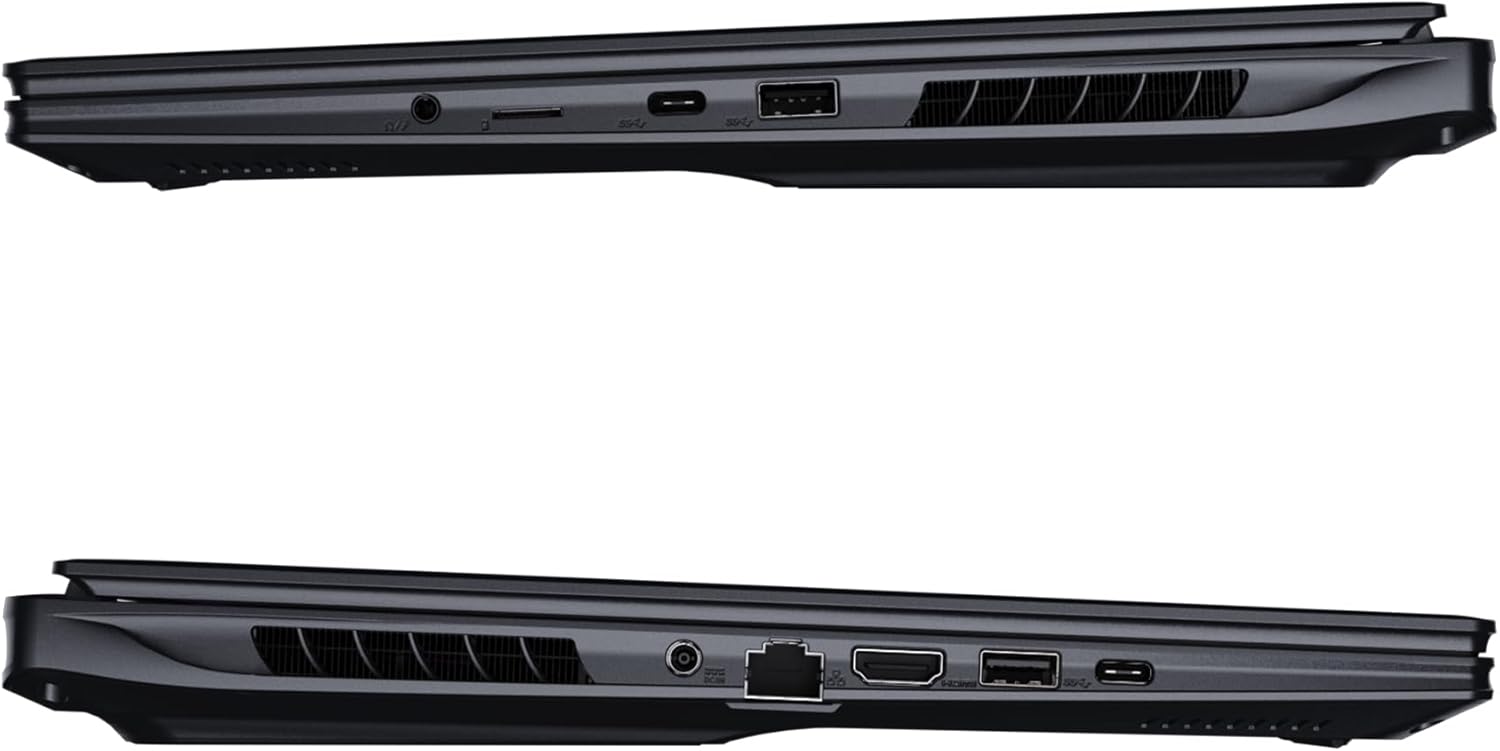
Зураг: хажуу тал view of the laptop illustrating the available ports for connectivity.
- USB портууд: Connect USB devices such as mice, keyboards, or external storage.
- HDMI порт: Connect to an external display or TV.
- Thunderbolt 4 порт: For high-speed data transfer and display output.
- Ethernet порт: Утастай сүлжээний холболтод зориулагдсан.
- Чихэвчний Жак: Чихэвч эсвэл гадаад чанга яригч руу аудио гаралт хийхэд зориулагдсан.
- Wi-Fi 7: Connect to wireless networks via the integrated Wi-Fi 7 module.
- Bluetooth 5.4: Bluetooth-тэй төхөөрөмжүүдтэй хослуул.
3. Зөөврийн компьютерээ ажиллуулах
3.1 Дэлгэцийн онцлог
Your AORUS Elite 16 BWH features a 16-inch WQXGA (2560x1600) IPS display with a 165Hz refresh rate and 16:10 aspect ratio, offering a wide viewing experience. It supports Dolby Vision for enhanced visual quality and is Pantone validated for color accuracy.

Image: The laptop's 16:10 aspect ratio display, highlighting its IPS panel and Pantone validation.
3.2 Гар ба мэдрэгчтэй самбар
The laptop is equipped with a backlit keyboard for comfortable typing in various lighting conditions and a responsive touchpad for navigation.
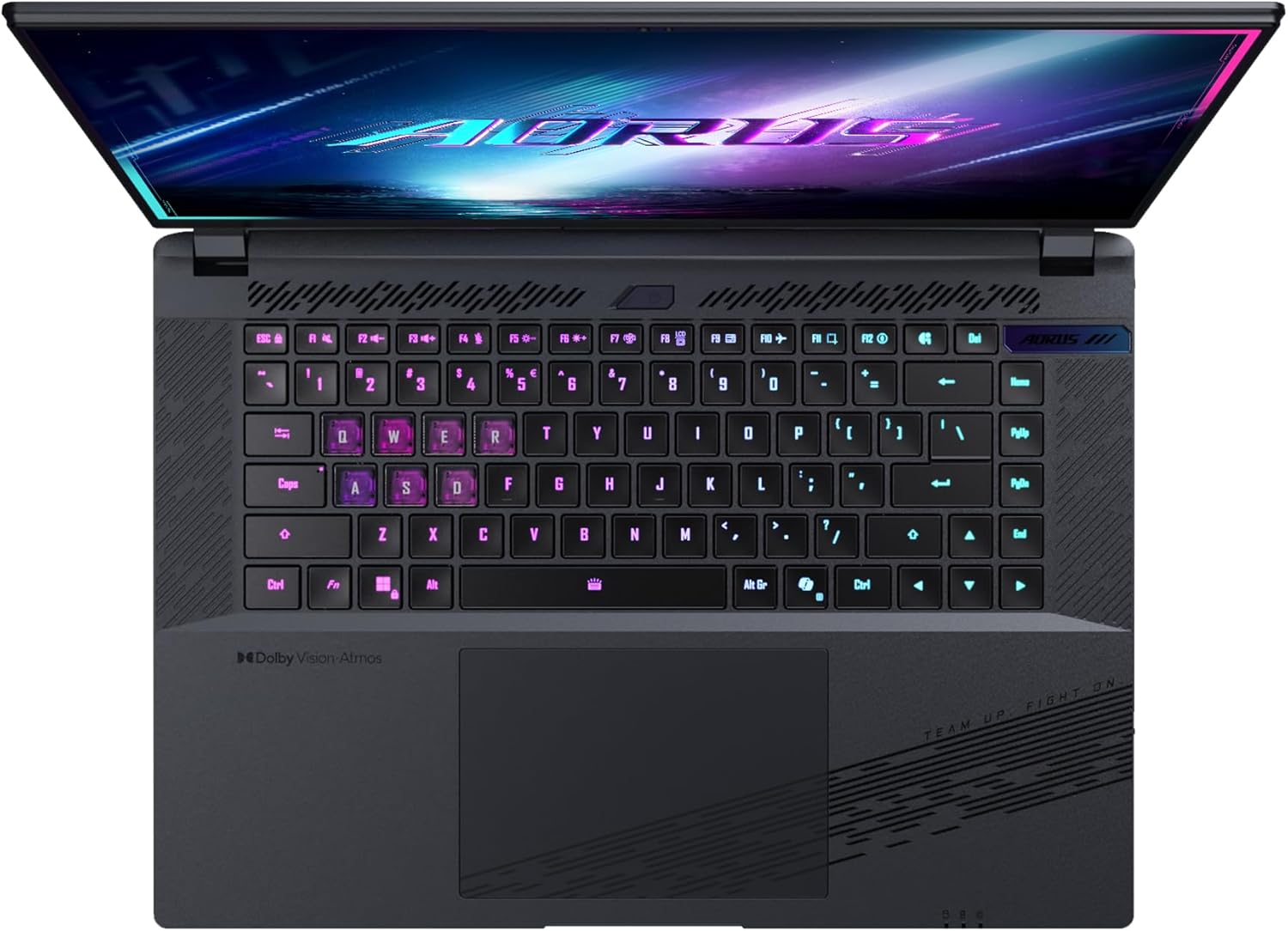
Зураг: дээрээс доош view зөөврийн компьютерын гарны тухай, шоуasing its backlit keys.
The keyboard also features a dedicated Copilot Key for quick access to AI functionalities in Windows 11.

Image: Close-up of the keyboard, highlighting the Copilot Key for AI features.
3.3 Аудио систем
Experience immersive audio with Dolby Atmos support and integrated 2W speakers. The laptop also includes a built-in microphone for communication.

Image: Visual representation of Dolby Atmos and Dolby Vision audio and visual enhancements.
3.4 Гүйцэтгэлийн онцлог
The AORUS Elite 16 BWH is powered by an Intel Core Ultra 9 processor with an integrated NPU for AI acceleration and an NVIDIA GeForce RTX 5070 laptop GPU, ensuring high performance for gaming and demanding tasks. It also features Advanced Optimus with DDS Technology for optimized graphics performance.

Зураг: Нарийвчилсан view of the Intel Core Ultra 9 processor chip.

Зураг: Нарийвчилсан view of the NVIDIA GeForce RTX 50 Series laptop GPU chip.
3.5 GiMATE AI агент
Utilize GiMATE, your personal AI agent, to optimize performance, manage smart cooling, enhance privacy, control power settings, and improve audio and voice functionalities.

Image: GiMATE AI Agent interface showing various optimization features.
4. Засвар үйлчилгээ
4.1 Хөргөх систем
The laptop features the WINDFORCE Infinity cooling system to maintain optimal temperatures during intensive use. Ensure the vents are clear of obstructions to allow proper airflow.

Image: Representation of the WINDFORCE Infinity cooling system.
4.2 Цэвэрлэгээ
Use a soft, lint-free cloth to clean the screen and exterior surfaces. For stubborn marks, dampАлчуурыг ус эсвэл дэлгэц цэвэрлэгч уусмалаар бага зэрэг арчина. Хүчтэй химийн бодисоос зайлсхий.
4.3 Батерейны арчилгаа
To prolong battery life, avoid extreme temperatures and do not leave the laptop fully charged or fully discharged for extended periods.
4.4 Програм хангамжийн шинэчлэлтүүд
Regularly update your Windows operating system, drivers, and GIGABYTE software to ensure optimal performance and security.
5. Алдаа засах
5.1 Эрчим хүчний асуудал
- Зөөврийн компьютер асахгүй байна: Цахилгаан адаптер найдвартай холбогдсон, залгуур ажиллаж байгаа эсэхийг шалгана уу. Батерейны цэнэгийн түвшинг шалгана уу.
- Зай цэнэглэгдэхгүй байна: Цахилгаан адаптер болон кабель гэмтээгүй эсэхийг шалгаарай. Өөр залгуураар оролдоно уу.
5.2 Дэлгэцийн асуудал
- Дэлгэц байхгүй: Connect an external monitor to check if the issue is with the laptop's screen. Ensure the laptop is powered on.
- Дэлгэц анивчсан эсвэл гажуудсан: Update graphics drivers. Check display cable connections if using an external monitor.
5.3 Холболтын асуудал
- Wi-Fi холбогдоогүй байна: Windows тохиргоонд Wi-Fi идэвхжсэн эсэхийг шалгана уу. Чиглүүлэгч болон зөөврийн компьютерээ дахин асаана уу.
- Bluetooth төхөөрөмжийг холбохгүй байна: Ensure the device is in pairing mode and within range. Update Bluetooth drivers.
5.4 Гүйцэтгэлийн ерөнхий асуудлууд
- Удаан гүйцэтгэл: Close unnecessary applications. Check for malware. Ensure sufficient free disk space.
- Хэт халалт: Ensure cooling vents are clear. Use the laptop on a hard, flat surface.
For more complex issues, refer to the GIGABYTE support webсайт эсвэл харилцагчийн үйлчилгээтэй холбоо барина уу.
6. Техникийн үзүүлэлтүүд
| Онцлог | Дэлгэрэнгүй |
|---|---|
| Брэнд | GIGABYTE |
| Загварын нэр | AORUS ELITE 16 BWHC3FRC65SP |
| Дэлгэцийн хэмжээ | 16 инч |
| Өнгө | Саарал |
| Хатуу дискний хэмжээ | 2000 GB (2x 1TB SSD Gen4) |
| CPU загвар | Intel Core Ultra 9 275HX |
| Суулгасан RAM хэмжээ | 32 ГБ DDR5 |
| Үйлдлийн систем | Windows 11 Pro |
| Онцлог шинж чанар | Backlit Keyboard, Memory Card Slot |
| График картын тодорхойлолт | Зориулагдсан |
| График процессор | NVIDIA GeForce RTX 5070 |
| Hard Disk Technology | SSD |
| Зүйлийн жин | 2300 грамм |
| Webкамерын чадвар | Yes (Frontal) |
| График картын RAM-ийн хэмжээ | 8 ГБ GDDR6 |
| Хамгийн их RAM дэмждэг | 64 ГБ |
| Зайны энергийн агуулга | 99 Watt-hours (Lithium-polymer, 4 cells) |
| Холболт | Bluetooth 5.4, Ethernet (10/1000 Mbit/s), HDMI (1 port), Thunderbolt 4 (1 port), USB 3.2 Gen 2 (2 ports), Wi-Fi 7 (802.11.be) |
| Процессорын хурд | 2.7 GHz (Max 5.4 GHz) |
| Процессорын тоо | 24 |
| Дэлгэцийн нягтрал | 2560 x 1600 пиксел (WQXGA) |
| Дэлгэцийн төрөл | IPS LCD |
| Аудио онцлог | Dolby Atmos, 2x 2W Integrated Speakers, Integrated Microphone |
7. Баталгаат хугацааны мэдээлэл
Your GIGABYTE AORUS Elite 16 BWH laptop comes with a 2 жилийн хязгаарлагдмал баталгаат хугацаа. This warranty covers manufacturing defects and hardware malfunctions under normal use. Please retain your proof of purchase for warranty claims. For detailed terms and conditions, refer to the warranty card included with your product or visit the official GIGABYTE webсайт.
8. Дэмжлэг
For technical assistance, driver downloads, and further product information, please visit the official GIGABYTE support webсайт. Та мөн тэндээс Түгээмэл асуултууд болон олон нийтийн форумуудыг олж болно.
- GIGABYTE албан ёсны Webсайт: www.gigabyte.com
- Харилцагчийн үйлчилгээ: Refer to your regional GIGABYTE webорон нутгийн холбоо барих мэдээллийн сайт.