Танилцуулга
Black-г сонгосон танд баярлалааview W50PRO Smartwatch. This manual provides essential information for setting up, operating, and maintaining your device. Please read it carefully to ensure optimal performance and a safe user experience. Keep this manual for future reference.
Багцын агуулга
Таны багцад бүх зүйл байгаа эсэхийг шалгана уу:
- Харview W50PRO Smartwatch
- Силикон оосор
- Replacement Nylon Braided Strap
- Соронзон цэнэглэх кабель
- Хэрэглэгчийн гарын авлага (энэ баримт бичиг)

Зураг: Сав баглаа боодлын агуулга болон бүтээгдэхүүний хэмжээс.
Бүтээгдэхүүн дууссанview
Харview W50PRO Smartwatch features a 1.45-inch HD touchscreen display, function buttons, a powerful flashlight, and a comfortable silicone strap. Its robust design is suitable for various activities.

Зураг: Харview W50PRO Smartwatch with its key features labeled.
Тохиргоо
1. Төхөөрөмжийг цэнэглэж байна
Before first use, fully charge your smartwatch. Connect the magnetic charging cable to the charging points on the back of the watch and plug the USB end into a power adapter (not included) or a computer's USB port. The watch will display a charging indicator.
- Бүрэн цэнэглэхэд ихэвчлэн 3 цаг зарцуулдаг.
- The 960mAh battery provides up to 30 days of typical use and 100 days of standby time.

Image: Battery capacity and charging information.
2. Програм суулгах
-ийг татаж аваад суулгана уу "Da Fit" application on your smartphone. You can find it in the App Store (iOS) or Google Play Store (Android).
3. Device Pairing and Bluetooth Calls
To connect your smartwatch and enable Bluetooth calling:
- Download the Da Fit app from your phone's app store.
- Ухаалаг утсан дээрээ Bluetooth-г идэвхжүүлнэ үү.
- Open the Da Fit app and add your device.
- Confirm the pairing request on your phone and watch.
- Grant necessary notification permissions within the Da Fit app for calls and messages.
- Once paired, you can make and receive calls directly from your watch.

Image: Connection and calling setup guide.
Ашиглалтын заавар
1. Үндсэн навигаци
- Мэдрэгчтэй дэлгэц: Цэс рүү шилжиж, функцүүдэд хандахын тулд зүүн/баруун, дээш/доош шударна уу. Сонгохын тулд товшино уу.
- Функцийн товчлуурууд: Use the physical buttons on the side of the watch for quick access to specific functions or to return to the home screen.
2. Flashlight and Compass
The W50PRO includes a built-in flashlight and compass for outdoor activities.
- Гар чийдэн: Activate the flashlight feature from the watch's menu. It offers fixed and intermittent modes for various situations.
- Луужин: Access the compass feature from the watch's menu for accurate directional guidance.
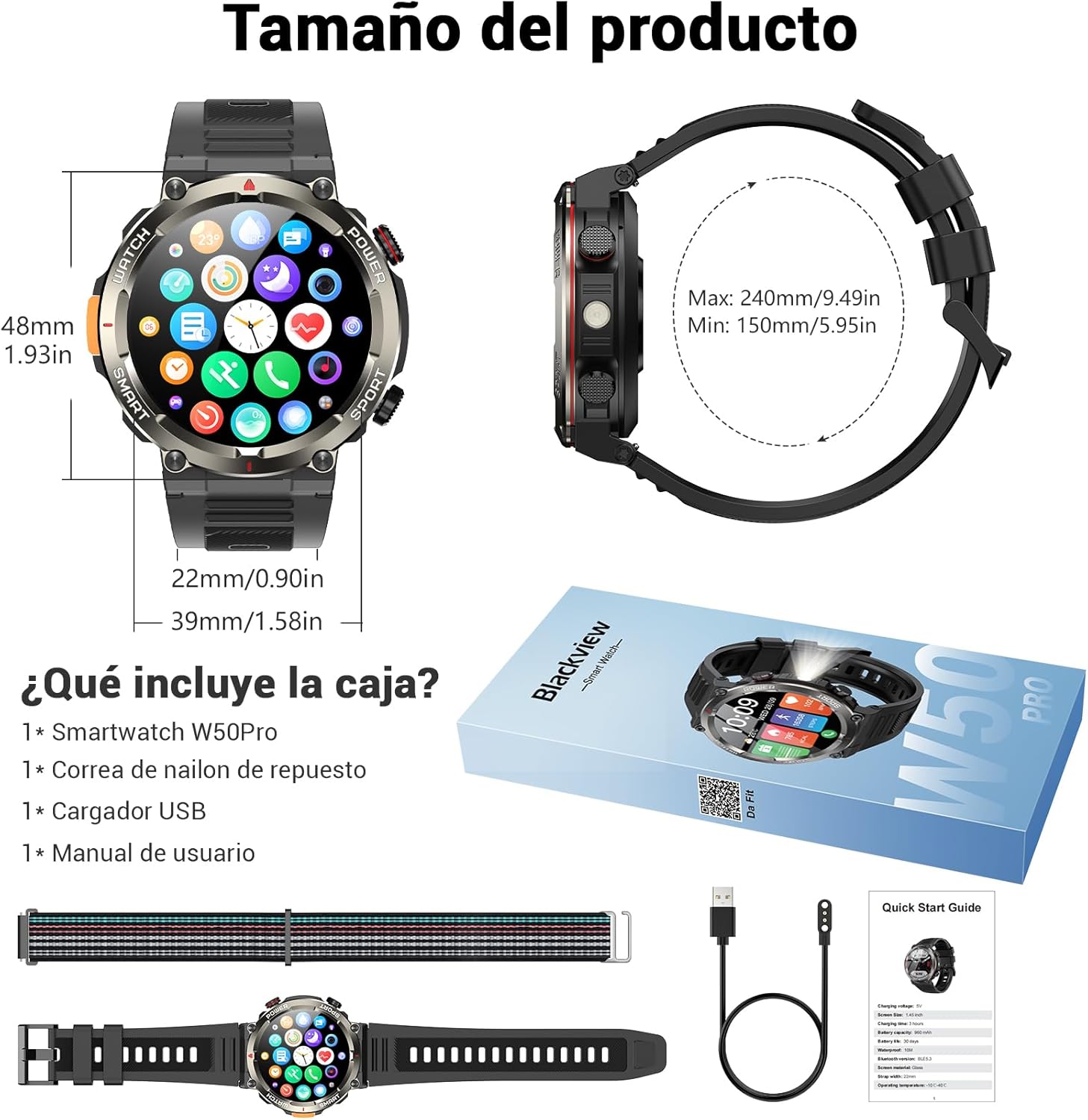
Image: Compass feature for outdoor navigation.

Image: Powerful LED flashlight in action.
3. Bluetooth Calling and Notifications
Once paired with your smartphone, the W50PRO allows you to manage calls and notifications directly from your wrist.
- Make/Receive Calls: Use the integrated speaker and microphone to make or answer calls.
- Мэдэгдэл: Receive real-time alerts for text messages, emails, and social media apps.
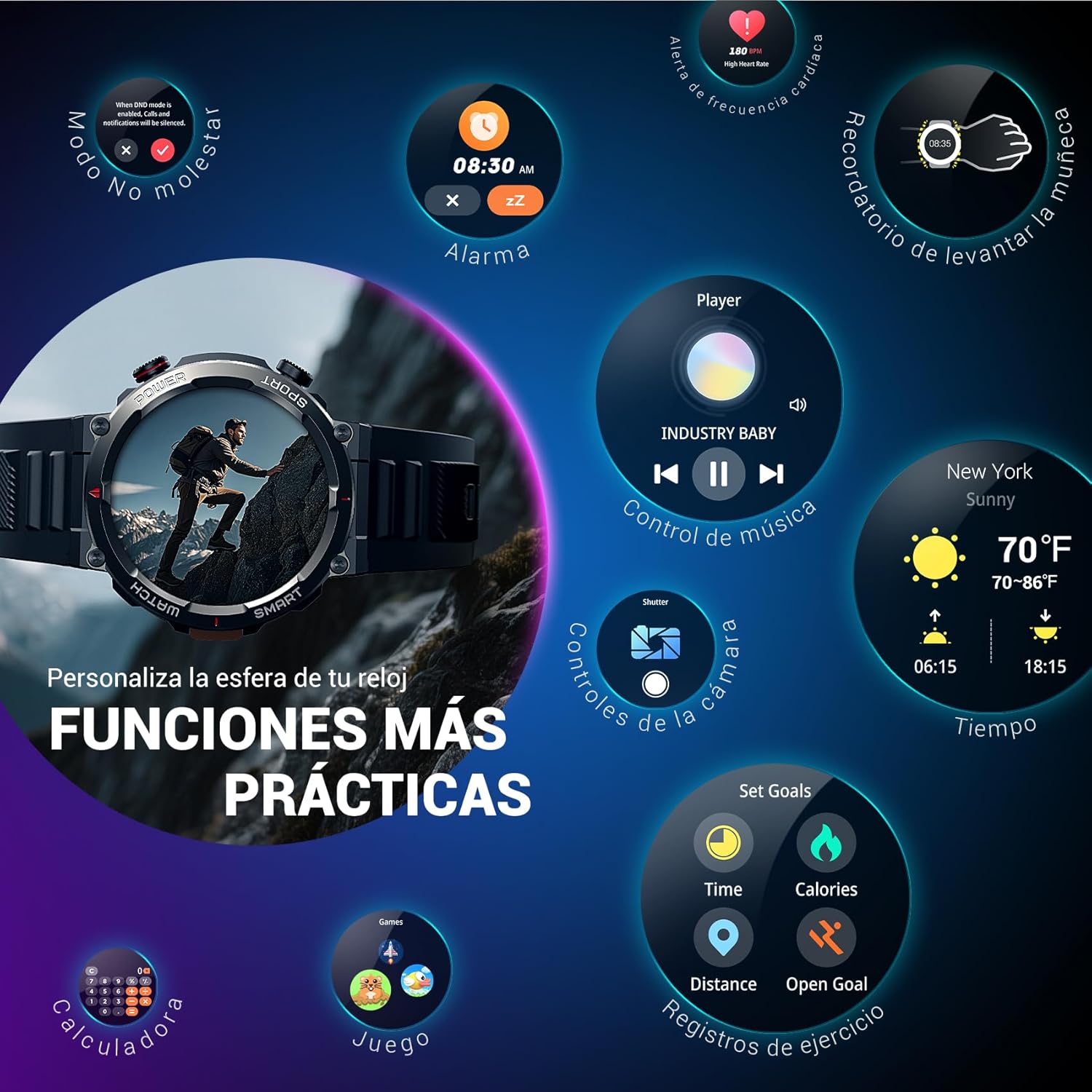
Image: Bluetooth calling and notification features.
4. Эрүүл мэндийн хяналт
The smartwatch is equipped with high-precision sensors to monitor various health indicators:
- Зүрхний цохилт: Бодит цагийн зүрхний цохилтын хяналт.
- Цусан дахь хүчилтөрөгч (SpO2): Цусан дахь хүчилтөрөгчийн түвшинг хянах.
- Унтлагын хяналт: Унтах чанар болон хэв маягийг хянадаг.
- Стрессийн түвшин: Таны стрессийн түвшингийн талаархи ойлголтыг өгдөг.
All health data synchronizes with the Da Fit app for detailed analysis and trend tracking.

Image: Real-time health monitoring features.
5. Спортын горимууд
The W50PRO offers over 100 integrated sports modes, including running, cycling, climbing, rope skipping, football, and basketball. It accurately records exercise time, distance, steps, calorie consumption, and heart rate changes, providing clear and intuitive performance data. Detailed data can be viewДа Фит аппликейшн дээр ed.

Зураг: Дууслааview of 100+ sports modes.
6. Цагны нүүрийг өөрчлөх
The Da Fit app provides a wide selection of watch faces to suit various styles. You can also upload personal photos as wallpaper and adjust text color and widget layout to create a unique watch interface.

Image: Customizable watch faces.
7. Бусад практик функцууд
Харview W50PRO includes additional features for daily convenience:
- Цаг агаарын урьдчилсан мэдээ
- Хөгжмийн хяналт
- Камерын алсын удирдлага
- Сэрүүлэг
- Суурин сануулагч
- Ус уух сануулга
- Секундомер
- Countdown timer
- Утас хайх
- Тооцоологч
- Тоглоомууд
- Гэрэлтүүлгийн тохируулга

Image: Multiple smart functions available on the smartwatch.
Засвар үйлчилгээ
1. Цэвэрлэгээ
Regularly clean your smartwatch and strap to prevent skin irritation and maintain device functionality. Use a soft, damp дэлгэцийг арчих даавуу болон casing. For the strap, follow the manufacturer's cleaning recommendations based on the material (silicone or nylon).
2. Усны эсэргүүцэл
Харview W50PRO Smartwatch features an IP68 water resistance rating. This means it is protected against dust ingress and can withstand immersion in water up to 1.5 meters for up to 30 minutes. It is suitable for daily use, such as hand washing or light rain. Avoid using it in hot water, saunas, or during diving, as steam and high pressure can compromise the seals.

Image: Durability features including IP68 water resistance.
3. Зайны арчилгаа
Батерейны ашиглалтын хугацааг уртасгахын тулд:
- Хэт их температураас зайлсхий.
- Зайг байнга бүрэн шавхаж болохгүй.
- Charge the device using the provided magnetic charging cable.
Алдааг олж засварлах
Хэрэв та хар арьстай холбоотой асуудалтай тулгарвалview W50PRO Smartwatch, try the following:
- Төхөөрөмж асахгүй байна: Цаг бүрэн цэнэглэгдсэн эсэхийг шалгаарай.
- Утастай холбох боломжгүй: Check if Bluetooth is enabled on both devices. Restart both the watch and phone. Ensure the Da Fit app has necessary permissions.
- Эрүүл мэндийн буруу мэдээлэл: Ensure the watch is worn snugly on your wrist. Clean the sensors regularly.
- Мэдэгдэл хүлээж аваагүй: Verify that notification permissions are granted in the Da Fit app and your phone's settings. Ensure the app is running in the background.
- Батерейны богино хугацаа: Reduce screen brightness, disable unnecessary features, and limit frequent heart rate monitoring.
For persistent issues, refer to the Da Fit app's help section or contact customer support.
Үзүүлэлтүүд
| Онцлог | Тодорхойлолт |
|---|---|
| Брэнд | Харview |
| Загвар | W50PRO |
| Дэлгэцийн хэмжээ | 1.45 инч |
| Дэлгэцийн төрөл | LCD |
| Шийдвэр | 360 x 360 пиксел |
| Зайны багтаамж | 960 мАч |
| Ердийн батерейны ашиглалтын хугацаа | 30 хоног хүртэл |
| Зогсоолын цаг | 100 хоног хүртэл |
| Цэнэглэх хугацаа | Ойролцоогоор 3 цаг |
| Холболт | Bluetooth |
| Хүний интерфейсийн оролт | Buttons, Microphone |
| Усны эсэргүүцэл | IP68 |
| Тохиромжтой утасны загварууд | iOS болон Android |
| Бүтээгдэхүүний хэмжээс | 8.8 x 2.2 x 18.1 см |
| Бүтээгдэхүүний жин | 136 гр |
Баталгаат болон дэмжлэг
For warranty information and technical support, please refer to the documentation included with your purchase or visit the official Blackview webсайт. Баталгаат нэхэмжлэл гаргахын тулд худалдан авалтаа нотлох баримтаа хадгалаарай.