
1. Танилцуулга
The RX-350 Infrared Thermal Imager is a high-performance device designed for precise temperature measurements using infrared technology. It is ideal for monitoring areas where identifying temperature variations is crucial. The RX-350 offers excellent thermal resolution, allowing detection of even small temperature differences on objects and surfaces.
This manual provides essential information for the safe and effective operation of your thermal imager. Please read it thoroughly before use and keep it for future reference.

2. Аюулгүй байдлын мэдээлэл
Always observe the following safety precautions to prevent injury and avoid damage to the device:
- Do not point the camera directly at high-intensity light sources (e.g., sun, lasers) as this may damage the infrared sensor.
- Avoid exposing the device to extreme temperatures, humidity, or corrosive environments.
- Төхөөрөмжийг задлах, өөрчлөхийг бүү оролдоорой. Бүх үйлчилгээг мэргэшсэн боловсон хүчинд шилжүүлээрэй.
- Use only the provided charger and battery type.
- Төхөөрөмжийг хүүхдэд хүрэхгүй газар хадгална уу.
3. Бүтээгдэхүүн дууссанview
3.1. Бүрэлдэхүүн хэсэг ба удирдлага

Дараах хэсгүүдтэй танилцаарай:
- Хэт улаан туяаны линз: Дулааны цацрагийг барьж авдаг.
- Digital Camera Lens: Captures visible light images for fusion mode.
- LED гэрэл: Provides illumination for visible light photography in dark environments.
- Camera Screen: Displays thermal and visible images, menu, and data.
- Power ON/OFF Key: Төхөөрөмжийг асаах эсвэл унтраана.
- Цэсийн түлхүүр: Accesses the device's settings and options.
- Selection/Enter Key: Цэс дэх сонголтыг баталгаажуулна.
- Навигацийн товчлуурууд (Дээш, Доош, Зүүн, Баруун): Цэсийн сонголтоор шилжинэ.
- Өдөөгч: Used to capture images or videos.
- Микро USB порт: For charging and data export to a computer.
- Бугуйн оосор: Аюулгүй харьцах зориулалттай.
3.2. Screen Elements Explanation

The screen displays various information during operation:
- Ялгарал: Current emissivity setting.
- Батерейны түвшин: Батерейны цэнэгийн үлдсэнийг заана.
- Highest Temperature Cursor: Marks the hottest point in the image.
- Өнгөний код: Represents the temperature scale.
- Central Point Temperature Cursor: Displays temperature at the center of the screen.
- Цаг: Одоогийн цаг.
- Огноо: Одоогийн огноо.
- Lowest Temperature Cursor: Marks the coldest point in the image.
- Central Temperature: Numerical value of the central point temperature.
3.3. Өнгөт палитр тайлбар
The device offers several color palettes to visualize temperature differences:
- Солонго: A common palette showing a full spectrum of colors for temperature variations.
- Iron Oxide Red: Highlights hotter areas in red/yellow tones.
- Rock Red: Similar to Iron Oxide Red, with slightly different color mapping.
- White Heat: Displays hotter areas as white and colder areas as black.
- Black Heat: Displays hotter areas as black and colder areas as white.
- Cold Color: Emphasizes colder temperatures.
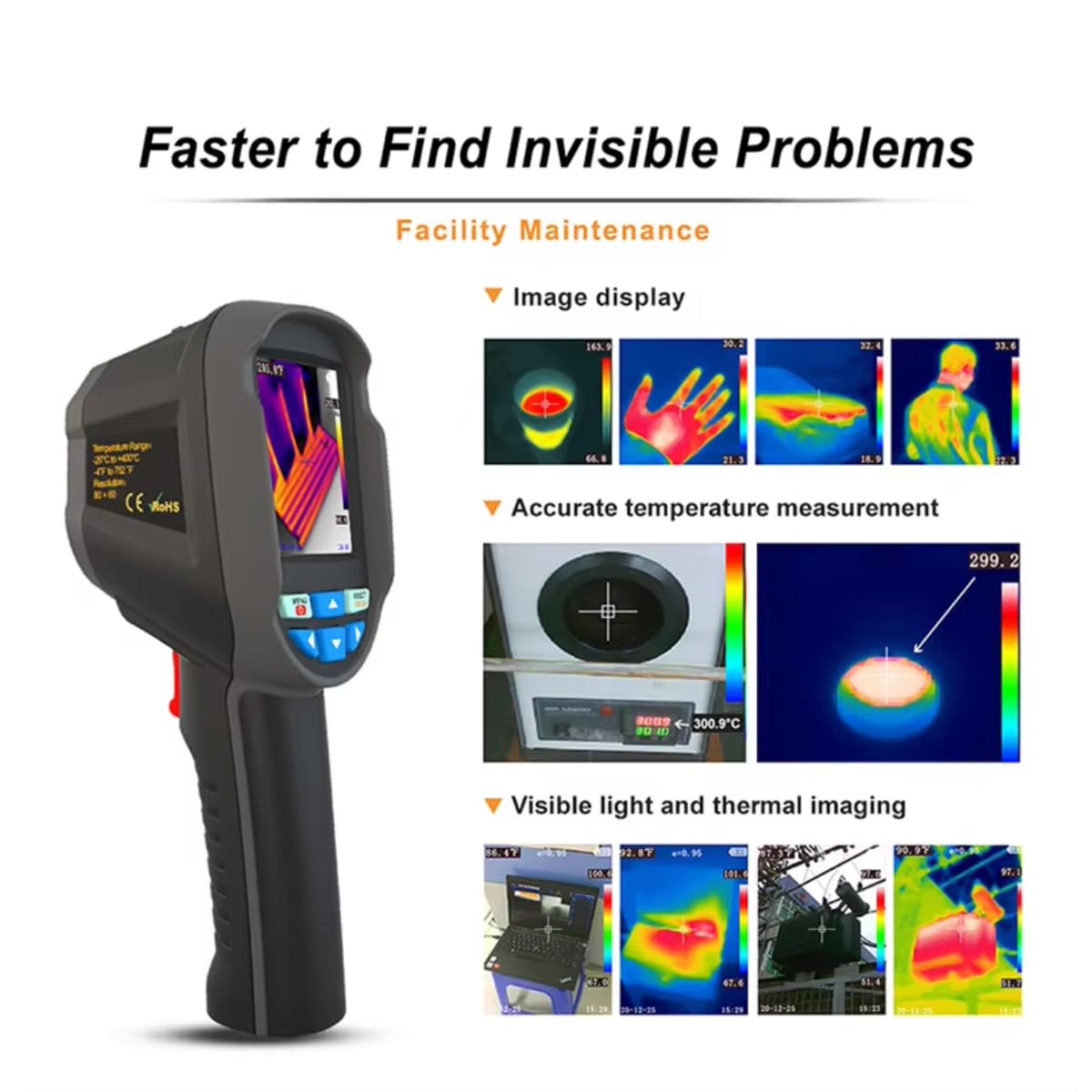
The radiation coefficient (emissivity) can be adjusted to increase the measurement accuracy of objects with half-reflection surfaces. The highest and lowest temperature cursors guide users to areas with the highest and lowest temperatures in the thermal images. Selectable color palettes are provided to meet various imaging needs.
4. Тохиргоо
4.1. Хайрцагнаас задлах, анхны үзлэг
Upon receiving your RX-350 Thermal Imager, carefully unpack all components and inspect them for any signs of damage. The package should contain:
- 1x RX-350 Thermal Imager
- 1х Хамгаалалтын хайрцаг
- 1х цэнэглэгч (цахилгаан адаптер)
- 1x USB Cable (Micro USB)
- 1x хэрэглэгчийн гарын авлага (энэ баримт бичиг)

4.2. Батерейг цэнэглэж байна
Before first use, fully charge the device's removable 18650 Lithium Battery. Connect the Micro USB cable to the camera's USB port and the other end to the charger. Plug the charger into a power outlet. The charging indicator on the screen will show the charging status. A full charge typically takes 2 to 3 hours.

4.3. Асаах/унтраах
- Асаахын тулд: Press and hold the Power ON/OFF key until the screen illuminates.
- Унтраахын тулд: Press and hold the Power ON/OFF key until the device shuts down.
The device features an automatic shutdown function, configurable for 5 minutes, 20 minutes, or disabled.
5. Ашиглалтын заавар
5.1. Basic Temperature Measurement
Once powered on, the camera will display a thermal image. Point the infrared lens towards the object or area you wish to measure. The screen will show real-time temperature readings, including the central point temperature, and the highest and lowest temperatures detected within the field of view.
5.2. Adjusting Emissivity
Emissivity is a crucial setting for accurate temperature measurement. Different materials have different emissivities. To adjust:
- дээр дарна уу Цэс түлхүүр.
- Navigate to the 'Emissivity' setting using the Navigation keys.
- дээр дарна уу Selection/Enter түлхүүр.
- Adjust the value between 0.01 and 1.00 using the Navigation keys.
- дээр дарна уу Selection/Enter баталгаажуулах түлхүүр.
Consult a reference table for common material emissivities if precise measurements are required.
5.3. Changing Color Palettes
To change the visual representation of temperature:
- дээр дарна уу Цэс түлхүүр.
- Navigate to the 'Color Palette' setting.
- дээр дарна уу Selection/Enter түлхүүр.
- Select your desired palette (e.g., Rainbow, Iron, Cold Color, White Hot, Black Hot) using the Navigation keys.
- дээр дарна уу Selection/Enter баталгаажуулах түлхүүр.
5.4. Image/Video Capture and Storage
The device supports image (JPG) and video (MP4) storage on its built-in 4GB eMMC memory (approximately 3GB user available space).
- To Capture an Image: Aim the camera and press the Триггер товч товч.
- Видео бичлэг хийхийн тулд: -г удаан дар Триггер button to start recording, and press it again to stop.
5.5. Connecting to PC for Data Export
To export captured images and videos:
- Connect the camera to your computer using the provided Micro USB cable.
- The camera will appear as a removable storage device on your computer.
- You can then copy the JPG images and MP4 videos to your computer.
The device also supports standalone image analysis on a PC.

6. Засвар үйлчилгээ
6.1. Цэвэрлэгээ
- Use a soft, dry cloth to clean the device's body.
- Линзний хувьд зурааснаас зайлсхийхийн тулд тусгай зориулалтын линз цэвэрлэх даавуу, уусмал хэрэглээрэй.
- Зүлгүүрийн цэвэрлэгч, уусгагчийг бүү ашигла.
6.2. Зайны арчилгаа
- Батерейг эрүүл байлгахын тулд төхөөрөмжийг ашиглаагүй байсан ч гэсэн батерейг тогтмол цэнэглээрэй.
- Store the device with a partially charged battery (around 50%) if it will not be used for an extended period.
- Байнга зайгаа бүрэн цэнэглэхээс зайлсхий.
7. Алдаа засах
If you encounter issues with your RX-350 Thermal Imager, try the following:
- Төхөөрөмж асахгүй байна: Ensure the battery is fully charged. Try connecting the charger and powering on.
- Температурын буруу заалт: Check the emissivity setting for the material being measured. Ensure the lens is clean.
- Дэлгэц хоосон эсвэл царцсан: Асаах товчийг удаан дарж төхөөрөмжийг дахин асааж үзнэ үү. Хэрэв хариу өгөхгүй бол батерейг бүрэн цэнэггүй болтол нь хүлээнэ үү, дараа нь дахин цэнэглэнэ үү.
- Компьютерт холбогдох боломжгүй: USB кабель камер болон компьютерт найдвартай холбогдсон эсэхийг шалгаарай. Өөр USB порт эсвэл кабель ашиглаж үзнэ үү.
Асуудал арилахгүй бол тусламж авахын тулд хэрэглэгчийн дэмжлэгтэй холбогдоно уу.
8. Техникийн үзүүлэлтүүд
| Онцлог | Тодорхойлолт |
|---|---|
| Загвар | RX-350 |
| Хэт улаан туяаны нарийвчлал | 160x120 (19200 пиксел) |
| -ийн талбар View (FOV) | 35°(Өндөр) × 27°(В) |
| Spectral Response Band | 8 ~ 14um |
| Пикселийн хэмжээ | 12 ум |
| NETD (дуу чимээний эквивалент температурын зөрүү) | ≤ 50 мК |
| Frame Rate | 25 Гц |
| Температурын хэмжилтийн хүрээ | -20 ℃ ~ +550 ℃ (-4 ℉ ~ +1022 ℉) |
| Хэмжилтийн нарийвчлал | (-15 ℃ ~ +550 ℃) ± 2 ℃ or ± 2%; (-20 ℃ ~ -15 ℃) ± 4 ℃ or ± 4% |
| Хэмжих нэгж | ℃ / ℉ |
| Линзний фокусын урт | 3.2 мм |
| Ялгаралтын тохиргоо | Adjustable from 0.01 ~ 1.00 |
| Хэмжиж болох зай | 0м ~ 3м |
| Optimal Measurable Distance | 0.5 ~ 1.2м |
| Фокус горим | Чөлөөт төвлөрөл |
| Temperature Measurement Points | Center point / Hot spot and Cold spot |
| Өнгөт палитр | Rainbow, Iron, Cold Color, White Hot, Black Hot |
| Дэлгэцийн хэмжээ | 2.8 inches (240 × 320) |
| Зураг харуулах горим | Infrared / Visible Light / Dual Fusion |
| Гэрэлтүүлгийн систем | LED дүүргэгч гэрэл |
| Төхөөрөмжийн хадгалах сан | 4GB built-in eMMC (approx. 3GB user available) |
| Зураг/Видео формат | JPG / MP4 |
| Image/Video Export Method | Компьютерт USB холболт |
| Image Analysis Function | Supports standalone analysis on PC |
| Цэсийн хэл | English, German, Italian, Chinese |
| Зайны төрөл | Зөөврийн цэнэглэдэг лити батерей (18650) |
| Зайны багтаамж | 2000 мАч |
| Хэрэглэх хугацаа | 2-3 цаг |
| Цахилгаан холболт | Микро USB |
| Автомат унтраах тохиргоо | 5 minutes / 20 minutes / None |
| Ашиглалтын температур | -10 ℃ ~ +45 ℃ (-14 ℉ ~ +122 ℉) |
| Хадгалах температур | -20 ℃ ~ +60 ℃ (-4 ℉ ~ +140 ℉) |
| Харьцангуй чийгшил | 10% ~ 85% RH (конденсацгүй) |
| Бүтээгдэхүүний жин | 375 гр |
| Бүтээгдэхүүний хэмжээс | 9.6 × 7.2 × 22.6 см |
9. Баталгаат хугацаа ба дэмжлэг
Баталгаат мэдээлэл болон техникийн дэмжлэг авахыг хүсвэл худалдан авалтад өгөгдсөн баримт бичигт хандах эсвэл худалдагчтай шууд холбогдоно уу. Аливаа баталгаат нэхэмжлэлийн хувьд худалдан авалтаа нотлох баримтаа хадгалаарай.