
1. Танилцуулга
This manual provides essential information for the safe installation, operation, and maintenance of your TOMZN TOB9-VAP 63A 1P+N WiFi Smart Switch Energy Meter. This device is a miniature circuit breaker (MCB) with integrated energy metering (Kwh, Voltage, Ampуур хилэн, Ватtage), monitoring, and timer relay functions, compatible with TUYA Smartlife applications. It is designed to protect electrical circuits from overloads and short circuits while offering smart control and energy consumption insights.
2. Аюулгүй байдлын мэдээлэл
АНХААРУУЛГА: Цахилгаанд цохиулах эрсдэлтэй.
- Суурилуулалт, засвар үйлчилгээг зөвхөн мэргэшсэн ажилтнууд хийх ёстой.
- Төхөөрөмжийг суурилуулах эсвэл үйлчилгээ үзүүлэхийн өмнө гол хэлхээний таслуурын цахилгааныг үргэлж салгаж байгаарай.
- Бүх утас холболтууд найдвартай, орон нутгийн цахилгааны кодуудтай нийцэж байгаа эсэхийг шалгаарай.
- Хэрэв төхөөрөмж эвдэрсэн мэт байвал түүнийг ажиллуулж болохгүй.
- This device is designed for indoor use in dry environments unless otherwise specified for specific outdoor enclosures.
- The device is rated for 1P+N (Single Phase + Neutral) systems. Ensure correct polarity during installation.
3. Бүтээгдэхүүн дууссанview
The TOMZN TOB9-VAP is a versatile smart circuit breaker offering protection and advanced monitoring capabilities.
3.1. Үндсэн шинж чанарууд
- Overload and Short Circuit Protection: Prevents damage caused by excessive current.
- Energy Metering (Kwh, V, A, W): Monitors real-time and historical energy consumption.
- WiFi холболт: Remote control and monitoring via smartphone app.
- Timer Relay Function: Schedule on/off times for connected loads.
- VA Protection: Тохируулах боломжтой Voltagд ба Amperage protection settings.
- TUYA Smartlife Compatible: Integrates with popular smart home platforms.
- Удаан эдэлгээтэй барилга: Made with high-quality insulating, flame-retardant, and UV-resistant materials.
- Аюулгүй холболтууд: Screw-type terminals for stable electrical connections.
3.2. Бүрэлдэхүүн хэсэг ба үзүүлэлтүүд

Figure 1: TOMZN TOB9-VAP WiFi Smart Switch Energy Meter (Metering VA Protection, 1-63A Adjustable). This image shows the device with its input (Power) and output (Load) terminals, WiFi indicator, CE mark, signal light, and the main power button. The display indicates 'Metering VA protection In: 1-63A'.

Figure 2: TOMZN TOB9-63M WiFi Smart Switch Energy Meter (Metering). This variant includes energy metering capabilities (kW·h, W, V, A) but may not have the adjustable VA protection of the TOB9-VAP.
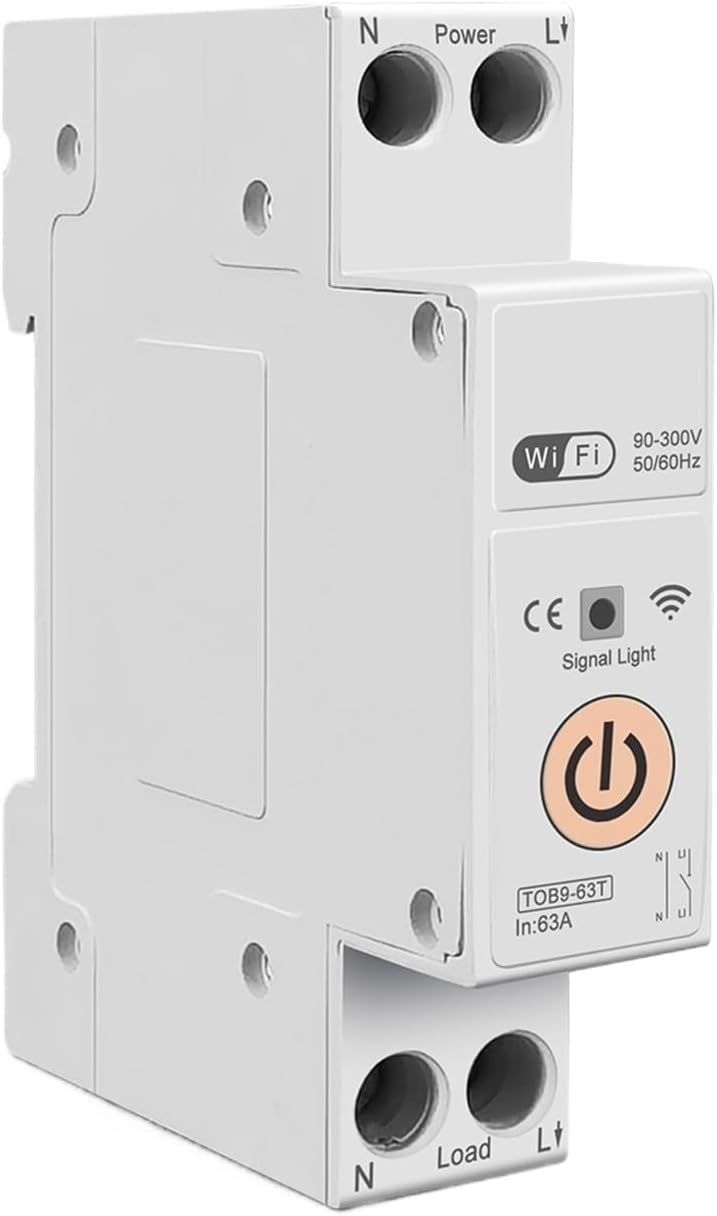
Figure 3: TOMZN TOB9-63T WiFi Smart Switch (No Metering). This basic variant provides WiFi control and circuit protection without energy metering functions.
- Power Terminals (N, L): Input connections for neutral and live wires.
- Load Terminals (N, L): Output connections for neutral and live wires to the load.
- WiFi үзүүлэлт: Shows the status of the WiFi connection.
- Дохионы гэрэл: Төхөөрөмжийн статусыг заана.
- Үндсэн цахилгаан товч: Manual ON/OFF control for the circuit breaker.
- Display (TOB9-VAP/TOB9-63M): Shows real-time energy data (Kwh, W, V, A) and protection settings.
4. Тохиргоо
4.1. Суурилуулалт ба утас
- Эрчим хүчийг салгах: Before starting, ensure the main power supply to the installation area is completely disconnected.
- Суурилуулалт: Mount the TOB9-VAP on a standard DIN rail within an appropriate electrical enclosure.
- Оролтын утас: Connect the incoming neutral wire to the 'N' terminal under 'Power' and the incoming live wire to the 'L' terminal under 'Power'. Ensure secure screw-type connections.
- Гаралтын утас: Connect the neutral wire to your load to the 'N' terminal under 'Load' and the live wire to your load to the 'L' terminal under 'Load'.
- Баталгаажуулалт: Бүх холболтын битүүмжлэл, зөв туйлшралыг давхар шалгана уу.
- Эрчим хүчийг сэргээх: Once installation is complete and verified, restore power to the main circuit.
4.2. App Pairing (TUYA Smartlife)
- Апп татаж авах: Download the 'TUYA Smart' or 'Smart Life' app from your smartphone's app store.
- Бүртгүүлэх/Нэвтрэх: Бүртгэл үүсгэх эсвэл одоо байгаа данс руугаа нэвтэрнэ үү.
- Төхөөрөмж нэмэх: In the app, tap '+' to add a new device. Select 'Electrical' > 'Circuit Breaker (Wi-Fi)'.
- Хослуулах горим: Ensure the TOB9-VAP's WiFi indicator is blinking rapidly. If not, press and hold the main power button for 5-10 seconds until it blinks rapidly to enter pairing mode.
- WiFi-д холбогдох: Follow the in-app instructions to connect the device to your 2.4GHz WiFi network. (5GHz networks are not supported).
- Төхөөрөмжийн нэрийг өөрчлөх: Once paired, you can rename the device for easy identification in the app.
5. Ашиглалтын заавар
5.1. Гар аргаар ажиллуулах
- Асаах/унтраах: Press the main power button on the device to manually switch the circuit breaker ON or OFF.
5.2. App Control and Monitoring
- Алсын Асаах/унтраах: Use the TUYA Smartlife app to remotely switch the circuit breaker ON or OFF.
- Эрчим хүчний хяналт: View real-time and historical data for Kwh consumption, current (A), voltage (V), and power (W) directly in the app.
- Цаг хэмжигч/Хуваарь: Set up schedules or countdown timers for automatic ON/OFF operations.
- VA Protection Settings: Adjust the over-voltage, боть доорtage, over-current, and over-power protection thresholds within the app. The device will automatically trip if these thresholds are exceeded.
- Үзэсгэлэнгийн автоматжуулалт: Integrate the device into smart scenes with other TUYA-compatible devices.
6. Засвар үйлчилгээ
- Тогтмол үзлэг: Periodically inspect the device and its wiring for any signs of damage, loose connections, or overheating.
- Цэвэрлэгээ: Clean the exterior of the device with a dry, soft cloth. Do not use liquid cleaners or solvents.
- Програм хангамжийн шинэчлэлтүүд: Check the TUYA Smartlife app for any available firmware updates to ensure optimal performance and security.
- Мэргэжлийн шалгалт: For any internal issues or complex repairs, consult a qualified electrician.
7. Алдаа засах
| Асуудал | Боломжит шалтгаан | Шийдэл |
|---|---|---|
| Төхөөрөмж асахгүй байна. | No power supply; loose wiring; internal fault. | Check main power supply. Verify all wiring connections. If problem persists, contact support. |
| WiFi индикатор анивчихгүй/холбогдохгүй байна. | Incorrect pairing mode; weak WiFi signal; 5GHz network. | Ensure device is in rapid blinking pairing mode. Move device closer to router. Ensure router is 2.4GHz. |
| Төхөөрөмж байнга эвдрдэг. | Overload/short circuit; incorrect VA protection settings. | Reduce load on the circuit. Check for short circuits. Adjust VA protection thresholds in the app if necessary. |
| Inaccurate energy readings. | Буруу утас; төхөөрөмжийн эвдрэл. | Verify wiring connections. If problem persists, contact support. |
8. Техникийн үзүүлэлтүүд
| Онцлог | Дэлгэрэнгүй |
|---|---|
| Загвар | TOB9-VAP |
| Нэрлэсэн гүйдэл | 1-63A (Тохируулж болно) |
| Үнэлгээтэй ботьtage | 90-300V гүйдэл |
| Давтамж | 50/60 Гц |
| Польшууд | 1P+N |
| Холболт | WiFi (зөвхөн 2.4GHz) |
| Апп нийцтэй байдал | TUYA Smart / Smart Life |
| Хамгаалалтын онцлог | Overload, Short Circuit, Over-Voltage, Дотуур ботьtage, Over-Current, Over-Power |
| Багцын хэмжээ | 0.39 x 0.39 x 0.39 инч |
| Зүйлийн жин | 3.53 унц |
| Үйлдвэрлэгч | Generic (TOMZN) |
| Загварын дугаар | JCZWUUZZB-DFE767306BB9FC909ED20C115B9 |
9. Баталгаат хугацаа ба дэмжлэг
For warranty information, technical support, or service inquiries, please refer to the documentation provided with your purchase or contact the seller directly. Keep your purchase receipt as proof of purchase.


