
Bagotte A21
Bagotte Robot Vacuum and Mop Model A21 User Manual
Тохиргоо, ашиглалт, засвар үйлчилгээний талаархи таны гарын авлага
1. Аюулгүй ажиллагааны чухал заавар
Please read this user manual carefully before using the Bagotte Robot Vacuum and Mop Model A21. Keep this manual for future reference.
- Энэ төхөөрөмжийг 8 ба түүнээс дээш насны хүүхэд, бие бялдар, мэдрэхүйн болон оюун ухааны хомсдолтой эсвэл туршлага, мэдлэг дутмаг хүмүүс уг төхөөрөмжийг аюулгүй ашиглах зааварчилгаа, зааварчилгаа авсан тохиолдолд ашиглаж болно. .
- Хүүхэд төхөөрөмжөөр тоглохыг хориглоно. Цэвэрлэгээ болон хэрэглэгчийн засвар үйлчилгээг хараа хяналтгүй хүүхэд хийж болохгүй.
- Зөвхөн үйлдвэрлэгчийн өгсөн анхны цахилгаан адаптерийг ашиглана уу.
- Роботыг ил гал эсвэл эмзэг зүйлтэй орчинд бүү ашиглаарай.
- Ensure the charging station is placed on a level surface against a wall, with no obstacles within 1 meter on either side and 2 meters in front.
- Before cleaning, remove power cords, small objects, and any items that could entangle the robot.
- Робот болон түүний электрон эд ангиудыг усанд дүрж болохгүй.
- Засвар үйлчилгээ эсвэл цэвэрлэгээ хийхээсээ өмнө роботыг унтрааж, цэнэглэх станцын залгуурыг салга.
2. Багцын агуулга
Савлахдаа бүх бүрэлдэхүүн хэсгүүд байгаа, сайн нөхцөлд байгаа эсэхийг шалгаарай.

Image: All items included in the Bagotte Robot Vacuum A21 package.
- A21 Robot Vacuum Cleaner * 1
- Charging Station * 1
- Remote Control (2 AAA batteries included) * 1
- Цахилгаан адаптер * 1
- 2-in-1 Water Tank * 1
- Хажуугийн сойз * 2
- Mop Holder * 1
- Mop Cloth * 2
- Hepa Filters * 1
- Цэвэрлэх сойз * 1
- Хэрэглэгчийн гарын авлага * 1
3. Бүтээгдэхүүн дууссанview
The Bagotte A21 is a 3-in-1 robot vacuum designed for vacuuming, sweeping, and mopping. It features a slim design, powerful suction, and multiple control options.

Image: Bagotte Robot Vacuum A21 main unit and accessories.
Үндсэн нэгжийн бүрэлдэхүүн хэсгүүд
- Хавтасны дээд хэсэг: Цахилгаан товч, Wi-Fi заагч.
- Урд бампер: Collision sensors.
- Хажуугийн сойз: For sweeping edges and corners.
- Жолооны дугуй: Хөдөлгөөний хувьд.
- Хогийн сав/Усны сав: Integrated unit for dry and wet cleaning.
- Цэнэглэх харилцагчид: For automatic recharging.
- Bottom Sensors: Cliff sensors to prevent falls.
4. Тохиргоо
4.1 Цэнэглэх станцыг байрлуулах
Place the charging station against a wall on a hard, level surface. Ensure there are no obstacles within 1 meter (3.3 feet) to the left and right, and 2 meters (6.6 feet) in front of the charging station. This allows the robot to return for charging without obstruction.

Image: Robot vacuum returning to its charging station.
4.2 Анхны цэнэглэлт
Connect the power adapter to the charging station and plug it into a wall outlet. Place the robot onto the charging station, ensuring the charging contacts align. For first-time use, charge the robot for at least 6 hours to ensure the battery is fully conditioned.
4.3 Хажуугийн сойз суурилуулах
Attach the side brushes to the corresponding posts on the bottom of the robot until they click into place. Ensure the brushes are securely fastened.
4.4 Installing the 2-in-1 Water Tank/Dustbin
To use the mopping function, fill the water tank with clean water. Attach the mop cloth to the mop holder, then slide the mop holder onto the water tank. Insert the combined 2-in-1 water tank/dustbin unit into the back of the robot until it clicks securely.

Image: Components for 3-in-1 cleaning functionality.
5. Ашиглалтын заавар
5.1 Асаах/унтраах
- Асаах: Press and hold the power button on the robot for a few seconds until the indicator light turns on.
- Унтраах: Заагч гэрэл унтрах хүртэл асаах товчийг хэдэн секундын турш дарна уу.
5.2 цэвэрлэх горим
The robot offers four cleaning modes to suit different needs:

Image: Illustration of different cleaning modes.
- Автомат цэвэрлэгээ: Робот нь системчилсэн хэв маягаар автоматаар цэвэрлэдэг.
- Толбо цэвэрлэх: Робот нь тодорхой хэсгийг спираль хэлбэрээр цэвэрлэж, төвлөрсөн цэвэрлэгээ хийдэг.
- Ирмэг цэвэрлэх: Робот нь хана, тавилганы ирмэгийг цэвэрлэдэг.
- Гар аргаар цэвэрлэх: Control the robot's direction using the remote control or app.
5.3 Програмын удирдлага (Tuya Smart App)
Download the Tuya Smart app from your smartphone's app store. Follow the in-app instructions to connect your robot to your home's 2.4GHz Wi-Fi network. The app allows for advanced control and scheduling.
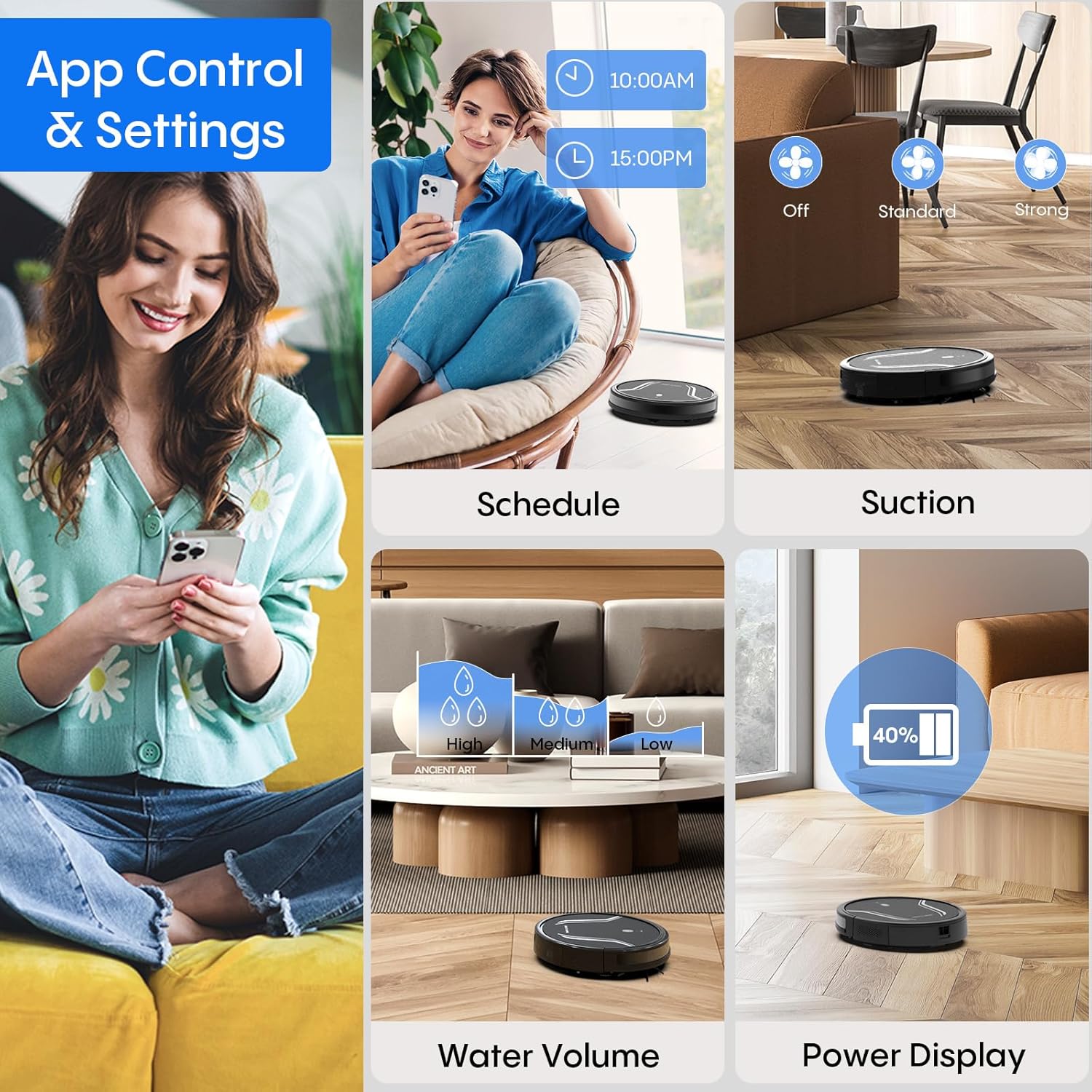
Image: App control interface for the robot vacuum.
- Хуваарь: Роботыг автоматаар цэвэрлэх тодорхой цагийг тохируулна уу.
- Цэвэрлэх горимууд: Select desired cleaning modes.
- Сорох хүч: Adjust suction levels (e.g., Standard, Strong).
- Усны хэмжээ: Control water flow for mopping (e.g., Low, Medium, High).
- Зайны төлөв: Monitor the robot's battery level.
- Find My Robot: Locate the robot if it gets stuck or lost.
5.4 Алсын удирдлага
Use the included remote control to manually direct the robot, start/pause cleaning, select cleaning modes, and send it back to the charging station.
5.5 Дуут удирдлага (Alexa/Google Assistant)
Once connected to the Tuya Smart app, you can link your robot to Amazon Alexa or Google Assistant for voice commands. For example, say "Alexa, turn on the robot."

Image: Robot vacuum controlled via voice command.
5.6 Автомат цэнэглэлт
When the battery level is low, the robot will automatically return to its charging station to recharge. You can also manually send it back using the app or remote control.
6. Засвар үйлчилгээ
Тогтмол засвар үйлчилгээ нь таны роботын тоос сорогчийн ашиглалтын хугацааг уртасгаж, оновчтой гүйцэтгэлийг баталгаажуулдаг.
6.1 Хогийн савыг хоослох
Press the release button to remove the 2-in-1 water tank/dustbin unit. Open the dustbin cover and empty its contents into a trash bin. It is recommended to empty the dustbin after each cleaning cycle.
6.2 Шүүлтүүрийг цэвэрлэх
Remove the HEPA filter and sponge filter from the dustbin. Tap them gently to remove dust. The filters are not washable and should be replaced every 3-6 months, depending on usage.
6.3 Хажуугийн сойз цэвэрлэх
Periodically check the side brushes for tangled hair or debris. Carefully remove any obstructions. If brushes are worn or damaged, replace them with new ones.
6.4 Цэвэрлэх мэдрэгч
Wipe the cliff sensors (located on the bottom of the robot) and the charging contacts (on both the robot and charging station) with a clean, dry cloth. This ensures proper navigation and charging.
6.5 Cleaning Mop Cloth and Water Tank
After each mopping session, remove the mop cloth and wash it thoroughly. Allow it to air dry completely before reattaching. Empty any remaining water from the water tank and rinse it out. Ensure the water tank is dry before storage.
7. Алдаа засах
Хэрэв танд робот тоос сорогчтой холбоотой асуудал тулгарвал дараах нийтлэг асуудал, шийдлүүдийг үзнэ үү.
| Асуудал | Боломжит шалтгаан | Шийдэл |
|---|---|---|
| Робот асахгүй байна | Батерей бага; Цахилгаан товчийг зөв дараагүй байна | Charge the robot; Press and hold the power button until the indicator lights up. |
| Робот цэнэглэдэггүй | Charging contacts are dirty; Charging station not powered | Clean charging contacts on both robot and station; Ensure power adapter is plugged in. |
| Робот байнга гацдаг | Too many obstacles; Cliff sensors are dirty | Clear the cleaning area of loose cables and small objects; Clean cliff sensors. |
| Цэвэрлэгээний гүйцэтгэл муу | Dustbin full; Filters clogged; Side brushes worn | Empty dustbin; Clean or replace filters; Clean or replace side brushes. |
| Угаах функц ажиллахгүй байна | Water tank empty; Mop cloth not attached; Water flow setting too low | Fill water tank; Attach mop cloth correctly; Adjust water flow setting in the app. |
| Wi-Fi-д холбогдох боломжгүй байна | Incorrect Wi-Fi password; Not 2.4GHz network; Robot too far from router | Verify password; Ensure router is 2.4GHz; Move robot closer to router during setup. |
8. Техникийн үзүүлэлтүүд
| Онцлог | Дэлгэрэнгүй |
|---|---|
| Загварын дугаар | A21 |
| Бүтээгдэхүүний хэмжээс | 15 x 12.5 x 4 инч |
| Зүйлийн жин | 7.24 фунт |
| Сорох хүч | 5000 Па хүртэл |
| Тоосны хайрцагны багтаамж | 250mL (integrated with water tank) |
| Усны савны багтаамж | 200mL (integrated with dust box) |
| Хяналтын аргууд | App, Remote Control, Voice Control (Alexa/Google Assistant) |
| Wi-Fi нийцтэй байдал | Зөвхөн 2.4 GHz |
| Автомат шинж чанарууд | Auto-recharge, Obstacle avoidance, Fall prevention |
9. Баталгаат хугацаа ба дэмжлэг
Bagotte provides a 12-month service warranty for the Robot Vacuum and Mop Model A21. For technical support, warranty claims, or any questions regarding your product, please contact Bagotte customer service through the official webсайт эсвэл таны худалдан авах платформ.
Please have your model number (A21) and purchase information ready when contacting support.
Ask a question about this manual
Ask about setup, troubleshooting, compatibility, parts, safety, or missing instructions. Manuals+ will review the question and use this page’s manual context to help answer it.