
Танилцуулга
This manual provides detailed instructions for the installation, operation, and maintenance of your Generic HI-M505 Radio Receiver. Designed for 12V and 24V systems, this unit features DAB, AM, FM radio, USB connectivity, and Bluetooth, making it suitable for various applications, including compatibility with Komatsu, Kobelco, and Sumitomo excavator parts.
Багцын агуулга
Доор жагсаасан бүх зүйл таны багцад байгаа эсэхийг шалгана уу.
- 1 x Car Radio Stereo With Frame
- 1 x GPS Cable
- 2 x USB кабель
- 1 x Power Cable With Canbus
- 1 х RCA кабель
- 1 x Камерын оролтын кабель
- 1 x Radio Adapter Cable
- 1 x Хэрэглэгчийн гарын авлага (энэ баримт бичиг)
Тохиргоо ба суурилуулалт
Зөв суурилуулалт нь оновчтой гүйцэтгэлд чухал үүрэгтэй. Хэрэв та ямар нэгэн алхамын талаар эргэлзэж байвал мэргэшсэн техникчтэй зөвлөлдөнө үү.
1. Аюулгүй байдлын урьдчилан сэргийлэх арга хэмжээ
- Disconnect the vehicle's battery before starting installation to prevent electrical shorts.
- Ensure the unit is compatible with your vehicle's electrical system (12V or 24V).
- Жолоочийн хөдөлгөөнд саад учруулж болзошгүй газар төхөөрөмжийг бүү суулгаарай view эсвэл тээврийн хэрэгслийн ажиллагаанд саад учруулах.
2. Төхөөрөмжийг суурилуулах
- Carefully remove the existing radio or blank panel from the dashboard.
- Insert the HI-M505 radio stereo with its frame into the dashboard opening.
- Secure the unit using appropriate mounting hardware (not included unless specified).
3. Утасны холболт
Connect the provided cables as follows:
- Power Cable with Canbus: Connect to the vehicle's power supply and ground. Ensure correct polarity. The Canbus connection facilitates communication with the vehicle's system.
- Radio Adapter Cable: Connect to the vehicle's antenna input.
- GPS Cable: Connect the GPS antenna to the unit and mount the antenna in a location with a clear view тэнгэрийн.
- USB Cables (x2): Connect to the unit's USB ports. These can be routed to a convenient location for connecting USB devices.
- RCA кабель: Гадаад холболтод зориулагдсан amplifiers or other audio/video devices.
- Camera Input Cable: Ар талыг холбоход зориулагдсанview camera (camera not included).
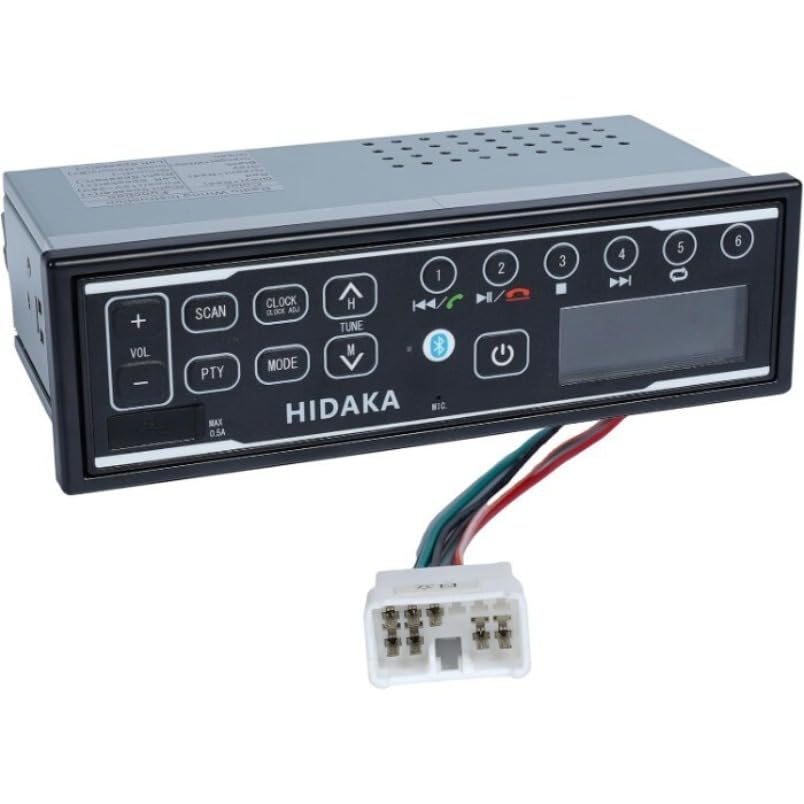
Зураг: Урд view of the HI-M505 Radio Receiver, showing the display and control buttons. This image illustrates the general appearance of the unit.
Ашиглалтын заавар
The HI-M505 operates on an Android platform, offering a user-friendly interface.
1. Асаах/унтраах
Press and hold the power button (usually marked with a power symbol) to turn the unit on or off. A short press typically mutes the audio or changes the source.
2. Radio Functions (DAB, AM, FM)
- Эх сурвалжийн сонголт: Tap the "Radio" icon on the main screen or use the source button to select AM, FM, or DAB (if available in your region).
- Скан хийж байна: Use the seek buttons to automatically scan for available stations.
- Урьдчилан тохируулсан зүйлс: Save your favorite stations to preset buttons for quick access.
3. USB тоглуулах
Insert a USB drive into one of the provided USB ports. The unit will automatically detect the drive and display its contents. Use the media player application to browse and play audio or video files.
4. Bluetooth холболт
- Go to the unit's settings menu and select "Bluetooth".
- Enable Bluetooth and make the unit discoverable.
- On your mobile device, search for available Bluetooth devices and select "HI-M505" (or similar name).
- Хэрэв асуувал хослуулах кодыг баталгаажуулна уу.
- Once paired, you can stream audio or make hands-free calls.
5. Wi-Fi and Apple CarPlay
- Wi-Fi: Access the Wi-Fi settings to connect to a local Wi-Fi network or a mobile hotspot. This enables internet access for apps and updates.
- Apple CarPlay: Connect your iPhone via USB to activate Apple CarPlay. This allows you to use compatible iPhone apps directly on the unit's display.
Засвар үйлчилгээ
Regular maintenance ensures the longevity and optimal performance of your HI-M505 radio receiver.
- Цэвэрлэгээ: Use a soft, dry cloth to clean the display and exterior. Avoid abrasive cleaners or solvents.
- Програм хангамжийн шинэчлэлтүүд: Periodically check for software updates via Wi-Fi to ensure you have the latest features and bug fixes.
- Кабелийн холболтууд: Бүх кабелиуд найдвартай холбогдсон, гэмтээгүй эсэхийг шалгаарай.
Алдааг олж засварлах
Хэрэв танд асуудал тулгарвал дараах нийтлэг асуудал, шийдлүүдийг үзнэ үү.
- Эрчим хүчгүй:
- Check the power cable connections and ensure they are secure.
- Verify the vehicle's fuse for the radio is not blown.
- Ensure the vehicle's battery is charged and connected.
- Дуугүй:
- Check the volume level and ensure the unit is not muted.
- Чанга яригчийн холболтыг шалгана уу.
- Хэрэв гадны төхөөрөмж ашиглаж байгаа бол amplifier, check its power and connections.
- Радио хүлээн авалт муу:
- Ensure the radio antenna is properly connected and not damaged.
- Check for obstructions or interference in the area.
- Bluetooth холболтын асуудал:
- Ensure Bluetooth is enabled on both the unit and your mobile device.
- Delete previous pairings on both devices and try pairing again.
- Move closer to the unit to ensure a strong signal.
- USB төхөөрөмж танигдаагүй:
- Ensure the USB device is formatted correctly (e.g., FAT32).
- Try a different USB device or cable.
- Check if the USB port is damaged.
Хэрэв асуудал хэвээр байвал хэрэглэгчийн тусламжтай холбогдоно уу.
Үзүүлэлтүүд
| Онцлог | Дэлгэрэнгүй |
|---|---|
| Загвар | HI-M505 |
| Брэнд | Ерөнхий |
| Холболтын технологи | Bluetooth, WiFi |
| Хянагчийн төрөл | Android |
| Онцлог шинж чанарууд | Apple CarPlay, Built-In Wi-Fi |
| Тохиромжтой төхөөрөмжүүд | Ampнастан |
| Холбогч төрөл | USB төрөл А |
| Аудио гаралтын горим | Стерео |
| Зүйлийн жин | 4.4 фунт |
| Эрчим хүчний оролт | 12V / 24V DC (as per product description) |
Баталгаат хугацааны мэдээлэл
Specific warranty terms and conditions for the Generic HI-M505 Radio Receiver are provided by the seller at the time of purchase. Please refer to your purchase documentation or contact the seller directly for detailed warranty coverage, duration, and claim procedures.
Хэрэглэгчийн дэмжлэг
For technical assistance, troubleshooting beyond this manual, or inquiries regarding your HI-M505 Radio Receiver, please contact the seller or retailer from whom you purchased the product. They will be able to provide the most accurate and timely support.