
1. Танилцуулга
This manual provides essential information for the safe operation and maintenance of your SuperRC V666 Drone with Camera. Please read it thoroughly before first use to ensure proper setup and to maximize your flying experience. The V666 drone features a brushless motor, optical flow positioning, and an HD 180° adjustable camera, designed for both beginner and adult users.
2. Аюулгүй байдлын урьдчилан сэргийлэх арга хэмжээ
- Нислэгийн орчин: Fly in open areas, away from people, animals, buildings, and power lines. Avoid flying in strong winds or adverse weather conditions.
- Батерейны аюулгүй байдал: Use only the provided batteries and charging cable. Do not overcharge or puncture batteries. Discontinue use if batteries show signs of damage or swelling.
- Сэнсний аюулгүй байдал: Keep hands, face, and loose clothing away from rotating propellers. Ensure propellers are securely attached before flight.
- Харааны шугам: Нислэгийн үеэр дроныг үргэлж харааны шугамаар харж байгаарай.
- Насны зөвлөмж: This product is suitable for users aged 14 and above.
- хөндлөнгийн оролцоо: Хүчтэй цахилгаан соронзон хөндлөнгийн нөлөөллийн эх үүсвэрийн ойролцоо нисэхээс зайлсхий.
- Multiple Drones: When operating multiple drones simultaneously, power on and pair each drone and its remote control separately to prevent frequency conflicts.
3. Багцын агуулга
Доор жагсаасан бүх зүйл таны багцад байгаа эсэхийг шалгаарай.
Зураг: Дууслааview of the SuperRC V666 Drone package contents, showing the drone, remote control with screen, two batteries, spare propellers, screwdriver, USB charging cable, card reader, and memory card.
- SuperRC V666 Drone
- Нэгдсэн дэлгэцтэй алсын удирдлага
- 2 x Lithium Ion Batteries (1000mAh each)
- Сэлбэг сэнс
- Сэнсний хамгаалагчид
- Гар цүнх
- Микро USB кабель
- Халив
- Карт уншигч
- Санах ойн карт
4. Бүрэлдэхүүн хэсгүүдийг тодорхойлох
4.1 Дрон дээгүүрview
Зураг: Нарийвчилсан view of the SuperRC V666 Drone, showing the main body, camera, and protected propellers.
Familiarize yourself with the drone's key components:
- Камер: Front-mounted, 180° manually adjustable HD camera.
- Сэнс: Four propellers with protective guards.
- Сойзгүй мотор: Provide stable and powerful flight.
- Зайны тасалгаа: Located on the drone's body.
- Цахилгаан товч: For turning the drone on/off.
- Body Light: Integrated lighting for visibility.
4.2 Алсын удирдлагатайview
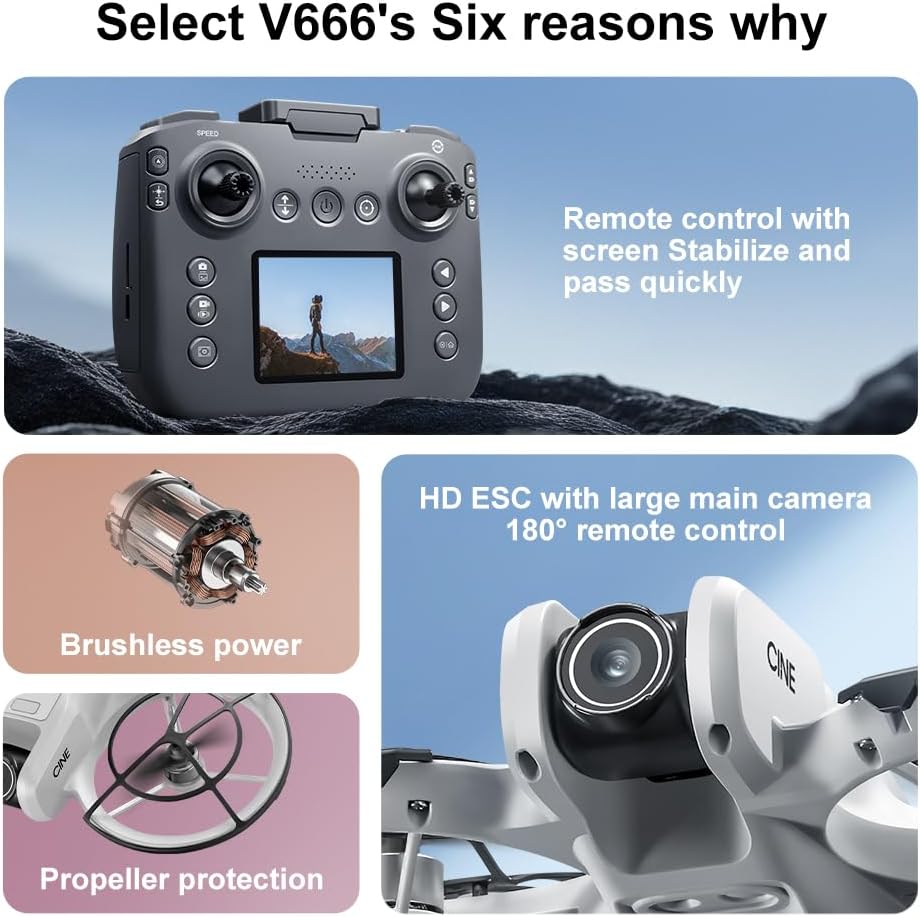
Image: The remote control for the SuperRC V666 Drone, featuring a central display screen, dual joysticks, and multiple control buttons.
Алсын удирдлагын онцлог:
- Жойстик: Left for throttle/yaw, right for pitch/roll.
- Integrated Screen: Displays flight information and live camera feed.
- Цахилгаан товч: To turn the remote control on/off.
- Нэг товчлууртай хөөрөх/буух товчлуур: Автоматаар хөөрөх эсвэл буух үйлдлийг эхлүүлнэ.
- Хурд тохируулах товч: Toggles between different flight speeds.
- Фото/Видео товчлуурууд: For capturing images and recording video.
- Тайрах товчлуурууд: For fine-tuning drone stability.
5. Тохиргоо
5.1 Зайг суурилуулах, цэнэглэх
- Insert the fully charged Lithium Ion battery into the drone's battery compartment. Ensure it clicks into place securely.
- To charge the battery, connect it to the Micro-USB cable and then to a USB power source (e.g., computer, USB wall adapter). The charging indicator will show the charging status.
- Charge the remote control battery using its dedicated charging port and cable.
5.2 Сэнсний суурилуулалт
The drone comes with propeller guards pre-installed. If you need to replace propellers:
- Identify the correct propeller type (A or B) for each motor. Propellers are typically marked.
- Align the propeller with the motor shaft and press down firmly until it is secure.
- Ensure all propellers rotate freely without obstruction.
5.3 Дрон ба алсын удирдлагатай хослуулах

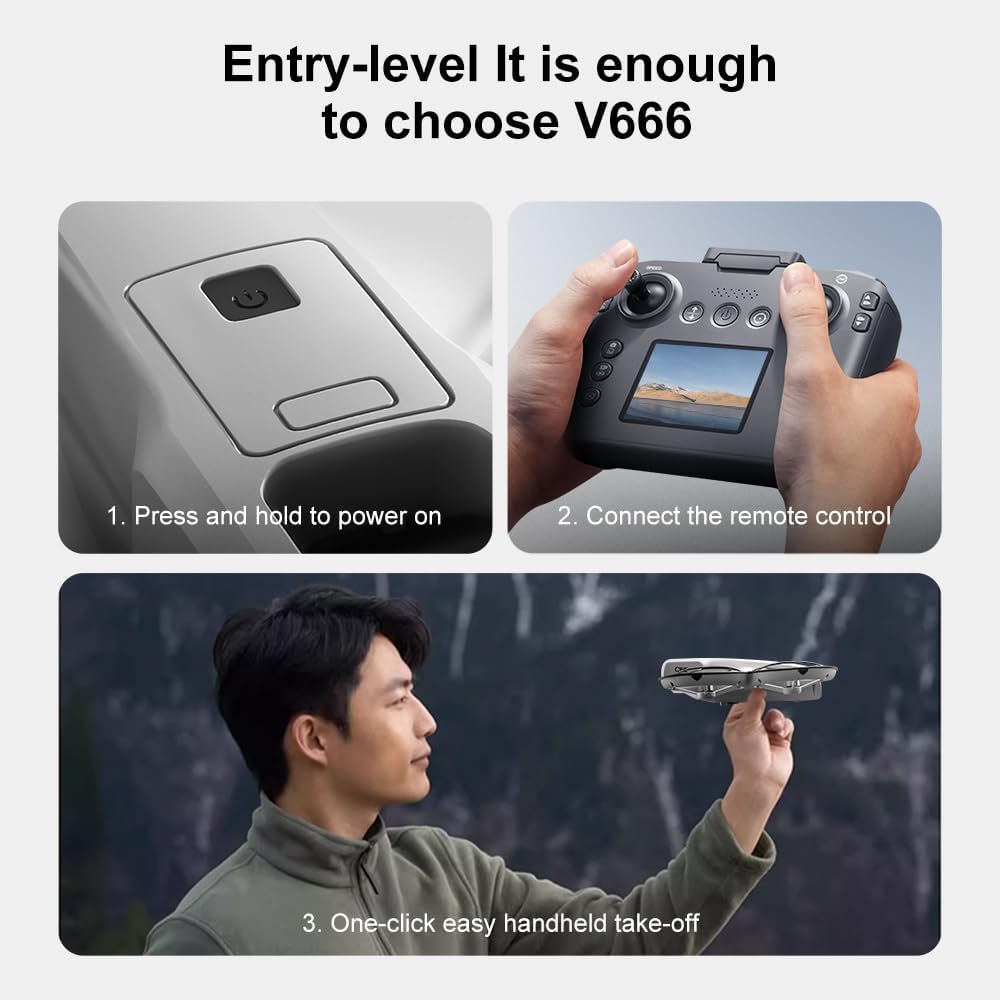
Image: Visual guide demonstrating the steps for powering on the drone, connecting the remote control, and initiating a one-click handheld take-off.
- Дроныг тэгш, тэгш гадаргуу дээр байрлуул.
- Press and hold the power button on the drone until its indicator lights turn on.
- Алсын удирдлагыг асаана уу.
- The drone and remote control will automatically attempt to pair. Once paired, the drone's indicator lights will become solid.
- Жич: If operating multiple drones, power on and pair each drone and its remote control individually to avoid signal interference.
6. Ашиглалтын заавар
6.1 Нислэгийн үндсэн удирдлага
- Зүүн жийстик (Агаар тохируулагч/Хажуу тийш):
- Push up/down: Increase/decrease altitude (Throttle).
- Push left/right: Rotate drone left/right (Yaw).
- Баруун жийстик (Өнхрүүлэлт/Өнхрүүлэлт):
- Push up/down: Move drone forward/backward (Pitch).
- Push left/right: Move drone left/right (Roll).
- Хурдны тохируулга: Press the speed button on the remote to cycle through different flight speeds (e.g., low, medium, high).
6.2 One-Key Functions
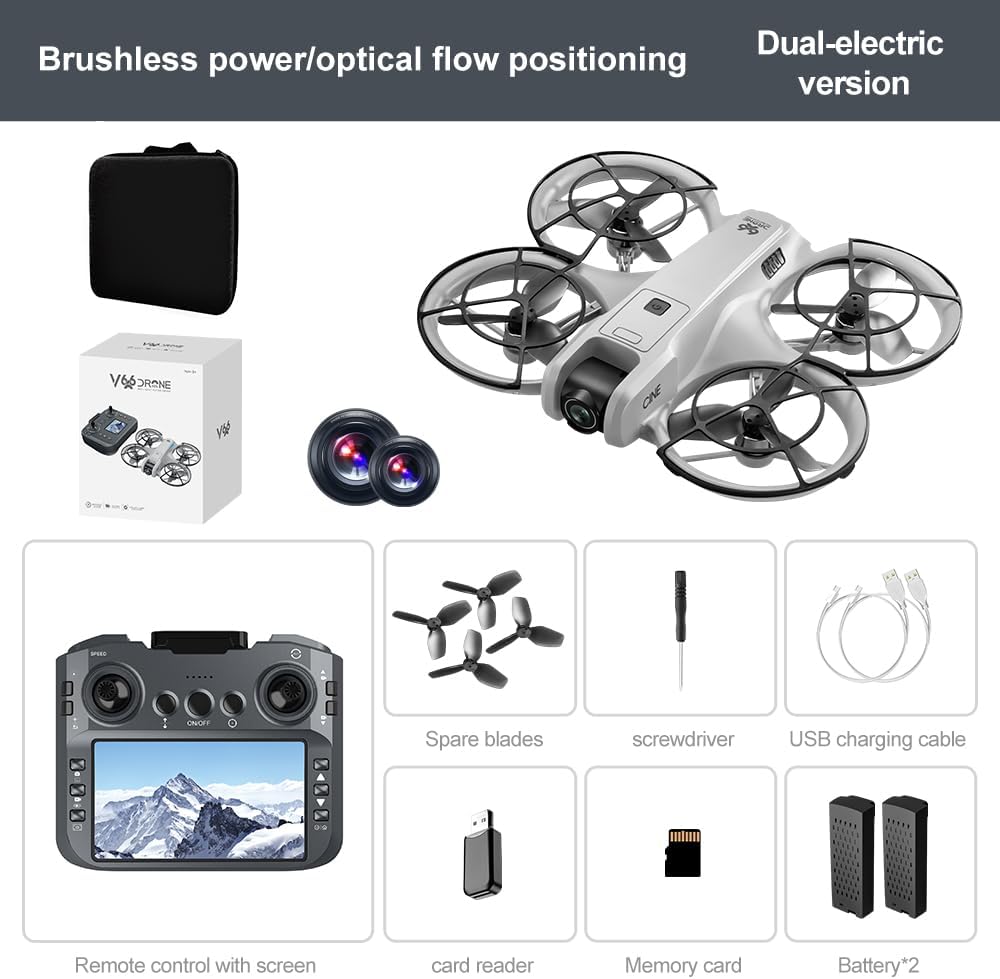
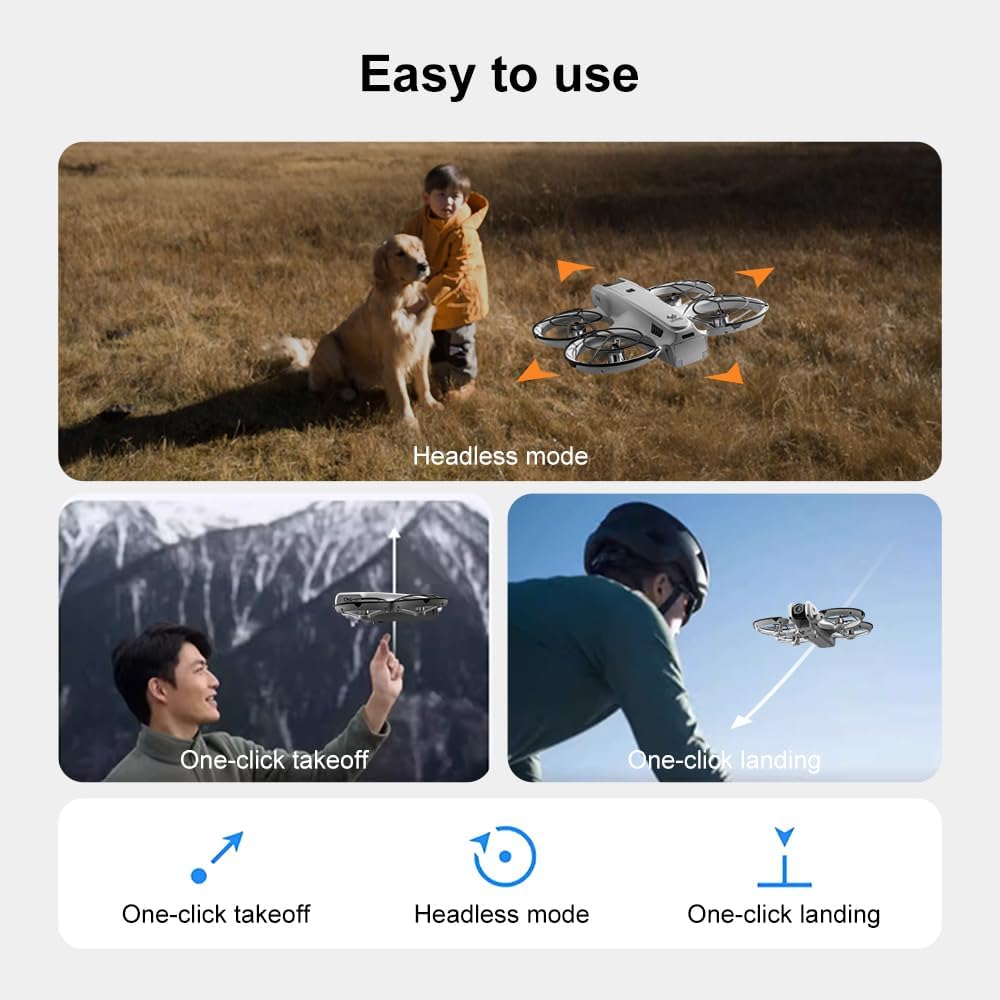
Image: Visual representation of the drone's Headless Mode, One-Click Take-off, and One-Click Landing functionalities.
- Нэг түлхүүртэй хөөрөлт: Press the designated button once, and the drone will automatically ascend to a stable hovering height.
- Нэг түлхүүрээр буух: Press the designated button once, and the drone will automatically descend and land gently.
- Нэг түлхүүрээр буцах: Activates the drone's return-to-home function. The drone will attempt to return to its take-off point.
6.3 Толгойгүй горим
In Headless Mode, the drone's orientation is relative to the pilot, regardless of which way the drone's front is facing. This simplifies control for beginners.
6.4 Дохионы удирдлага
The drone supports gesture-based photo and video capture. Perform specific hand gestures in front of the camera to trigger these functions during flight.
6.5 Камерын ажиллагаа
- Камерын өнцгийг тохируулах: The camera lens can be manually adjusted 180° before flight to achieve the desired viewөнцөг.
- Зураг/Видео авах: Зураг авах эсвэл видео бичлэг эхлүүлэх/зогсоохын тулд алсын удирдлага дээрх тусгай товчлууруудыг ашиглаарай.
- Шууд хангамж: The integrated screen on the remote control provides a real-time view from the drone's camera via Wi-Fi connectivity.
- Хадгалах: Captured photos and videos are saved to the inserted memory card.
7. Засвар үйлчилгээ
- Цэвэрлэгээ: Use a soft, dry cloth to clean the drone and remote control. Avoid using solvents or harsh chemicals.
- Сэнс солих: If propellers are damaged, replace them with spare parts using the provided screwdriver. Ensure correct propeller type (A or B) is used for each motor.
- Хадгалах: Store the drone and its components in a cool, dry place, away from direct sunlight and extreme temperatures. Remove batteries if storing for extended periods.
8. Алдаа засах
| Асуудал | Боломжит шалтгаан | Шийдэл |
|---|---|---|
| Дрон асахгүй байна | Батерейг цэнэглээгүй эсвэл буруу суурилуулсан. | Батерейг бүрэн цэнэглэж, зөв оруулсан эсэхийг шалгаарай. |
| Drone fails to pair with remote control | Remote control not powered on, or pairing sequence incorrect. | Ensure both devices are powered on. Follow pairing steps (Section 5.3). Avoid multiple drones pairing simultaneously. |
| Нислэгийн үеэр дрон нисдэг | Not calibrated on a flat surface, or environmental factors. | Ensure drone is placed on a flat surface before take-off. Perform calibration if available (refer to remote control instructions). Avoid strong winds. |
| Poor camera image quality or no live feed | Weak Wi-Fi signal, camera lens dirty, or memory card issue. | Ensure drone is within Wi-Fi range. Clean camera lens. Check memory card for proper insertion and sufficient space. |
| Нислэгийн богино хугацаа | Battery not fully charged, or battery degradation. | Fully charge batteries before each flight. Consider replacing old batteries if performance significantly degrades. |
9. Техникийн үзүүлэлтүүд
| Онцлог | Дэлгэрэнгүй |
|---|---|
| Брэнд | SuperRC |
| Загварын нэр | V666 |
| Өнгө | Саарал |
| Зүйлийн жин | 0.2 килограмм (ойролцоогоор 7 унц) |
| Бүтээгдэхүүний хэмжээс | 7"L x 6"W x 2"H |
| Ур чадварын түвшин | Эхлэгч |
| Моторын төрөл | Сойзгүй мотор |
| Камер | HD 180° Manually Adjustable |
| Видео бичлэгийн нягтрал | 720p |
| Видео бичлэгийн формат | MP4 |
| Холболтын технологи | Wi-Fi, Radio Frequency |
| Оптик мэдрэгчийн технологи | Optical Flow, CMOS |
| Зайны төрөл | Лити ион |
| Зайны багтаамж | 1000 мАч |
| Хяналтын төрөл | Алсын удирдлага |
| Онцлог шинж чанарууд | Adjustable Camera, One Button Return, One Key Rotation, Rechargeable, Speed Adjustment, Optical Flow Positioning |
10. Баталгаат хугацаа ба дэмжлэг
For warranty information or technical support, please refer to the documentation included with your purchase or contact SuperRC customer service directly. Keep your proof of purchase for any warranty claims.
Нэмэлт тусламж авахыг хүсвэл зочилж болно SuperRC Store on Amazon.