
MOBAPAD Huben2 H6
MOBAPAD Huben2 Wireless Switch Controller Pro Instruction Manual
Model: Huben2 H6 | Brand: MOBAPAD
1. Танилцуулга
This manual provides detailed instructions for the setup, operation, and maintenance of your MOBAPAD Huben2 Wireless Switch Controller Pro. Please read this manual thoroughly before using the product to ensure optimal performance and longevity.
2. Аюулгүй байдлын мэдээлэл
- Хянагчийг ус болон бусад шингэнээс хол байлга.
- Хянагчийг хэт өндөр температурт бүү оруул.
- Хянагчийг унагаах эсвэл хүчтэй цохилтод өртөхөөс зайлсхий.
- Do not attempt to disassemble or repair the controller yourself. Contact customer support for assistance.
- Цэнэглэхийн тулд зөвхөн өгсөн цэнэглэгч кабель эсвэл баталгаажуулсан USB-C кабелийг ашиглана уу.
3. Багцын агуулга
Таны багцад бүх зүйл байгаа эсэхийг шалгана уу:
- MOBAPAD Huben2 Wireless Controller Pro
- USB-C цэнэглэгч кабель
- Wireless Dongle (2.4G)
- PU Travel Case
- Replaceable D-pad (Cross/Circle)
- Хэрэглэх заавар (энэ баримт бичиг)
4. Хянагчийн зохион байгуулалт
Familiarize yourself with the buttons and features of your Huben2 controller.

Зураг 4.1: Урд view of the MOBAPAD Huben2 Wireless Controller Pro. Shows the joysticks, face buttons (A, B, X, Y), D-pad, and central function buttons.
- Зүүн/Баруун аналог саваа: Capacitive joysticks with 4,096-step precision.
- A/B/X/Y товчлуурууд: Omron mechanical face buttons.
- D-pad: Replaceable cross or circle D-pad.
- L1/R1 (Мөрний товч): Standard shoulder buttons.
- L2/R2 (Триггерүүд): Dual-mode triggers (Hall Effect and Microswitch).
- M1/M2/M3/M4 Buttons: Four programmable back buttons.
- Нүүр хуудас товч: Powers on/off and returns to system home screen.
- Дэлгэцийн зургийн товчлуур: Дэлгэцийн агшинг авдаг.
- Нэмэх/Хасах товчлуурууд: Standard system menu buttons.
- Турбо товч: Турбо функцийг идэвхжүүлдэг/идэвхгүй болгодог.
- USB-C порт: Цэнэглэх, утастай холбох зориулалттай.

Зураг 4.2: Ар талд view showing the four programmable M1, M2, M3, M4 back buttons.
5. Тохиргоо
5.1 Хянагчийг цэнэглэх
Before first use, fully charge the controller. Connect the provided USB-C cable to the controller's USB-C port and the other end to a USB power source (e.g., console, PC, or USB wall adapter). The charging indicator will show the charging status.
- A full charge provides approximately 15 hours of gameplay.

Figure 5.1: The controller features a 1000mAh battery for extended gameplay.
5.2 Холболтын горимууд
The Huben2 controller supports three connection methods:

Figure 5.2: The controller supports 2.4G wireless, Bluetooth, and wired connections across various platforms.
- 2.4G Wireless (via Dongle):
- Compatible with Windows PC, Steam, and Android TV.
- 2.4G утасгүй донглыг төхөөрөмжийнхөө USB порт руу оруулна уу.
- Turn on the controller. It should automatically connect to the dongle.
- Bluetooth утасгүй:
- Compatible with Nintendo Switch, Nintendo Switch 2, Android, and iOS devices.
- On your device, navigate to Bluetooth settings and enable Bluetooth.
- On the controller, press and hold the Bluetooth pairing button (refer to controller layout for exact location) until the indicator lights flash rapidly.
- Select "MOBAPAD Huben2" from the list of available devices on your system to pair.
- For Nintendo Switch, the controller can wake the console from sleep mode after initial pairing and firmware update via the Mobapad app.
- Утастай холболт:
- Compatible with Windows PC and Android TV.
- Connect the controller to your device using the USB-C cable. The controller will be recognized automatically.
6. Ашиглалтын заавар
6.1 Асаах/унтраах
- Асаах: Нүүр товчийг дарна уу.
- Унтраах: Press and hold the Home button for 3-5 seconds. The controller will also power off automatically after a period of inactivity.
6.2 Dual Trigger Modes
The L2 and R2 triggers feature dual modes for different gaming experiences:

Figure 6.1: Visual representation of the 2mm Microswitch Trigger and 10mm Hall Linear Trigger modes.
- Microswitch Trigger (2mm): Provides a short, tactile click for rapid input, ideal for FPS games.
- Hall Effect Linear Trigger (10mm): Offers analog input with a longer travel distance, suitable for racing or simulation games.
- Солих горимууд: Use the physical switches located near the L2/R2 triggers to toggle between modes.
6.3 Customizable Features (Back Buttons, Macros, App Support)
The Huben2 controller offers extensive customization options:
- Програмчлагдах Буцах Товчнууд (M1-M4): Assign single button presses or complex macros to the four back buttons using the dedicated Mobapad PC/mobile application.
- Rapid-Fire Turbo Mode: Activate turbo functionality for any button. Refer to the Mobapad app or controller manual for specific button combinations to enable/disable.
- Mobapad App: Download the official Mobapad application for Windows or mobile devices to:
- Adjust joystick dead zones and response curves.
- Чичиргээний эрчмийг тохируулах.
- Макро үүсгэх болон удирдах.
- Хянагчийн програм хангамжийг шинэчлэх.
6.4 HD Rumble and ALPS Linear Motors
The controller features dual ALPS linear motors for precise HD Rumble feedback, reacting to in-game sound and motion with 0ms startup time.
6.5 6-Axis Motion Control
The integrated 6-axis motion sensor provides precise motion control for compatible games.

Figure 6.2: The controller's internal 6-axis sensing motors enable precise motion control.
6.6 Replaceable D-pad and Faceplate
The controller allows for customization of the D-pad and faceplate.
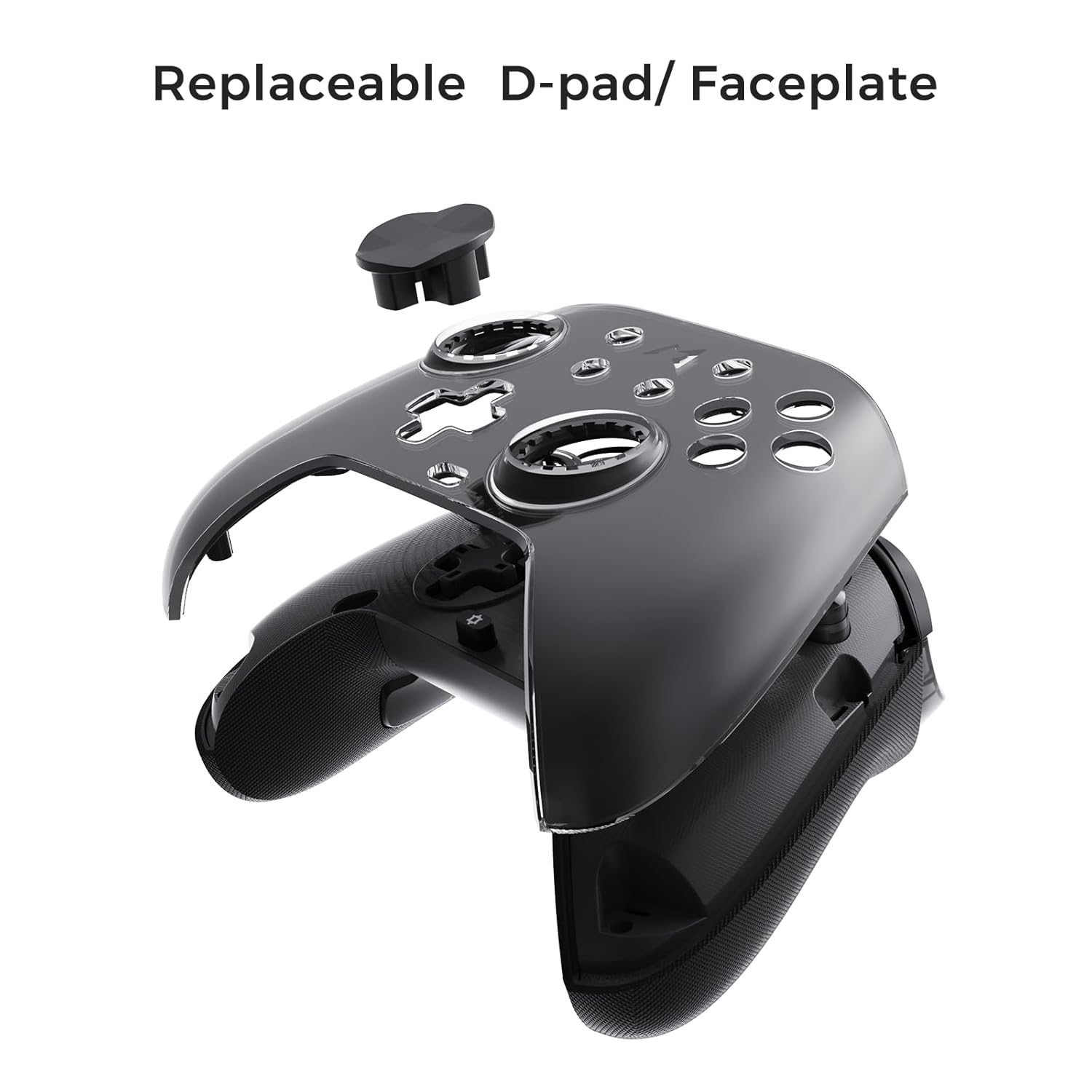
Figure 6.3: The D-pad and faceplate can be replaced for customization or preference.
- To replace the D-pad, gently remove the magnetic faceplate and then lift out the D-pad. Insert the desired D-pad (cross or circle) and reattach the faceplate.
7. Засвар үйлчилгээ
- Цэвэрлэгээ: Удирдлагыг цэвэрлэхийн тулд зөөлөн, хуурай даавуу ашиглаарай. Зөрүүд бохирдлыг бага зэрэг арчинаampдаавуугаар усаар. Химийн хүчтэй бодис, зүлгүүрийн цэвэрлэгч хэрэглэж болохгүй.
- Хадгалах: Store the controller in a cool, dry place, away from direct sunlight and extreme temperatures. When not in use for extended periods, store it in the provided PU travel case.
- Батерейны арчилгаа: Батерейны ашиглалтын хугацааг уртасгахын тулд удирдлагыг байнга бүрэн цэнэггүй болгохоос зайлсхий. Байнга ашиглаагүй байсан ч тогтмол цэнэглээрэй.
8. Алдаа засах
| Асуудал | Боломжит шалтгаан | Шийдэл |
|---|---|---|
| Хянагч асахгүй байна. | Батерей бага. | Хянагчийг дор хаяж 30 минут цэнэглээрэй. |
| Хянагч утасгүй холболтгүй байна. | Not in pairing mode; out of range; interference; incorrect mode selected. | Ensure controller is in pairing mode. Move closer to the device. Check for other wireless devices causing interference. Verify correct connection mode (2.4G or Bluetooth). |
| Оролтын саатал эсвэл холболт тасарсан. | Wireless interference; low battery; outdated firmware. | Reduce distance to device. Charge controller. Update firmware via Mobapad app. Try wired connection. |
| Товчлуур эсвэл joystick нь хариу өгөхгүй байна. | Software glitch; physical obstruction; calibration issue. | Restart the controller and the connected device. Check for physical debris. Calibrate joysticks via Mobapad app. |
| HD Rumble not working. | Feature disabled in game/system settings; low battery. | Ensure rumble is enabled in game and system settings. Charge controller. |
If you encounter issues not listed here, please refer to the official MOBAPAD support webсайт эсвэл харилцагчийн үйлчилгээтэй холбоо барина уу.
9. Техникийн үзүүлэлтүүд
| Онцлог | Дэлгэрэнгүй |
|---|---|
| Загварын дугаар | Mobapad Huben2 H6 |
| Холболт | 2.4G утасгүй, Bluetooth, утастай (USB-C) |
| Тохиромжтой байдал | Nintendo Switch, Nintendo Switch 2, Windows, Steam, Android, iOS |
| Жойстик | Capacitive, 4,096-step precision, 1000Hz polling rate |
| Өдөөгч | Dual Mode: 2mm Omron Microswitch, 10mm Hall Effect Linear |
| Товчлуур | Omron Mechanical Face Buttons, Programmable Back Buttons (M1-M4) |
| Чичиргээ | Dual ALPS Linear Motors (HD Rumble) |
| Хөдөлгөөний хяналт | 6 тэнхлэгт гироскоп |
| Зайны багтаамж | 1000 мАч лити ион |
| Зайны ашиглалт | 15 цаг хүртэл (ойролцоогоор) |
| Хэмжээ | 6.3 x 4.13 x 2.76 инч |
| Жин | 1.87 фунт |
10. Баталгаат хугацаа ба дэмжлэг
MOBAPAD products are designed and manufactured to the highest quality standards. For warranty information, technical support, or customer service inquiries, please visit the official MOBAPAD website or contact their authorized support channels. Please retain your proof of purchase for warranty claims.
Webсайт: Visit the MOBAPAD Store on Amazon