
Strong SRT427
STRONG 4K UHD Box SRT 427 User Manual
Танилцуулга
This manual provides comprehensive instructions for the installation, operation, and maintenance of your STRONG 4K UHD Box SRT 427. Please read this manual carefully before using the device to ensure proper functionality and to prevent damage. Keep this manual for future reference.
Багцын агуулга
Тохиргоог үргэлжлүүлэхийн өмнө багцад бүх зүйлс байгаа эсэхийг шалгана уу:
- STRONG 4K UHD Box SRT 427
- Алсын удирдлага (батарей ороогүй)
- Эрчим хүчний адаптер
- HDMI кабель
- Шуурхай суулгах гарын авлага
Тохиргоо
Follow these steps to set up your STRONG 4K UHD Box SRT 427:
- ТВ-д холбогдох: Connect one end of the HDMI cable to the HDMI OUT port on the SRT 427 and the other end to an available HDMI IN port on your television.
- Цахилгаанд холбогдох: Plug the power adapter into the DC IN port on the SRT 427, then plug the adapter into a wall outlet.
- Интернетэд холбогдох (заавал биш): For internet-based features, connect an Ethernet cable to the LAN port on the SRT 427, or configure Wi-Fi settings after initial boot-up.
- Алсын удирдлагад батерей оруулах: Open the battery compartment on the remote control and insert 2x AAA batteries (not included), ensuring correct polarity.
- Асаах: Turn on your TV and select the correct HDMI input source. The SRT 427 should power on automatically. If not, press the power button on the remote control.
- Анхны тохиргооны мастер: Follow the on-screen instructions to complete the initial setup, including language selection, network configuration, and channel scanning.
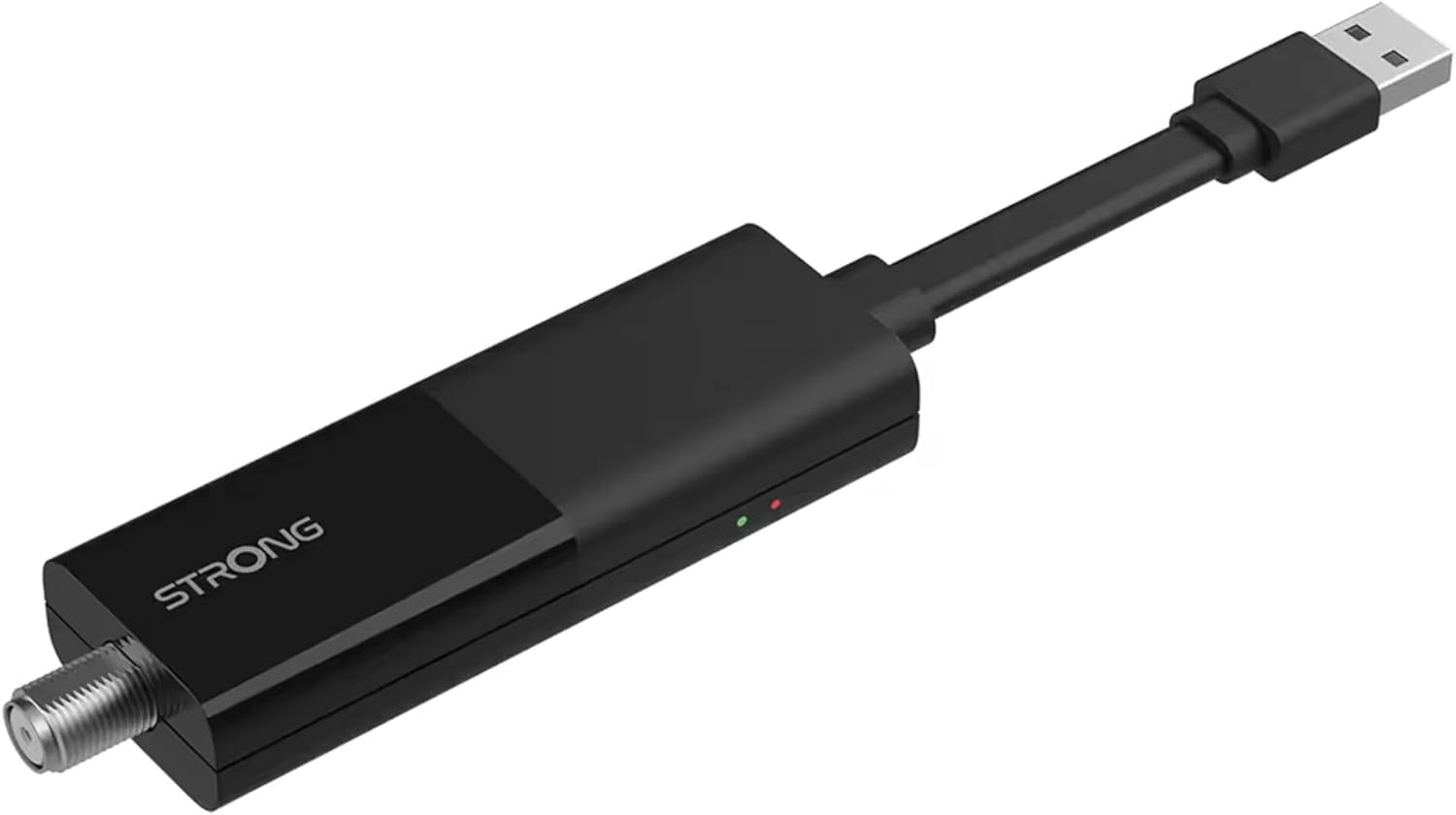
Image: The STRONG 4K UHD Box SRT 427, a compact black USB dongle-style device with a USB connector on one end and an F-type coaxial antenna input on the other, featuring the 'STRONG' logo and small indicator lights.
Ашиглалтын заавар
Once the initial setup is complete, you can begin using your SRT 427. Use the remote control to navigate the user interface.
- Үндсэн дэлгэц: дээр дарна уу ГЭР button to access the main menu, where you can find applications, settings, and media options.
- Навигац: Сум товчийг ашиглана уу (ДЭЭД, ДООШ, Зүүн, Зүүн) to move through menus and options. Press OK сонголтыг баталгаажуулах.
- Дууны хяналт: -г ашиглана уу VOL+ болон VOL- аудио дууны түвшинг тохируулах товчлуурууд.
- Сувгийн сонголт: If connected to an antenna, use the CH+ болон CH- buttons to change channels, or enter channel numbers directly using the numeric keypad.
- Тохиргоо: Access the settings menu to customize display, audio, network, and system preferences.
- Медиа тоглуулах: Connect a USB storage device to the USB port to play media files (photos, videos, music) through the built-in media player.
Засвар үйлчилгээ
Proper maintenance ensures the longevity and optimal performance of your SRT 427.
- Цэвэрлэгээ: Цэвэрлэхийн өмнө төхөөрөмжийг цахилгаан тэжээлээс салга. Гадна талыг нь зөөлөн, хуурай даавуугаар арчина. Шингэн цэвэрлэгч эсвэл зүлгүүрийн материал бүү хэрэглэ.
- Агааржуулалт: Төхөөрөмжийг агааржуулалт сайтай газар байрлуулсан эсэхийг шалгаарай. Агааржуулалтын нүхийг бүү хааж болохгүй.
- Температур: Төхөөрөмжийг хэт өндөр температур, нарны шууд тусгал эсвэл өндөр чийгшилд оруулахаас зайлсхий.
- Програм хангамжийн шинэчлэлтүүд: Periodically check for firmware updates through the system settings to ensure you have the latest features and bug fixes.
Алдааг олж засварлах
If you encounter issues with your SRT 427, refer to the following common problems and solutions:
| Асуудал | Шийдэл |
|---|---|
| Хүч чадалгүй | Check if the power adapter is securely connected to the device and the wall outlet. Ensure the outlet is functional. |
| Зурагтаар зураг байхгүй | Verify the HDMI cable is correctly connected to both the SRT 427 and the TV. Ensure the TV is set to the correct HDMI input source. |
| Дуу алга | Check the volume level on both the SRT 427 and your TV. Ensure audio settings in the SRT 427 menu are correct. |
| Алсын удирдлага ажиллахгүй байна | Check and replace the batteries. Ensure there are no obstructions between the remote and the device's IR sensor. |
| Wi-Fi-д холбогдох боломжгүй байна | Ensure your Wi-Fi router is on and within range. Re-enter the Wi-Fi password in the network settings. Try restarting both the SRT 427 and your router. |
Үзүүлэлтүүд
Technical specifications for the STRONG 4K UHD Box SRT 427:
- Загварын дугаар: SRT427
- Бүтээгдэхүүний хэмжээ: 5.91 x 7.87 x 5.91 инч
- Барааны жин: 1.76 фунт
- Батерей: 1 AAAA batteries required (for remote control, typically)
- Үйлдвэрлэгч: Хүчтэй
- Language (Default): Italian (may vary by region, user configurable)
- ASIN: B0FDPX7PRQ
- Эхний боломжтой огноо: 21 оны наймдугаар сарын 2025
Баталгаат болон дэмжлэг
For warranty information and technical support, please refer to the warranty card included in your product packaging or visit the official Strong webТөхөөрөмжийг өөрөө засах гэж бүү оролдоорой, учир нь энэ нь таны баталгааг хүчингүй болгож болзошгүй.
Албан ёсны Webсайт: www.strong.tv
Ask a question about this manual
Ask about setup, troubleshooting, compatibility, parts, safety, or missing instructions. Manuals+ will review the question and use this page’s manual context to help answer it.