
Танилцуулга
This manual provides essential information for the safe and efficient operation of your Bagotte BG550 Pro Robot Vacuum and Mop. Please read it thoroughly before using the product and retain it for future reference. The Bagotte BG550 Pro is a versatile 3-in-1 cleaning device designed to vacuum, sweep, and mop various floor types, including hardwood, tile, laminate, and low-pile carpets.
Аюулгүй байдлын мэдээлэл
Гэмтэл, гэмтлийн эрсдлийг бууруулахын тулд дараах аюулгүй байдлын урьдчилан сэргийлэх арга хэмжээг дагаж мөрдөнө үү.
- Эхний ашиглахаасаа өмнө робот бүрэн цэнэглэгдсэн эсэхийг шалгаарай.
- Do not operate the robot in wet environments or near standing water.
- Keep loose cables, curtains, and small objects out of the robot's path to prevent entanglement.
- Робот ажиллаж байх үед хүүхэд, тэжээвэр амьтдыг хянах.
- Роботыг том хог хаягдал, хурц үзүүртэй зүйл эсвэл шатаж буй материалыг цуглуулахад ашиглаж болохгүй.
- Only use the original charging dock and power adapter provided with the unit.
- Хамгийн сайн ажиллагааг хангахын тулд сойз болон шүүлтүүрийг тогтмол цэвэрлэж байгаарай.

Image: The robot vacuum features anti-collision sensors, obstacle avoidance, and fall prevention to ensure safe operation around furniture and stairs.
Багцын агуулга
Бүх зүйл багцад байгаа эсэхийг шалгана уу:
- Bagotte BG550 Pro Robot Vacuum Cleaner x1
- Цэнэглэх станц x1
- Цахилгаан адаптер x1
- 2-in-1 Water Tank x1
- Side Brushes x2 pairs
- Mop Holder x1
- Цэвэрлэх даавуу x2
- HEPA Filters x1
- Цэвэрлэх сойз x1
- Remote Control x1 (2 AAA batteries included)
- Хэрэглэгчийн гарын авлага x1

Image: A visual representation of all items included in the Bagotte BG550 Pro Robot Vacuum and Mop package, including the robot, charging station, remote control, water tank, brushes, mop cloths, and user manual.
Бүтээгдэхүүн дууссанview
The Bagotte BG550 Pro combines vacuuming, sweeping, and mopping functionalities. It features a powerful 5000Pa suction for effective debris and pet hair removal, and a 2-in-1 dustbin and water tank system for comprehensive cleaning. Its slim design allows it to navigate under furniture, while anti-drop sensors and obstacle transition capabilities ensure thorough coverage.

Image: The Bagotte BG550 Pro robot vacuum and mop is shown performing 3-in-1 cleaning, highlighting its vacuuming, sweeping, and mopping capabilities with adjustable suction and water levels.

Image: The robot vacuum is shown actively cleaning a wooden floor, illustrating its powerful suction to prevent hair entanglement and effectively pick up debris.

Image: The robot vacuum is depicted with its slim profile, emphasizing its ability to clean under low-lying furniture and its quiet operation.
Тохиргоо
- Савлах: Carefully remove all components from the packaging. Remove any protective films or stickers from the robot and charging dock.
- Цэнэглэх цэгийн байршил: Place the charging dock against a wall in an open area, ensuring there are no obstacles within 1 meter (3 feet) to either side and 2 meters (6 feet) in front. Connect the power adapter to the charging dock and plug it into a wall outlet.
- Анхны төлбөр: Place the robot onto the charging dock. The indicator light on the robot will show charging status. Allow the robot to fully charge before its first use (approximately 5-6 hours).
- Хажуугийн сойз суурилуулах: Snap the side brushes onto the posts on the bottom of the robot until they click into place.
- Prepare for Mopping (Optional): If using the mopping function, fill the 2-in-1 water tank with clean water and attach the mop cloth to the mop holder. Insert the assembled water tank into the robot.

Image: The robot vacuum is shown automatically returning to its charging station when its battery is low, illustrating the self-charging feature.
Ажиллаж байна
The Bagotte BG550 Pro offers multiple ways to control its cleaning functions:
- Гарын авлагын хяналт: Цэвэрлэгээг эхлүүлэх эсвэл түр зогсоохын тулд робот дээрх асаах товчийг дарна уу.
- Алсын удирдлага: Use the included remote control to direct the robot, select cleaning modes, and initiate charging.
- Туяа ухаалаг апп: Download the Tuya Smart app on your smartphone. Connect the robot to your 2.4GHz Wi-Fi network. The app allows you to:
- Start/Pause/Stop cleaning
- Select cleaning modes (Auto, Edge, Spot, Manual)
- Adjust suction power and water levels
- Цэвэрлэгээний хуваарийг тохируулах
- View цэвэрлэгээний бүртгэл
- Locate the robot using the "Find Robot" function
- Дуут удирдлага: Integrate with Google Assistant or Amazon Alexa for voice commands (e.g., "Alexa, turn on the robot").

Зураг: Дээд тал нь view of a floor plan showing the robot vacuum operating in different cleaning modes: Auto Cleaning, Edge Cleaning, Spot Cleaning, and Manual Cleaning.

Image: The robot vacuum is shown being controlled by voice commands through an Amazon Echo device and via the Tuya Smart app on a smartphone, demonstrating multiple control options.
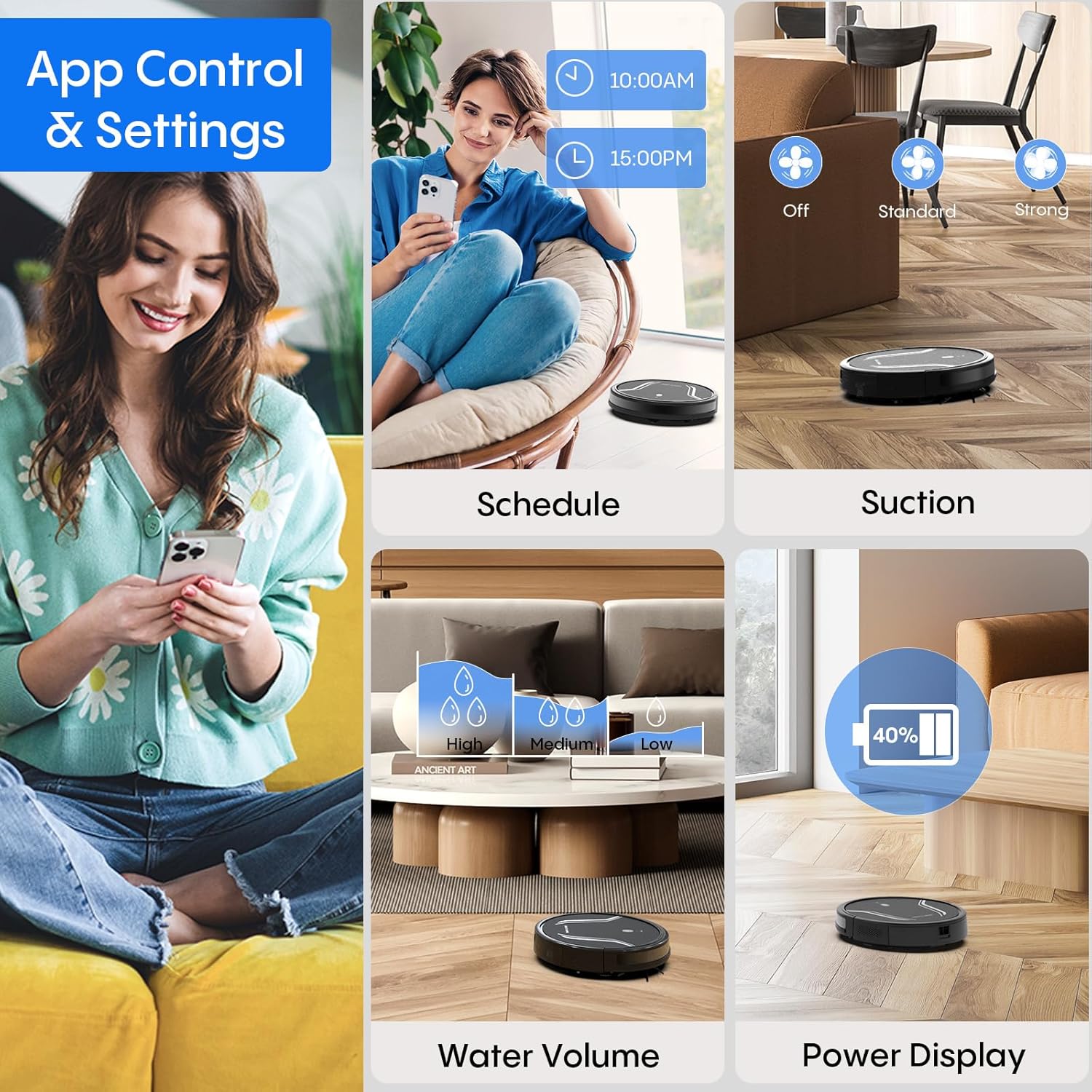
Image: A smartphone screen displays the Bagotte BG550 Pro app interface, showing options for scheduling cleaning, adjusting suction power, controlling water volume for mopping, and monitoring battery level.
Засвар үйлчилгээ
Тогтмол засвар үйлчилгээ нь таны роботын тоос сорогчийн ашиглалтын хугацааг уртасгаж, оновчтой гүйцэтгэлийг баталгаажуулдаг.
- Хогийн савыг хоослох: After each cleaning cycle, press the dustbin release button and remove the dustbin. Open the dustbin cover and empty its contents.
- Цэвэрлэх шүүлтүүр: Remove the HEPA filter and primary filter from the dustbin. Tap them to remove dust. Rinse the primary filter and dustbin with water (do not rinse the HEPA filter). Allow them to air dry completely before reassembling.
- Хажуугийн сойз цэвэрлэх: Regularly check side brushes for tangled hair or debris. Use the cleaning tool to cut and remove any tangled hair. Replace worn brushes.
- Cleaning Mop Cloth: Remove the mop cloth after each mopping session and wash it by hand or machine. Allow it to air dry completely.
- Цэвэрлэх мэдрэгч: Wipe the anti-drop sensors and bumper sensors with a clean, dry cloth to ensure they function correctly.
- Батерейны арчилгаа: To maintain battery health, ensure the robot is charged when not in use. If storing for an extended period, fully charge the battery and turn off the robot.

Image: The robot vacuum is shown disassembled to highlight its 250ml dustbin with high-efficiency filter, 200ml electric control water tank, and washable mopping cloth, illustrating components for maintenance.
Алдааг олж засварлах
If you encounter issues with your Bagotte BG550 Pro, refer to the following common solutions:
| Асуудал | Шийдэл |
|---|---|
| Робот асахгүй байна | Ensure the battery is charged. Check if the power switch is in the 'ON' position. |
| Робот цэнэглэдэггүй | Verify the charging dock is powered. Clean charging contacts on both the robot and dock. Ensure proper alignment. |
| Робот байнга гацдаг | Clear obstacles, loose cables, and thick rugs from the cleaning area. Clean drive wheels. |
| Цэвэрлэгээний гүйцэтгэл муу | Empty the dustbin. Clean or replace filters. Clean side brushes and main brush. Check for blockages in the suction inlet. |
| Угаах функц ажиллахгүй байна | Ensure the water tank is filled and correctly installed. Check if the mop cloth is attached. Adjust water level settings in the app. |
Үзүүлэлтүүд
| Онцлог | Дэлгэрэнгүй |
|---|---|
| Брэнд | Баготт |
| Загварын нэр | BG550 Pro |
| Онцлог шинж чанар | Захын цэвэрлэгээ |
| Өнгө | Матт хар |
| Бүтээгдэхүүний хэмжээс | 15"L x 12.5"W x 4"H |
| Шүүлтүүрийн төрөл | HEPA |
| Зайны ашиглалт | 120 минут |
| Эрчим хүчний эх үүсвэр | Батерейгаар ажилладаг |
| Хяналтын арга | Аппликейшн, Дуу хоолой |
| Тохиромжтой төхөөрөмжүүд | Amazon Echo (Alexa), Google Assistant |
| Form Factor | Робот |
| Зүйлийн жин | 7.09 фунт |
| Батерей | 4 C батерей шаардлагатай (дагсан) |
| Гадаргуугийн зөвлөмж | Wood, Tile, Laminate, Low-pile Carpet |
Баталгаат болон дэмжлэг
The Bagotte BG550 Pro Robot Vacuum Cleaner comes with a 12-month service warranty. For professional customer service and support, please refer to the contact information provided in your warranty card or visit the official Bagotte webсайт.
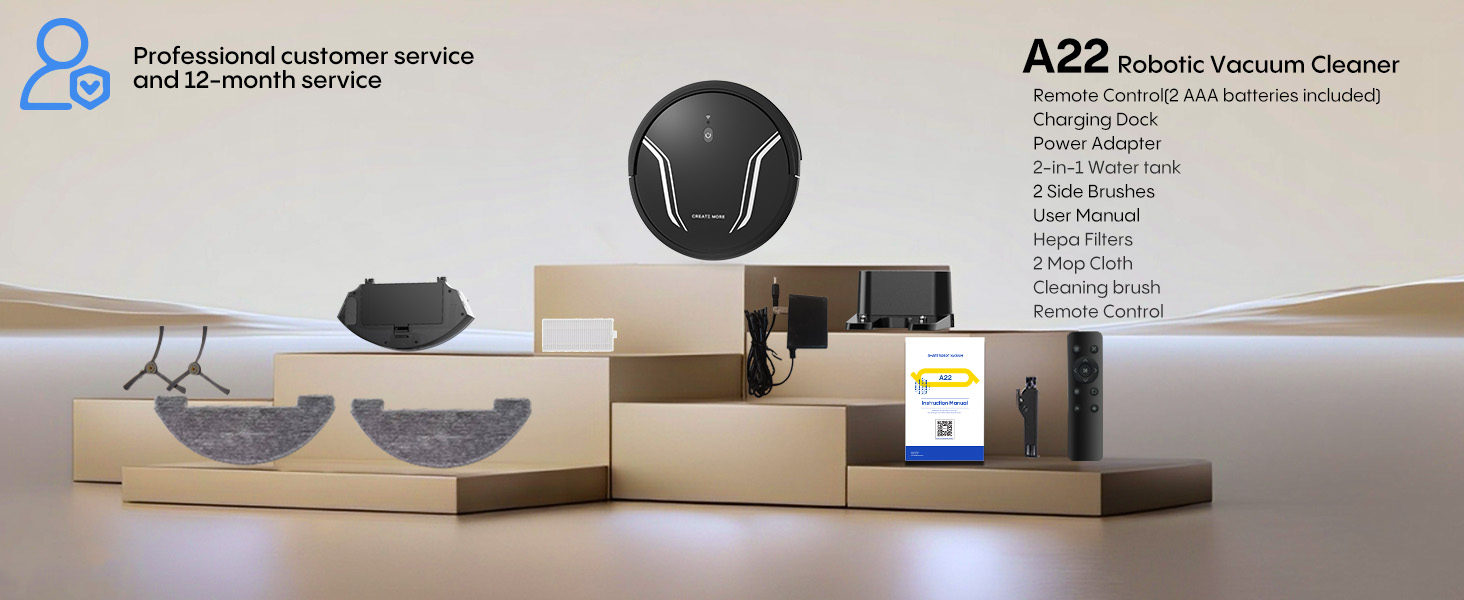
Image: The Bagotte A22 (BG550 Pro) robot vacuum and its accessories are displayed, along with a note about professional customer service and a 12-month service period.