Танилцуулга
This manual provides detailed instructions for the installation, operation, and maintenance of your ZUMIMALL 4G LTE Cellular Solar Security Camera, Model ZY-G1. This camera is designed for outdoor use in locations without Wi-Fi access, utilizing 4G LTE cellular connectivity and solar power for continuous operation. It features 3MP/2K resolution, 360° pan-tilt-zoom (PTZ) capabilities, color night vision, PIR/AI motion detection, and two-way audio communication.
Хайрцагт юу байна
Таны багцад бүх бүрэлдэхүүн хэсгүүд байгаа эсэхийг шалгана уу:
- Камер (x1)
- Камерын хаалт (x1)
- Сав баглаа боодлын хайрцаг (x1)
- Бүтээгдэхүүний гарын авлага (x1)
- Нарны хавтан (x1)
- Нарны хавтангийн хаалт (x1)
- Цэнэглэх кабель (x1)
- Шураг уут (x1)

Figure 1: Package Contents. This image displays the ZUMIMALL 4G LTE Cellular Solar Security Camera, solar panel, mounting hardware, charging cable, and instruction manual.
Video 1: What's in the package. This video demonstrates the unboxing of the ZUMIMALL 4G LTE Cellular Solar Security Camera and its included accessories.
Гол онцлогууд
- 4G LTE холболт: Operates independently without Wi-Fi, ideal for remote locations. Includes a built-in SIM card and requires a data plan after a 3-day free trial.
- Solar Powered & Rechargeable: Equipped with a 10000mAh battery and a 5W high-efficiency solar panel for continuous power.
- 360° Pan-Tilt-Zoom (PTZ): Өргөн 360°-ыг санал болгодог view with 4X digital zoom, controllable via the ZUMIMALL App.
- 3MP/2K Color Night Vision: Provides clear, high-resolution footage day and night, enhanced by two spotlights for color night vision.
- PIR / AI Motion Detection: Advanced motion sensor detects movement and sends instant alerts. Customizable detection areas and optional AI detection for pets or cars.
- 2-Way Audio & Multi-Sharing: Communicate with visitors or deter intruders using the built-in speaker and microphone. Share live footage with up to 4 family members.
- IP66 цаг агаарт тэсвэртэй: Гаднах янз бүрийн цаг агаарын нөхцөл байдлыг тэсвэрлэх зориулалттай.

Figure 2: 4G LTE Signal and Application Scenarios. This image highlights the camera's 4G LTE capability and its suitability for various outdoor environments without Wi-Fi.

Figure 3: Diverse Application Scenarios. This image illustrates the wide range of outdoor locations where the camera can be effectively deployed.
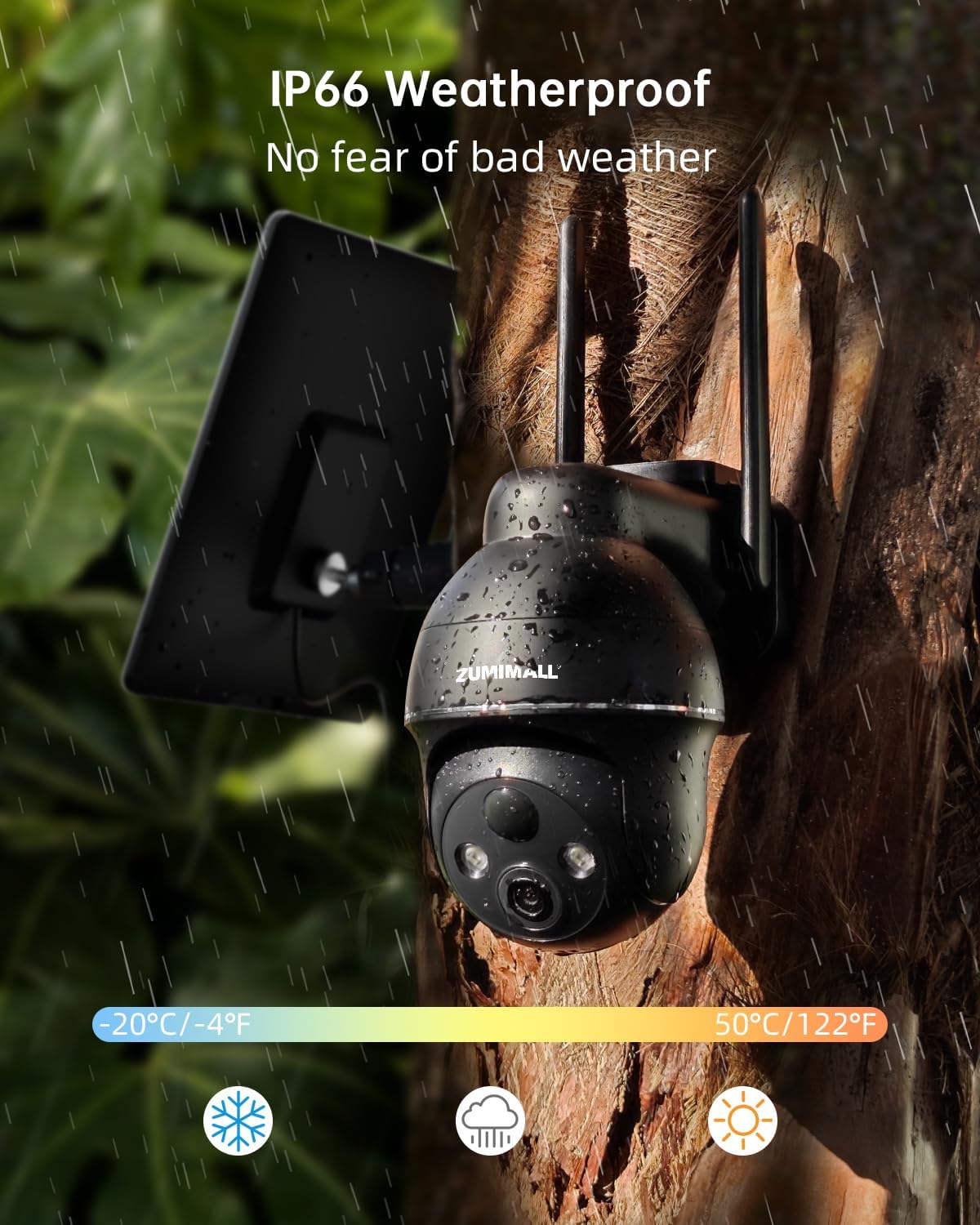
Figure 4: IP66 Weatherproof Design. The camera is shown enduring rain, emphasizing its robust construction for all weather conditions.

Figure 5: IP66 Weatherproof Capability. This graphic details the camera's ability to withstand harsh outdoor weather and extreme temperatures.

Figure 6: Solar Power and Pan & Tilt Functionality. This image illustrates the camera's solar charging and its extensive pan and tilt range for comprehensive coverage.

Figure 7: Solar Charging Efficiency. This graphic explains how the solar panel provides continuous power, with one sunny day generating three days of energy.

Figure 8: 360° View Coverage. This image visually represents the camera's ability to rotate and cover a full 360-degree area.

Figure 9: 2K HD Video and Smart Color Night Vision. This image illustrates the camera's high-definition video quality and its night vision capabilities with integrated spotlights.

Figure 10: 2K Color Day & Night Vision. This image demonstrates the camera's clear footage quality in both daylight and nighttime conditions.

Figure 11: PIR Motion Alert & Smart AI Analysis. This graphic highlights the camera's intelligent detection capabilities for various objects.

Figure 12: Customizable Detection Area. This image demonstrates how users can define specific areas for motion detection to reduce false alarms.

Figure 13: Clear Voice Call and Multi-Sharing. This image highlights the camera's two-way audio and the ability to share access with multiple users.

Figure 14: Multiple People Sharing. This graphic emphasizes the camera's feature allowing multiple users to view and manage the camera simultaneously.
Тохируулах заавар
1. Powering On and Resetting the Device
- Remove the silicone plug from the bottom of the camera to access the power and reset buttons.
- дээр удаан дар Хүч төхөөрөмжийг асаах товч.
- After the device is powered on, press and hold the Дахин тохируулах button until you hear a "Boogu" sound, then release. This indicates a successful reset.
- Wait for the red indicator light to flash slowly, then for the blue indicator light to flash slowly, indicating that the network has been connected successfully. This process may take 1-5 minutes.
Video 2: How to reset the camera. This video demonstrates the process of resetting the ZUMIMALL 4G LTE Cellular Solar Security Camera.
2. Програм суулгах ба холболт
- ZUMIMALL аппликейшнийг ухаалаг гар утасныхаа апп дэлгүүрээс татаж аваарай.
- Open the ZUMIMALL App and tap 'Add Device'.
- Follow the on-screen prompts in the app. When instructed, scan the QR code displayed in the app using the camera. A "beep" sound from the camera indicates a successful scan.
- Wait for the device to connect. Once the indicator light turns blue, the setup is successful.
Video 3: How to connect the camera. This video guides you through the steps to connect your ZUMIMALL 4G LTE Cellular Solar Security Camera to the mobile application.
3. SIM Card and Data Plan
The camera operates exclusively with its included 4G SIM card and does not support Wi-Fi connections. A 3-day free trial data plan is included. After the trial, a data plan is required to keep the camera online. Be aware of potential data charges before purchasing a plan.
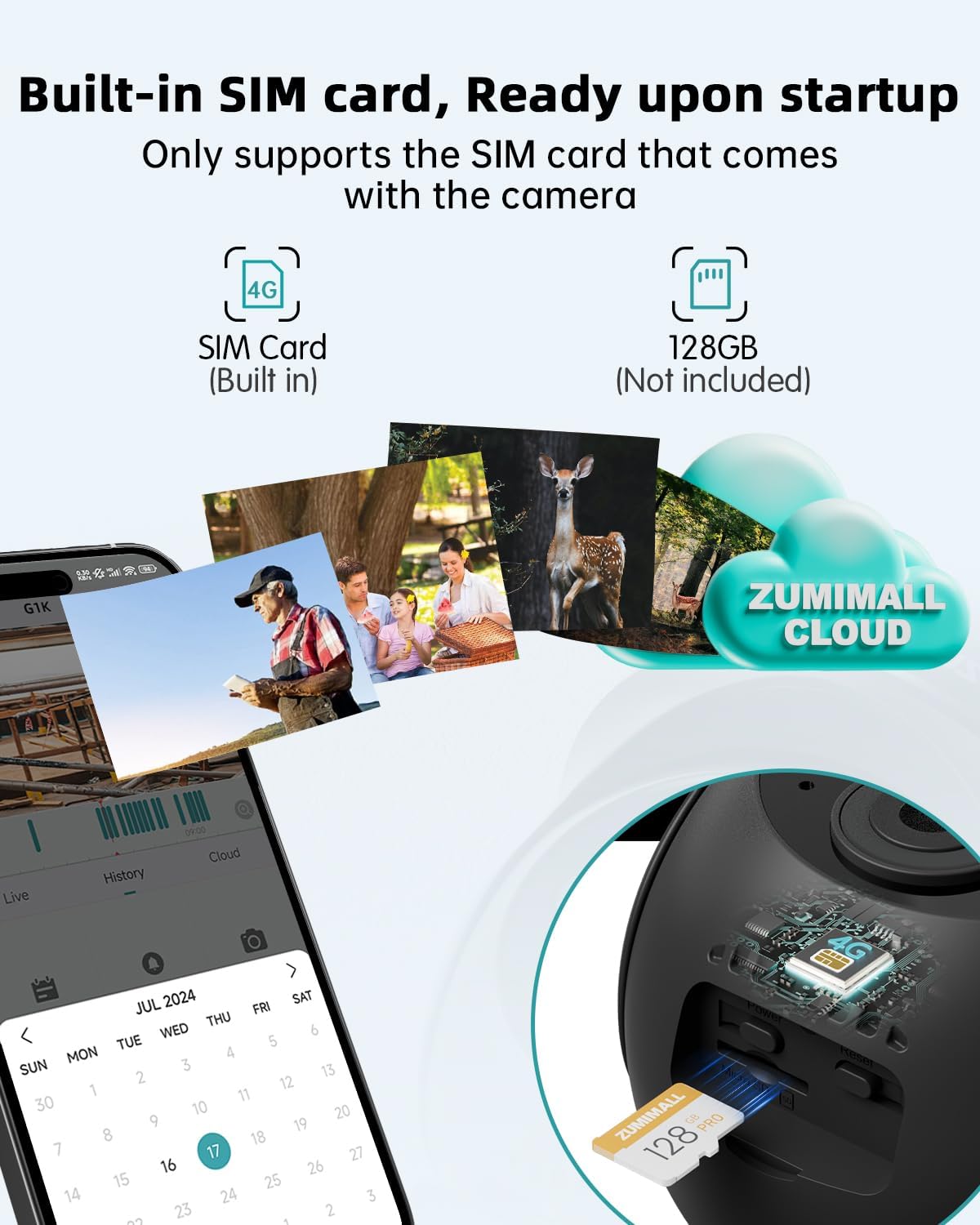
Figure 15: Built-in SIM Card and Storage. This image shows the camera's internal SIM card and the slot for an optional Micro SD card.

Figure 16: Cellular Data Plan Options. This graphic outlines the available data plans for the camera, including pricing and duration.
4. Микро SD карт суурилуулах
The camera supports local storage via a Micro SD card (up to 128GB, not included). Insert the Micro SD card into the designated slot on the camera, ensuring correct orientation. This allows for continuous recording or backup of motion-triggered events.

Figure 17: Local and Cloud Storage Options. This image illustrates the Micro SD card slot for local storage and mentions the 7-day free rolling cloud storage service.
Ашиглалтын заавар
Амьд View болон Pan/Tilt Control
Access the live feed of your camera through the ZUMIMALL App. Use the on-screen controls to remotely pan (355°) and tilt (120°) the camera, allowing you to monitor a wide area. The 4X digital zoom can be used to view дэлгэрэнгүй.
Хөдөлгөөн илрүүлэх ба дохиолол
The camera's PIR motion sensor detects movement and sends instant notifications to your smartphone. You can customize the detection area within the app to focus on specific zones and reduce false alarms. Upgrade to the AI detection service for specific identification of pets or vehicles.
2 талын аудио
Utilize the two-way audio feature to communicate through the camera. This allows you to speak to visitors or deter unwanted guests directly from your smartphone.
Шөнийн харааны горимууд
The camera automatically switches to night vision in low-light conditions. With its 2K resolution and built-in spotlights, it provides clear color night vision footage.
Хандалтыг хуваалцах
Share access to your camera's live feed and recordings with up to four family members or friends through the ZUMIMALL App, allowing them to assist in monitoring your property.
Засвар үйлчилгээ
Нарны хавтангийн үр ашиг
Ensure the solar panel is positioned in an area that receives direct sunlight for several hours each day to maximize charging efficiency. Regularly clean the solar panel surface to remove dust, dirt, or debris that may obstruct sunlight and reduce charging performance.
Зайны ашиглалт
The camera's 10000mAh battery is designed for extended use. Factors such as frequent motion detection, live view access, and extreme temperatures can affect battery life. Optimal solar charging will help maintain battery levels.
Цаг агаарын эсэргүүцэл
The IP66 weatherproof rating ensures the camera can withstand rain, snow, and dust. Periodically inspect the camera and its mounting for any signs of wear or damage, especially after severe weather conditions.
Алдааг олж засварлах
- Camera not connecting: Ensure the SIM card is active and has a valid data plan. Perform a device reset as described in the setup section. Check the cellular signal strength in the camera's location.
- Видео чанар муу: Verify that the camera lens is clean and free from obstructions. Ensure adequate lighting for optimal image capture, especially at night.
- Зай цэнэглэгдэхгүй байна: Confirm the solar panel is receiving direct sunlight and is free from dirt or obstructions. Check the connection between the solar panel and the camera.
- Хуурамч хөдөлгөөний сэрэмжлүүлэг: Adjust the motion detection sensitivity settings in the ZUMIMALL App. Utilize the customizable detection area feature to exclude irrelevant zones.
Үзүүлэлтүүд
| Онцлог | Тодорхойлолт |
|---|---|
| Загварын нэр | ZY-G1 |
| Холболтын технологи | Утасгүй (4G LTE гар утас) |
| Дотор/гадаа ашиглах | Гадаа |
| Эрчим хүчний эх үүсвэр | Solar Powered (5W Solar Panel), 10000mAh Rechargeable Battery |
| Видео бичлэгийн нягтрал | 3MP/2K |
| Онцлог шинж чанарууд | 2-Way Audio, HD Resolution, Motion Sensor (PIR/AI), Color Night Vision, PTZ Technology (360° View) |
| Цаг агаарын хамгаалалттай үнэлгээ | IP66 |
| Хадгалах | Micro SD Card (up to 128GB, not included), Cloud Storage (7-day free rolling) |
| Тохиромжтой төхөөрөмжүүд | Smartphone (Android, iOS via ZUMIMALL App) |
| Суурилуулах төрөл | Ханын бэхэлгээ |
| Зүйлийн жин | 2.33 фунт |
| Бүтээгдэхүүний хэмжээс | 0.1 x 0.1 x 0.1 inches (Note: This dimension seems generic, refer to product packaging for precise measurements) |
Баталгаат болон дэмжлэг
For warranty information and customer support, please refer to the official ZUMIMALL website or contact their customer service directly. The product includes an instruction manual and mounting screws. Additional protection plans may be available for purchase.


