
1. Бүтээгдэхүүн дууссанview
The RAVEMEN ABF01 is a smart tracker designed for bicycles, offering advanced anti-theft and tracking capabilities. It is fully compatible with Apple's 'Find My' network, allowing you to locate your bicycle globally using Apple devices. Its discreet design, long battery life, and robust construction make it an ideal solution for securing your bike.
Гол онцлогууд:
- Глобал хяналт: Utilizes Apple's 'Find My' network for precise location tracking worldwide.
- Lost Mode & Real-time Notifications: Receive instant alerts if your bicycle moves outside a designated area. Activate Lost Mode to display owner information for improved recovery.
- Ultra-low Power Design: Up to 8 months of continuous operation on a single 2-hour USB-C charge. Battery level notifications prevent unexpected power depletion.
- Stealth Installation: Designed for discreet mounting under a bottle cage or frame, secured with tampтэсвэртэй эрэг.
- IPX6 ус нэвтэрдэггүй: Ensures reliable performance in harsh weather conditions, including heavy rain and muddy environments.
- Хөнгөн жин: Weighs only 27g, ensuring no impact on cycling performance.
2. Тохируулах гарын авлага
2.1. Төхөөрөмжийг цэнэглэж байна
Before initial use, fully charge your RAVEMEN ABF01 tracker. Connect the provided USB-C cable to the device and a power source. A full charge takes approximately 2 hours and provides up to 240 days of operation.

Image: The RAVEMEN ABF01 tracker showing charging status indicators. A lightning bolt icon indicates charging, and a filled lightning bolt indicates charging complete.
2.2. Pairing with Apple 'Find My'
The RAVEMEN ABF01 is compatible with Apple's 'Find My' network. Ensure your iOS/iPadOS/macOS device is updated to the latest version.
- Enable Bluetooth and 'Find My': On your iPhone, iPad, or Mac, ensure Bluetooth is turned on and the 'Find My' app is enabled.
- Шинэ зүйл нэмэх: Open the 'Find My' app, navigate to the 'Items' tab, and tap 'Add New Item'. Then select 'Other Supported Item'.
- Хянагчийг идэвхжүүлэх: Press and hold the power button on the tracker for 3 seconds. The device will enter pairing mode.
- Холбох: Your device will detect "RAVEMEN ABF01". Tap 'Connect' to complete the pairing process.

Image: A visual guide demonstrating the four steps to pair the RAVEMEN ABF01 with an iPhone using the Apple Find My application.
2.3. Суурилуулалт
The tracker is designed for discreet installation on your bicycle frame, typically under a bottle cage. Special tamper-resistant screws are included to prevent easy removal.
- Loosen Bottle Holder Screws: If installing under a bottle cage, loosen the existing screws that secure your bottle holder to the bicycle frame.
- Position the Tracker: Place the RAVEMEN ABF01 tracker over the bolt holes on your frame. If using a bottle cage, align both the tracker and the bottle cage with the bolt holes.
- Secure with Special Tool: Use the provided special wrench to tighten the tamper-resistant screws, securing the tracker firmly to the frame.
- Дуусгах: Ensure the tracker is securely mounted and does not interfere with other bicycle components.

Image: A four-step diagram illustrating how to install the RAVEMEN ABF01 tracker onto a bicycle frame, either directly or underneath a bottle holder, using the provided screws and tool.
3. Ашиглалтын заавар
3.1. Tracking Your Bicycle
Once paired, you can track your RAVEMEN ABF01 using the Apple 'Find My' app on your iPhone, iPad, or Mac. The app will display the real-time location of your bicycle on a map.

Image: A smartphone displaying the Apple Find My app, showing the location of a bicycle tracker on a map, with a close-up of the tracker installed on a bicycle frame.
3.2. Алдагдсан горим болон мэдэгдэл
The 'Find My' app allows you to set up notifications and activate 'Lost Mode' for your tracker.
- Мэдэгдлүүдийн ард үлдсэн: Configure the app to send you an alert if your bicycle is left behind or moves out of a specified safe zone.
- Алдагдсан горим: If your bicycle is lost, activate 'Lost Mode' in the 'Find My' app. This will display a custom message and contact information to anyone who finds your tracker, significantly increasing the chances of recovery.
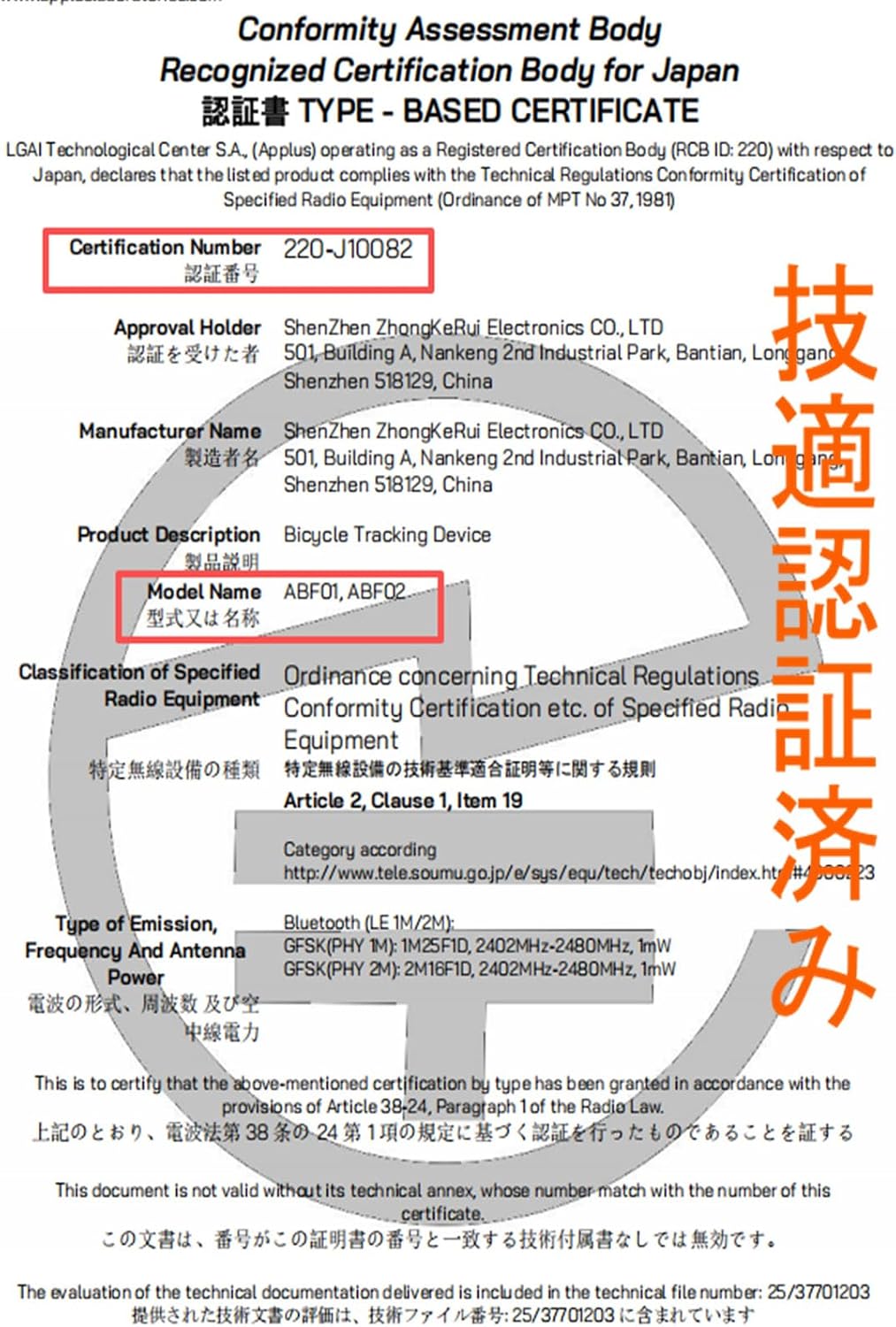
Image: A smartphone screen showing a 'bike left behind' notification, indicating the RAVEMEN ABF01 tracker has moved out of range, with a bicycle and location pin in the background.
4. Засвар үйлчилгээ
4.1. Зайны удирдлага
The RAVEMEN ABF01 features an ultra-low power design, providing extended battery life. You will receive a notification on your smartphone when the battery level is low, prompting you to recharge the device. Regular charging (approximately every 8 months with typical use) ensures continuous protection.
4.2. Цэвэрлэгээ ба арчилгаа
The tracker is IPX6 waterproof, meaning it can withstand strong jets of water. You can clean the device with a damp даавуу. С-г гэмтээж болзошгүй хүчтэй химийн бодис эсвэл зүлгүүрийн материал хэрэглэхээс зайлсхийasing.
5. Алдаа засах
- Device Not Appearing in 'Find My' App:
1. Ensure Bluetooth is enabled on your Apple device.
2. Make sure the 'Find My' app is enabled and updated to the latest version.
3. Press and hold the tracker's power button for 3 seconds to re-enter pairing mode.
4. If the issue persists, try resetting the tracker (see below). - Байршлын шинэчлэлт байхгүй байна:
1. Check the tracker's battery level. Recharge if low.
2. Ensure your Apple device has an active internet connection.
3. The 'Find My' network relies on nearby Apple devices. In remote areas with few Apple devices, location updates may be less frequent or precise. - Sound Not Playing (if applicable):
1. Some users have reported issues with the sound function. Ensure the device is powered on. If the sound does not activate as expected, a factory reset might be necessary. - Resetting the Tracker:
If you experience persistent issues, you can perform a factory reset. While the device is ON, click the power button twice, then press and hold for 5 seconds. The device will beep during the reset process and emit a confirmation sound upon completion.
6. Техникийн үзүүлэлтүүд
| Брэнд | Ravemen |
| Загварын дугаар | ABF01 |
| Тохиромжтой байдал | Apple 'Find My' network (iOS/iPadOS/macOS) |
| Зайны ашиглалт | 240 хоног хүртэл (8 сар) |
| Цэнэглэх хугацаа | Ойролцоогоор 2 цаг (USB-C) |
| Усны хамгаалалттай үнэлгээ | IPX6 |
| Жин | 27 гр |
| Оруулсан бүрэлдэхүүн хэсгүүд | RAVEMEN ABF01 Tracker, USB-C Cable, Tamper-resistant Screws & Special Wrench, User Manual |
| Гарал үүслийн улс | Хятад |

Image: A diagram showing the dimensions (length 10.8cm, width 2.8cm, thickness 0.9cm) and weight (27g) of the RAVEMEN ABF01 tracker, along with the size of the M5 screw (2cm).

Image: An illustration of the RAVEMEN ABF01 package contents, including the tracker, USB-C cable, tamper-resistant screws with special wrench, and user manual.
7. Баталгаат хугацаа ба дэмжлэг
7.1. Баталгаат хугацааны мэдээлэл
The RAVEMEN ABF01 comes with a 2 жилийн чанарын баталгаатай from the date of purchase. This warranty covers manufacturing defects and ensures the product meets its specified performance standards. Please retain your proof of purchase for warranty claims.
7.2. Хэрэглэгчийн дэмжлэг
For any questions, technical assistance, or warranty claims, please contact RAVEMEN customer support through the official channels provided at the point of purchase or on the RAVEMEN website. When contacting support, please have your product model (ABF01) and purchase details ready.
8. Чухал тэмдэглэл
- This product is designed for use with Apple iOS devices only. Android devices are not supported for tracking via the 'Find My' network.
- Ensure your Apple devices (iPhone, iPad, Mac, Apple Watch) are running the latest operating system versions (iOS/iPadOS/macOS/watchOS) for optimal compatibility and functionality with the 'Find My' app.
- The technical certification number for this product is 220-J10082.

Image: A certificate of conformity for the RAVEMEN ABF01 and ABF02 models, indicating technical certification for use in Japan with certification number 220-J10082.