
1. Танилцуулга
Thank you for choosing the AODSK 88-Key Weighted Hammer Action Digital Piano and Storage Bench. This manual provides essential information for the safe and efficient use of your new instrument. Please read it thoroughly before assembly and operation, and retain it for future reference.

Image 1.1: The AODSK 88-Key Digital Piano and accompanying white storage bench.
2. Аюулгүй ажиллагааны заавар
- Эрчим хүчний хангамж: Зөвхөн заасан тэжээлийн адаптерийг ашиглана уу. Боть байгаа эсэхийг баталгаажуулна ууtage нь танай бүс нутгийн шаардлагад нийцдэг.
- Ус ба чийг: Do not expose the instrument to rain, moisture, or excessive humidity. Avoid placing objects filled with liquids on or near the piano.
- Агааржуулалт: Зөв агааржуулалтыг хангах. Агааржуулалтын нүхийг хааж болохгүй.
- Дулааны эх үүсвэрүүд: Keep the instrument away from heat sources such as radiators, heat registers, stoves, or other heat-producing appliances.
- Цэвэрлэгээ: Зөвхөн хуурай даавуугаар цэвэрлэ. Шингэн цэвэрлэгч, аэрозоль хэрэглэж болохгүй.
- Хүүхдүүд: Supervise children when they are near the instrument. Small parts could be a choking hazard.
- Moving the Instrument: When moving the piano, ensure it is unplugged and handled carefully to prevent damage or injury.
3. Багцын агуулга
Доор жагсаасан бүх зүйл таны багцад байгаа эсэхийг шалгана уу.
- AODSK 88-Key Digital Piano Unit
- White Storage Bench
- Triple Pedal Unit
- Furniture Stand Components
- Гүйдэг түлхүүрийн таг
- Эрчим хүчний адаптер
- Чихэвч
- Тоос бүрхэвч
- Тоног төхөөрөмж, багаж хэрэгслийг угсрах
- Хэрэглэгчийн гарын авлага (энэ баримт бичиг)
- Online Lesson Access Information
4. Тохиргоо
4.1. Digital Piano Assembly
Follow these steps to assemble the digital piano and its stand:
- Бүх эд ангиудыг задалж, зурааснаас урьдчилан сэргийлэхийн тулд зөөлөн, цэвэр гадаргуу дээр тавь.
- Attach the side panels of the furniture stand to the main piano body using the provided screws and tools. Ensure all connections are secure.
- Install the triple pedal unit into its designated slot on the stand. Connect the pedal cable to the corresponding port on the piano.
- Carefully place the assembled piano unit in its desired location.
- Slide the key cover into its tracks above the keyboard.
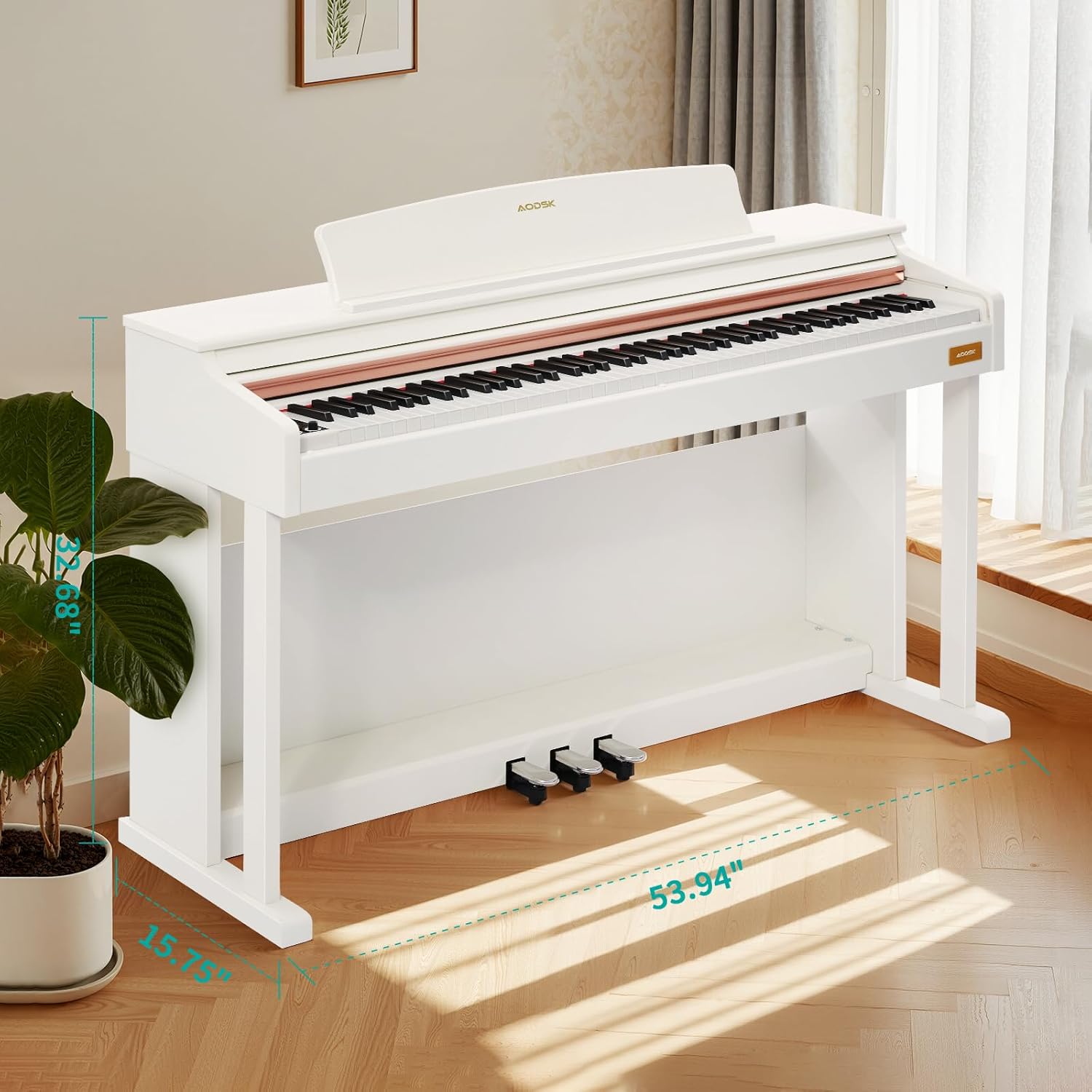
Image 4.1: Digital piano dimensions for placement planning. (Approx. 53.94" W x 15.75" D x 32.68" H)
4.2. Storage Bench Assembly
The storage bench is designed for quick, tool-free assembly:
- Remove the bench legs and hardware from the storage compartment under the seat.
- Screw each leg firmly into the designated corner mounts on the underside of the bench seat. No tools are typically required for this step.
- Ensure all legs are stable and the bench is level before use.

Image 4.2: The storage bench with its lid open, revealing the internal compartment.
5. Бүрэлдэхүүн хэсгүүд дууссанview
5.1. Хяналтын самбар
The control panel provides access to various functions and settings of the digital piano.

Зураг 5.1: Ойролцоогоор view of the digital piano's control panel, showing buttons for tone, rhythm, demo, volume, and other features.
- Цахилгаан товч: Төгөлдөр хуурыг асаах эсвэл унтраах.
- Дууны товчлуурууд: Мастер дууны хэмжээг тохируулна уу.
- Дууны товчлуур: Selects from 680 available tones.
- Ритм товчлуур: Selects from 600 available rhythms.
- Демо товчлуур: Plays demonstration songs (80 available).
- Хуваах товчлуур: Activates dual keyboard split tone function.
- MP3 Play/Pause: Controls MP3 playback via USB.
- Record/Play: Initiates and plays back two-track recordings.
- Numerical Select: Used to input specific tone, rhythm, or demo numbers.
- USB залгуур: For MP3 playback and potentially other data transfer.
5.2. Triple Pedal System
The piano features a standard triple pedal system for expressive playing.
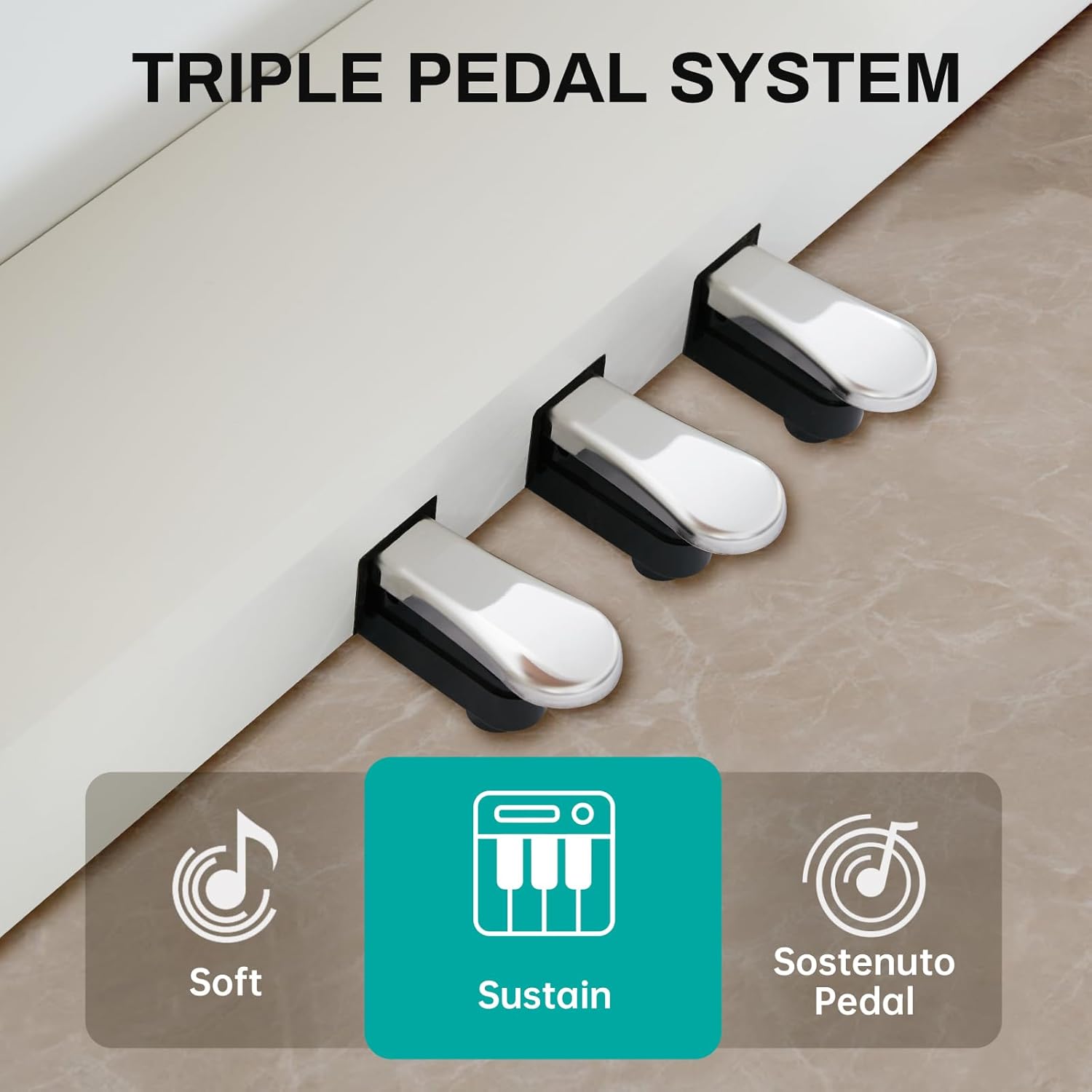
Image 5.2: Close-up of the three pedals: Soft, Sustain, and Sostenuto.
- Зөөлөн дөрөө (Зүүн): Reduces the volume and changes the timbre of the notes.
- Sustain Pedal (Middle): Sustains the notes, allowing them to ring out after the keys are released.
- Sostenuto Pedal (Right): Sustains only the notes that are held down at the moment the pedal is pressed, while subsequent notes remain unaffected.
5.3. 88-Key Weighted Hammer Action Keyboard
The 88-key keyboard is designed to replicate the feel of an acoustic grand piano, providing a realistic playing experience.
- Weighted Hammer Action: Provides a heavier touch in the lower register and a lighter touch in the higher register, similar to an acoustic piano.
- Мэдрэгчийн мэдрэмж: The piano responds to the force with which keys are played, allowing for dynamic expression.
6. Ашиглалтын заавар
6.1. Асаах/унтраах
дээр дарна уу Цахилгаан товч on the control panel to turn the piano on. Press it again to turn the piano off.
6.2. Дууны түвшний хяналт
-г ашиглана уу Volume Knobs on the control panel to adjust the overall output volume of the piano.
6.3. Ая сонгох
дээр дарна уу Ая товчлуур, then use the numerical keys or navigation buttons to select from the 680 available instrument tones.
6.4. Хэмнэлийн сонголт
дээр дарна уу Ритм товчлуур, then use the numerical keys or navigation buttons to select from the 600 available rhythm patterns.
6.5. Demonstration Songs
дээр дарна уу Демо товч to cycle through or select one of the 80 built-in demonstration songs.
6.6. Dual Keyboard Split Tone
-г идэвхжүүлнэ Хуваах товч to divide the keyboard into two sections, allowing two different tones to be played simultaneously or for two players to use the keyboard independently.
6.7. MP3 тоглуулах
MP3 бүхий USB дискийг оруулна уу files руу USB залгуур. -г ашиглана уу MP3 Play/Pause and navigation buttons to control playback.
6.8. Two-Track Recording
дээр дарна уу Бичлэг хийх товч to start recording your performance. Press it again to stop. Use the Тоглуулах товч to listen to your recorded tracks.
6.9. Pedal Functions
-г ашиглах Soft, Sustain, and Sostenuto Pedals as described in Section 5.2 to add expression to your playing.
7. Засвар үйлчилгээ
Proper maintenance ensures the longevity and performance of your digital piano.
- Цэвэрлэгээ: Wipe the piano and bench surfaces with a soft, dry cloth. For stubborn dirt, slightly dampen the cloth with water and mild soap, then wipe dry immediately. Avoid abrasive cleaners or solvents.
- Тоосны бүрхэвч: Use the provided dust cover when the piano is not in use to protect it from dust and debris.
- Гол арчилгаа: Keep the keys clean. If they become dirty, wipe them gently with a soft, slightly damp даавуу.
- Байгаль орчны нөхцөл: Store the piano in a stable environment, away from direct sunlight, extreme temperatures, and high humidity, which can affect electronic components and wood finishes.
8. Алдаа засах
If you encounter any issues, please refer to the table below for common problems and solutions.
| Асуудал | Боломжит шалтгаан | Шийдэл |
|---|---|---|
| Дуу алга | Power off; Volume too low; Headphones connected; Pedal issue. | Ensure power is on. Increase volume. Disconnect headphones. Check pedal connections. |
| Түлхүүрүүд хариу өгөхгүй байна | Instrument off; Specific setting activated (e.g., local control off). | Turn piano on. Check manual for advanced settings like local control. |
| Педал ажиллахгүй байна | Pedal cable loose; Pedal unit faulty. | Ensure pedal cable is securely connected to the piano. |
| MP3 тоглуулахтай холбоотой асуудлууд | USB диск зөв форматлагдаагүй байна; Тохиромжгүй байна file type; USB drive loose. | USB диск FAT32 форматтай эсэхийг шалгаарай. MP3 ашиглана уу files. Reinsert USB drive. |
| Гажуудсан дуу чимээ | Volume too high; Speaker interference. | Reduce volume. Ensure no objects are blocking speakers. |
Эдгээр шийдлүүдийг туршиж үзсэний дараа асуудал хэвээр байвал хэрэглэгчийн дэмжлэгтэй холбоо барина уу.
9. Техникийн үзүүлэлтүүд
- Гар: 88-Key Weighted Hammer Action
- Полифони: 128-тэмдэглэл
- Ая: 680 суурилагдсан ая
- Хэмнэл: 600 барьсан хэмнэл
- Жагсаал дуунууд: 80
- Дөрөө: Triple Pedal System (Soft, Sustain, Sostenuto)
- Чиг үүрэг: Dual Keyboard Split, MP3 Playback, Two-Track Recording
- Вандангийн хэмжээ: 29-inch width, 2.68-inch deep storage bin
- Bench Weight Capacity: 300 фунт
- Холболт: USB залгуур
10. Баталгаат хугацаа ба дэмжлэг
This AODSK product is covered by a standard manufacturer's warranty against defects in materials and workmanship. Please refer to the warranty card included in your package for specific terms and conditions, including the warranty period and how to make a claim.
For technical support, troubleshooting assistance, or warranty inquiries, please contact AODSK customer service through the retailer where you purchased the product or visit the official AODSK webхолбоо барих мэдээлэл авах сайт.