
boAt Rockerz Trinity Gen 2
boAt Rockerz Trinity Gen 2 Bluetooth Neckband Earphones User Manual
Model: Rockerz Trinity Gen 2
Танилцуулга
Thank you for choosing the boAt Rockerz Trinity Gen 2 Bluetooth Neckband Earphones. This manual provides essential information for setting up, operating, and maintaining your earphones. Please read it carefully to ensure proper use and to maximize your listening experience. These earphones are designed for extended audio playback, high-resolution sound, and clear communication.
Хайрцагт юу байна
- boAt Rockerz Trinity Gen 2 Earphones
- Цэнэглэх кабель
- Хэрэглэгчийн гарын авлага
The package includes the boAt Rockerz Trinity Gen 2 Earphones, a charging cable, and this user manual.
Бүтээгдэхүүн дууссанview
The boAt Rockerz Trinity Gen 2 features a flexible neckband design with in-ear earbuds. It includes integrated controls for media playback, call management, and voice assistant activation. The neckband houses the battery and main electronics.
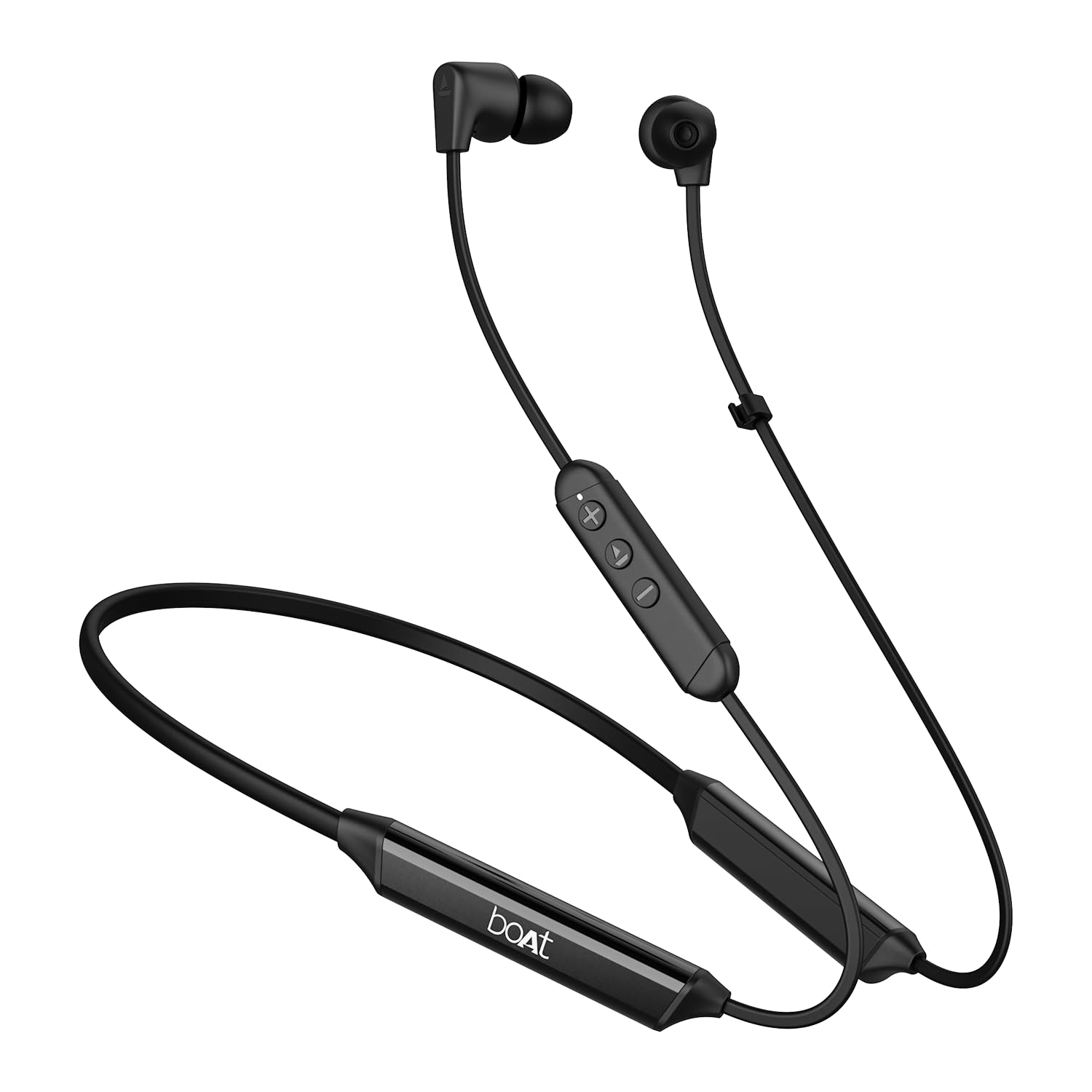
Image: The boAt Rockerz Trinity Gen 2 neckband earphones, highlighting the flexible neckband and in-ear design.

Зураг: Нарийвчилсан view of the boAt Rockerz Trinity Gen 2 earbuds and the inline control panel, showing buttons for volume and playback.
Тохиргоо
1. Чихэвчийг цэнэглэх
Before first use, fully charge your earphones. Connect the provided charging cable to the charging port on the neckband and to a USB power source. The LED indicator will show charging status. A full charge provides up to 150 hours of playback. With ASAP Charge, 10 minutes of charging provides up to 24 hours of playback.
Image: The boAt Rockerz Trinity Gen 2 neckband, illustrating its long battery life with "150 HOURS PLAYBACK" text.
2. Асаах/унтраах
- Асаахын тулд: Press and hold the Multi-function button (usually the center button on the inline control) for approximately 3 seconds until the LED indicator flashes blue and you hear a power-on prompt.
- Унтраахын тулд: Press and hold the Multi-function button for approximately 5 seconds until the LED indicator flashes red and you hear a power-off prompt.
3. Bluetooth хослол
- Чихэвчийг унтраасан эсэхээ шалгаарай.
- Press and hold the Multi-function button for about 5-7 seconds until the LED indicator flashes red and blue alternately, indicating pairing mode.
- On your device (smartphone, laptop), enable Bluetooth and search for available devices.
- Select "boAt Rockerz Trinity Gen 2" from the list of found devices.
- Холбогдсоны дараа LED индикатор аажмаар цэнхэр анивчдаг бөгөөд та баталгаажуулах дууг сонсох болно.

Image: The boAt Rockerz Trinity Gen 2 earphones connected to both a smartphone and a tablet, illustrating the dual pairing feature.
4. Dual Pairing (Multipoint)
The Rockerz Trinity Gen 2 supports dual pairing, allowing connection to two devices simultaneously. After pairing with the first device, disable Bluetooth on that device. Put the earphones back into pairing mode and connect to the second device. Once connected to the second device, re-enable Bluetooth on the first device. The earphones will automatically connect to both devices, allowing seamless switching between them for calls and media.
Ашиглалтын заавар
Үндсэн удирдлага
- Тоглуулах/түр зогсоох: Multi-function товчийг нэг удаа дарна уу.
- Дууг нэмэгдүүлэх: '+' товчийг дарна уу.
- Дууг багасгах: '-' товчийг дарна уу.
- Дараагийн дуу: '+' товчийг удаан дар.
- Өмнөх бичлэг: '-' товчийг удаан дар.
- Дуудлагад хариулах/дуусах: Multi-function товчийг нэг удаа дарна уу.
- Дуудлагаас татгалзах: Олон үйлдэлт товчлуурыг 2 секундын турш барина уу.
- Дуут туслахыг идэвхжүүлэх: Олон үйлдэлт товчийг хоёр удаа дарна уу.
LDAC-тай өндөр нягтралтай аудио
The Rockerz Trinity Gen 2 supports Hi-Res Audio with LDAC codec, providing superior sound quality. Ensure your connected device also supports LDAC for the best audio experience. This feature allows for high-resolution audio transmission over Bluetooth, preserving more detail from your music.

Image: The boAt Rockerz Trinity Gen 2 earphones displaying the "Hi-Res Audio Wireless" and "LDAC" logos, indicating high-resolution audio support.
Хос EQ горимууд
Switch between different equalizer modes to customize your audio experience. Refer to the product's quick start guide or experiment with button combinations (often a triple-press of the Multi-function button or a combination with volume buttons) to cycle through available EQ presets. This allows you to adjust the sound profile таны хүссэнээр.

Image: A close-up of the boAt Rockerz Trinity Gen 2 earbuds, highlighting the availability of dual EQ modes for sound customization.
AI-ENx™ Technology for Clear Calls
The earphones feature AI-ENx™ technology, which enhances call clarity by eliminating background noise. This ensures your voice is heard clearly during calls, even in noisy environments.

Image: A close-up of a boAt Rockerz Trinity Gen 2 earbud, emphasizing the AI-ENx™ technology for clear voice calls.
BEAST™ Mode (Low Latency)
Activate BEAST™ Mode for a low-latency gaming experience (65ms). This mode synchronizes audio with visuals, providing a more immersive gaming session. To activate/deactivate BEAST™ Mode, refer to the specific instructions in your quick start guide, usually involving a dedicated button press or a combination.

Image: The boAt Rockerz Trinity Gen 2 earphones with "BEAST™ MODE 65ms Low Latency" text, depicted alongside gaming characters to illustrate its use for gaming.
Засвар үйлчилгээ
Цэвэрлэгээ
- Чихэвчийг зөөлөн, хуурай, хөвөнгүй даавуугаар арчина.
- Химийн хатуу бодис, цэвэрлэгээний уусгагч, хүчтэй угаалгын нунтаг хэрэглэж болохгүй.
- Дууны чанарт нөлөөлж болзошгүй лав хуримтлагдахаас сэргийлж чихний үзүүрийг тогтмол цэвэрлэж байгаарай.
Усны эсэргүүцэл (IPX5)
The earphones are IPX5 rated, meaning they are resistant to sweat and light splashes of water. They are not designed for submersion in water. Avoid exposing them to heavy rain or direct water jets. Ensure the charging port cover is securely closed when not charging to maintain water resistance.

Image: The boAt Rockerz Trinity Gen 2 earbuds with water droplets on them, illustrating their IPX5 water resistance rating.
Хадгалах
Store the earphones in a cool, dry place away from direct sunlight and extreme temperatures. Avoid storing them with sharp objects that could damage the cables or earbuds.
Алдааг олж засварлах
Хүч чадалгүй
- Чихэвч бүрэн цэнэглэгдсэн эсэхийг шалгаарай.
- Press and hold the Multi-function button for 3-5 seconds to power on.
Төхөөрөмжтэй хослуулах боломжгүй
- Ensure the earphones are in pairing mode (LED flashing red and blue alternately).
- Төхөөрөмж дээрээ Bluetooth асаалттай байгаа бөгөөд энэ нь тухайн хүрээнд (ихэвчлэн 10 метр) байгаа эсэхийг шалгаарай.
- Forget "boAt Rockerz Trinity Gen 2" from your device's Bluetooth list and try pairing again.
- Төхөөрөмж болон чихэвчээ хоёуланг нь дахин асаана уу.
Дуу бага эсвэл гажуудсан
- Чихэвч болон холбогдсон төхөөрөмжийнхөө дууны түвшинг тохируулна уу.
- Ensure the ear tips are clean and properly seated in your ears.
- Илүү сайн битүүмжлэхийн тулд өөр өөр хэмжээтэй чихний үзүүрийг туршиж үзээрэй.
- Хөндлөнгөөс зайлсхийхийн тулд холбогдсон төхөөрөмждөө ойртоорой.
Микрофон ажиллахгүй байна
- Чихэвч таны төхөөрөмжид зөв холбогдсон эсэхийг шалгаарай.
- Check your device's audio settings to ensure the earphones are selected as the input device.
- Clean the microphone opening if it appears obstructed.
Үзүүлэлтүүд
| Брэнд | завь |
| Загварын нэр | Rockerz Trinity Gen 2 |
| Чихний байрлал | Чихэнд |
| Form Factor | Чихэнд |
| Дуу чимээний хяналт | AI-ENx™ Technology (for calls) |
| Холболтын технологи | Bluetooth |
| Батерейны дундаж наслалт | 150 цаг |
| Батерейг цэнэглэх хугацаа | 10 Minutes (for 24 hours playback via ASAP Charge) |
| Аудио драйверын төрөл | Dynamic Driver (10mm, inferred from description) |
| Давтамжийн хүрээ | 20 Гц - 40,000 Гц |
| Усны эсэргүүцэл | IPX5 |
| Онцлог шинж чанарууд | Hi-Res Audio with LDAC, Dual EQ Modes, AI-ENx™ Technology, Dual Pairing, BEAST™ Mode (65ms Low Latency), ASAP Charge |
| Хяналтын арга | Дуу хоолой, Товчлуур |
| Зүйлийн жин | 60 грамм |
Баталгаат болон дэмжлэг
Баталгаат хугацааны мэдээлэл
The boAt Rockerz Trinity Gen 2 earphones come with a 1 жилийн баталгаат хугацаа from the date of purchase. This warranty covers manufacturing defects. Please retain your purchase receipt for warranty claims. The warranty does not cover damage caused by misuse, accidents, unauthorized modifications, or normal wear and tear.
Хэрэглэгчийн дэмжлэг
For technical assistance, warranty claims, or any other inquiries, please contact boAt customer support:
- Имэйл: info@imaginemarketingindia.com
- Үйлдвэрлэгч: Imagine Marketing ХХК
Please visit the official boAt webхамгийн сүүлийн үеийн тусламжийн мэдээлэл, холбоо барих мэдээллийг авах сайт.
Ask a question about this manual
Ask about setup, troubleshooting, compatibility, parts, safety, or missing instructions. Manuals+ will review the question and use this page’s manual context to help answer it.